Yahoo Search: Your Daily Hub
- 47.23K
- 3.9
- Installs
- 10.00M
- Price
- Free

Screenshots





Analysis by Reviewed APKs
Yahoo Search: Your Daily Hub is a search app for people who want quick web results alongside news, weather, sports, and AI-powered answers. I found its mix of familiar search and Yahoo Scout useful for everyday questions that need a little context, not just a list of links. The homepage can also keep selected interests close at hand, though the AI features are limited to the United States.
A Search for Everyday Questions
When I first opened Yahoo Search, I pictured using it for the small questions that come up between errands: checking the day’s headlines, looking up a restaurant, or finding out whether rain might change my plans. The app brings search together with news, weather, sports scores, and other updates, so it can serve as a quick starting point rather than a place I visit only when I have a very specific query.
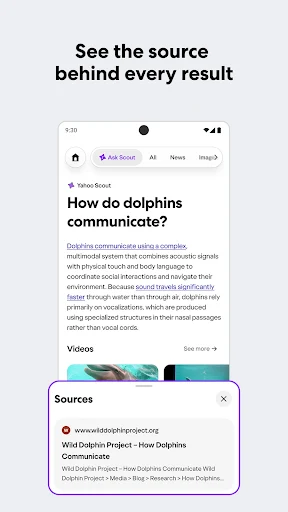
For a question with a straightforward answer, I can use the traditional search bar. If I want a more conversational response, Yahoo Scout can produce an AI-powered answer and a short summary, with citations I can tap to inspect the underlying sources. I like that distinction in practice: a quick lookup stays quick, while a complicated topic has a path toward more context and original reporting.
Search, Not a Full Browser
Yahoo Search makes the most sense as a search and discovery hub. Its classic search is there for navigating to information, while Scout is designed to explain or summarize a topic. The homepage adds at-a-glance updates for areas such as weather, finance, and sports, and pinned interest tiles can make a topic easier to return to. That combination is more varied than a bare search box, without turning the app into a general-purpose productivity suite.
I would not treat Scout as a replacement for reading original sources or a dedicated news publication. Its answers draw on the open web, and the app provides citations so I can follow up when a detail matters. Nor is this primarily a full browsing workspace: the main appeal is getting to a useful result or update quickly. AI features are available only in the United States, which makes the experience less consistent for people elsewhere.
Make the Homepage Useful
A little intentional setup can make the app feel less like a generic search page. I would pin only a few interests I actually check, such as a hobby, destination, or stock, rather than filling the homepage with topics I rarely revisit. The idea is to keep those tiles useful as shortcuts, while letting the dynamic homepage surface relevant weather, finance, and sports updates when they are available.
For research, I find it helpful to treat a Scout summary as a first pass: ask a clear question, scan the answer, then open citations for reporting that deserves more attention. For a simpler lookup, switching back to classic search avoids adding an AI step where I do not need one. SafeSearch and customizable settings also give users a way to adjust their search experience instead of accepting every default.
More From Our News Desk

Zoom Meetings, Google Meet, or Teams: Which Is Easiest to Join?

How I Build a Free Streaming Lineup With Tubi

Why Crunchyroll Is the Default Anime App for So Many Fans

YouTube TV: A Practical Guide to Cutting Cable

Rummikub and the Small Comfort of Phone Games

TeamViewer Remote Control or AnyDesk for Helping Family?
Who May Enjoy Yahoo Search
I would recommend Yahoo Search to people who want one convenient place for everyday web searches and quick checks on news, local spots, weather, or sports. It is especially appealing if you like having both familiar search results and an optional AI answer in the same app. Pinning a few personal interests may also suit anyone who regularly checks the same topics and would rather keep them close to the homepage.
It may be a weaker fit for someone who wants a dedicated browser, a highly specialized research tool, or AI answers outside the United States. Scout can help orient a search, but its summaries are not a reason to skip the linked sources when accuracy or nuance matters. People who prefer a very stripped-down search screen may also find the extra homepage updates less useful than a simpler search app.
Yahoo is the developer. On Google Play, Yahoo Search has more than 10 million installs and a 3.9-star rating from around 47,000 ratings. It is free to download, contains ads, and has no in-app purchases. The Google Play content rating is Everyone, making the stated age category broad, though individual users may still want to review the app’s content and settings.
The current version is 10.5.5. Yahoo Search was released on June 30, 2010, and its last update was October 30, 2026. A minimum Android version is not included in the supplied app details, so I would check Google Play on the device where I plan to install it. Feature availability and displayed content can vary by location; AI features are available only in the United States.
A Familiar Search App With More Context
A Familiar First Step
When I first opened Yahoo Search, its clearest promise was straightforward: search the web, with extra useful information gathered around the search experience. There is a traditional search option for quick navigation and Yahoo Scout for asking questions in a more conversational way. That familiar split matters because it leaves room for a fast lookup without requiring me to make every query an AI conversation.
The setup idea is easy to understand even before making the app a daily habit. Pin interests as tiles, then use the homepage to keep selected subjects and dynamic updates in view. I would start with just one or two topics I check regularly. That gives the personalization a practical purpose and makes it easier to judge whether the extra homepage content is helping.
The Daily Search Rhythm
In day-to-day use, the most appealing workflow is alternating between quick search and a little more explanation. I can look for a direct result in classic search, then use Scout when a question needs a plain-language overview or a summary of a broader topic. For current events, Yahoo Search can surface trending stories and breaking-news information, with sources to explore when a headline catches my attention.
I also like that everyday checks do not have to begin with a carefully composed research query. A local restaurant search, a weather check, or a look at sports scores fits the app’s role as a daily hub. Feature availability and what appears on screen can vary by location, so the exact mix of updates may not be identical for everyone. Still, the broad idea is practical: search and several common checks share a home.
Scout and Pinned Interests
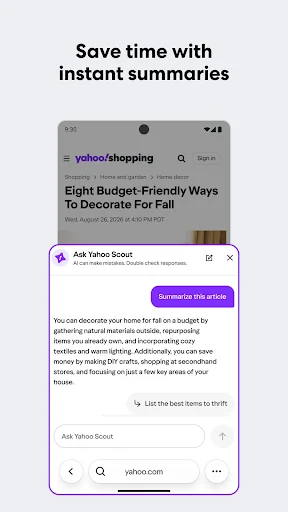
Yahoo Scout is the feature that most changes the character of the app. It can answer questions, summarize information at the top of search results, and point to citations for deeper reading. The examples described range from explaining a complicated idea simply to planning a budget trip. I would use that sort of answer as a starting outline, then check the cited material for details that affect a decision.
The interest tiles offer a different kind of convenience. Rather than asking Scout a new question every time, I can pin subjects such as a hobby or destination and keep them front-and-center. The homepage can also show real-time updates for finance, weather, and sports. These features make the app feel more personal without changing its core job: helping me find information and return to topics I care about.
A Routine That Stays Light
A sensible routine for me would be to open the app in the morning, glance at the homepage for weather or a sports update, and search for anything that needs a closer look. If a headline is important, I can use its citations to read the original reporting rather than relying only on a summary. Later, a pinned interest can act as a quick way back to a recurring subject.
For shopping research, Scout can help compare product features and outline potential benefits, while a classic search can lead to more detailed results. I would keep the question specific and use the answer to organize what I want to compare. For local discovery, I can search for restaurants, shops, or services near me. These are modest workflows, but they show how the app can fit around ordinary decisions without demanding a lengthy setup.
Limits to Keep in View
The biggest practical limit is regional availability: Yahoo says AI-related features are available only in the United States, and other features or displayed content can vary by location. Someone choosing the app mainly for Scout should keep that in mind before building a routine around AI answers. The classic search experience and the broader idea of a search homepage remain useful, but not every user should expect the same feature mix.
The app also contains ads, which may be a consideration if I want a particularly uncluttered search experience. And while citations are valuable, a summary is still only a summary; opening the sources is the better way to get fuller context on a developing story or complicated topic. Yahoo Search works best as a convenient entry point, not as a promise that every question can be settled with one short answer.
Yahoo Search: Your Daily Hub brings familiar web search, Yahoo Scout, pinned interests, and everyday updates into one app. I like the choice between a quick classic search and an AI-assisted answer, especially when citations make it easy to continue reading. The ads and US-only AI availability are worth weighing, but neither changes the app’s basic usefulness as a search starting point.
I would try it if I want search plus a convenient glance at news, weather, sports, or personal interests. It is less compelling if I only want a bare search box or need Scout outside the United States. For everyone else, Yahoo Search offers a practical mix of quick lookups and deeper discovery, with a clear reason to check sources when a topic matters.
Yahoo Search Frequently Asked Questions
What is Yahoo Search: Your Daily Hub used for?
Yahoo Search is for searching the web and keeping everyday information close by. It offers classic search and Yahoo Scout, which can provide AI-powered answers, summaries, and citations. The app also describes news and trending topics, local discovery, weather, sports updates, and pinned interest tiles for returning to subjects that matter to you.
Can I use Yahoo Search: Your Daily Hub on iPhone?
The app details here are for its Android availability on Google Play. They do not establish availability on other platforms or devices, so check the relevant store for your device before relying on it. Yahoo also says feature availability and displayed content can vary by location, and AI features are available only in the United States.
What Android version does Yahoo Search: Your Daily Hub require?
The minimum Android version is not provided in the app details. Requirements can vary as the app is updated and by device, so check the Google Play page on the Android device you plan to use. The current version shown is 10.5.5, but that number alone does not tell you the minimum system requirement.
Does Yahoo Search: Your Daily Hub cost money?
Yahoo Search is free to download on Google Play, contains ads, and has no in-app purchases according to its app details. Store information can change over time, so it is sensible to check Google Play for the current terms before installing. The presence of ads is worth considering if you prefer a search experience without advertising.
Is Yahoo Search: Your Daily Hub suitable for me?
It may suit you if you want web search with optional AI answers, cited sources, and quick access to topics such as news, weather, and sports. It may be less suitable if you want only a minimal search box or depend on AI features outside the United States. The app’s content rating on Google Play is Everyone.
Pros
- Offers a choice between traditional web search and AI-powered answers with citations.
- Pinned interest tiles can keep recurring topics easy to revisit.
- Combines search with news, local discovery, weather, and sports updates.
- Free to download with no in-app purchases.
Cons
- AI-related features are available only in the United States.
- The app contains ads, which may make the experience feel less minimal.
- Feature availability and displayed content can vary by location.
- Category
- Tools
- Version
- 10.5.5