Android Switch
- 1.29M
- 4
- Installs
- 10.00B
- Price
- Free

Screenshots
Analysis by Reviewed APKs
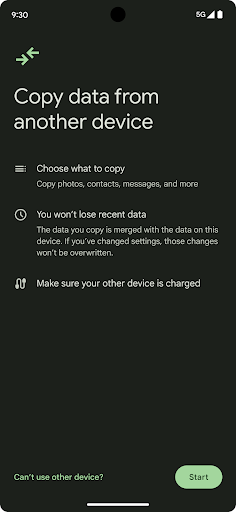
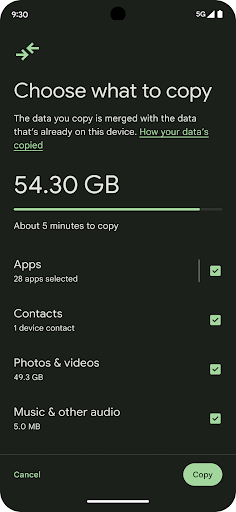
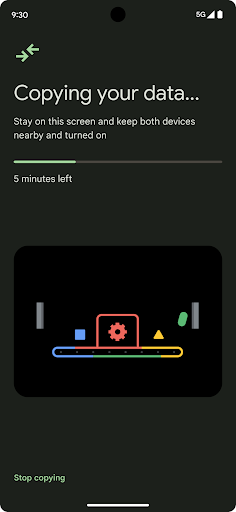
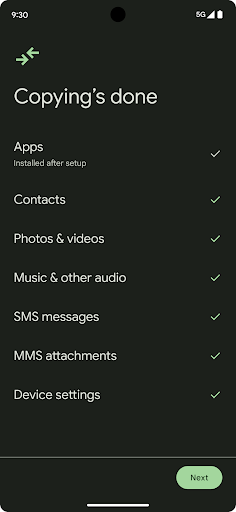
Android Switch helps move photos, videos, contacts, and other data from an old phone or tablet to an Android device during setup. It suits people replacing a phone who would rather bring familiar personal content along than start from scratch. I like that its purpose is focused and practical. It is a moving-day tool for your digital life, not a general file manager or an app for everyday syncing.
A calmer phone changeover
When I first opened a new Android phone, the first job was getting my everyday essentials across: contacts I rely on, photos I wanted to keep close, and videos I didn't want to lose track of. Android Switch is built for that setup moment. It copies data from another Android or iOS device, so the old phone can serve as the source while the new one gets ready for daily use.
That makes the app most useful before the new phone has become part of your routine. I would keep both devices nearby, set aside a little uninterrupted time, and think through what I want to bring over before starting. The app's job is to help carry selected kinds of personal data into the new device, rather than make me recreate everything by hand. That is a welcome practical role on an otherwise busy setup day.
A transfer tool, not a sync app
Compared with moving photos or contacts one at a time, Android Switch is aimed at handling a change of device as a single setup task. It can work with data from an Android or iOS phone or tablet, which is useful if your new Android device is replacing something from a different platform. I see it as a bridge between phones, not a place to organize or browse all my content.
It is also not a general-purpose backup service or an everyday file-sharing tool based on the information available. The central use is copying data during setup. There is a special option for Pixel 9 and newer devices, including Pro, Pro Fold, and A-Series models: those users can move data after setup, even without the other device. Outside that case, the setup timing is worth keeping in mind.
Make setup more manageable
A little preparation can make a phone transfer feel less like a last-minute scramble. Before starting, I would check that the old device is the one with the contacts, photos, and videos I want to carry forward, then put the phones somewhere I can focus on the process. I would also avoid planning the transfer for the exact moment I need to leave home or hand off the old phone.
It helps to think about the move as one step in setting up a new device, rather than a way to keep two phones continuously in sync. After the transfer, I would take a moment to look for the personal content I expected to bring over. For supported Pixel 9 and newer models, the ability to use Android Switch after initial setup offers more flexibility if the first day gets busy.
More From Our News Desk

Zoom Meetings, Google Meet, or Teams: Which Is Easiest to Join?

How I Build a Free Streaming Lineup With Tubi

Why Crunchyroll Is the Default Anime App for So Many Fans

YouTube TV: A Practical Guide to Cutting Cable

Rummikub and the Small Comfort of Phone Games

TeamViewer Remote Control or AnyDesk for Helping Family?
Who will find it useful
I would recommend Android Switch to someone setting up a new Android phone who wants a straightforward way to bring over photos, videos, contacts, and other data from an older Android or iOS device. It is especially relevant if the thought of manually moving personal content makes a new-phone setup feel like a chore. Since it is already installed on Android devices, it is positioned as a built-in part of getting started.
It may be less useful if you are not changing devices, or if what you need is ongoing synchronization or a dedicated place to manage files. Most of the described use centers on transfer during setup. Pixel 9 and newer owners have the added option to move data later, but that flexibility does not change the app's basic purpose. I would choose it for a transition, not as a daily utility.
Android Switch is a free Tools app from Google LLC. On Google Play, it has over 10 billion installs and a 4.0-star rating from about 1.3 million ratings. The content rating is Everyone. The version shown is 1.0.1002387102, and the recorded release date is July 21, 2021.
The app is listed at no cost, with no in-app purchases and no ads. Its recorded last update is October 22, 2026. Android Switch is described as already installed on Android devices, where it supports copying data during setup. A minimum Android version is not included among the available app details.
A focused tool for changing phones
Getting started
My first impression is that Android Switch has a narrow, understandable job: help bring personal data from one device to another while setting up an Android phone. That clarity matters when setup already involves making decisions about a new device. Rather than presenting it as a place to manage a whole digital life, the app is there for one transition.
Because it is already installed on Android devices, it is part of the setup experience rather than something the description asks users to add separately. The source can be another Android or iOS phone or tablet. I would start when I have the old device handy and can give the transfer my attention, rather than trying to fit it into the last few rushed minutes of setup.
The day-to-day payoff
Android Switch is not something I would expect to open every morning. Its value comes from helping the new phone feel more familiar once the move is done. Contacts, photos, and videos are the concrete examples that make the benefit easy to picture: they are the kinds of things people notice when they are missing from a device they now use every day.
That makes the experience a brief but meaningful part of a larger change. The app's role is to copy data from a source device, not to become a regular destination for it. I would judge it by whether it helps reduce the amount of personal content I need to reconstruct after switching phones, not by whether it offers features for daily phone management.
What stands out
The useful detail is that Android Switch can take data from either an Android or an iOS device. That gives it a clear role for people moving into Android from different kinds of phones, as well as for those replacing an older Android device. The described content includes photos, videos, contacts, and more, giving the transfer a broader purpose than moving just one type of file.
The standout exception is for Pixel 9 and newer devices, including Pro, Pro Fold, and A-Series models. On those devices, the app can be used to move data after the initial setup, even when the other device is not available. That is a meaningful convenience for someone who did not have time to complete everything on day one, while remaining specific to those Pixel models.
A practical transfer routine
If I were switching phones, I would treat the transfer as a small project: identify which device currently holds the data I care about, set aside time, and use Android Switch as part of setting up the new Android phone. Thinking of the task this way helps avoid the familiar frustration of discovering later that an old contact or a favorite video stayed behind.
Once the move is done, I would spend a few minutes checking the new phone for the kinds of content I expected to carry over. That is a simple way to catch a mismatch while the old phone is still available. Pixel 9 and newer owners have more timing flexibility, but for other devices, planning around setup is the sensible routine suggested by the app's core purpose.
Keep expectations grounded
Android Switch is focused on copying data, and that focus is also its main limitation. It is not described as a tool for ongoing synchronization, organizing a photo library, or managing files after the transfer. Someone looking for those broader tasks may need a different kind of app. I would use this one when changing devices and avoid expecting it to become a permanent part of my daily routine.
The timing matters, too. The usual use is during setup of an Android device, so it makes sense to have the source phone or tablet available then. The described option to transfer after setup applies to Pixel 9 and newer models. If your device or setup situation differs, check the Google Play information for current details before relying on a particular workflow.
Android Switch is a practical, low-fuss answer to a specific problem: bringing personal data along when setting up an Android phone. I appreciate that its supported sources include both Android and iOS devices, and that newer Pixel models get a post-setup option. Its narrow focus is easy to understand, even if it is not meant for everyday file management.
I would recommend it to anyone preparing to move to a new Android phone, especially if keeping contacts, photos, and videos close matters. If you are not changing devices, there is little reason to make it part of your routine. For a phone transition, though, it is a sensible place to begin.
Android Switch Frequently Asked Questions
What is Android Switch used for?
Android Switch is used to copy photos, videos, contacts, and other data from another phone or tablet to an Android device during setup. The source can be an Android or iOS device. On Pixel 9 and newer models, including Pro, Pro Fold, and A-Series devices, it can also be used after setup.
Which phones and platforms work with Android Switch?
The app is for Android devices and can copy data from another Android or iOS phone or tablet. Android Switch is described as already installed on Android devices. The option to transfer after the new phone has been set up is described for Pixel 9 and newer, including Pro, Pro Fold, and A-Series models.
What Android version does Android Switch require?
A minimum Android version is not included in the available app details. Android Switch is described as already installed on Android devices, but compatibility can depend on the device and current app release. Check the Google Play information for your phone to see the requirements that apply to your setup.
Does Android Switch cost money or include purchases?
Android Switch is listed as free, with no in-app purchases and no ads. Store details can change over time, so it is worth checking the Google Play information before installing or using the app if you want the latest cost and availability details.
Is Android Switch useful if I am not changing phones?
Usually, the app is most useful when moving data to a new Android device, particularly during its setup. Pixel 9 and newer owners can use it after setup as well. If you are looking for a regular file organizer or ongoing sync tool, Android Switch may not suit that need; its described purpose is data transfer.
Pros
- Copies photos, videos, contacts, and more during Android device setup.
- Can transfer data from either an Android or iOS device.
- Pixel 9 and newer models can use it after initial setup.
- Free to use, with no ads or in-app purchases.
Cons
- Most users need to use it during the new device setup process.
- Its focus is transfer, not ongoing synchronization or file organization.
- Post-setup transfer is described only for Pixel 9 and newer devices.
- Category
- Tools
- Version
- 1.0.1002387102