Digital Wellbeing
- 1.50M
- 3.6
- Installs
- 10.00B
- Price
- Free

Screenshots
Analysis by Reviewed APKs
Digital Wellbeing helps me understand how I use my phone and gives me a few practical ways to step away from distracting apps. It suits Android users who want a clearer picture of their habits without installing a separate tracking tool. After spending time with its usage summaries, app timers, Focus mode, and bedtime schedule, I see it as a useful set of gentle prompts rather than a strict system for changing behavior.
A Check-In Before Work
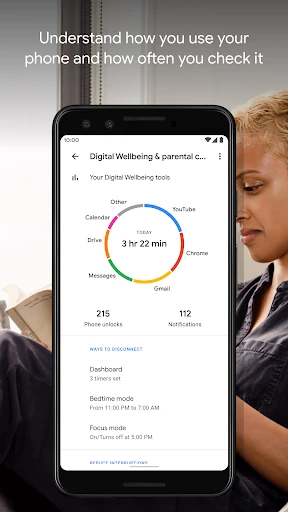
When I first opened Digital Wellbeing, I thought about the familiar morning routine: pick up the phone to check the time, then notice a handful of notifications and get pulled into apps before breakfast. The app’s daily view brings together how often I use different apps, how many notifications arrive, and how often I unlock the phone. That makes the habit easier to notice than it is when I am moving through the day on autopilot.
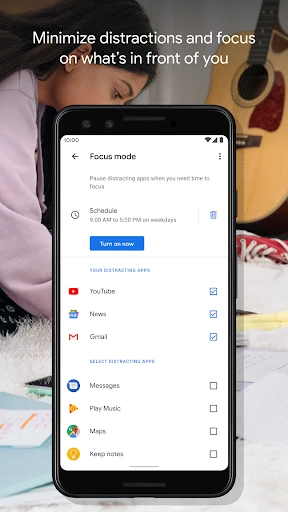
I can use that picture to choose one manageable change. If a particular app keeps taking more of my attention than I intended, I can set a daily timer for it. If work or study needs a quieter stretch, Focus mode can pause distracting apps, either when I turn it on or on a schedule. These tools do not decide what matters to me; they give me a convenient nudge at the moment I need one.
A Built-In Alternative
Digital Wellbeing is best compared with the basic usage-tracking and app-limiting tools people might otherwise look for separately. Its main appeal is having the daily habit overview, timers, Focus mode, and bedtime options together as part of the phone’s Settings experience. For someone who wants a straightforward way to check patterns and create boundaries, that built-in approach feels more practical than adding another standalone app to manage.
It is not a productivity planner, a detailed diary, or a substitute for deciding why a habit needs to change. The app shows usage patterns and offers ways to pause or limit access, but the everyday choices remain mine. People who want extensive analysis, custom reports, or a more involved coaching experience may find its focused set of tools too simple. Its strength is convenience, not a promise that screen habits will change on their own.
Make Small Changes Stick
I get more from Digital Wellbeing when I treat it as a quick check-in rather than a dashboard to study for ages. Looking at the daily view once at a convenient time can help me spot which apps are taking up attention and whether notifications are interrupting more than I expected. From there, I can choose one timer or one quiet period instead of trying to overhaul every part of my phone use at once.
Schedules make the tools easier to fold into an ordinary routine. I can set Focus mode to come on during a regular work, school, or home activity, and use bedtime mode on a schedule in the evening. The practical trick is to choose times that match my real day and revisit them if they become a nuisance. A boundary that fits my routine is more useful than a strict setting I quickly ignore.
More From Our News Desk

Zoom Meetings, Google Meet, or Teams: Which Is Easiest to Join?

How I Build a Free Streaming Lineup With Tubi

Why Crunchyroll Is the Default Anime App for So Many Fans

YouTube TV: A Practical Guide to Cutting Cable

Rummikub and the Small Comfort of Phone Games

TeamViewer Remote Control or AnyDesk for Helping Family?
Who May Find It Useful
I would recommend Digital Wellbeing to Android users who are curious about their phone habits and want modest, built-in ways to cut interruptions. It is especially handy if the problem is easy to name: checking a particular app too often, getting distracted during a recurring block of time, or carrying notifications into bedtime. The daily overview helps make those patterns visible, while the available controls offer a simple next step.
It may not suit someone looking for detailed behavioral analysis, a broad personal productivity system, or a tool that makes decisions for them. The approach is intentionally practical: review the information, set a limit or schedule, and see whether it helps. I also would not recommend expecting a timer alone to reshape a routine. People who prefer to handle phone use without limits or scheduled pauses may have little reason to use its controls.
Digital Wellbeing is a free Android app from Google LLC in the Tools category. On Google Play it has over 10 billion installs and a 3.6-star rating from around 1.5 million ratings. Its content rating is Everyone. The available version is 1.49.996288414 (886717), and the recorded release date is August 8, 2018.
The app costs $0 and has no in-app purchases or ads. Its recorded last update is October 19, 2026. The Android version requirement is not included among the available facts, so it is sensible to check the Google Play information for requirements that apply to a particular device.
A Closer Look at Everyday Phone Habits
A Quiet First Impression
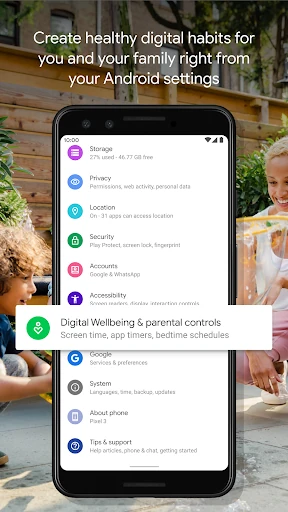
Digital Wellbeing does not present itself as a separate destination I need to remember to visit. The instructions point me to the phone’s Settings menu, which makes the tools feel connected to the device rather than like another app competing for attention. That is a sensible first impression for something meant to help me spend less time distracted by my phone.
The daily overview gives me a useful starting point: app use, notifications, and phone checks all offer different clues about a routine. I like that the picture is not limited to how long I have an app open. Seeing notification volume and unlock frequency alongside app use can help explain why a day feels interrupted, even when no single app seems especially absorbing.
Useful Day to Day
The day-to-day value is in turning a general intention into a specific action. “I should use my phone less” is vague; a timer for one app or a scheduled Focus period is something I can actually try. The daily overview gives me context, and the controls let me respond without needing to set up a separate tracking routine.
I would keep my expectations measured. Digital Wellbeing can help make use more visible and introduce pauses, but it cannot tell me which messages matter or whether a particular app is worthwhile. I still need to choose what to limit and when. That division of responsibility feels fair: the app supplies a few convenient tools, while I decide what kind of phone use works for my day.
Timers and Quiet Modes
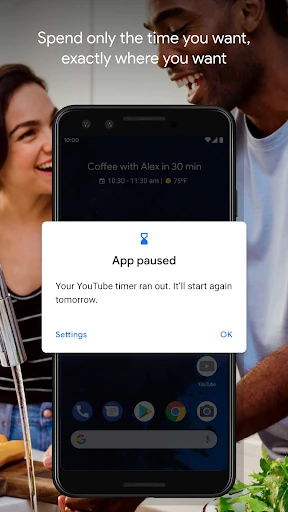
App timers stand out because they address a recognizable pattern: opening an app for a moment and staying longer than planned. I can set a daily limit for an app I want to keep in check. It is a simple boundary, not an elaborate time-management system, and that simplicity is part of the appeal for someone who wants a practical reminder rather than a long setup process.
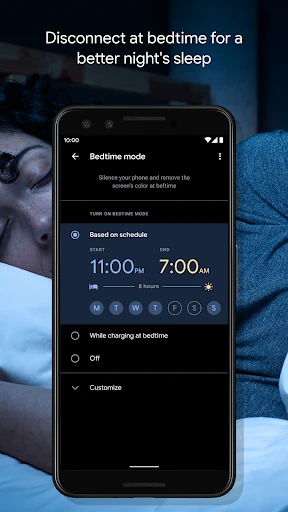
Focus mode provides another kind of boundary. I can pause distracting apps with a tap or schedule Focus mode for a recurring period, such as a stretch at work, school, or home. Bedtime mode covers the evening routine: it can follow a schedule, fade the screen to grayscale, and use Do Not Disturb to silence notifications. Those distinct options let me match the tool to the situation.
A Routine I Can Repeat
A realistic routine for me would start with a quick look at the daily usage picture after a busy day. If one app is taking more time than I meant to give it, I can try a daily timer rather than changing several settings at once. I can then see whether the new boundary feels workable in ordinary life, instead of assuming a single adjustment will suit every day.
For a regular study or work block, a scheduled Focus period may be more useful than waiting until I notice a distraction. In the evening, bedtime mode can provide a separate cue to put the phone aside, with grayscale and silenced notifications as part of that scheduled wind-down. I would keep the routine light: a couple of settings chosen for real circumstances, then a brief review when they stop fitting.
Keep Expectations Grounded
The main limitation is that the tools are deliberately narrow. I get a view of app use, notifications, and phone checks, plus timers and modes for reducing interruptions. I do not get a broad personal plan or a detailed explanation of what my habits mean. That is enough for people who want simple controls, but it may feel thin to anyone hoping for a richer analysis or a more guided experience.
Another practical consideration is that scheduled limits depend on my own choices. I need to decide which apps to pause, which periods deserve quiet, and whether bedtime settings fit my evenings. The app offers ways to set boundaries, not a universal routine that will suit everyone. It works best as a small aid to deliberate choices, with the understanding that my needs and schedule can change.
Digital Wellbeing makes the most sense to me as a convenient starting point for noticing phone habits and trying a few reasonable boundaries. Its daily view, app timers, Focus mode, and bedtime schedule cover common situations without turning the process into a major project. I appreciate the practical scope, though anyone seeking extensive analysis or hands-off behavior change should look elsewhere.
I recommend it to Android users who want a simple, built-in way to check usage and reduce interruptions at chosen times. Start with one pattern and one setting, then see whether it fits your routine. If you want a comprehensive productivity system, Digital Wellbeing is likely too limited; if a gentle nudge is enough, its straightforward tools are worth exploring.
Digital Wellbeing Frequently Asked Questions
What is Digital Wellbeing used for?
Digital Wellbeing helps Android users review everyday phone habits and take steps to disconnect. It shows information about app use, notifications, and how often the phone is checked or unlocked. It also offers daily app timers, Focus mode for pausing distracting apps, and bedtime mode with scheduled grayscale and Do Not Disturb options.
Which devices can use Digital Wellbeing?
Digital Wellbeing is an Android app, and its guidance says to find it in the phone’s Settings menu. The available information does not give a specific device list or Android version requirement. Compatibility can depend on the device and software, so check the Google Play store information for the phone you plan to use.
What Android version does Digital Wellbeing require?
The Android version requirement is not included in the available app facts. Because requirements and compatibility can vary by device or change over time, check Digital Wellbeing’s Google Play information before installing or updating it. The app’s described tools include usage summaries, app timers, Focus mode, and bedtime mode.
Does Digital Wellbeing cost money?
Digital Wellbeing is free, with a listed price of $0. The available facts say it has no in-app purchases and contains no ads. Store details can change, so it is still worth checking the Google Play information for the current terms when you are considering the app.
Is Digital Wellbeing right for everyone?
It may suit Android users who want a quick view of phone habits and simple ways to pause or limit app use. It may be less appealing to people who want detailed analysis, extensive coaching, or a full productivity system. The tools provide options and reminders, while you decide which habits and schedules to address.
Pros
- Combines app-use, notification, and phone-check information in one daily overview.
- Offers daily app timers for users who want a straightforward boundary.
- Focus and bedtime modes can be used with schedules.
- Free to use, with no ads or in-app purchases.
Cons
- The toolset is simple and may not satisfy users seeking detailed analysis.
- Users must decide which apps and schedules make sense for them.
- Android version requirements are worth checking for a particular device.
- Category
- Tools
- Version
- 1.49.996288414 (886717)