Yahoo Sports: Scores and News
- 206.80K
- 4.7
- Installs
- 10.00M
- Price
- Free

Screenshots

Analysis by Reviewed APKs
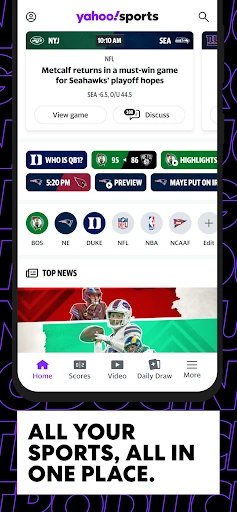
Yahoo Sports: Scores and News is a broad sports companion for keeping tabs on teams, games, and coverage without hopping between league apps. I’d recommend it to fans who want live scores, useful game details, and personalized alerts in one place. After spending time with its mix of scoreboards, stories, videos, and discussion, my take is that it works best as a flexible daily sports hub, not a substitute for watching a game.
A quick game-day check
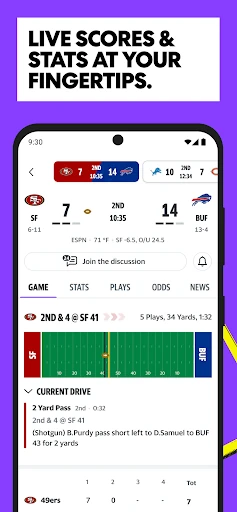
Imagine checking your phone between errands on a Sunday when several NFL games are underway. In Yahoo Sports, I can follow selected teams, scan live scores, and open a game for play-by-play, stats, and updates. That makes it easier to catch the shape of a game without sitting down for the full broadcast. I can also set alerts for starts, score changes, and big moments, so the app can do some of the checking for me.
After the final whistle, I can look for video highlights and a recap rather than searching through a general news feed. The app covers more than football: its listed sports include basketball, baseball, hockey, college sports, soccer, tennis, golf, motorsports, and combat sports. I found that breadth useful when my attention shifted from one league to another during the same day. It’s a practical way to stay current when watching every event isn’t realistic.
A hub, not a broadcast
The obvious alternative is opening a separate app for each league or team. Yahoo Sports brings scores, schedules, standings, box scores, news, and highlights across many sports into one place, which is appealing when my interests change with the season. Team pages gather results, coverage, rosters, stats, and highlights around a particular club. That wider scope is the point: I can keep up with several competitions without treating each one as a separate routine.
I wouldn’t approach it as a replacement for a live broadcast or as a dedicated fantasy-management tool. The material here centers on following games, reading coverage, watching highlights, and joining sports conversations. It also includes commentary and community features, but the app’s basic value is keeping me informed. If I want one specific team’s entire world and nothing else, a narrower team-focused experience may feel simpler; Yahoo Sports suits the fan who likes variety.
Make alerts work for you
I’d start by choosing only the teams and leagues I genuinely follow. That gives the score updates and news a better chance of feeling relevant instead of turning into a stream of every result in sports. Yahoo Sports supports alerts for game starts, score changes, and important moments, and it offers a choice between breaking-news alerts and daily digests. Those options make it easier to shape the app around how often I want to check in.
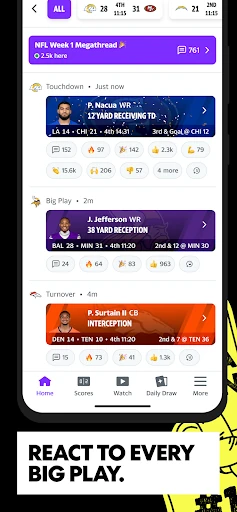
A useful habit is to pair an alert with a quick game-page visit. I can check the score, scan the play-by-play or box score, and then leave the app until something changes. On quieter days, team pages and video highlights offer a compact catch-up. When I’m following a close game, the Key Plays feed is designed to surface notable events such as touchdowns, turnovers, and other big plays. It’s a more intentional rhythm than repeatedly refreshing scores.
More From Our News Desk

Zoom Meetings, Google Meet, or Teams: Which Is Easiest to Join?

How I Build a Free Streaming Lineup With Tubi

Why Crunchyroll Is the Default Anime App for So Many Fans

YouTube TV: A Practical Guide to Cutting Cable

Rummikub and the Small Comfort of Phone Games

TeamViewer Remote Control or AnyDesk for Helping Family?
Who will enjoy it
I’d recommend Yahoo Sports to fans who follow multiple teams, switch between leagues, or want a quick way to check scores and headlines during a busy day. The mix of live game details, schedules, standings, stats, video highlights, and team coverage gives it more range than a simple scoreboard. It also suits someone who likes choosing a few teams to follow and receiving updates instead of browsing every sport from scratch.
It may be less appealing to someone who wants a very minimal score-only tool, since Yahoo Sports also brings in news, video, commentary, and community discussion. Fans looking for a dedicated place to watch full games should not assume highlights and game updates are the same thing as a broadcast. I’d also keep alert settings focused if frequent sports updates can distract from the day. Its best audience is curious, multi-sport fans who enjoy dipping in and out.
Yahoo Sports: Scores and News is developed by Yahoo and is listed in the Sports category on Google Play. The app has more than 10 million installs, with a 4.7-star rating from about 207,000 ratings. It is free to download, contains ads, and offers in-app purchases. The listed in-app product range is $5.99 to $14.99 per item, so optional purchases are part of the app’s store details.
The app has a Teen content rating. Its minimum Android requirement and current version are shown as varying, so it’s worth checking the Google Play page on the device you plan to use. The release date is June 28, 2016, and the most recent update in the supplied details is January 31, 2026. The update notes describe bug fixes and performance improvements.
Following Games Without Living in the App
Opening the scoreboards
When I first opened Yahoo Sports, the clearest idea was its range: this is meant to cover many sports, not just one team or league. That breadth can be handy, but I’d make the experience feel manageable by choosing the teams I care about first. The app supports personalized alerts and team-focused coverage, so there’s a practical way to narrow the stream to my own interests.
The setup payoff is less about building an elaborate profile and more about deciding what deserves my attention. I might follow a local basketball team and a football team I watch with family, then use the app to check their schedules and results. For someone who casually follows several sports, that small bit of focus helps turn a wide-ranging app into a more useful daily stop.
The daily score check
The core experience is straightforward: check a score, open a game when I want more context, and return later for a recap. Game pages include play-by-play, in-game updates, win probabilities, and stats, while schedules, standings, and box scores provide useful reference points. I like that the app can answer both the quick question—“How are they doing?”—and the slightly more involved one about how a game is unfolding.
For a close match, the sequence feels natural. I can glance at the live score, use the play-by-play to understand a swing, then check the box score when I have a moment. If I can’t follow continuously, alerts can flag a start, score change, or big moment. It’s a format that fits short breaks and commutes better than expecting me to stay in the app from kickoff to the final.
Details beyond the score
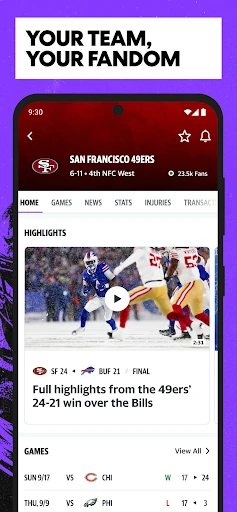
The team pages are one of the more useful ways to bring the app’s coverage together. They collect highlights, news, storylines, results, rosters, and team stats, including recent historical seasons. When I’m catching up after a few days away, that collection gives me more to work with than a score alone. I can move from a result to coverage and then to a highlight without changing the subject of my search.
Video is another part of the mix. Yahoo Sports describes a player experience for finding highlights, with recommendations and playlists as ways to explore what’s available. The app also includes original shows and commentary, with coverage touching on basketball, boxing, MMA, fantasy, and other sports topics. Those extras make it feel like a sports destination rather than only a utility, while the live scores remain the main reason I’d open it on a game day.
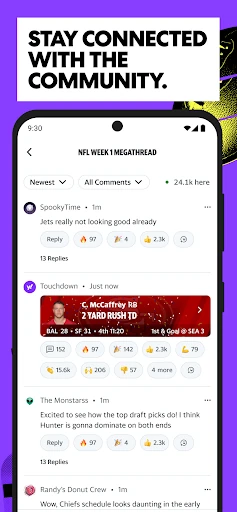
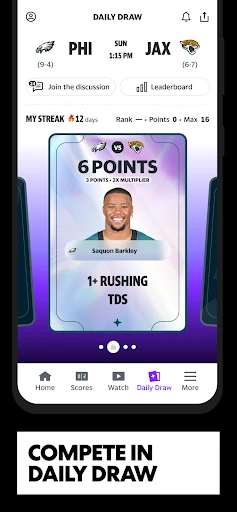
There are also community discussions and Daily Draw, a game built around choosing cards for events in the game of the day and earning points for correct picks. These features won’t matter to every fan, but they give people who enjoy sports talk or a small prediction-style diversion another reason to browse. I’d treat them as optional side routes, not the core promise of the app.
A low-effort routine
My practical routine would begin in the morning with a glance at schedules and standings for the teams I follow. If there’s a game later, I’d leave a relevant alert enabled and let the app tell me when it starts or when a notable update arrives. That reduces the temptation to keep checking manually, especially on a day when I’m working or doing errands.
At halftime or during a break, I’d open the game page for its score, stats, and play-by-play. Afterward, I could visit the team page for a recap or watch a highlight. If I’ve missed several games, the same page’s coverage and recent results offer a convenient catch-up path. It’s not a complicated system, but it turns the app’s many features into a routine that doesn’t require constant attention.
Keep expectations grounded
Yahoo Sports is busy by design: it combines sports, news, video, commentary, alerts, and community features. That breadth is an advantage if I want a single place to browse, but it can feel like more than I need when all I want is one score. Selecting a smaller set of teams and adjusting alert frequency helps, though the app’s wider editorial and video material remains part of the experience.
The app also contains ads and offers in-app purchases, so it isn’t an entirely ad-free, purchase-free experience. Its game coverage and highlights are useful for following events, but I wouldn’t mistake them for a promise of full live broadcasts. Finally, Android requirements and the version vary in the supplied store details. Checking the Google Play page for the device in hand is the sensible last step before installing.
Yahoo Sports earns its place on my phone by making it easy to follow several teams and leagues without opening a stack of separate apps. Scores, game details, alerts, team pages, and highlights form a useful everyday package, while shows and community features add optional depth. The breadth is its strength, though fans who only want a bare scoreboard may find it busier than necessary.
I’d recommend it to sports fans who like a flexible, personalized way to keep up during the day. Choose a focused set of teams, use alerts thoughtfully, and dip into game pages when a score needs context. If that sounds like your routine, Yahoo Sports is a capable all-around companion; if you want a minimalist tool or a broadcast replacement, it may not be the right fit.
Yahoo Sports Frequently Asked Questions
What is Yahoo Sports: Scores and News used for?
Yahoo Sports is used to follow live scores and game updates across a broad range of sports. It also provides schedules, standings, box scores, play-by-play, stats, highlights, post-game recaps, news, team pages, and personalized alerts. Fans can also find commentary, community discussions, and Daily Draw in the app.
Can I use Yahoo Sports on my Android device?
Yahoo Sports: Scores and News is an Android app available through Google Play. The Android version requirement varies in the supplied store details, so check its Google Play page for the requirement that applies to your device. The app supports following teams and leagues with scores, coverage, and alerts.
Is Yahoo Sports free, and does it have purchases?
The app is free to download and contains ads. It also offers in-app purchases, with listed items ranging from $5.99 to $14.99 per item. Store details can change, so check Google Play for current pricing and purchase information before deciding whether the app’s optional paid items matter to you.
What Android version does Yahoo Sports require?
The minimum Android version varies in the supplied Google Play details. Because requirements can change, check the Yahoo Sports store page on the device you want to use before installing. The app is rated Teen, and its store page provides the practical compatibility details for your particular device.
Who is Yahoo Sports a good fit for?
It’s a good fit for fans who follow several teams or sports and want scores, game details, news, highlights, and alerts together. Someone who only wants a simple scoreboard may find its extra coverage and community features unnecessary. It’s also best viewed as a way to follow games, not as a replacement for watching them.
Pros
- Covers scores, schedules, standings, stats, and game updates across many sports.
- Team pages collect results, news, highlights, rosters, and stats in one place.
- Custom alerts help fans follow selected teams and notable game moments.
- Video highlights and recaps make it easier to catch up after games.
Cons
- The wide mix of news, video, and community content may feel busy to score-only fans.
- The app contains ads and offers optional in-app purchases.
- Its game updates and highlights are not a substitute for a full broadcast.
- Category
- Sports
- Version
- VARY