Messenger
- 114.93M
- 4.7
- Installs
- 5.00B
- Price
- Free

Screenshots
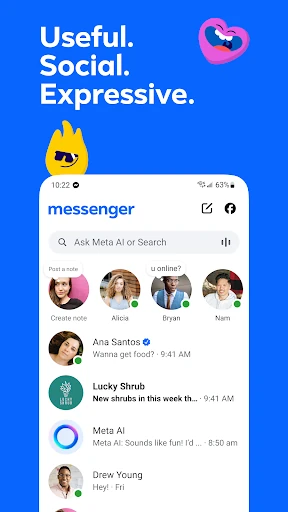
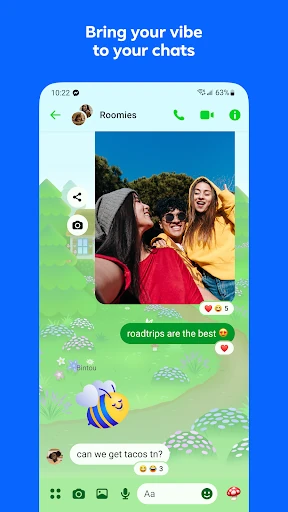


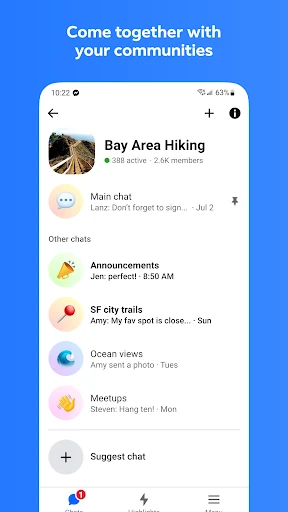

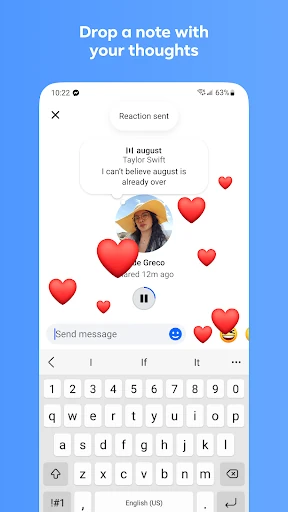
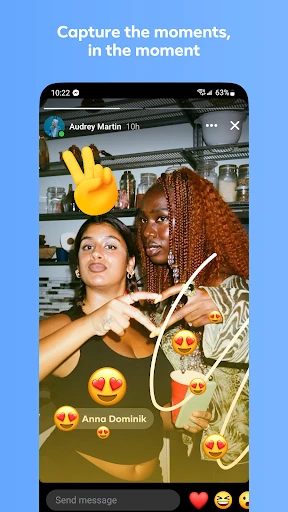
Analysis by Reviewed APKs
Messenger is Meta’s communication app for keeping conversations, photos, and calls in one place. It suits people who already keep up with friends or family through Facebook, as well as anyone who wants group chats and more expressive ways to share everyday moments. After spending time with its mix of practical chat tools and social extras, I find it useful and flexible, though its range can make it feel like more than a simple inbox.
A Chat for Everyday Plans
When I think about Messenger’s core job, I picture a familiar, low-stakes routine: a family group chat trying to settle on a dinner time. Someone can send a quick message, another person can add a photo, and the conversation can continue without turning into a formal email thread. Messenger is built to connect people on Facebook and Messenger, so it can be especially handy when those are already part of the group’s daily habits.
The small sharing tools help when a conversation needs more than text. I can imagine using a shared album after a get-together so the photos stay together in the group chat, or sending a document directly in a conversation instead of switching to another service. For a quick personal update, Stories and Notes offer short-lived ways to share what is happening. Those options make Messenger feel suited to ongoing social contact, not just one-off messages.
More Than a Basic Inbox
Compared with a bare-bones text messenger, Messenger puts several kinds of social sharing alongside ordinary chat. It supports calls, group conversations, photo and video sharing, file sharing, and features such as themes and animated stickers. That makes it a natural fit for people whose friends and family already use it, and for groups that want to keep plans, pictures, and casual conversation together rather than spreading them across several apps.
I would not treat it as a dedicated project-management workspace or a replacement for every way of communicating. Its emphasis is on personal connections, communities, and creator broadcast channels, with practical file sharing as one part of that mix. If I only wanted a quiet place to exchange plain text, some of its social extras might feel unnecessary. And features such as Meta AI are available only in select languages and countries, so they are not a reason to choose it everywhere.
Small Habits That Help
A little organization goes a long way in an app that can hold conversations, shared media, and quick updates. For a group trip or family event, I would use a shared album to collect photos and videos in the relevant group chat, rather than letting them disappear into a long scroll. When someone needs to send a Word, PDF, or Excel document, Messenger supports files up to 100MB directly in chat, which can save a switch to another app.
I also like the idea of matching a feature to the moment instead of using everything by default. A QR code can help connect with someone met in person; an edited message can fix a rushed typo within 15 minutes; and disappearing messages can suit conversations where people want messages to go away after they have been read. Chat themes, reactions, and stickers are optional touches, but they can make a familiar group thread feel more personal.
More From Our News Desk

Zoom Meetings, Google Meet, or Teams: Which Is Easiest to Join?

How I Build a Free Streaming Lineup With Tubi

Why Crunchyroll Is the Default Anime App for So Many Fans

YouTube TV: A Practical Guide to Cutting Cable

Rummikub and the Small Comfort of Phone Games

TeamViewer Remote Control or AnyDesk for Helping Family?
Who Will Feel at Home
I would recommend Messenger to people who already have friends, relatives, or communities using it. It works well for casual conversations that move between text, photos, files, and calls, and for groups that like having shared albums and expressive chat tools close at hand. The connection to Facebook can also make it convenient for people who want to find and contact their existing connections there without needing a phone number.
It may be less appealing to someone who wants a deliberately minimal messaging app and has little interest in Stories, Notes, themes, creator channels, or AI features. It is also worth remembering that not every feature is universally available: Meta AI, for example, is limited to select languages and countries. I would choose Messenger for social reach and flexible sharing, rather than expecting it to be a focused work or task-management tool.
Messenger is developed by Meta Platforms, Inc. On Google Play, it has over 5 billion installs and a 4.7-star rating from around 115 million ratings. The app is free to download and contains in-app purchases, with listed item prices ranging from $0.05 to $7,999.99. Google Play gives it an Everyone content rating.
The supplied Google Play details identify version 585.0.0.53.94 and a last update date of November 2, 2026. Messenger was released on January 30, 2014. The minimum Android version is not included in the available app details, so check Google Play for the requirement that applies to your device.
A Closer Look at Messenger
Opening the App
My first impression of Messenger is that it wants to be a social home base, not merely a place to type a sentence and leave. The feature mix spans messages, calls, shared media, communities, and ways to decorate a conversation. That breadth is useful once I know which parts matter to me, but it can take a moment to separate everyday essentials from features I may only use occasionally.
A practical first step is to start with the people and conversations I already want to keep up with. Messenger is designed to connect with friends and family on Facebook and Messenger, and its description says a phone number is not needed for that connection. I would then try a group chat or share a photo before deciding whether extras like themes, Notes, or Stories belong in my routine.
The Daily Conversation
In ordinary use, the appeal is having several ways to respond without changing the basic rhythm of a conversation. A short text can handle a quick answer; a reaction, GIF, or animated sticker can add tone; and a photo can make a story easier to share. Calls are part of the app too, which gives a conversation another option when typing back and forth is inconvenient.
Group chats are where the range feels especially practical to me. A group can talk through a plan, share pictures, and keep related documents together in the same place. Messenger supports large files up to 100MB, including Word, PDF, and Excel documents. I would not assume that every group needs all of these tools, but having them available can reduce the number of places a shared conversation has to move.
Useful Standout Tools
Shared albums are one of the more tangible additions to a group conversation. Instead of having vacation or birthday pictures scattered through a chat, people can collect photos and videos in an album to share and revisit. High-definition photo sharing is another welcome option when the image itself matters. These are features I can see using naturally, rather than extras that require a group to adopt a new routine.
Message editing and unsending address the small mistakes that happen in fast chats. Messenger lets users edit a message up to 15 minutes after sending, which is enough time to correct a hurried typo. For chats where messages should not stick around indefinitely, disappearing messages let people choose how long end-to-end encrypted chats remain after they have been read. That is a specific control, not a reason to assume every conversation works the same way.
The more expressive and exploratory tools give Messenger a distinct social flavor. Chat themes can change the look of a conversation, while Stories and Notes are designed for updates that disappear after 24 hours. QR codes provide another way to connect with someone in person. Meta AI can answer questions and help create or edit images, though it is available only in select languages and countries.
A Simple Weekly Routine
For a low-effort routine, I would keep a family or friend group chat for day-to-day plans, then use a shared album when a particular event generates a batch of photos. If someone needs to pass around a work or school document, sending it in the conversation can keep it close to the discussion. A call is there when the group would rather talk than work through a string of replies.
I would keep the optional social features selective. A Story or Note can be a quick update for friends, while a theme or sticker can add personality to a conversation that is already active. If I meet someone new and want to connect through Messenger, a QR code offers a direct route. Using only the pieces that fit my relationships keeps the app from feeling like a checklist of features.
A Few Limits to Consider
Messenger’s breadth is also its main trade-off. People who prefer a stripped-down text-only tool may find the extra social features distracting, especially if they have no use for Stories, creator channels, communities, or chat customization. The experience makes most sense when the people I want to reach are already connected to Facebook or Messenger; an app with a large audience is not automatically useful for every particular circle.
Some capabilities have clear boundaries. Files are capped at 100MB, message editing is limited to 15 minutes after sending, and Meta AI is only available in select languages and countries. Disappearing messages have a specific setup and apply to end-to-end encrypted chats as described. I would check the current Google Play details for device requirements and availability before relying on a particular feature.
Messenger is a capable choice for everyday social communication, especially when my friends and family already use it. I like that familiar chat can stretch to shared albums, files, calls, and small expressive touches without making every conversation feel formal. Its large feature set is useful, but it is not essential for people who want nothing beyond straightforward text messaging.
I would recommend giving Messenger a try if you want one place for group conversations and casual sharing with your existing connections. If you value a quieter, more focused inbox, its social extras may be more than you need. The best fit depends less on the feature count than on whether the people you care about are there.
Messenger Frequently Asked Questions
What is Messenger used for?
Messenger is a communication app for chatting and calling friends and family, sharing photos and videos, and taking part in group conversations. It also supports shared albums, files up to 100MB, message editing, disappearing messages in end-to-end encrypted chats, and social features such as Stories, Notes, and chat themes.
Which devices can run Messenger?
The app details provided here are for Android and Google Play. Messenger connects people on Facebook and Messenger, and its description says a phone number is not needed to connect with friends and family there. For current device compatibility and other platform availability, check the relevant store listing.
What Android version does Messenger require?
The minimum Android version can vary as app updates and device requirements change. Check Messenger’s Google Play listing for the requirement that applies to the version currently available for your device.
Is Messenger free, and does it have in-app purchases?
Messenger is free to download and offers in-app purchases. The supplied Google Play details show item prices ranging from $0.05 to $7,999.99. Prices and available purchase options may vary, so review the current store listing before buying anything.
Is Messenger a good fit for everyone?
It is a good fit for people whose friends, family, or communities already use Messenger and who want group chat with photo, file, and call options. Someone looking for a minimal text-only app may prefer fewer social extras. Meta AI is available only in select languages and countries.
Pros
- Combines everyday messaging, calls, group chats, and photo sharing.
- Shared albums help keep event photos together in group conversations.
- Supports files up to 100MB and message edits within 15 minutes.
- Themes, reactions, Stories, and Notes add optional ways to express yourself.
Cons
- The broad feature set may feel busy for people who want plain messaging.
- Meta AI is available only in select languages and countries.
- Files are limited to 100MB, and message editing has a 15-minute window.
- Category
- Communication
- Version
- 585.0.0.53.94