Gmail
- 14.50M
- 4.1
- Installs
- 10.00B
- Price
- Free

Screenshots
Analysis by Reviewed APKs
Gmail is an email app for keeping personal and work messages moving on an Android phone, tablet, or Wear OS watch. It suits people who want a familiar inbox, strong search, and the option to manage several email accounts in one place. After spending time with its everyday tools, I see it as a capable, convenient default, though its growing set of AI features can make a simple email app feel busier than necessary.
A Busy Day in One Inbox
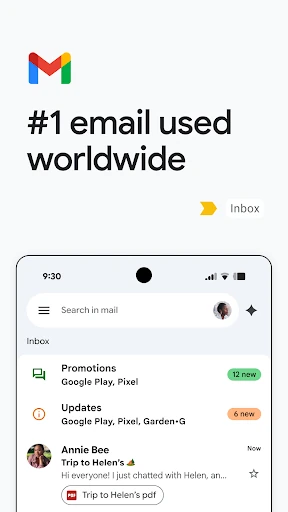
When I first opened Gmail, I thought about the small gaps in an ordinary day: checking a delivery update while waiting for coffee, finding an address before heading out, or replying to a colleague between tasks. The app is built for those quick checks. Its inbox brings messages together, and search helps me return to details without scrolling through weeks of mail.
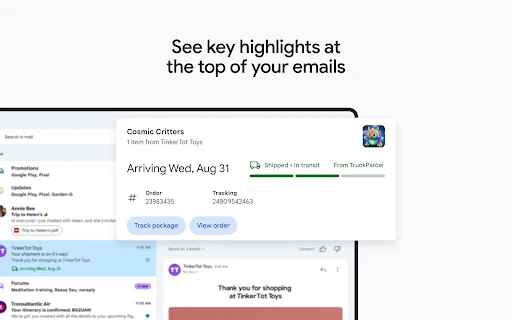
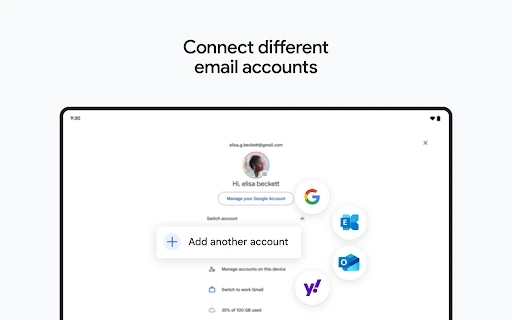
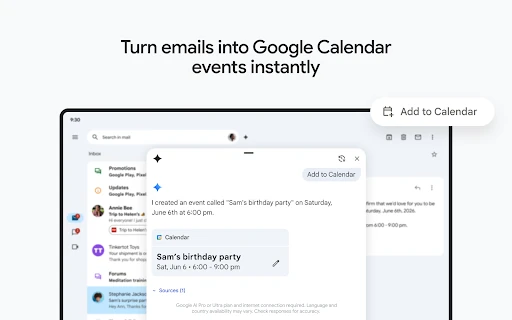
The practical win is having multiple accounts from different email providers available in the same app. I can switch between them rather than opening separate apps for personal and work messages. Summary cards at the top of emails can surface useful details, while an Add to Calendar button can turn an email into a Google Calendar invite. Those features make Gmail feel useful beyond simply reading and sending messages.
Email, Not Every Work Tool
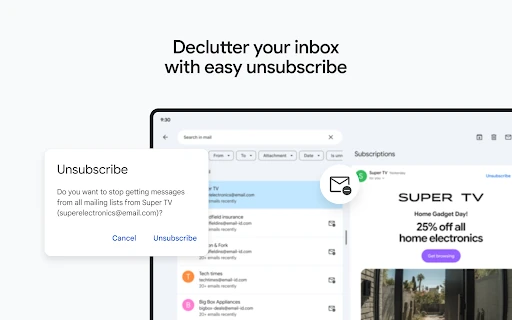
Compared with using separate apps for each email account, Gmail offers a more consolidated place to check messages and search for information. It also has tools for unsubscribing from unwanted senders and for handling suspicious mail. For someone who already uses Google services, the Calendar connection is a natural extra. On Wear OS, a tile or complication offers a quick view of email activity from the watch.
Still, Gmail is primarily an email app, not a replacement for every part of a work suite. Google Workspace adds connections to tools such as Meet, Chat, Calendar, and task lists, but those broader collaboration features belong to that environment. The app also is not a magic fix for an overflowing inbox: search and unsubscribe options help, but keeping mail organized still takes a little attention.
Small Habits That Help
I get more from Gmail when I treat search as a first stop, not a last resort. A relevant keyword can be easier than guessing when a message arrived, especially when I only need one detail from an old thread. If I know a message contains a date or appointment, checking its summary card or calendar option can save a few taps and reduce the chance that I leave the email unfinished.
A second useful habit is making a quick pass through unwanted mail and using the unsubscribe option where it fits. Switching between accounts deliberately also helps me avoid replying from the wrong address. On a Wear OS watch, the tile or complication can suit a glance at incoming mail; I would still use the phone for reading or composing anything that needs more attention.
Reads About Gmail
More From Our News Desk

Zoom Meetings, Google Meet, or Teams: Which Is Easiest to Join?

How I Build a Free Streaming Lineup With Tubi

Why Crunchyroll Is the Default Anime App for So Many Fans

YouTube TV: A Practical Guide to Cutting Cable

Rummikub and the Small Comfort of Phone Games

TeamViewer Remote Control or AnyDesk for Helping Family?
Who Will Get the Most From It
I would recommend Gmail to anyone who checks email throughout the day and wants messages from different providers within one app. It is especially convenient for people who use Google Calendar, since some email details can lead directly to an invite. Search, multiple-account support, and an unsubscribe option make it practical for a mix of personal messages, subscriptions, and work correspondence.
It may be less appealing if you want a very minimal inbox or would rather keep each email account in its own app. People who only need basic reading and replies may not care about the AI-assisted writing and search options. Some Gemini features require a Google AI Pro or Ultra plan and an internet connection, so I would treat them as optional extras rather than the main reason to choose Gmail.
Gmail is developed by Google LLC and is listed on Google Play in the Communication category. It has more than 10 billion installs and a 4.1-star rating from about 14.5 million ratings. The app is free to download, and the store facts indicate that it contains ads. There are no in-app purchases recorded in the provided store details.
The app is rated Everyone and was released on September 21, 2010. Its version varies with the device. The listed last update is October 26, 2026. Gmail is available for Android phones and tablets, and the description also notes Wear OS support. The minimum Android version is worth checking on Google Play, since it can depend on the device and current app requirements.
A Familiar Inbox With More Tools
Getting Started
My first impression is that Gmail is built to make familiar email actions easy to reach. The core idea is straightforward: open the inbox, read a message, search for one you need, or switch accounts. That makes it approachable even if I do not want to explore every extra feature right away.
The app supports multiple accounts from different email providers, which is useful if my personal and work addresses are not all from the same service. I can begin with the account I use most and bring in others as needed. The experience is available on Android phones and tablets, with a separate Wear OS option for quick email overviews.
The Everyday Inbox
Day to day, Gmail's value is less about a single clever trick and more about reducing the effort of common email chores. Powerful search helps me find a message by relevant keywords, while summary cards can bring key details to the top of an email. When I am in a hurry, these tools make it easier to retrieve information without rereading an entire thread.
There is also a useful distinction between seeing an email and doing something with it. An Add to Calendar button can create a Google Calendar invite from an email, and the unsubscribe option gives unwanted senders a more direct path out of the inbox. Neither removes the need to make decisions, but both can make routine cleanup and follow-through less fiddly.
Standout Search and Writing
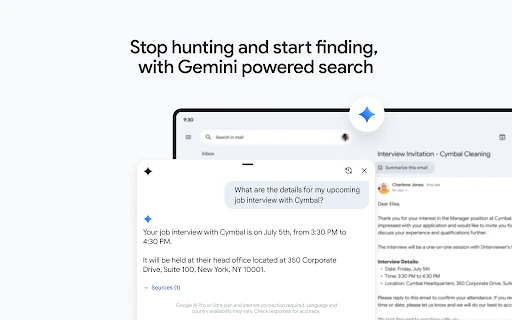
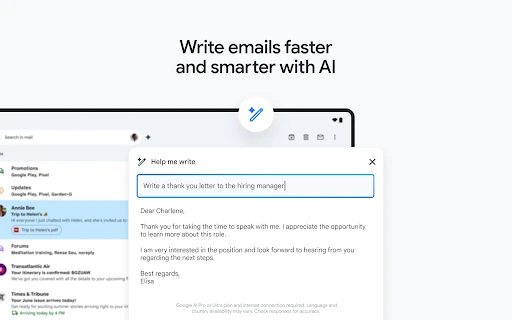
The standout feature set is the combination of search, account switching, and optional Google AI tools. The description says users can ask Gemini to find specific details in inbox messages or Google Drive files, and offers writing help through Help me write and contextual Smart Reply. These are additions to the usual email workflow, rather than requirements for using the app.
There are important limits to keep in mind with those AI tools: Google AI Pro or Ultra and an internet connection are required for the described Gemini features, and language and country availability may vary. Google also advises checking responses for accuracy. I would use the writing assistance as a starting point and review any draft before sending it.
A Simple Daily Routine
A practical routine could start with a quick morning inbox check, followed by a search for any message that needs action. If an email contains an event, I can look for the calendar option; if a recurring sender is no longer useful, I can consider unsubscribing. This keeps the app focused on decisions I can make in a few minutes rather than turning every message into a project.
Later in the day, switching accounts can help me separate personal and work correspondence without jumping between apps. A Wear OS tile or complication can provide a quick overview when I am away from my phone. I would save longer replies and careful review for the larger screen, since the watch feature is described as a way to manage email at a glance.
What to Keep in Mind
Gmail can do a lot, but the extra options may be more than some people want from an email app. If my needs are limited to reading and replying, AI writing help, Gemini search, and connections to other Google tools may not change my routine. The basic value remains account access and email search, so the added features are easiest to appreciate when they solve a real task.
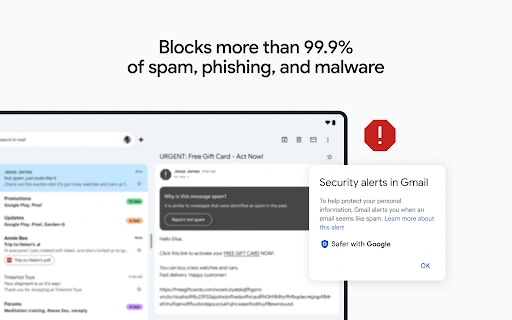
The app's security protections are another part of its appeal: Gmail says it automatically blocks more than 99.9% of spam, phishing, and malware from reaching the inbox. That is a stated protection, not a reason to stop using care with messages. Ads are also noted in the store facts, and anyone checking device compatibility should consult Google Play for current Android requirements.
Gmail remains a practical choice for managing several email accounts, finding old messages, and handling small follow-up tasks without leaving the inbox. I especially like the way search and Calendar actions support real daily routines. The optional AI features add another layer, but they are not necessary to get value from the app.
I would try Gmail if I want a flexible, familiar inbox on Android or a quick email view on Wear OS. It is less compelling for someone seeking a bare-bones mail reader or who does not need its Google-connected extras. Overall, it is a strong everyday option, with a few conveniences worth using selectively.
Gmail Frequently Asked Questions
What is Gmail used for?
Gmail is an email app for reading, sending, searching, and managing messages. It supports multiple accounts from different email providers and includes tools such as unsubscribe options, email summary cards, and a way to create Google Calendar invites from emails. Optional Gemini features can help with inbox search and writing, subject to plan and availability requirements.
Which devices can run Gmail?
Gmail is available on Android phones and tablets, and its description also includes support for Wear OS watches, where users can add a tile or complication for an email overview. The minimum Android version can vary with device and app requirements, so check the Google Play listing for the version that applies to your device.
Does Gmail cost money?
Gmail is free to download on Google Play, and the provided store details show no in-app purchases. The store facts indicate that the app contains ads. Some Gemini features require a Google AI Pro or Ultra plan and an internet connection, so those optional tools have separate requirements; check the store for current details.
What Android version does Gmail require?
The minimum Android version may vary by device and current app requirements. Gmail's version is also described as varying with the device. I would check the Google Play listing from the Android phone or tablet you plan to use, since that is the best place to see compatibility information for that device.
Is Gmail a good fit for everyday email?
I think Gmail suits people who want to manage several email accounts, search for older messages, and use Google Calendar alongside email. It may feel like more app than necessary if you only want a minimal reader. Gemini writing and search tools are optional, and availability can vary by language, country, and plan.
Pros
- Supports multiple email accounts from different providers in one app.
- Powerful keyword search helps retrieve details from older messages.
- Email summaries and Calendar actions can simplify everyday follow-up.
- Wear OS tile and complication offer a quick email overview.
Cons
- Ads are indicated in the Google Play store facts.
- Some Gemini features require a paid Google AI plan and internet access.
- Extra tools may feel unnecessary to people seeking a minimal inbox.
- Category
- Communication