Yahoo Mail: Email & Planner
- 8.86M
- 4.2
- Installs
- 100.00M
- Price
- Free

Screenshots
Analysis by Reviewed APKs
Yahoo Mail: Email & Planner is an email app for keeping messages, plans, and order details in one place. I found its appeal less in replacing every tool I use and more in making a busy inbox easier to act on: a reservation or bill email can become part of a plan instead of something I mean to revisit later. It suits people who want email to do a little more organizing.
From Inbox to Daily Plan
Picture a weekday morning with a dinner reservation, a package update, and a bill reminder buried among newsletters. Yahoo Mail is designed to bring those details closer to the surface. Its Planner can identify events and tasks in messages, then show them in a unified view. In practice, that makes the app feel useful for the small coordination jobs that otherwise send me searching through old email.
The hands-on idea is straightforward: open a relevant message, use Add to Planner, and keep the resulting event or task with the rest of the day’s plans. The app also describes automatically finding details, which can reduce retyping. I like that the workflow starts with the email itself rather than asking me to remember which separate calendar or task app should hold each piece of information.
Email, Not a Whole Office
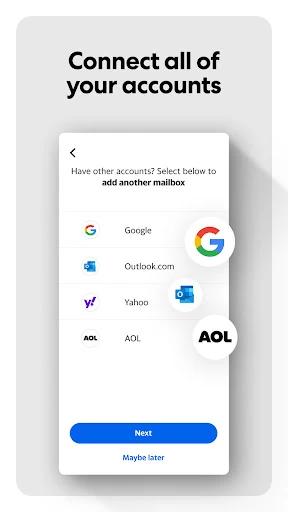
Compared with a basic mail reader, Yahoo Mail is trying to connect correspondence to the errands and appointments it contains. It can also bring Gmail, Outlook, and AOL accounts into a unified inbox, and its Planner can show an existing Gmail calendar alongside plans. That makes it a plausible choice if I want one email-centered place to review several accounts and pull practical details out of messages.
It is still an email app, not a replacement for every calendar, project manager, or shopping service. The features described are centered on messages, events, tasks, receipts, and delivery updates. Someone who needs a specialized team workflow or a dedicated planning system may prefer those separate tools. I see Yahoo Mail as a way to make routine inbox work more actionable, not as a universal productivity suite.
Small Habits That Help
A useful habit is to handle an important message while it is open. If it contains a reservation or deadline, adding it to Planner then is easier than trusting myself to remember it after closing the inbox. For deliveries, I can look to the Orders Hub for tracking information rather than repeatedly searching for the original confirmation. These small handoffs are where the app’s organizing approach makes practical sense.
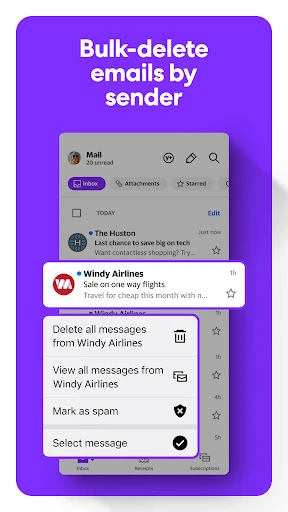
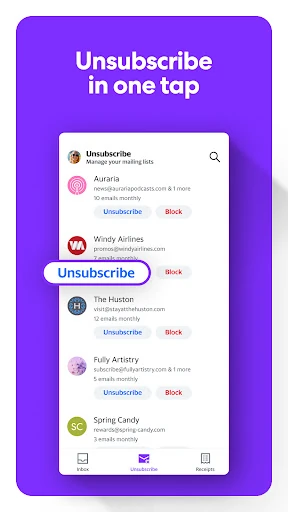
I’d also make occasional inbox cleanup part of the routine. Yahoo Mail includes one-tap unsubscribe and the option to delete messages by sender, which can help tame a persistent newsletter or a bulky thread of promotional mail. For long messages, AI summaries are intended to surface key points and action items. Used selectively, these tools can make a quick check-in more focused without turning every email into a project.
Reads About Yahoo Mail
More From Our News Desk

Zoom Meetings, Google Meet, or Teams: Which Is Easiest to Join?

How I Build a Free Streaming Lineup With Tubi

Why Crunchyroll Is the Default Anime App for So Many Fans

YouTube TV: A Practical Guide to Cutting Cable

Rummikub and the Small Comfort of Phone Games

TeamViewer Remote Control or AnyDesk for Helping Family?
Who May Find It Useful
I’d recommend Yahoo Mail to people who spend part of their day juggling personal email, delivery notices, bills, and appointments. The Planner and Orders Hub are especially relevant if useful details tend to disappear into a crowded inbox. It may also suit someone who wants to connect Gmail, Outlook, or AOL accounts rather than opening several mail apps just to check what came in.
It may be less appealing if you want a minimal mail reader with no extra organizing features, or if your work depends on specialized planning tools. The app’s combination of inbox, planner, package details, and AI options gives it a broader feel than email alone. I’d try it if that integration sounds helpful, while keeping expectations practical: the central job is still managing email.
Yahoo Mail is developed by Yahoo and is available on Google Play. The app has more than 100 million installs and a 4.2-star rating from about 8.9 million ratings. Google Play gives it an Everyone content rating. Its listed release date is June 22, 2010, reflecting a long-running email app rather than a new arrival.
The app is free to download, with ads and in-app purchases. Listed in-app product prices range from $0.99 to $119.99 per item. The version varies with device, and the minimum Android version is not specified in the supplied app facts. The listed last update date is October 22, 2026.
A Closer Look at the Inbox
A Familiar Starting Point
When I first opened Yahoo Mail, the main idea was easy to grasp: this is a familiar inbox with extra attention paid to what messages ask me to do. The app presents itself as a place to manage mail alongside events and tasks, rather than treating every message as something to read and forget. That framing should make sense to anyone who already uses email as a record of daily commitments.
Getting value from the extra features depends on the kind of mail arriving. A reservation confirmation or shipping message gives the app useful information to organize; a casual note may simply stay a note. I appreciate that Planner includes an Add to Planner action for turning a message into a task or event, so the basic workflow does not require a complicated planning ritual.
The Everyday Inbox
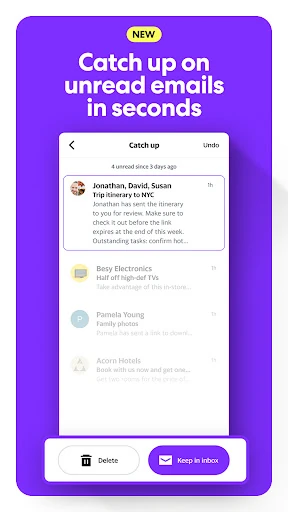
Day to day, the app’s strongest promise is reducing the time between spotting a useful message and acting on it. Yahoo Mail describes a Primary Inbox that puts crucial updates ahead of distractions, plus a quick way to review unread messages and keep or delete them. Those options suit a quick morning scan, when I want to find anything requiring attention before getting pulled into less important mail.
The experience also reaches beyond a Yahoo address. Gmail, Outlook, and AOL accounts can be connected for a unified inbox. That is handy if personal mail is spread across providers, though it also means the app becomes a broader place to check and organize messages. I would use the combined view when convenience matters, then rely on the individual account details as needed.
Useful Extras in Context
Planner is the most distinctive idea here because it connects email with events and tasks. The app says it can find details in messages, lets me add items with a tap, and can display plans alongside an existing Gmail calendar. That combination is most compelling for everyday logistics: a reservation, a flight confirmation, or a due date that would otherwise remain tucked away in a thread.
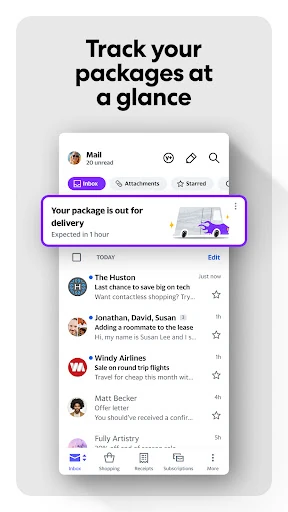
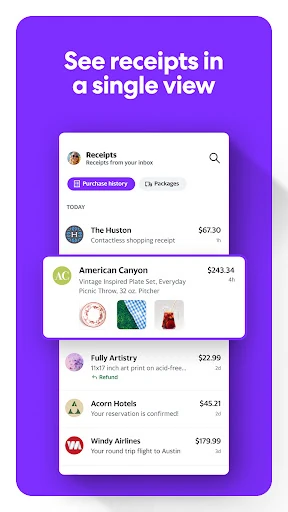
Orders Hub addresses another familiar inbox chore. It brings order and receipt information together and surfaces package tracking numbers, delivery updates, and estimated arrival details. I can see the value when I have several purchases in transit or need to find a receipt later. It is a practical organizational feature, rather than a reason by itself to treat the app as a shopping platform.
There are also AI features for summarizing long emails and helping draft messages in different tones, along with quick actions for tasks such as scheduling or checking in. The app describes built-in spam detection, one-tap unsubscribe, and deleting messages by sender as additional inbox controls. Each feature tackles a specific nuisance; I would use the ones that fit my mail habits rather than expecting them all to change how I communicate.
A Practical Daily Routine
A sensible routine would be to check the Primary Inbox once in the morning, scan unread messages, and deal with anything that has a clear next step. I could add a date or task to Planner while the source email is open, then check the unified plan when reviewing the day. This keeps email as the starting point and avoids relying on memory to revisit a confirmation later.
For packages, I would use Orders Hub when checking what is on the way, and return to its grouped order or receipt information when I need a purchase record. A brief cleanup at the end of the week could use unsubscribe or delete-by-sender options for recurring clutter. These are modest habits, but they match the app’s strengths better than trying to reorganize an entire life at once.
Keep Expectations Grounded
The broad feature set is also the main thing to weigh. People who want only a straightforward place to read and send email may not care about Planner, order tracking, summaries, or drafting assistance. Ads are present, and in-app purchases are offered, so the free download does not mean every part of the experience is necessarily free of commercial elements.
Smart extraction and summaries can help surface details, but I would still check important dates and amounts against the original message. That is a sensible habit whenever an app turns email content into a plan. The app’s description emphasizes convenience and organization; it does not make it a substitute for reading a message when the exact wording matters.
Finally, Yahoo Mail’s usefulness depends on whether its connected-account and planning approach fits your routine. Its feature set reaches across email, calendars, tasks, and orders, but it remains centered on managing messages. If you prefer each activity in a dedicated service, the unified approach may feel like extra complexity rather than a benefit.
Yahoo Mail makes its best case when a crowded inbox doubles as a record of appointments, purchases, and things to do. Planner, Orders Hub, account connections, and cleanup tools give everyday messages more useful follow-through. I found the approach practical, especially for routine coordination, while still seeing email—not comprehensive task management—as the app’s center.
I’d recommend giving it a try if you want one mobile inbox to help organize plans and order details, or if you check several supported email accounts. If you value a bare-bones reader or already have a planning workflow you love, the extras may not be worth changing habits for. Its appeal is convenience, not replacing every app.
Yahoo Mail Frequently Asked Questions
What is Yahoo Mail used for?
Yahoo Mail is an email app for reading and organizing messages, with tools for turning email details into plans and tasks. It also groups order and receipt information and surfaces package tracking updates. You can connect Gmail, Outlook, and AOL accounts, so the app can serve as a unified inbox as well as a place to manage Yahoo email.
Which devices can run Yahoo Mail?
Yahoo Mail is available as an Android app through Google Play. The supplied app information does not give a single minimum Android version, and its version varies with device. For current device compatibility, check the Google Play store entry on the phone or tablet you plan to use before installing.
Does Yahoo Mail cost money?
Yahoo Mail is free to download, but it contains ads and offers in-app purchases. The listed in-app product prices range from $0.99 to $119.99 per item. Which purchases are available and their current prices may vary, so check the Google Play store entry for the latest details before buying.
Can Yahoo Mail organize plans from email?
Yes. Yahoo Mail’s Planner is designed to surface events and tasks from messages, and it includes an Add to Planner action for adding an item from an email. Its unified view can show plans alongside an existing Gmail calendar. The app also organizes order and receipt details through Orders Hub.
Is Yahoo Mail a good fit for everyone?
It may suit people who want email, everyday plans, and delivery details together, particularly if they connect Gmail, Outlook, or AOL accounts. People who prefer a minimal email app or use dedicated planning tools may not need its extras. Yahoo Mail has an Everyone content rating on Google Play; individual preferences will still vary.
Pros
- Planner can turn useful email details into events and tasks.
- Orders Hub groups receipts and surfaces package tracking updates.
- Supports a unified inbox for Gmail, Outlook, and AOL accounts.
- Includes practical inbox cleanup tools like unsubscribe and delete by sender.
Cons
- Ads and in-app purchases are part of the free app.
- The broad feature set may feel excessive for basic email reading.
- Important dates and details still deserve a check against the original email.
- Category
- Communication