Device Care
- 699.55K
- 3.9
- Installs
- 5.00B
- Price
- Free

Screenshots
Analysis by Reviewed APKs
Device Care is Samsung’s utility for checking and maintaining the condition of a Galaxy smartphone. It suits people who want a quick view of battery use, memory, and device status without digging through technical tools. My overall take is that it is most useful as a straightforward maintenance dashboard: the one-tap optimization and battery controls make routine checks approachable, while its Galaxy focus means it is not a general-purpose phone cleaner.
A Quick Check Before Heading Out
Imagine getting ready to leave home and noticing your Galaxy phone is already low on battery. Device Care gives you a place to check the phone’s overall condition and see which apps are using power. From there, you can review battery-saving options or look at apps flagged as draining power. That makes it useful for a practical moment: figuring out what might help before a long commute, rather than waiting until the phone is nearly empty.
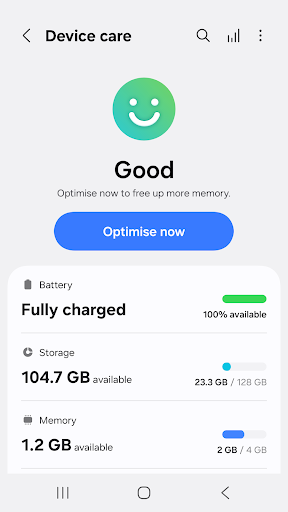
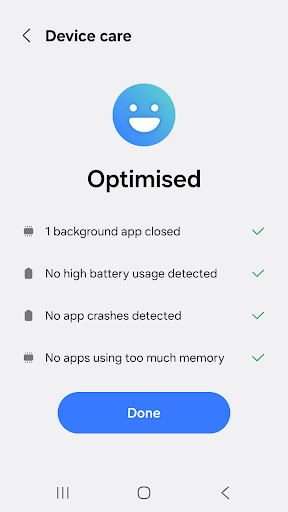
The app’s 100-point condition score offers a fast overview when I don’t want to inspect every setting individually. If the device needs attention, the one-click optimization is designed to take prompt action without requiring specialist knowledge. I’d treat that score as a convenient snapshot, not a complete explanation of every issue. The useful part is having an accessible starting point for checking battery, memory, and potential malware concerns in one Samsung utility.
A Galaxy Tool, Not a Cleaner
Device Care makes the most sense alongside the built-in tools on a Galaxy phone. It brings several maintenance checks together: a device-condition report, memory management, battery monitoring, power-saving modes, and malware detection. Rather than searching around for separate utilities, a user can start with this Samsung app and see which of those areas may need attention. Its clearest advantage is that focused, integrated role—not a promise to transform how the phone works.
It is not a general-purpose cleaner for every Android phone, and it is not a replacement for a dedicated security product or a detailed battery-analysis tool. The app is intended for Galaxy smartphones, and some Galaxy devices may not support every feature. That makes the fit fairly specific: it can be a handy routine dashboard for Samsung owners, but it is less compelling for someone looking for a universal utility or extensive technical reports.
Make Checks a Small Habit
I’d get the most from Device Care by checking it when there is a reason, rather than tapping optimization repeatedly out of habit. A quick look at the condition score can tell me whether I should inspect battery use, review memory, or simply carry on. If battery life is the concern, the per-app usage analysis and power monitor are more relevant than a broad maintenance check. That small distinction keeps the app practical instead of turning it into busywork.
The two widget types can make a glanceable check more convenient, while the power-saving options are worth considering when I expect a long stretch away from a charger. I’d also revisit the app power monitor periodically to see whether unused apps need attention. Device Care supports simple, repeatable habits; it does not need to become a daily ritual. Its best use is as an easy reference when battery, memory, or device condition is on my mind.
More From Our News Desk

Zoom Meetings, Google Meet, or Teams: Which Is Easiest to Join?

How I Build a Free Streaming Lineup With Tubi

Why Crunchyroll Is the Default Anime App for So Many Fans

YouTube TV: A Practical Guide to Cutting Cable

Rummikub and the Small Comfort of Phone Games

TeamViewer Remote Control or AnyDesk for Helping Family?
Who will find it useful
I’d recommend Device Care to Galaxy owners who want basic maintenance tools in one approachable place. It is especially suitable for people who would rather see a simple condition score and a few practical options than work through several technical screens. The battery analysis, app power monitor, power-saving modes, and memory management give it useful everyday roles, whether the goal is checking a sudden battery drain or taking a quick look at the phone’s general status.
It may not suit someone who wants detailed diagnostics, an all-purpose Android cleaner, or a utility that works the same way across phone brands. Some features may also be unavailable on particular Galaxy devices, so the experience can depend on the model. If you rarely check battery or memory use and are happy handling device settings elsewhere, Device Care may feel like an extra stop rather than an essential part of your routine.
Device Care is a Tools app from Samsung Electronics Co., Ltd. On Google Play, it has over five billion installs and a 3.9-star rating from around 700,000 ratings. The app is free, with no in-app purchases and no ads. Its content rating is Everyone, which fits a practical device-maintenance utility rather than an entertainment app.
The app was released on June 1, 2017, and its listed last update is September 3, 2026. The version varies with device, and no single minimum Android version is specified in the supplied app details. Device Care is intended for Galaxy smartphones; some Galaxy devices may not support every feature, and Google Play updates are available only on some devices.
A Practical Dashboard for Galaxy Care
A Simple Starting Point
The first thing Device Care promises is an at-a-glance view of a Galaxy phone’s condition, expressed as a score out of 100. That is a low-friction way to begin: I can check the overall status before deciding whether there is anything worth investigating. The interface is intended to be intuitive, and the one-click optimization gives less technical users a direct action to try when they want to tidy up routine device maintenance.
I’d approach the score as a signpost rather than a diagnosis. A single number can help prompt a closer look, but it does not replace checking the specific area that matters, such as battery usage or memory. The app’s value is that it pairs that broad snapshot with practical maintenance options. For a Galaxy owner who wants a quick orientation rather than a deep technical breakdown, that is a sensible first impression.
Useful in Ordinary Phone Life
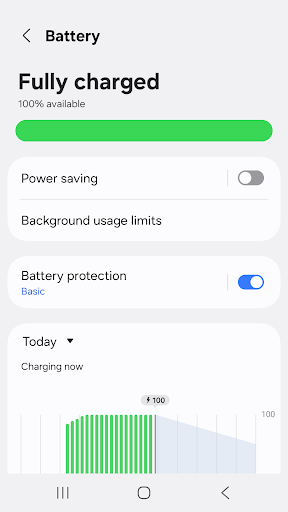
Day to day, battery monitoring is one of the clearer reasons to open Device Care. It analyzes battery use by app, identifies apps that drain power, and includes an app power monitor for checking unused apps. When my phone seems to be losing charge faster than expected, that gives me a sensible place to look before changing my routine or switching on a power-saving option.
Memory management is another part of the everyday toolkit, while the overall optimization option keeps common maintenance actions close at hand. These are practical controls rather than a detailed record of everything happening on the phone. I’d use them as needed—after noticing an issue or before a day when battery life matters—not as a reason to constantly monitor the device. That keeps the app’s role clear and modest.
Battery and Protection Tools
The power options add a useful layer for days when charging opportunities are limited. Device Care offers both Power saving mode and Maximum power saving mode, giving users two named modes to consider when they want their phone to last longer. The app also identifies battery-draining apps, so users can look for a possible cause instead of treating every battery concern as the same problem.
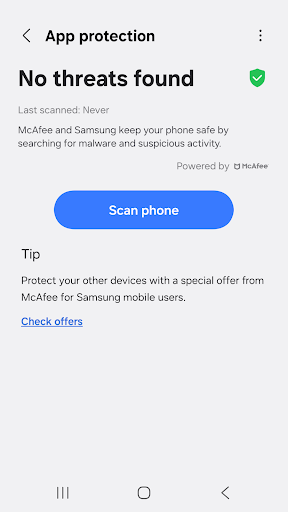
Security is also part of the feature set: Device Care says it detects malware, including viruses and spyware, and provides real-time protection for smartphones. I’d keep that description in perspective and regard it as one component of Samsung’s device-care offering, not a reason to make broad assumptions about every security need. The two available widget types are a smaller convenience, making some information or access available without always opening the app.
A Routine That Stays Light
A useful routine could be as simple as checking Device Care when the phone’s battery life changes, then opening the per-app analysis to see which apps are using power. If an app is identified as draining the battery, the app power monitor offers a place to review unused apps. When I know I’ll be away from a charger, I can consider one of the power-saving modes. Each step follows a specific need instead of repeating a generic optimization.
For a general check-in, the condition score and memory tools offer a quick overview without requiring a long session. I’d use a widget if I wanted a more convenient way to glance at Device Care information, choosing from the two types the app provides. There is no need to build a complicated schedule around it. The strongest workflow is occasional and purposeful: check, investigate the relevant area, and use a control when it matches the situation.
Keep the Scope in Mind
Device Care is designed for Galaxy smartphones, and some Galaxy devices may not support every feature. That matters because the available tools can depend on the device rather than appearing identically for every Samsung owner. Google Play updates are also available only on some devices. I would check how the app behaves on my particular phone instead of assuming that every advertised capability will be present.
The app’s broad condition score is convenient, but people who want detailed diagnostics may find that approach too basic. Its maintenance tools are focused on device status, battery, memory, power saving, and malware detection; it is not presented as a universal utility for every Android brand. Those limits are not a problem if a quick Galaxy-focused dashboard is the goal. They are worth remembering if you expect a more extensive troubleshooting suite.
Device Care is a sensible, focused utility for Galaxy owners who want a simple view of device condition and a few practical ways to check battery use, memory, and power-saving options. I like that its core job is easy to understand. It works best as an occasional maintenance stop, not an app that needs constant attention.
I’d try it if I owned a Galaxy phone and wanted these checks gathered in one place, especially for investigating battery drain or preparing for a long day away from a charger. If you want deep technical diagnostics or a tool for phones from any brand, it may not be the right fit. Device support can vary, so expectations should stay device-specific.
Device Care Frequently Asked Questions
What is Device Care used for?
Device Care is Samsung’s utility for checking and maintaining a Galaxy smartphone. It reports the phone’s condition on a 100-point scale, offers one-click optimization, manages memory, analyzes battery use by app, and provides power-saving modes. It also includes malware detection and two widget types. Some features may not be available on every Galaxy device.
Which phones and platforms support Device Care?
Device Care is an Android app intended for Galaxy smartphones. It is not described as a general-purpose utility for phones from every Android manufacturer. Some Galaxy devices may not support all of its features, and Google Play updates are available only on some devices. Check the store information and your device’s compatibility for details relevant to your phone.
What Android version does Device Care require?
A minimum Android version is not specified in the app details provided here, so I would check the Google Play store page for the requirement shown for your device. Device Care is meant for Galaxy smartphones, and feature availability can vary between Galaxy models. The app’s version also varies with device rather than having one universal version number.
Does Device Care cost money or include purchases?
Device Care is free on Google Play, and the supplied app details indicate that it has no in-app purchases and contains no ads. Store information can change over time, so it is worth checking the current Google Play page before installing. The app’s listed content rating is Everyone.
Is Device Care a good fit for my phone routine?
It is a reasonable fit if you use a Galaxy smartphone and want a straightforward place to check battery use, memory, and overall device condition. It may be less suitable if you expect detailed technical diagnostics or a tool for many phone brands. Some features depend on the Galaxy device, so check the store details for your model.
Pros
- Combines battery analysis, memory management, and a device-condition score in one Galaxy utility.
- Includes two power-saving modes for times when extending battery life matters.
- Offers one-click optimization and two widget types for convenient routine checks.
- Free to use, with no in-app purchases or ads.
Cons
- Designed for Galaxy smartphones rather than Android phones from every manufacturer.
- Some features may not be supported on every Galaxy device.
- The overall condition score may feel basic to users seeking detailed diagnostics.
- Category
- Tools