YouTube
- 172.37M
- 3.8
- Installs
- 10.00B
- Price
- Free

Screenshots


Analysis by Reviewed APKs
YouTube is the familiar video app for finding channels, catching up on new uploads, watching live streams, and sharing videos of your own. I find it most useful when I want one place for everything from a quick music break to a longer how-to session. Its breadth is the appeal, though ads and an endlessly changing mix of recommendations can make focused viewing harder.
A Familiar Video Break
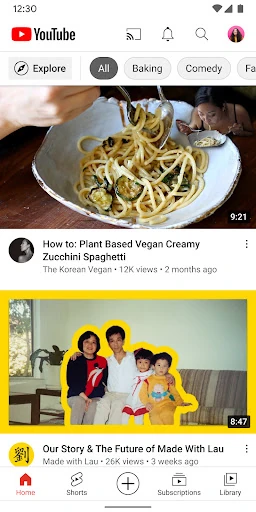
When I first opened YouTube, the practical appeal was how quickly I could move from a general interest to a specific channel. Home offers personal recommendations, while Subscriptions is a more direct way to see what channels I follow have posted. On a busy day, I might check a short update over lunch, then return in the evening to a longer learning video. The app serves both habits without needing separate video apps.
Library helps make those casual visits easier to pick up again. It brings together videos I have watched, liked, or saved for later, so I can return to something without relying on memory or searching from scratch. I spent an evening moving between a saved video and a few channel uploads, and the separation between recommendations, subscriptions, and saved activity made the experience feel more organized than simply browsing one long feed.
More Than a Streaming Queue
Compared with a service built around a fixed catalogue of shows or films, YouTube is better understood as a broad collection of channels and individual videos. I use it when I want a creator’s latest post, a music video, a live conversation, or an explanation of a topic. Explore also surfaces popular subjects, including music, gaming, beauty, news, and learning, though some discovery options depend on country.
That variety is not the same as a carefully bounded entertainment library. The app is not specifically a podcast manager, a classroom course platform, or a place where every video follows the same format. It includes comments and community posts as well as viewing, and users can create or upload videos. If I want to stay focused, I need to choose a channel or saved video rather than assume the next recommendation will match my original purpose.
Small Habits That Help
A simple habit that works for me is saving a video when I find it but do not have time to watch. Later, I can look for it in Library instead of trying to reconstruct the search that led me there. Subscribing to channels I genuinely return to also gives Subscriptions a clearer role: it becomes a way to check new uploads, rather than just another stream of suggested content.
I also treat Home and Explore as browsing spaces, not as a to-do list. If I have a specific reason for opening the app, I go straight to a channel or saved video; if I have time to wander, recommendations and trending topics are useful starting points. For creators, the app supports making or uploading videos and live streaming from a mobile device, while comments and community features offer ways to interact.
Reads About YouTube
More From Our News Desk

Zoom Meetings, Google Meet, or Teams: Which Is Easiest to Join?

How I Build a Free Streaming Lineup With Tubi

Why Crunchyroll Is the Default Anime App for So Many Fans

Rummikub and the Small Comfort of Phone Games

TeamViewer Remote Control or AnyDesk for Helping Family?

Gmail, Yahoo Mail and Outlook: A Calmer Phone Inbox
Who Will Get the Most From It
I’d recommend YouTube to people who regularly watch creator channels, want a wide mix of subjects in one app, or like switching between quick clips and longer videos. It also suits viewers who want to follow channel updates, join conversations, or make and upload content from a mobile device. The combination of recommendations, subscriptions, and saved activity gives different kinds of viewers a few ways to shape their routine.
It may be less appealing if you want an ad-free experience without paying for an available upgrade, or if you prefer a small, predictable catalogue over an open-ended selection. The volume of recommendations can be distracting when I only came to watch one thing. Families should also look into the YouTube Kids app or the supervised experience described by YouTube, since those options are available only in select countries.
YouTube is developed by Google LLC and is available for Android phones and tablets. Google Play shows more than 10 billion installs, with a 3.8-star rating from around 172 million ratings. The app is free to download, but it contains ads and offers in-app purchases. The stated in-app product range is $0.05 to $999.99 per item, so purchases can vary considerably.
Google Play gives the app a Teen content rating. Its version is listed as varying with device, and the release date shown is October 20, 2010. The listed last update is October 26, 2026. The Android version requirement is not included in the available app details, so check Google Play for the requirement that applies to your device.
How YouTube Fits Into My Day
Opening the App
The first impression is less about a complicated setup and more about being presented with videos to browse. Home is the obvious starting point, and the main destinations have distinct jobs: Subscriptions for followed channels, Library for watched, liked, and saved videos, and Explore for popular topics and trends. That layout gives me a few useful routes into the app instead of making every visit depend on the same recommendation feed.
I find the experience easiest to shape by following channels I actually want to hear from. Once I do that, Subscriptions becomes a practical check-in rather than a backup version of Home. The app also brings community activity into the viewing experience through comments, Posts, Stories, Premieres, and live streams. Which discovery and creator features appear can depend on the country, so the exact mix is not identical everywhere.
The Daily Viewing Flow
Day to day, YouTube works well for both deliberate searches and unplanned browsing. I might open it with a particular channel in mind, or start on Home when I have a few minutes and want to see what catches my attention. That flexibility is a strength, but it also means the app can easily stretch a short break into a much longer session if I keep following recommendations.
Subscriptions provide a useful counterweight to the general feed. I can check the latest from channels I chose, then use Library to return to saved videos or things I have already watched. I appreciate having those different paths because they let me move between discovery and follow-up. The app is still built around a large, varied collection, so a little intention helps when I am trying to watch one specific thing.
Community and Creation
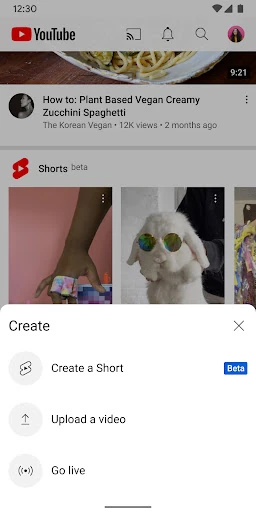
YouTube is not only a place to watch. The app supports uploading or creating videos from a mobile device, and creators can live stream directly from it. For viewers, comments provide a way to respond and interact with creators or other community members. Channel memberships are another option for participating, where offered, with paid monthly memberships and channel-specific perks.
Community features add context around a video, especially when a creator uses Posts, Stories, Premieres, or live streams to keep viewers involved. I like that these formats give channels more ways to communicate than uploading a finished video alone. They can also make the app feel busier, so viewers who only want a quiet viewing session may prefer to keep their attention on a chosen video rather than every surrounding conversation.
A Practical Evening Routine
One routine I can see myself using is checking Subscriptions after dinner, saving anything that looks useful for another time, and then opening Library when I am ready to watch. It works for a mix of entertainment and learning without requiring me to remember every title. If I am in the mood to browse instead, Explore can point me toward popular topics, with some areas and features varying by country.
For a commute or travel day, the distinction between regular access and Premium matters. YouTube Premium is available in select countries and includes ad-free viewing, background playback while using other apps or with the screen locked, and video saving for offline situations. YouTube Music Premium is also included with those benefits. Without Premium, I would plan around the standard viewing experience rather than assume those options are part of the free app.
Trade-Offs to Consider
The biggest everyday compromise is advertising. YouTube contains ads, and the free app does not promise uninterrupted viewing. There is a paid Premium option in select countries, but anyone comparing costs should check the current offer in their location. Channel memberships are separate paid options for channels that provide them, so the app’s purchase possibilities are not limited to one uniform upgrade.
The open-ended selection can be another drawback. Recommendations are handy when I want to discover something, but they are not always the best route when I have a specific task or limited time. Some Explore and creator features are only available in select countries, and family options also vary by country. Those limits do not undermine the basic video app, but they are worth remembering before relying on a particular feature.
YouTube remains a useful all-purpose video app because it combines channel subscriptions, recommendations, saved viewing, community features, and mobile creation. I especially like being able to switch between a purposeful visit and casual discovery without changing apps. The trade-offs are familiar: ads, a wide-open feed, and some features that depend on where you live.
I recommend it to Android users who want a broad mix of creator videos and enjoy following channels over time. It is less suited to anyone who wants a tightly curated, uninterrupted experience by default. A few small habits—subscribing selectively and saving videos for later—make the app easier to use on your own terms.
YouTube Frequently Asked Questions
What is the YouTube app used for?
YouTube is for watching videos and following channels across subjects such as music, gaming, news, fashion, and learning. The app includes personal recommendations, channel subscriptions, and a Library for watched, liked, and saved videos. Users can also comment, upload or create videos, and live stream from a mobile device. Availability of some discovery and community features can depend on country.
Which devices can run the YouTube app?
The app is described for Android phones and tablets. The supplied app details do not specify a minimum Android version, and requirements can change with a device or app update. Check the YouTube page on Google Play for the current compatibility information for your particular phone or tablet before installing.
Does YouTube cost money to use?
The YouTube app is free to download and contains ads. It also offers in-app purchases; Google Play gives a broad per-item price range, while the available options can differ. YouTube Premium is offered in select countries and includes benefits such as ad-free viewing and offline video saving. Check Google Play for current prices and available plans in your region.
Does YouTube have a version requirement?
YouTube's listed version varies with device, and the available details do not provide a minimum Android requirement. Compatibility can depend on the device and the current app release. The Google Play page is the best place to check the requirement shown for your device and whether an update is available.
Who is the YouTube app best suited for?
YouTube suits people who want a wide range of videos, follow creator channels, or like combining casual browsing with saved viewing. It can also serve people who want to upload videos or live stream from mobile. Viewers who dislike ads or prefer a limited, predictable catalogue may find the open-ended recommendations less suitable. Family viewing options vary by country.
Pros
- Combines recommendations, subscriptions, and saved viewing in one familiar app.
- Supports mobile video creation, uploads, live streams, and community interaction.
- Covers a broad range of subjects and creator formats.
- Library makes it easier to return to watched, liked, and saved videos.
Cons
- The free app contains ads, which can interrupt viewing.
- Recommendations can turn a focused visit into extended browsing.
- Some discovery, family, and membership features vary by country.
- Category
- Video Players & Editors