Files by Google
- 9.10M
- 4.5
- Installs
- 5.00B
- Price
- Free

Screenshots
Analysis by Reviewed APKs
Files by Google is a practical file manager for finding downloads, organizing what is on your phone, and making room when storage gets tight. It also handles offline media, file sharing, and optional file protection. I find it most useful for people who want one straightforward place to manage everyday files without ads. It is a capable utility, though its cleaning suggestions still call for a little judgment.
A Quick Storage Check
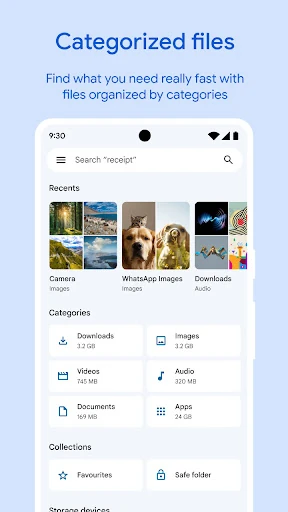
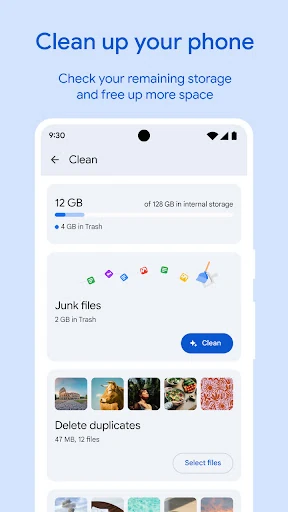
When I first opened Files by Google, I imagined using it during one of those familiar moments when my phone warns that storage is running low. I could check space on the phone, an SD card, or a USB drive, then look through recommendations for old chat-app photos, duplicate files, or cache to clear. That makes the app feel useful before I even start searching for a particular download.
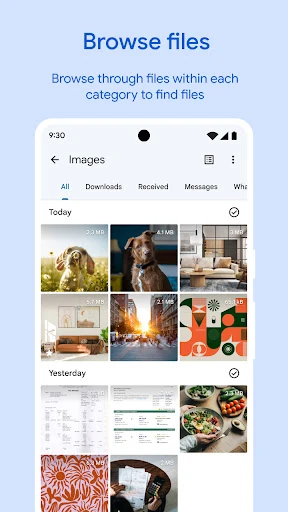
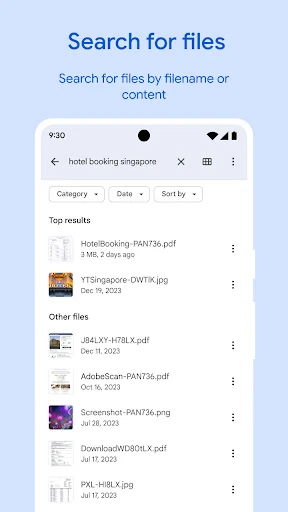
In a more ordinary routine, I might open it after downloading a document or receiving a video in a chat. Search and simple browsing help me get to photos, videos, and documents, while sorting by size gives me a quick way to spot large files. Instead of digging through unrelated folders, I can use the app as a practical starting point for finding something and deciding what to do with it.
A Utility, Not a Workstation
Files by Google sits between a basic folder browser and a dedicated storage-cleanup tool. It covers several everyday jobs in one place: finding files, reviewing suggestions to free space, playing offline music or video, and sending files to nearby Android or Chromebook devices with Quick Share. I like that range for casual phone upkeep. It means I can move from locating a video to sharing it without treating each task as a separate project.
I would not treat it as a full desktop-style file workstation or a replacement for every cloud-storage app. Its described strengths are everyday browsing, cleanup recommendations, offline sharing, and backing up to Google Drive, an SD card, or another cloud storage app on the device. It is also not a reason to delete files on autopilot. The suggestions can help identify candidates, but I would review them before clearing anything I might want later.
Small Habits That Help
A useful habit is to check the space overview before a long trip or a busy week of taking photos. Looking at storage on the phone, SD card, or USB drive can help me understand where room is available. If I am short on space, I can review the app's suggestions and sort files by size, rather than trying to guess which folders are taking up the most room.
I also find it sensible to make file management a small, occasional task instead of a frantic cleanup. Search for the document or video I actually need, move files I want to keep to Drive or an SD card, and use Quick Share when someone nearby needs a copy. For sensitive items, a PIN or pattern in the app offers a separate lock from the device lock. These are modest steps, but they make the app more useful.
More From Our News Desk

Zoom Meetings, Google Meet, or Teams: Which Is Easiest to Join?

How I Build a Free Streaming Lineup With Tubi

Why Crunchyroll Is the Default Anime App for So Many Fans

YouTube TV: A Practical Guide to Cutting Cable

Rummikub and the Small Comfort of Phone Games

TeamViewer Remote Control or AnyDesk for Helping Family?
Who Might Find It Useful
I would recommend Files by Google to Android users who regularly download documents, save videos, or find that chat photos accumulate faster than expected. It is especially convenient if you want a single app for browsing, checking storage, playing offline media, and moving files to a nearby device. The interface is aimed at ordinary upkeep rather than complicated file administration, and the app’s no-ads approach is a welcome fit for a utility you may open briefly and often.
It may be less appealing if your file routine depends on advanced desktop workflows or highly specialized organization tools. People who prefer to manage every folder manually may also find recommendations less useful than direct control. And while the app can help you identify old or duplicate files, deciding what is safe to remove remains your job. I see it as a helpful everyday manager, not a substitute for careful backups or personal review.
Files by Google is a free Android tools app from Google LLC. Google Play shows more than 5 billion installs and a 4.5-star rating from around 9.1 million ratings. The app is rated Everyone, contains no ads, and does not offer in-app purchases. Those details make it a low-friction option to try if you need a basic file manager and storage helper.
The recorded release date is December 1, 2017, and the listed version is 1.13003.1002253400.1-release. Its last update is dated October 27, 2026. The description says the app uses less than 20 MB of device storage. Android version requirements can vary by release, so it is worth checking the Google Play details for compatibility with your device.
A Closer Look at Everyday File Management
First Open, Simple Purpose
My first impression is that Files by Google has a clear job: help me find and manage what is already on my device. The main ideas are easy to grasp without needing to learn a complicated filing system. I can browse or search for files, look at storage, and consider recommendations when space becomes an issue. That direct approach suits an app I am likely to open for a quick task rather than sit with for an hour.
Getting started does not need to mean reorganizing the whole phone. I would begin by checking the available space and trying search for a file I know is there. From there, I could explore the recommendations or sort by size if I am trying to understand what is taking up room. The app also works with SD cards and USB drives, which gives the storage view a bit more reach than phone memory alone.
The Everyday File Routine
In day-to-day use, search is the feature I would reach for when I remember what a file is but not where it landed. Simple browsing is there when I would rather scan, and sorting by size answers a different question: what is taking up the most room? Those options cover the two common reasons I open a file manager, locating something and getting a clearer picture of my storage.
The cleanup suggestions make more sense as prompts than commands. Old photos from chat apps, duplicate files, and cache are examples of things the app can surface while helping me free space. I appreciate having those possible targets in view, but I would still pause before removing anything. A recommendation can point me toward a decision; it cannot know whether I personally want to keep a particular image or download.
Sharing and File Protection
Quick Share gives Files by Google a useful role when someone nearby needs a photo, video, app, or other file. It can share to nearby Android and Chromebook devices, and the description says transfers work without an internet connection. That is handy in a room or on a trip where a direct transfer is easier than uploading a file first. The stated maximum speed is up to 480 Mbps, though actual transfer speed can depend on circumstances.
For private files, the app offers a PIN or pattern that can differ from the lock on the device itself. I like that distinction because it gives the file-protection feature its own access step. It is a focused option rather than a broad security suite, so I would think of it specifically as a way to protect files within the app. The description also says Quick Share transfers are secured with end-to-end encryption.
Media and Backup in Practice
Files by Google can also play music and videos stored offline, with controls such as playback speed and shuffle. That is a handy extra when I have a saved video to watch or music to play without opening a separate media app. It does not change the app’s main identity as a file manager, but it makes a quick browse-and-play task feel more self-contained.
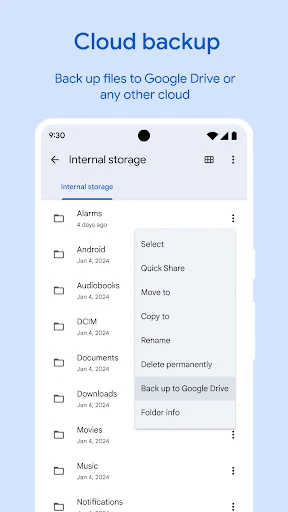
When I want to make room without losing a file, I can move it to Google Drive or an SD card. The app can also share files to other cloud-storage apps already on the device. I would use that as a deliberate backup step for items I want to keep, rather than as a reason to assume every file is already backed up. It helps connect cleanup with keeping important material somewhere else.
Limits and Useful Caution
The biggest limitation is not a missing headline feature but the need to make decisions yourself. Storage recommendations can point out old photos, duplicates, or cache, yet a file that looks expendable to a tool may still matter to me. I would review suggested items before clearing them and use a backup destination for anything I want to preserve. That small pause is part of using cleanup features responsibly.
Files by Google is also most compelling for Android-centered routines. Quick Share is described for Android and Chromebook devices nearby, while the app’s file browsing, offline playback, and storage tools are built around the device and its connected storage. If I wanted a broader work setup or specialized file handling, I would look at the tools that match that job. For routine phone management, though, its scope is sensible.
One modest plus is that the app uses less than 20 MB of storage according to its description, and it contains no ads. Those details suit a utility that is supposed to help reclaim space rather than crowd the phone with distractions. Still, the app cannot create storage out of nowhere: moving files, reviewing suggestions, and making sensible choices are what make its tools useful.
Files by Google earns its place as a practical everyday utility. I like the combination of straightforward search, storage checks, cleanup suggestions, offline playback, nearby sharing, and file protection, especially without ads. Its best use is keeping routine phone file tasks manageable, not automating every decision or replacing a more specialized work setup.
I would recommend it to Android users who want a simple way to find files and keep an eye on storage. If you are comfortable reviewing suggestions before deleting anything, it is a useful companion for regular phone upkeep. If you need advanced file workflows, its straightforward approach may feel limited.
Files by Google Frequently Asked Questions
What is Files by Google used for?
Files by Google helps you browse and search for files, review suggestions to free up device space, share files offline with nearby Android and Chromebook devices, and play offline music or videos. It can also move files to Google Drive or an SD card and protect files with a PIN or pattern different from your device lock.
Which devices can run Files by Google?
Files by Google is an Android app. Its Quick Share feature is described for sharing with nearby Android and Chromebook devices. Android version requirements can vary with the app release and device, so check the Google Play details to see whether a particular phone is compatible.
Does Files by Google cost money?
Files by Google is free to download and use, with no in-app purchases and no ads. It can move files to Google Drive or an SD card, and can share to other cloud-storage apps on your device. Any terms for those separate services may vary, so check their details in the relevant store.
What Android version does Files by Google require?
The Android version requirement can vary by release and device. The app’s current store details are the best place to check compatibility before installing or updating. Files by Google can work with storage on the device, an SD card, and a USB drive, according to its description.
Is Files by Google a good fit for my phone?
It is a good fit if you want a straightforward way to find files, check storage, review cleanup suggestions, share nearby, or play offline media. It may not suit people looking for advanced file-management workflows. I recommend reviewing suggested files before deleting them, especially if you are unsure whether you want to keep something.
Pros
- Combines file search, storage checks, cleanup suggestions, offline playback, and sharing in one utility.
- Quick Share can send files offline to nearby Android and Chromebook devices.
- Offers a separate PIN or pattern option for protecting files.
- Free to use, with no ads or in-app purchases.
Cons
- Cleanup suggestions still require you to decide what is safe to remove.
- Its straightforward approach may not satisfy users who need advanced file workflows.
- Quick Share is described for nearby Android and Chromebook devices.
- Category
- Tools
- Version
- 1.13003.1002253400.1-release