Transparency
- 2.05K
- 1.7
- Installs
- 1.00M
- Price
- Free

Screenshots
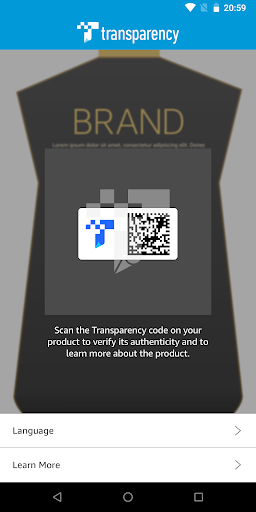
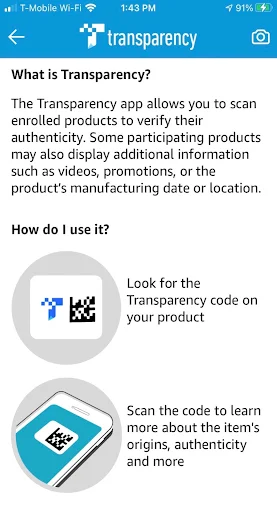
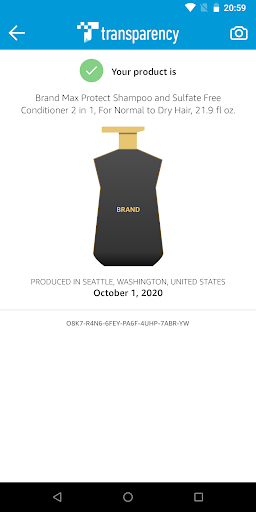
Analysis by Reviewed APKs
Transparency is a scanning app for checking enrolled products: scan one and it can show whether it is authentic, with extra product details available on some items. I see the appeal for anyone who wants a quick check while shopping or opening a package. Its usefulness depends on the product being part of the program, so it’s a focused tool rather than a general-purpose product research app.
A quick product check
Picture a package arriving at home and having a moment of doubt about where it came from. With Transparency, the basic job is direct: scan a participating product and check the authenticity information shown by the app. I like that this puts the check close to the item itself, rather than asking me to identify it by name and search through a broad catalog.
The important qualifier is that the product must be enrolled. I wouldn’t expect the app to give the same answer for every item on a store shelf or in a delivery box. When I think about using it, I treat the scan as a way to access information tied to eligible products, not as a universal verdict on anything I happen to buy.
A focused alternative
For a participating item, Transparency has a narrower purpose than a shopping app, a product-review site, or a general barcode lookup tool. Those alternatives are useful for comparing products or browsing opinions; this app is about scanning enrolled products to check authenticity and, sometimes, see additional details. That distinction makes the experience easier to understand, but it also limits how often it will help.
I wouldn’t use Transparency to decide which product is best, compare prices, or look up every item in my pantry. Its role begins when an item is enrolled and a scan can return relevant information. That makes it a useful companion for a specific check, rather than a replacement for a retailer’s product page or a broader research routine.
Make the scan count
The simplest habit is to scan when the product is in front of me and I actually want to check it. That keeps the app’s purpose clear: start with an enrolled item, scan it, and review the result and any extra information offered. I’d avoid turning it into a general browsing stop, since products outside the program may not provide the same experience.
I’d also take a moment to look beyond the authenticity result when extra details appear. Some participating products may include a video, promotion, or information about manufacturing date or location. Those details can add context to a scan, but they aren’t promised for every product, so I’d approach them as occasional extras rather than the main reason to open the app.
More From Our News Desk

Zoom Meetings, Google Meet, or Teams: Which Is Easiest to Join?

How I Build a Free Streaming Lineup With Tubi

Why Crunchyroll Is the Default Anime App for So Many Fans

YouTube TV: A Practical Guide to Cutting Cable

Rummikub and the Small Comfort of Phone Games

TeamViewer Remote Control or AnyDesk for Helping Family?
Who may find it useful
I’d recommend Transparency to people who encounter enrolled products and want a straightforward way to check them. It suits a practical, occasional routine: scan an eligible item, read what the app returns, and move on. The additional product information can also be useful for someone who likes knowing more about an item’s origins or manufacturing details when those details are provided.
It may be a poor fit for someone expecting every product to scan, or someone looking for broad shopping research, ratings, or product comparisons. The app’s value is tied to participating products, not to how many things someone buys. If enrolled items aren’t part of your regular shopping, you may have little reason to open it often.
Transparency is developed by Amazon Mobile LLC and is listed in the Tools category on Google Play. The app has over one million installs and a 1.7-star rating from 2,048 ratings. Those figures give useful context, though they don’t tell me whether a particular enrolled product will offer the information I want.
The app is free to download, with no in-app purchases or ads. Its content rating is Everyone. The listed version is 4.0.9; it was released on December 7, 2016, and last updated on June 15, 2026. An Android minimum version is not specified in the supplied app details, so check Google Play for compatibility with your device.
A Scan With a Specific Purpose
A clear first impression
When I first considered Transparency, the name left room for guesswork, but its central job is quite specific: scan enrolled products to verify authenticity. That focus helps set expectations. I don’t need to think of it as a broad shopping assistant; I can open it when I have a participating product to check and want the app’s product-specific information.
Getting value from the app starts before the scan: the item needs to be enrolled. That’s the main condition shaping the experience, and it’s worth keeping in mind when deciding whether to install it. A scan can be useful when it applies, but the app is not a general-purpose scanner for identifying every product.
The everyday scan
The core experience is built around a simple sequence: bring up Transparency, scan an enrolled product, and review what it shows. I like that the app’s job is easy to explain without a long workflow. If I’m checking a product at home, that direct approach makes more sense than searching the web for clues that may not be tied to that particular item.
What matters is the result for that product, not just the act of scanning. Transparency is intended to help verify authenticity for enrolled products, so I’d read the returned information in that context. I wouldn’t treat it as a general product review or assume that one scan tells me everything I might want to know about an item.
Extra product details
Some participating products can show more than authenticity information. The app may also surface videos, promotions, or details such as a product’s manufacturing date or location. I can see those extras being useful after a scan, especially when I’m curious about the item beyond the basic check.
These additions are product-dependent, which keeps expectations grounded. I wouldn’t open the app expecting every enrolled item to have a video or manufacturing details, and I wouldn’t assume that every scan includes a promotion. The practical benefit is that the app can offer more context when it is available, without making those extras the central promise.
A handy moment to scan
A realistic routine is to keep the app in mind when a participating product arrives or when I’m handling one I want to check. I can scan it at that moment, review the authenticity result, and take a little longer if additional product details appear. That turns the app into a small, situational tool instead of another place to browse without a clear reason.
I’d keep the expectation simple: use Transparency for the products it covers, then return to other sources for questions outside that job. If I’m choosing between products or looking for general reviews, those are different tasks. Separating them makes it easier to see whether a scan gave me the specific information I came for.
Keep the limits in view
The biggest limitation is also the clearest one: the app scans enrolled products. That means it may be valuable in one shopping situation and irrelevant in another. I wouldn’t judge it by how well it handles random items, because its purpose is tied to participating products rather than every product with a label.
The Google Play rating is 1.7 stars from 2,048 ratings, a modest reception worth weighing alongside the app’s narrow use case. The app’s stated function is straightforward, but a low score may make some people cautious. I’d consider whether I actually encounter enrolled products before deciding that a dedicated scanning app belongs in my routine.
Transparency makes sense as a focused way to check enrolled products and see any additional information attached to them. I appreciate that its purpose is easy to understand, but its usefulness depends on having eligible items to scan. It isn’t a shopping guide or a universal product checker, and I’d keep those boundaries in mind.
I’d recommend trying it if you have participating products and want a direct authenticity check. If your needs are broader, or you rarely encounter enrolled items, it may not earn a regular place on your phone. The free download makes it easy to consider, but the narrow scope is the real decision point.
Transparency Frequently Asked Questions
What is Transparency used for?
Transparency is used to scan enrolled products and check their authenticity. Some participating products may also show extra information, such as videos, promotions, or manufacturing date or location. It is intended for products in the program, rather than as a general scanner or product comparison app.
Which devices can run Transparency?
Transparency is available as an Android app on Google Play. The supplied app details do not specify a minimum Android version, so compatibility may depend on your device and current app requirements. Check the Google Play page for the requirements that apply to your phone or tablet.
Does Transparency cost anything?
Transparency is free to download. It has no in-app purchases and contains no ads, according to the supplied app details. Product eligibility still matters: the app’s authenticity check is for enrolled products, and extra information can vary from one participating product to another.
Does Transparency work with every product?
No. Transparency is designed to scan enrolled products, so it should not be treated as a universal product checker. Some participating items may provide additional information after a scan, but those details vary. For a specific item, the app’s result depends on its participation in the program.
Who should try the Transparency app?
It may suit people who encounter enrolled products and want to check authenticity or view product details when available. It may not suit someone seeking broad product reviews, comparisons, or information about every item they buy. The app is most relevant when its specific scanning use matches your routine.
Pros
- A focused scan can check authenticity for enrolled products.
- Some participating items provide manufacturing details or other extra information.
- Free to download, with no in-app purchases or ads.
- Its basic purpose is easy to understand.
Cons
- It only applies to enrolled products, limiting how often some people can use it.
- Videos, promotions, and manufacturing details may not appear for every product.
- Its 1.7-star Google Play rating may give some users pause.
- Category
- Tools
- Version
- 4.0.9