Microsoft Defender: Antivirus
- 83.44K
- 4.4
- Installs
- 10.00M
- Price
- Free

Screenshots
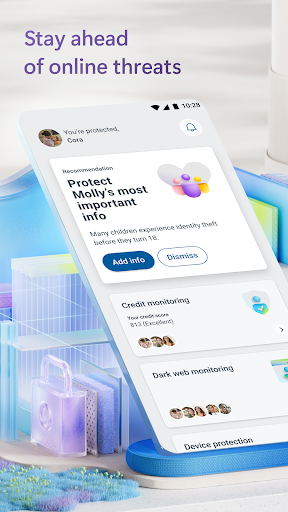
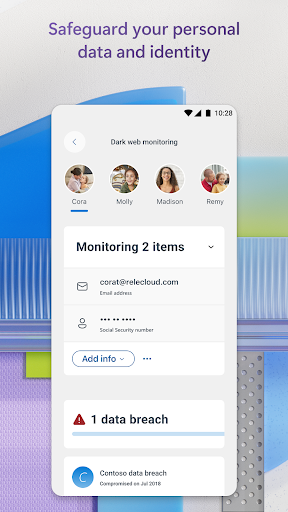
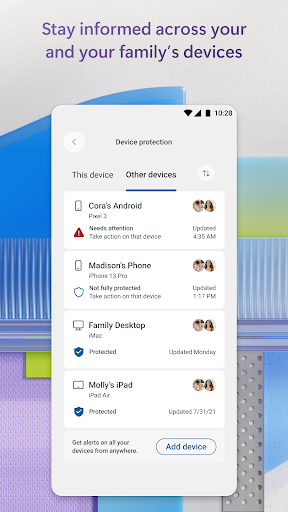
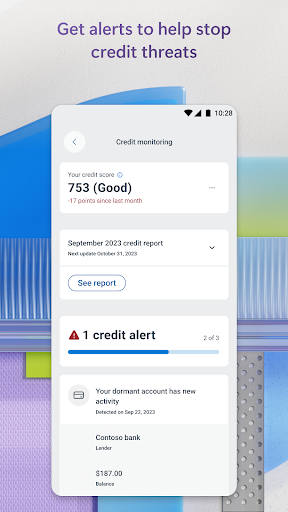
Analysis by Reviewed APKs
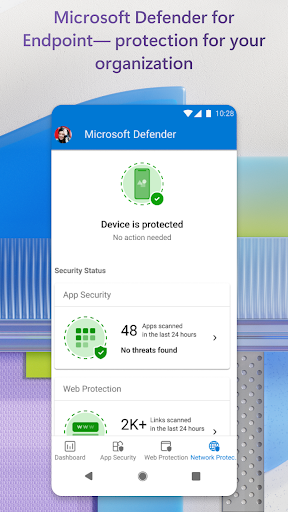
Microsoft Defender: Antivirus is a security app for people who want a shared view of device and identity protection across their Microsoft accounts. It combines antivirus scanning, threat alerts, and guidance, with some features tied to a Microsoft 365 subscription and regional availability. I like the idea of keeping security information together, though it is best understood as part of Microsoft’s subscription ecosystem rather than a standalone antivirus app.
A security check-in
When I’m juggling a phone, a laptop, and family accounts, security notices can end up scattered across different places. Defender is designed to bring device and identity security status together, with alerts and recommended actions when it spots something that needs attention. That makes it a plausible app to check during a quiet moment, rather than waiting until a suspicious link or an unfamiliar warning forces me to figure out what to do.
The basic rhythm is straightforward: open the app, review what it reports, and follow its guidance if there’s a threat to address. Its description includes antivirus scanning, threat monitoring, alerts about malicious apps, and checks on harmful links before they are opened. I wouldn’t treat any single app as a substitute for careful online habits, but having a place to review security signals can make those habits easier to maintain.
More than a virus scanner
Compared with a narrowly focused antivirus tool, Defender reaches into identity monitoring, family device status, and alerts across devices. That wider scope is the main reason to consider it. It is aimed at people already using Microsoft accounts and, for individual protection, Microsoft 365 Personal or Family. Business and school users can sign in with their organization account when it has the required license or subscription.
This isn’t a no-strings, standalone antivirus package for every device and situation. The individual offering requires a qualifying Microsoft 365 subscription, and some identity features are limited to the United States and its territories. Microsoft also says the app does not replace existing malware protection on iOS and Windows devices. If all I wanted were a basic scanner without a Microsoft account or subscription connection, this broader setup might feel like more than I need.
Make alerts useful
I’d get the most from Defender by making it part of a small, regular check-in: review the security status, read any alerts, and follow the suggested next steps rather than dismissing notifications automatically. The app is intended to provide timely threat alerts and recommended actions across devices, so the point is not to stare at a dashboard all day. It’s to notice the things that deserve attention while they are still manageable.
For a household, it also makes sense to check which family devices and identity details are covered, then understand who can see what. Some child identity alert details require a one-time parent or legal guardian verification, and consent requirements depend on age. Availability can differ by region, language, and device, so I’d confirm which features apply before building a family routine around them.
More From Our News Desk

Zoom Meetings, Google Meet, or Teams: Which Is Easiest to Join?

How I Build a Free Streaming Lineup With Tubi

Why Crunchyroll Is the Default Anime App for So Many Fans

YouTube TV: A Practical Guide to Cutting Cable

Rummikub and the Small Comfort of Phone Games

TeamViewer Remote Control or AnyDesk for Helping Family?
Who may find it useful
I’d recommend Defender to Microsoft 365 Personal or Family subscribers who want security status and threat alerts gathered in one app, especially if they are managing protection for more than one device or family member. It may also suit people who want identity monitoring alongside device security, provided those features are available where they live. The practical appeal is the combination of alerts and suggested actions, not a promise that security can run entirely on autopilot.
It may be a poor fit for someone looking only for a free, independent antivirus scanner, or for a user who does not want to sign in with a Microsoft account. Some features depend on a subscription, and identity and credit monitoring have regional and other eligibility limits. I’d also look elsewhere if I needed one app to replace existing malware protection on iOS or Windows, since Microsoft says Defender does not do that.
Microsoft Corporation develops Microsoft Defender: Antivirus, a Tools app for Android. On Google Play it has over 10 million installs and a 4.4-star rating from around 83,000 ratings. The content rating is Everyone. The listed version is 1.0.9406.0102, and the release date is August 17, 2020.
The app is free to download and contains no ads, but it offers in-app purchases priced from $6.99 to $129.99 per item. Microsoft says Defender for individuals requires a Microsoft 365 Personal or Family subscription and a Microsoft account. Business and school access requires a valid organizational license or subscription. The listed last update is October 18, 2026.
How Defender fits everyday security
A clear starting point
My first impression of Defender is that it is meant to be a home base for security, not just a button that runs a scan and disappears. Its description brings together device protection, identity monitoring, alerts, and expert guidance. That can be appealing if I already use Microsoft services, but it also means I’d first want to understand which parts are included with my account and which depend on a subscription.
Getting started involves signing in with a Microsoft account for individual use. People using it through work or school can sign in with their organization email, provided that organization has the appropriate license or subscription. I’d also pay attention to the permissions the app requests: Microsoft says it uses accessibility services to automatically block malicious web pages reached through links in messages, browsers, or email.
The daily security loop
Day to day, Defender’s value is in surfacing threats and pointing toward a response. It can alert users to malicious apps and help them take steps to remove a threat. It also describes continuous checks for harmful links before they are opened. Those functions address familiar moments, such as receiving a link in a message or finding out that an app may be unsafe.
The useful part is the connection between a warning and a recommended action. Rather than treating an alert as a vague reason to worry, I can use the app’s guidance to decide what needs attention. That still calls for judgment: an alert is a prompt to review the situation, not a reason to assume every device or account is automatically protected in every way.
Protection across devices
One of Defender’s more distinctive ideas is letting users check the security status of family devices and identities in one place. Multidevice alerts and recommendations make the app more relevant to households than a scanner focused on one phone. It also offers identity and credit monitoring features, though those are not universally available and have specific eligibility conditions.
Microsoft describes identity theft restoration support, including access to a restoration expert, and insurance coverage for eligible users. These are consequential benefits with terms and coverage conditions, rather than features I’d assume apply to everyone. The insurance and some monitoring are available only in the United States and its territories, and coverage can vary. I’d read the applicable details before relying on them.
A routine for families
For a family already using Microsoft 365, I’d make Defender part of a weekly household tech check. I’d review the device and identity status, look for new alerts, and talk through any recommended action with the person who uses the affected device. That keeps the process practical and gives family members a chance to ask about a warning instead of tapping through it without understanding.
I’d keep expectations specific: check what the app says is covered, and remember that availability can vary by device, language, and region. Family identity monitoring also has age-related consent and verification details. A routine should make it easier to stay informed, not imply that one dashboard can remove every online risk or replace attentive use of devices.
Limits to keep in mind
The biggest limitation is the subscription connection. Microsoft says the individual version is available with a Microsoft 365 Personal or Family subscription, so the free download should not be confused with every feature being free to use. The app also needs a Microsoft account for individual access. That makes it less compelling for people who want a one-off scanner without joining Microsoft’s wider setup.
Feature availability is uneven. Identity and credit monitoring are limited to the United States and its territories, and credit features have additional conditions, including a required English primary display language for the device. Microsoft notes that availability can vary by device, language, and region. I’d check which protections apply to my own account before treating the app as a complete security solution.
There is also a clear boundary around platform protection: Microsoft says Defender does not replace existing malware protection on iOS and Windows devices. That matters if I’m looking for one app to take over every security job across a mixed-device household. Defender is more useful as a connected layer of monitoring and guidance than as a universal replacement for other protections.
Microsoft Defender: Antivirus makes the most sense as a companion for people already invested in Microsoft 365 who want device, identity, and family security information brought together. Its alerts and guidance give it a practical role, while subscription requirements and regional limits narrow who will get the full experience.
I’d try it if I had a qualifying Microsoft 365 subscription and wanted a shared security check-in for my household. I’d be more cautious if I only needed a basic free scanner or expected it to replace protection on every platform. Check the app’s current requirements and feature availability before relying on specific protections.
Microsoft Defender Frequently Asked Questions
What is Microsoft Defender: Antivirus used for?
Microsoft Defender: Antivirus brings together device security features such as antivirus scanning, threat monitoring, malicious-app alerts, and checks for harmful links. It also offers multidevice alerts, recommendations, and identity-related features for eligible users. It is intended to help users review security status and respond to threats, rather than replace careful online habits or all other device protection.
Which devices can use Microsoft Defender: Antivirus?
The app is available for Android through Google Play. Microsoft also describes Defender services for other platforms and organization use, but availability and functions can differ by device, language, and region. Check the Google Play store details for current Android requirements and compatibility with your device before installing.
What Android version does Microsoft Defender require?
The Android version requirement may vary with the current app release and device compatibility. Check the Google Play store listing for the requirement that applies to your phone or tablet. Microsoft notes more generally that feature availability can vary by device, language, and region.
Is Microsoft Defender: Antivirus free?
The app is free to download and has no ads, but it offers in-app purchases priced from $6.99 to $129.99 per item. Microsoft says Defender for individuals requires a Microsoft 365 Personal or Family subscription and a Microsoft account. The exact features and costs that apply are worth checking in Google Play and with Microsoft.
Is Microsoft Defender: Antivirus right for my family?
It may suit a family that uses Microsoft 365 and wants to review device and identity security status together. Some identity features are restricted by location or eligibility, and child identity alert details can involve verification or consent requirements. It may not suit households seeking a standalone, subscription-free scanner or a replacement for existing protection on iOS and Windows.
Pros
- Combines device alerts, recommended actions, and identity features in one security app.
- Can help users review security status across family devices and accounts.
- Describes checks for harmful links and alerts about malicious apps.
- No ads, with a free download on Google Play.
Cons
- Individual use requires a Microsoft 365 Personal or Family subscription.
- Some identity and credit features are limited by location and eligibility.
- Does not replace existing malware protection on iOS and Windows devices.
- Category
- Tools
- Version
- 1.0.9406.0102