Gmail Go
- 161.07K
- 4.3
- Installs
- 1.00B
- Price
- Free
Screenshots
Analysis by Reviewed APKs
Gmail Go is an Android email app for keeping up with messages, sorting an inbox, and handling more than one email account. It suits people who want a straightforward way to read and answer mail without making email a bigger project. After looking at what it offers, my take is that its appeal is practical: familiar Gmail essentials, with useful organization and support for other account types.
A Quieter Inbox Routine
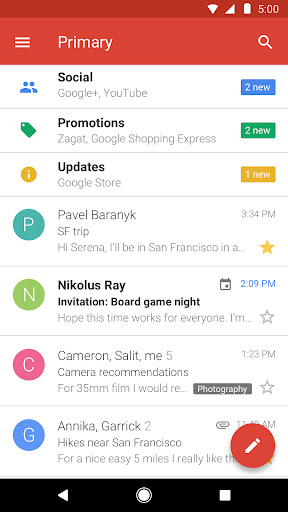
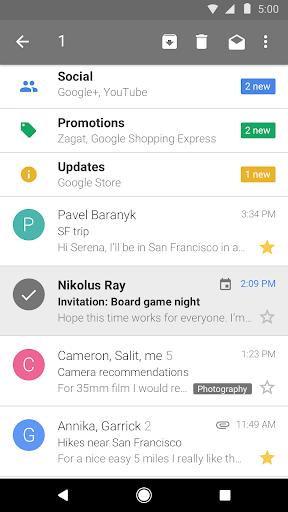
Picture a weekday morning: I have a few minutes before heading out, and I want to check whether anything needs an answer. Gmail Go is built for that kind of quick pass. Its inbox puts messages from friends and family first, while social and promotional mail is sorted into categories for later. That means I can look for the important note without treating every new notification as equally urgent.
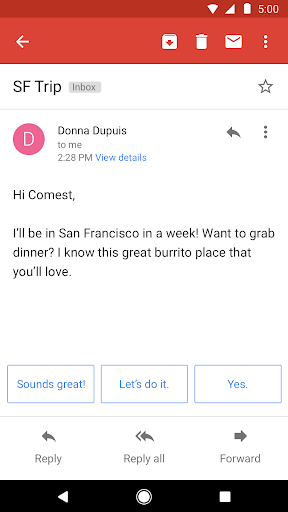
When a message needs attention, I can open it, read it, and respond. If I am between connections, the app description says mail can be read and answered offline, which is useful when a commute or a weak signal interrupts a routine. Search is another practical part of the workflow: instead of scrolling through a long inbox, I can look for a message directly.
Email, Not a Work Hub
The obvious comparison is the regular Gmail app, since Gmail Go is also built around Google email and an organized inbox. Its distinctive pitch is a lighter version of that familiar task: receive notifications, sort messages, search, and reply. It also supports non-Gmail addresses, including Outlook.com, Yahoo Mail, and other IMAP or POP accounts, so it can cover more than one mailbox.
I would treat it as an email tool rather than a broader productivity workspace. The supplied details focus on messages, attachments, inbox organization, and accounts; they do not describe calendars, documents, or team project tools. If email is the main job, that focus is sensible. If I wanted one app to coordinate a much wider set of work, this description does not make Gmail Go sound like that kind of product.
Small Habits That Help
A useful habit is to check the primary part of the inbox first, then visit the social and promotional categories when I have time. The point is not to ignore those messages forever; it is to give the more personal mail a clearer first look. That kind of light sorting can make a busy inbox feel less demanding without requiring me to build a complicated filing system.
I would also add the email accounts I actually check, rather than bouncing between separate apps. Gmail Go supports Gmail and other addresses using common account types, so one place can cover several inboxes. When I remember the subject or sender but not where a message landed, search is the natural next step. These small routines make the app more useful than simply opening it whenever a notification appears.
More From Our News Desk

Zoom Meetings, Google Meet, or Teams: Which Is Easiest to Join?

How I Build a Free Streaming Lineup With Tubi

Why Crunchyroll Is the Default Anime App for So Many Fans

YouTube TV: A Practical Guide to Cutting Cable

Rummikub and the Small Comfort of Phone Games

TeamViewer Remote Control or AnyDesk for Helping Family?
Who May Find It Useful
I would recommend Gmail Go to Android users who want a practical email reader, especially those who value an inbox that separates personal messages from social and promotional mail. It is also a reasonable fit for someone managing Gmail alongside another supported email account. Notifications, search, attachment sharing, and the ability to work with messages offline cover many ordinary email moments.
It may be less appealing to someone looking for a feature-rich workspace or a highly customized email system. The information provided presents a focused inbox experience, not a broad suite of tools. People who prefer every message in one undivided stream may also need time to adjust to categorized mail. Since the Android requirement can vary by device, anyone considering an older phone should check the store information for compatibility.
Gmail Go is developed by Google LLC and is listed as a free Android app. Google Play shows more than 1 billion installs, with a 4.3-star rating from about 161,000 ratings. The app contains ads, and it does not offer in-app purchases. Its content rating is Everyone. The listed version varies with the device, so the version shown for a particular phone may differ.
The release date shown is February 12, 2018, and the last update date is December 14, 2022. The minimum Android version is not specified in the supplied details, so compatibility is best checked on Google Play for the device in question. The description says the app includes 15 GB of free storage, supports multiple email accounts, and can handle reading and responding to mail offline.
A Closer Look at Everyday Email
A Familiar Start
When I first considered Gmail Go, the most appealing thing was how quickly its purpose became clear. This is for opening an inbox, finding a message, and replying—not for learning an entirely new approach to email. The description emphasizes notifications, a smart inbox, search, and attachments. Those are the basics I would want close at hand when checking mail in short bursts during the day.
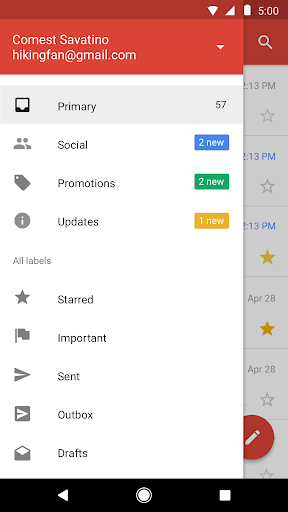
The setup is designed around accounts. Gmail addresses are supported, as are non-Gmail addresses such as Outlook.com and Yahoo Mail, plus other IMAP or POP email. That flexibility matters if a personal address and a secondary mailbox both need attention. I would start with the accounts I check regularly, then see whether the categorized inbox makes it easier to focus.
The Daily Email Loop
The day-to-day rhythm is uncomplicated: receive a notification, open the message, decide whether it needs a reply, and move on. Gmail Go also supports reading and responding while offline, so a connection interruption does not have to stop every small email task. The description does not promise that every online action is available offline, so I would think of this as a helpful fallback for messages rather than a replacement for a connection.
Search is valuable once an inbox has accumulated more mail than I want to browse manually. I can look for a message when I remember a phrase or need to return to a conversation, rather than relying on how recently it arrived. Attachments and sharing are also part of the described experience, which helps when an email is more than a quick exchange of text.
Sorting and Spam Control
The smart inbox is the feature that most shapes how Gmail Go feels. Messages from friends and family are prioritized, while social and promotional emails are grouped separately. I like the idea of having a first stop for the mail I am most likely to need, followed by a place to browse less urgent updates when the timing suits me. It gives an everyday inbox a little structure without making sorting the main task.
Spam blocking is another useful part of the package. The description says Gmail Go blocks spam before it reaches the inbox, helping keep the message list cleaner. That does not mean I would stop paying attention to suspicious messages or assume every inbox decision is perfect. It is simply a practical layer of inbox management alongside categories, notifications, and search.
A Simple Check-In Habit
For a routine, I would check the prioritized inbox at a convenient point in the morning, answer anything time-sensitive, and leave promotional mail for a later break. If I am expecting a particular message, I would use search rather than repeatedly scanning the whole inbox. That approach keeps email from becoming a constant stream of small interruptions, while still making it easy to return to messages that matter.
When I have more than one address, I would make a point of checking both as part of the same session. Gmail Go supports Gmail and non-Gmail accounts, which can reduce the need to switch between separate mail apps. If I am offline, I can still read and respond to mail according to the description, then resume normal email use when connected again.
A Few Boundaries
Gmail Go is still an email app, and that narrow focus is worth keeping in mind. Its described strengths are inbox organization, spam blocking, notifications, search, multiple accounts, and handling attachments. There is no need to expect it to replace a calendar, a document editor, or a project management tool based on the information available. For people who want email and little else, that focus can be a benefit.
The categorized inbox may not suit everyone. Some people would rather see every new message in a single chronological list, and the split between personal, social, and promotional mail may take a little adjustment. The app also contains ads, which can be a drawback for anyone who prefers an ad-free experience. Its Android version varies with the device, so compatibility details are worth checking before installing.
Gmail Go comes across as a focused way to manage everyday email, with useful inbox categories, search, spam blocking, support for multiple account types, and offline reading and replies. Its strongest quality is that it keeps the core task recognizable rather than turning email into a larger system.
I would try it if I use Android and want a practical place to check Gmail and other supported accounts. It is less compelling if I want an all-purpose productivity hub or dislike categorized inboxes and ads. For routine reading, replying, and finding messages, its feature set is a sensible fit.
Gmail Frequently Asked Questions
What is Gmail Go used for?
Gmail Go is an Android email app for receiving notifications, reading and replying to messages, organizing an inbox, and searching for mail. It supports Gmail and non-Gmail addresses such as Outlook.com and Yahoo Mail, along with other IMAP or POP accounts. Its description also covers attachments and reading or responding while offline.
Which devices can run Gmail Go?
Gmail Go is an Android app. The minimum Android version can vary with the device and is not specified in the details provided, so I would check its Google Play information for the phone or tablet I plan to use. The listed app version also varies by device.
Does Gmail Go cost anything?
Gmail Go is listed as free, with no in-app purchases. It contains ads. The description also says it includes 15 GB of free storage. Store details can change, so it is sensible to check Google Play for current information before installing.
Can Gmail Go handle more than Gmail?
Yes. The description says Gmail Go supports multiple accounts, including Gmail and non-Gmail addresses such as Outlook.com and Yahoo Mail, as well as other IMAP or POP email. That makes it useful for keeping several supported inboxes in one app rather than checking each through a separate email app.
Is Gmail Go a good choice for everyone?
It should suit Android users who want a focused email app with categorized messages, search, and support for multiple accounts. It may be less suitable for someone seeking a broader productivity workspace or who prefers an undivided inbox. Compatibility and store details can vary, so check Google Play for the device you use.
Pros
- Prioritizes personal messages and groups social and promotional mail separately.
- Supports Gmail and other email accounts, including Outlook.com and Yahoo Mail.
- Includes search, spam blocking, notifications, and offline reading and replies.
- Free to use, with no in-app purchases.
Cons
- Contains ads, which may bother users who prefer an ad-free inbox.
- Categorized mail may not suit people who want one chronological message list.
- The app focuses on email rather than a broader productivity workspace.
- Category
- Communication