CloudEye 365
- 447
- 3.3
- Installs
- 100.00K
- Price
- Free

Screenshots
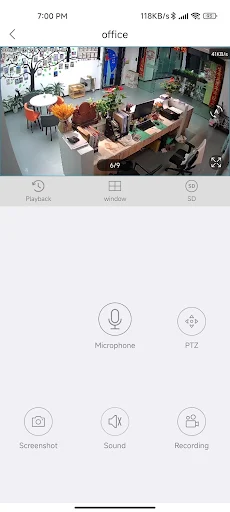
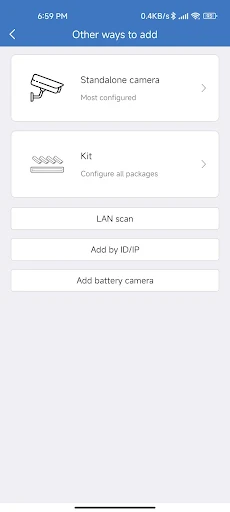
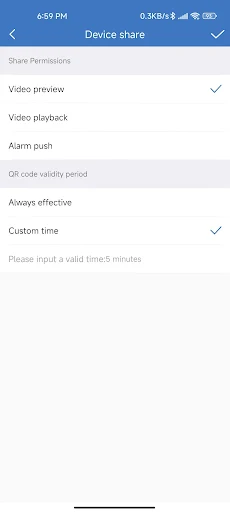
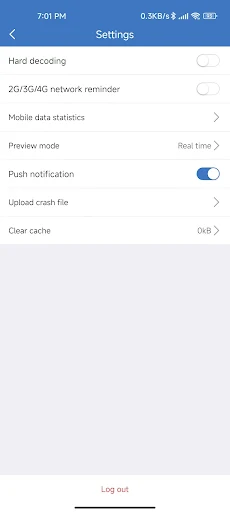
Analysis by Reviewed APKs
CloudEye 365 is a remote-monitoring app for checking a live feed away from home or the office and receiving alerts when a connected device detects unusual movement. I see it as a practical companion for someone who already has a related monitoring device and wants a quick way to keep an eye on a space. Its purpose is straightforward, though its usefulness depends on having that device in place.
Checking In From Away
When I imagine using CloudEye 365 on an ordinary day, the appeal is being able to check a live feed while away from a monitored home or office. Maybe I am out running errands and want a quick look at the space, or I am at work and would rather check in than wait until I get back. The app is designed for remote viewing, so that kind of occasional check is its central job.
The other part of that routine is an alert if the related device detects abnormal movement or suspicious activity. That can make the app useful when I am not actively watching the feed, because a notification may prompt me to take a closer look. I would treat the alert as a reason to check the situation, not as a complete account of what happened. The app's stated purpose is monitoring, not handling an incident for me.
A Companion, Not a Camera
CloudEye 365 makes the most sense alongside a compatible monitoring device: it gives the owner a way to access a live feed remotely and receive movement-related alerts. That puts it in a different role from a general-purpose camera app or a tool for editing and sharing video. Its focus is a view into a space that is being monitored, rather than creating content or managing a broader collection of media.
It is also not a substitute for the device itself. The description ties live viewing and alerts to a related device, so I would not choose CloudEye 365 expecting the app alone to watch a room. Nor does its stated purpose make it a general home-management dashboard. If I only need a way to record clips or browse photos, this is not aimed at that job; its value is checking a monitored place from elsewhere.
Make Checks More Useful
A simple habit that suits CloudEye 365 is to use it for specific check-ins rather than repeatedly opening it without a reason. For example, I might look at the live feed when I leave home, then check again if an alert arrives while I am out. That keeps the app's role clear: it is a remote window onto a monitored space, with notifications intended to draw attention to movement the related device detects.
I would also make a point of noticing which alerts are useful in my day and which ones lead to unnecessary checks. The description says the app notifies the owner about abnormal movement or suspicious activity, but it does not spell out detailed notification controls. So my workflow would stay modest: keep the app available for remote viewing, pay attention to alerts, and verify what is happening through the feed rather than assuming a notification tells the whole story.
More From Our News Desk

Zoom Meetings, Google Meet, or Teams: Which Is Easiest to Join?

How I Build a Free Streaming Lineup With Tubi

Why Crunchyroll Is the Default Anime App for So Many Fans

YouTube TV: A Practical Guide to Cutting Cable

Rummikub and the Small Comfort of Phone Games

TeamViewer Remote Control or AnyDesk for Helping Family?
Who May Find It Useful
I would recommend CloudEye 365 to someone who already uses a related monitoring device and wants to check its live feed while away from home or work. The combination of remote viewing and movement alerts fits a practical need: being able to look in on a monitored space without being physically there. If that is already part of your routine, a dedicated companion app may be more convenient than relying on occasional in-person checks.
It may not suit someone looking for a standalone camera, a broad security platform, or a tool with detailed features beyond the stated remote feed and alerts. The description is brief, so I would avoid assuming that it includes specific controls or integrations. I would also think carefully about whether notifications would be useful in my own routine. If alerts would mostly interrupt without prompting a meaningful check, the app may not add much.
CloudEye 365 is published by jeemak and is listed in the Libraries & Demo category on Google Play. It has more than 100,000 installs and a 3.3-star rating from 447 ratings. The app is free to download, with no in-app purchases and no ads according to its store information. Its content rating is Everyone, making the listed age classification suitable for a general audience.
The recorded release date is March 13, 2023. Its version is listed as varying with device, so the version a user sees can depend on the device. The available facts do not give a minimum Android version or a last-update date, so I have left those out. Before installing, I would check Google Play on the device I plan to use for the current compatibility details.
A Closer Look at Remote Monitoring
A Focused First Impression
CloudEye 365 presents a clear idea from the outset: help an owner access a live feed away from the place being monitored. I like that the central use is easy to understand. This is not an app I would open to browse unrelated tools; I would come to it with a particular space in mind and a reason to check in.
The important starting point is having the related device the app is meant to work with. The description connects remote viewing and alerts to that device, so the app's usefulness depends on the monitoring setup around it. I would first make sure the device and app are suitable for one another, then use the app for the practical task it describes rather than expecting it to create a monitoring system on its own.
The Everyday Check-In
The day-to-day appeal is straightforward: when I am away, I can use the app to access the live feed. That is a different kind of convenience from reviewing something later. A quick check can help me see what is happening in the monitored space in the moment, which is the core reason I would keep this app handy on a phone.
Alerts add a second way to interact with the app. Instead of choosing to view the feed first, I may be prompted to check it after the related device detects unusual movement or suspicious activity. I would still use the live view to understand the situation. An alert can bring my attention to a possible event, but the description does not suggest that it explains everything about what triggered it.
Live Viewing and Alerts
The two features that stand out are remote access to a live feed and notifications tied to movement or suspicious activity detected by a related device. Together, they make CloudEye 365 feel more like an on-the-go viewing companion than a passive app I only open when I am at home. The live view supports deliberate check-ins, while the alerts are intended to call attention to something that may merit a closer look.
I appreciate the practical pairing, but I would keep expectations tied to what is actually described. There is no reason to assume a particular recording feature, a timeline of events, or advanced camera controls from these details alone. The clear promise is narrower: access the feed remotely and receive a notification when the associated device detects activity it considers abnormal or suspicious.
That narrow focus can be a strength for someone who simply wants those two functions. It also means I would compare the app with my needs before relying on it for anything beyond remote viewing and movement-related notifications. For a straightforward check-in routine, the described features are easy to understand without turning the app into a more complicated security suite.
A Practical Monitoring Routine
A sensible routine might begin when I leave a monitored home or office. Once away, I can open CloudEye 365 when I want to view the live feed, rather than making a trip back just to check the space. If an alert arrives, I can use the same app to take a look. That connects the notification to a useful next step: checking the feed for context.
I would keep the habit simple and purposeful. For instance, I might reserve the live view for moments when I genuinely want to check the monitored area, and treat movement alerts as prompts to verify rather than conclusions. This approach makes the app part of a routine without assuming it can tell me everything about an event or replace my own judgment about what I see.
Keep the Scope in Mind
The main limitation is that CloudEye 365 is described as working with a related device. If I do not have a compatible monitoring device, the app's central functions may not be useful to me. The available description also stays focused on live access and movement alerts, so I would not expect a wider set of security or camera-management tools without checking the current store information.
Alerts are useful as prompts, but they can also mean extra interruptions if the detected activity is not important to me. The description does not explain how alerts are configured, so I would avoid assuming a particular level of customization. The store rating is 3.3 stars from 447 ratings, which gives prospective users another point of context, though the rating alone cannot predict how well the app will suit a specific device or routine.
I would also check the app's current compatibility details before installing, since the version is listed as varying with device and no minimum Android version is given in the available facts. That is a practical store-check rather than a reason to rule the app out. CloudEye 365 has a focused purpose, and it is most compelling when that purpose matches the device and monitoring habits already in place.
CloudEye 365 is a focused option for remote access to a live feed and alerts about movement detected by a related device. I like that its intended use is easy to grasp, and the two main functions fit naturally into an occasional check-in routine. Its appeal is less clear if I want a standalone camera app or a broader security toolkit.
I would try it if I already had the monitoring device it is designed to accompany and wanted to check in while away. Before installing, I would verify compatibility and current details in Google Play. For that specific use, CloudEye 365 is worth considering; for anything beyond remote viewing and movement alerts, I would look for clearer evidence that it meets the need.
CloudEye 365 Frequently Asked Questions
What is CloudEye 365 used for?
CloudEye 365 is intended for remote monitoring with a related device. It lets an owner access a live feed while away from home or an office, and it can notify the owner when the device detects abnormal movement or suspicious activity. Its stated purpose is focused on checking a monitored space, rather than serving as a general photo or video app.
Which devices and platforms support CloudEye 365?
CloudEye 365 is an Android app available through Google Play. The app description refers to access from away from home or the office, but compatibility with particular monitoring devices is not detailed in the information here. Check the Google Play store entry and device information for current compatibility details before installing.
What Android version does CloudEye 365 require?
The minimum Android version is not given in the available app facts. Requirements can vary as an app changes, so check the CloudEye 365 Google Play store entry from the Android device you plan to use. The version is described as varying with device, which is another reason to check current compatibility before installation.
Does CloudEye 365 cost money or include purchases?
CloudEye 365 is free to download on Google Play. Its store information says it has no in-app purchases and contains no ads. Store details can change, so it is worth checking the current entry before installing if you want to confirm the latest pricing and purchase information.
Who is CloudEye 365 best suited for?
CloudEye 365 is best suited to someone who has a related monitoring device and wants to view its live feed remotely or receive movement-related alerts. It may be less useful if you need a standalone camera or features beyond the app's stated purpose. Check the store details and device compatibility to decide whether it fits your setup.
Pros
- Remote access to a live feed suits quick check-ins away from home or the office.
- Movement-related alerts can prompt a closer look at a monitored space.
- Free to download, with no in-app purchases or ads stated in the store facts.
- Its focused purpose is easy to understand for compatible monitoring-device owners.
Cons
- The app's main functions depend on having a related monitoring device.
- The available description offers little detail about alert controls or other tools.
- Its 3.3-star rating from 447 ratings suggests checking fit before relying on it.
- Category
- Libraries & Demo