TP-Link Deco
- 246.85K
- 4.6
- Installs
- 10.00M
- Price
- Free

Screenshots
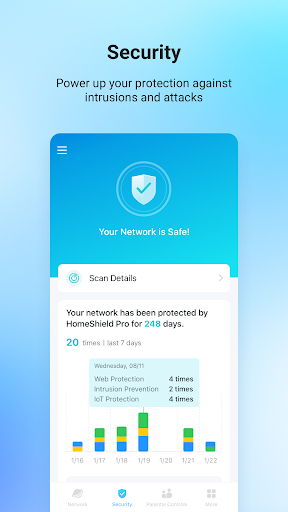
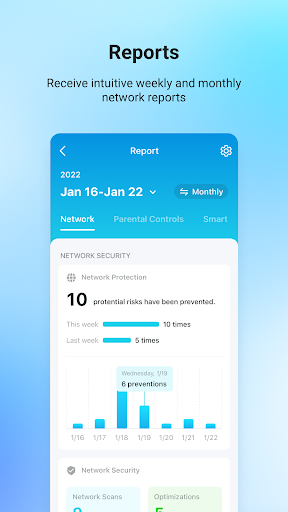
Analysis by Reviewed APKs
TP-Link Deco is a companion app for setting up and managing a Deco mesh WiFi network from your phone. It suits households that want to check connected devices, adjust access and keep an eye on network performance without opening a computer. I like its practical focus: it brings everyday controls together in one place, though the features available can depend on your Deco model and software.
A busy evening at home
Picture a familiar evening: someone is streaming in the living room, a child is using a tablet, and a visitor asks for the WiFi password. With a Deco network in place, the app gives you a phone-based way to see connected devices, create a guest network and check the connection. I appreciate how those ordinary tasks are the focus, rather than expecting you to navigate network settings on a computer.
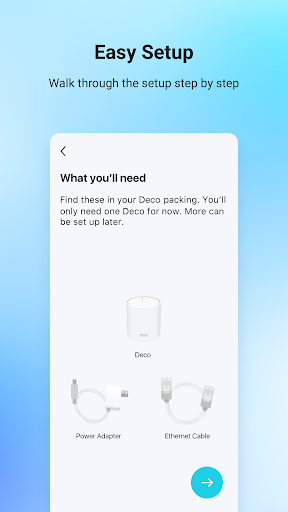
When I first opened the app, the guided setup stood out as the right starting point. It walks you through connecting the network and offers suggestions for where to place additional Deco units for coverage. Later, a glance at connection status and network speed can help you understand what is happening at home. That does not guarantee a faster connection, but it does make basic network checks more approachable.
A companion, not a replacement
The obvious alternative is managing a home network through a router interface or computer. Deco instead puts setup and day-to-day controls in a mobile app, with tools for checking devices, pausing access and running network performance tests. It also reaches beyond basic router controls with features such as device prioritization, schedules and smart-home device status, where supported by the Deco model and software.
This is not a general WiFi finder, a way to get internet service, or a standalone solution for improving a network without compatible Deco equipment. The app manages a Deco network; its usefulness depends on having that system. Nor would I treat its threat warnings or parental controls as a substitute for broader judgment about online safety. The app offers controls, but the household still decides how to use them.
Small habits that help
A useful habit is to check the connected-device view when something unfamiliar appears on the network. The app says it can identify what is connected and lets you block unwanted devices. I would use that view as a practical starting point, not assume every device name will be immediately obvious. For visitors, a guest network offers a separate way to provide internet access while keeping the private network shielded.
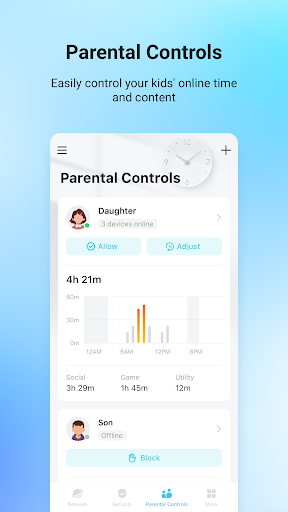
Schedules and device priority are easier to use when they match a routine. You can set time restrictions or pause WiFi on children’s devices, and QoS can give selected devices priority, including on a schedule. I would make small adjustments, then check whether they fit the household’s actual patterns. The detailed network reports and performance tests can also give you a clearer picture before changing settings.
More From Our News Desk

Zoom Meetings, Google Meet, or Teams: Which Is Easiest to Join?

How I Build a Free Streaming Lineup With Tubi

Why Crunchyroll Is the Default Anime App for So Many Fans

YouTube TV: A Practical Guide to Cutting Cable

Rummikub and the Small Comfort of Phone Games

TeamViewer Remote Control or AnyDesk for Helping Family?
Who may find it useful
I would recommend TP-Link Deco to people who already use, or are setting up, a Deco mesh system and want everyday network controls on their phone. It is especially relevant in homes with several connected devices, visitors who need guest access, or parents who want scheduling and pause controls. The app puts those jobs alongside setup and connection checks, so you do not need a separate computer routine for basic management.
It may be less useful if you do not have compatible Deco equipment, or if you want a general-purpose networking tool that works with any router. People who prefer making network changes only through a desktop interface may also find the mobile-first approach unnecessary. Keep in mind that the app’s features can vary by Deco model and software version, so the controls you see may not match every household’s setup.
TP-Link Deco is published by TP-LINK SYSTEMS INC. On Google Play, it has over 10 million installs and a 4.6-star rating from about 247,000 ratings. It is free to download, contains no ads, and offers in-app purchases priced from $2.99 to $159.99 per item. Google Play assigns it an Everyone content rating.
The listed version is 3.10.666. Its release date is April 10, 2017, and its last update is October 22, 2026. The Android version requirement is not included in the available app details, so check Google Play for the requirement that applies to your device.
Making Home Network Controls More Practical
Setup starts with guidance
The app’s first job is helping you get a Deco network running. Its step-by-step guide takes you through setup and offers suggestions for positioning additional units to improve whole-home coverage. I like that the placement advice is part of the process, since deciding where a mesh unit belongs can be less obvious than plugging one in and hoping for the best.
Once connected, the app gives you access to network management from your phone. That is a useful change from having to reach for a computer whenever you want to check a setting. The experience is tied to the Deco hardware, though, and the exact options available can vary with the model and software version.
Everyday network checks
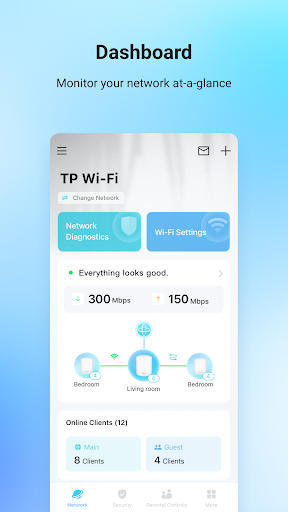
The day-to-day experience centers on seeing what is happening on the network and making straightforward changes. You can check connection status and network speed, view connected devices, and run performance tests. If you are trying to work out whether a particular device is online, having that information in one app is more convenient than guessing from the device itself.
The app also lets you block unwanted devices with a tap. I would treat that as a useful control rather than a reason to panic whenever a device name looks unfamiliar. The network reports add more detail about WiFi and connected devices, giving curious users a way to understand their setup beyond a single speed check.
Controls beyond setup
Guest access is one of the clearest household features. You can create a guest network for visitors, keeping their internet access separate from your private network. For a busy home, this is a tidy alternative to handing out the main WiFi details every time someone comes over. It is also easy to understand as a distinct task within a broader network-management app.
Parental controls include time restrictions, the ability to pause WiFi on children’s devices, and schedules for making room for family time. QoS adds another kind of control: you can choose devices to prioritize and set schedules for those priorities. The app also describes threat detection and warnings, content blocking, and support for connecting and checking compatible smart cameras, plugs and lights.
A routine for the household
A simple weekly routine could start with a quick look at connected devices and connection status. If a new phone, tablet or smart device has joined, you can check whether it belongs in the household. When friends visit, a guest network provides a separate access option; after they leave, you can review the network again rather than leaving access arrangements to memory.
For families, the most useful approach may be setting schedules that reflect real routines, then revisiting them when those routines change. If one device needs priority at a particular time, QoS scheduling can help organize that preference. I would pair those settings with occasional performance tests, so the app is helping you manage the network rather than encouraging constant tinkering.
Keep model limits in mind
The main limitation is that this is a control app for the Deco ecosystem, not a universal router manager. If your home does not use Deco equipment, the app’s central purpose will not apply. Even within that ecosystem, features can differ according to the model and software version, so it is worth checking what your particular setup supports before relying on a specific control.
Some features involve decisions that need household context. Pausing a device or setting a time restriction is straightforward, but the app cannot decide what schedule makes sense for a family. Likewise, a network speed check is a snapshot, not a promise of consistent performance. The app brings useful controls together, but it does not remove the need to interpret what you see.
TP-Link Deco makes the practical side of running a Deco mesh network easier to reach from a phone. Guided setup, connected-device checks, guest access and scheduling cover useful everyday jobs without requiring a computer. Its strongest appeal is convenience for people already using the hardware, rather than broad appeal as a networking app for every home.
I would recommend it to Deco owners who want a straightforward way to manage network access and keep track of connected devices. If you are choosing an app without a Deco system, this is not the one to start with. Check the features supported by your model, then use the app’s controls to build a network routine that suits your household.
TP-Link Deco Frequently Asked Questions
What is TP-Link Deco used for?
TP-Link Deco is used to set up and manage a Deco mesh WiFi network. It provides tools for checking connected devices and connection status, managing guest access, running performance tests, and controlling features such as schedules and device priority. The available tools can vary by Deco model and software version.
Which phones and devices support TP-Link Deco?
TP-Link Deco is an Android app available through Google Play. The provided details do not specify a minimum Android version, so check the Google Play page for the requirement that applies to your phone. The app is intended to manage Deco network equipment, and its features may vary by model.
Is TP-Link Deco free, and does it have in-app purchases?
The app is free to download and contains no ads. Google Play lists in-app purchases ranging from $2.99 to $159.99 per item. The details of purchases and which features they apply to may vary, so check the Google Play page for current information.
Does TP-Link Deco work with any WiFi router?
TP-Link Deco is a companion app for setting up and managing Deco mesh WiFi equipment, rather than a general router-management app. Its features depend on the Deco model and software version. If you have a different kind of router, check its app or product information for compatible management options.
Is TP-Link Deco a good fit for families?
It may suit families who want to schedule WiFi access or pause it on children’s devices, alongside other household network controls. It also supports guest networking and device prioritization. Whether those features are available can depend on the Deco model and software version, so check what your setup supports.
Pros
- Guided setup includes suggestions for positioning additional Deco units.
- Connected-device checks, guest access and network controls share one app.
- Schedules can manage WiFi access and device priority.
- Network reports and performance tests offer useful visibility.
Cons
- Its core purpose depends on having Deco network equipment.
- Available features can differ by model and software version.
- The Android version requirement needs checking in Google Play.
- Category
- Tools
- Version
- 3.10.666