Smart Tutor for SAMSUNG Mobile
- 75.11K
- 4.4
- Installs
- 100.00M
- Price
- Free
Screenshots
Analysis by Reviewed APKs
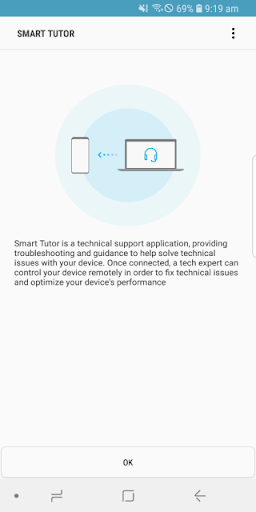
Smart Tutor for SAMSUNG Mobile is a remote-support app for Samsung Android phones and tablets. It suits people who would rather get help with a setting or device problem than hunt through menus alone. I like that its purpose is focused: you connect with a tech expert for a diagnosis, with screen sharing and privacy controls as part of the process. It is a support tool, not a general phone-optimization app.
Help With a Stubborn Setting
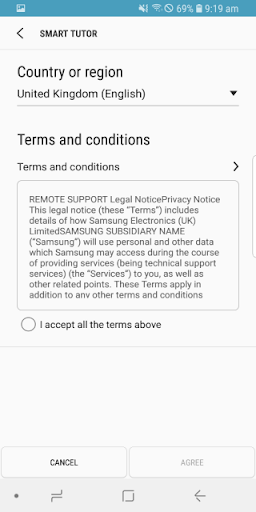
Imagine you are trying to change a display setting before heading out, but the menus do not look the way you expect. Smart Tutor gives you a route to remote help: contact the Samsung Contact Center, agree to the terms, and enter the six-digit connection code supplied by a tech expert. Once connected, the expert can diagnose the device while you follow along, rather than relying on a vague description of what is on screen.
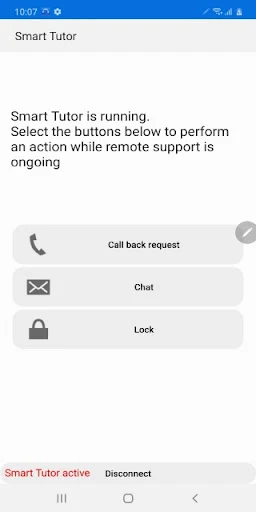
That guided approach is the app’s main appeal. It can cover questions about menus and features, advice about new features, display settings and errors, software or app updates, and device status. I would keep it in mind for a problem that is hard to explain over the phone. The connection is still something you start and can end yourself by tapping Disconnect, which makes the process feel more deliberate than leaving a support session open.
Remote Support, Not Tutorials
Smart Tutor is closer to a remote support session than a self-serve help library. Instead of browsing a catalog of lessons, you contact the Samsung Contact Center and work with a tech expert using a connection code. That can be useful when a setting is confusing or a device issue needs a closer look. If you already know what you want to change, searching your phone’s menus may be quicker.
It is also not a general-purpose cleaner or an automatic performance booster. The app provides remote diagnosis and functional advice; it does not promise to fix every issue or make changes without a support session. I would choose it when I want someone to help me understand a Samsung phone or tablet problem, not when I am looking for broad Android tutorials or a tool to manage unrelated apps.
Make the Session Easier
A little preparation can make a support call smoother. Before connecting, I would note what I was trying to do, what happened instead, and whether the issue concerns a feature, display, update, or device status. That gives the tech expert a clear starting point. I would also check Wi-Fi availability first, since using 3G or 4G for the session may count against the data plan.
During a session, keep the phone nearby and follow the expert’s instructions one step at a time. Smart Tutor includes chat alongside screen sharing, which gives you another way to communicate during the diagnosis. When the question is answered, use Disconnect to end the connection. For anyone who does not need help right away, installing the app ahead of time may save a few minutes when a confusing issue crops up.
More From Our News Desk

Zoom Meetings, Google Meet, or Teams: Which Is Easiest to Join?

How I Build a Free Streaming Lineup With Tubi

Why Crunchyroll Is the Default Anime App for So Many Fans

YouTube TV: A Practical Guide to Cutting Cable

Rummikub and the Small Comfort of Phone Games

TeamViewer Remote Control or AnyDesk for Helping Family?
Who May Find It Useful
I would recommend Smart Tutor to Samsung phone and tablet owners who occasionally need help finding a setting, understanding a feature, or discussing an update or device-status concern. It is especially practical for people who find it difficult to describe a screen over the phone. The combination of a support expert, screen sharing, and chat gives the conversation a concrete focus without asking the user to become a troubleshooting specialist.
It may not suit someone who wants a library of walkthroughs to browse independently, or a tool that automatically optimizes a device. The service depends on contacting the Samsung Contact Center and using a connection code, so it is not an instant, standalone answer to every question. It also does not support Google Experience devices such as Galaxy Nexus, and it requires an Android version newer than 6.
Smart Tutor for SAMSUNG Mobile is made by Samsung Electronics Co., Ltd. On Google Play, it has over 100 million installs and a 4.4-star rating from about 75,000 ratings. The app is free, with no in-app purchases and no ads. Its content rating is Everyone, making it suitable for a broad audience.
The supplied version is 1.5 (build 457). The app was released on January 6, 2015, and its recorded last update is November 2, 2026. It works on Android versions above Android 6. Google Experience devices such as Galaxy Nexus are not supported. Remote support can use Wi-Fi or mobile data; 3G or 4G data charges depend on the user’s mobile plan.
A Guided Look at Remote Support
A Focused First Impression
When I first considered Smart Tutor, its job was easy to understand: it provides a way to get remote help for a Samsung Android phone or tablet. The setup is tied to a support conversation, not a long account-building process described in the app information. You contact the Samsung Contact Center, accept the terms, and use the six-digit code from a tech expert to connect.
That sequence is worth knowing before you open the app expecting an instant help desk. The contact number depends on the country, and the session begins only after you have spoken with support and received a code. I would treat the app as one part of a support appointment. If you are already on a call about a device issue, the connection steps make sense in context.
The Session in Daily Use
The central experience is a remote diagnosis. Screen sharing lets the tech expert see the device as you work through the issue, while chat offers another channel during the session. This is useful when a menu label, display problem, or unfamiliar feature is easier to show than to explain. Rather than guessing which setting the user means, both sides can refer to the same screen.
The support session can address feature questions, advice about new features, display settings and errors, software upgrades and app updates, and device status. That is a practical range for routine phone questions, although it does not mean every problem can be resolved remotely. I would go in with a specific concern and use the expert’s guidance to understand what is happening, rather than expecting the app to diagnose everything automatically.
Privacy Controls Matter
The privacy controls are among the more notable parts of the description. Smart Tutor has screen lock and application lock features, and it restricts the tech expert from accessing apps that may contain personal information, such as Gallery, Messages, and email. That is relevant when sharing a device screen for troubleshooting, especially if you are concerned about private content appearing during a support session.
I appreciate that privacy is addressed as part of the remote-help experience instead of being an afterthought. Still, I would pay attention to the session and follow the instructions on screen; a privacy feature does not remove the need to be mindful when sharing a device. The app also includes a Disconnect option, so you can end the connection once the support conversation is finished.
A Useful Support Routine
For a practical routine, I would start by writing down the problem in plain language: what I was doing, what I expected, and what appeared instead. Then I would check whether the question falls into one of Smart Tutor’s stated areas, such as a menu, display setting, update, or device status. That makes the call more focused and helps the tech expert spend time on the part I cannot sort out myself.
Next, I would check whether Wi-Fi is available before the connection begins. The app can work over 3G or 4G, but mobile data charges depend on the operator’s plan, so Wi-Fi can be the more comfortable choice. During the session, I would keep the phone accessible, use screen sharing or chat as needed, and disconnect when done. This simple sequence suits occasional support better than keeping the app open as a daily utility.
Know the Boundaries
Smart Tutor is built around Samsung device support, so it is not a universal remote-help app for every Android phone. Google Experience devices, including Galaxy Nexus, are specifically excluded. The stated requirement is Android OS above Android 6, which is worth checking against an older device before relying on the app for a support session.
The other practical limitation is that help depends on reaching the Samsung Contact Center and getting a connection code from a tech expert. This is not a self-guided troubleshooting database that answers questions whenever you open it. Mobile-data use may also incur charges on 3G or 4G. Those boundaries are reasonable for a remote support tool, but they shape when it is useful and how I would prepare.
Smart Tutor for SAMSUNG Mobile has a clear purpose and a sensible set of tools for remote device support. Screen sharing, chat, and privacy controls give a tech expert a more direct way to help with settings, updates, and device questions. It works best as a companion to a support conversation, rather than a fix-it app you can use entirely on your own.
I would recommend it to Samsung owners who value guided help and are comfortable contacting the Samsung Contact Center to start a session. If you want independent tutorials or automatic maintenance, this is not the right fit. Check device compatibility and use Wi-Fi when practical, then keep Smart Tutor available for the occasional issue that is easier to show than describe.
Smart Tutor for SAMSUNG Mobile Frequently Asked Questions
What is Smart Tutor for SAMSUNG Mobile used for?
Smart Tutor is used to get remote help with Samsung Android phones and tablets. A tech expert can diagnose the device and offer functional advice about menus, features, display settings and errors, software or app updates, and device status. The session uses a connection code and can include screen sharing and chat.
Which devices and platforms support Smart Tutor?
Smart Tutor is for Android Samsung phones and tablets. Google Experience devices such as Galaxy Nexus are not supported. It is not described as an iOS or desktop app. For a particular device, check the Google Play details and compatibility information before relying on it for support.
What Android version does Smart Tutor require?
The stated requirement is Android OS above Android 6. Google Experience devices such as Galaxy Nexus are also excluded. If you are unsure whether your phone meets those conditions, check its Android version and the app’s current Google Play information, since compatibility details can vary by device.
Does Smart Tutor cost anything?
Smart Tutor is free to install and has no in-app purchases or ads. A remote session over 3G or 4G may use mobile data, and charges depend on your operator or plan. The app recommends checking Wi-Fi availability before connecting. Store details are worth checking in case they change.
Is Smart Tutor suitable for someone who is not tech-savvy?
It can suit someone who wants help with a Samsung device but finds it hard to explain a screen or setting. A tech expert can diagnose the phone remotely, with screen sharing and chat available. It is less suited to people who want self-guided tutorials or automatic fixes.
Pros
- Remote diagnosis makes confusing menus and display issues easier to show than describe.
- Screen sharing and chat provide more than one way to follow support guidance.
- Screen lock and application lock address privacy during a remote support session.
- Free to use, with no in-app purchases or ads.
Cons
- Starting a session requires contacting the Samsung Contact Center and receiving a code.
- Google Experience devices such as Galaxy Nexus are not supported.
- Mobile-data sessions may incur charges depending on the user’s plan.
- Category
- Tools
- Version
- 1.5 (build 457)