Galaxy Wearable
- 1.80M
- 3.7
- Installs
- 1.00B
- Price
- Free

Screenshots
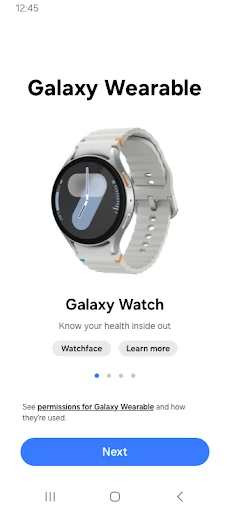
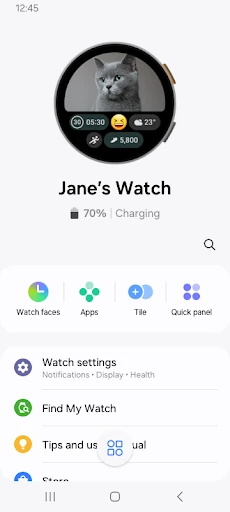
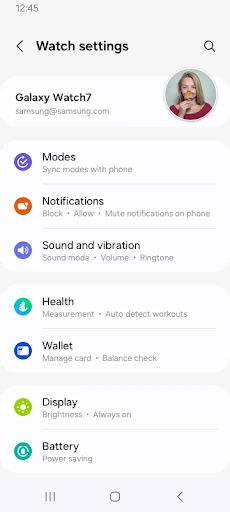
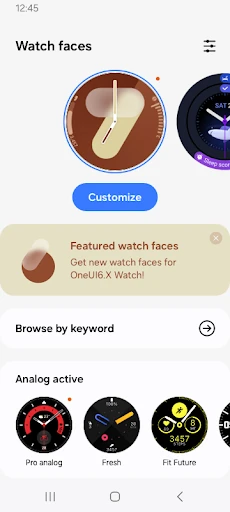
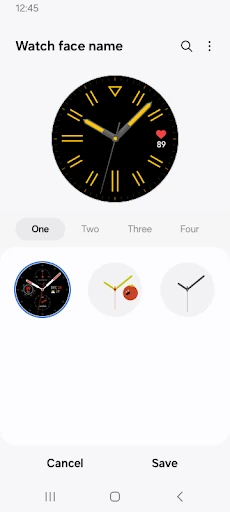
Analysis by Reviewed APKs
Galaxy Wearable is Samsung’s companion app for connecting and managing supported watches, earbuds, and other wearable devices from a phone. I see it as a practical control center rather than an app you open for entertainment: it handles setup, device settings, updates, and notifications. If you already use a compatible Galaxy wearable, it can make everyday adjustments easier; without one, there is little reason to install it.
A Day With Your Wearable
When I first opened Galaxy Wearable, I pictured the moment many people need it: a new watch or pair of Galaxy Buds beside a phone, ready to be paired. The app is the bridge between them. Pairing happens over Bluetooth, and once the connection is in place, the app provides the controls for managing the wearable instead of leaving every adjustment to the device itself.
That connection matters in ordinary little moments. I might want to change which notifications reach my wrist before a busy afternoon, check the watch’s settings later, or look for it if I have misplaced it. Galaxy Wearable brings those tasks together, including Find my Watch. It is most useful as a companion you return to for particular adjustments, rather than something that needs constant attention.
A Companion, Not a Wearable
The obvious alternative is to use the wearable on its own, where its built-in controls can handle whatever they offer. Galaxy Wearable serves a different role: it connects the device to a mobile phone and manages device features and applications. I would reach for it when I want to change settings or manage the connection, not as a replacement for the watch or earbuds themselves.
It is also not a universal manager for every Samsung accessory. The app’s supported devices vary by region, operator, and model, and the description specifically excludes Gear VR and Gear 360. Galaxy Buds models can use the app with tablets, but that tablet support should not be assumed for every wearable. Before relying on it, I would check that the particular device I own is supported.
Small Habits That Help
I would start by opening the app while the wearable is nearby and Bluetooth pairing is available, then make sure the connection is stable before changing settings. That simple habit saves time: the app’s device features depend on a working phone-to-wearable connection, so trying to manage a disconnected device can make the experience feel broken even when the app itself is fine.
After setup, I would use Galaxy Wearable when there is a reason to adjust something: notification types, clock settings, installed applications, or a software update. If an update or device feature is not behaving as expected, checking the connection first is a sensible step. Grant only the permissions needed for the functions I want, keeping in mind that some optional syncing features depend on particular permissions.
More From Our News Desk

Zoom Meetings, Google Meet, or Teams: Which Is Easiest to Join?

How I Build a Free Streaming Lineup With Tubi

Why Crunchyroll Is the Default Anime App for So Many Fans

YouTube TV: A Practical Guide to Cutting Cable

Rummikub and the Small Comfort of Phone Games

TeamViewer Remote Control or AnyDesk for Helping Family?
Who Will Get the Most From It
I would recommend Galaxy Wearable to someone setting up or maintaining a compatible Samsung wearable, especially if they want phone-based access to connection controls, clock settings, notifications, installed apps, and updates. It is a useful companion when settings are easier to review on a phone than on a small wearable screen. Find my Watch is another practical reason to keep the app available for a supported watch.
It may not suit someone who does not own a compatible wearable, or someone expecting one app to support every accessory and device combination. Compatibility varies, and some functions need a stable connection and relevant permissions. I would also look elsewhere if the goal is a general-purpose phone utility unrelated to wearable management. Galaxy Wearable has a focused job, and that focus is a strength only when it matches what you own.
Galaxy Wearable is a Tools app from Samsung Electronics Co., Ltd. On Google Play it has over a billion installs and a 3.7-star rating from around 1.8 million ratings. It was released on November 18, 2013, and the version varies with the device. These figures give a sense of its broad reach, though the rating is more mixed than its install count alone might suggest.
The app is free to download, with no in-app purchases or ads. Its content rating is Everyone. The latest update date provided is October 5, 2026. The minimum Android version is not specified in the available app details, so I would check the Google Play page for the requirement that applies to a particular phone. Supported wearable devices can also vary by region, operator, and model.
The Phone-Side Details That Matter
Getting Connected
My first impression is that Galaxy Wearable is built around a clear starting point: connect a wearable to a mobile device, then manage it from there. The setup is not meant to be a standalone experience. The description directs users to install the app and pair the wearable over Bluetooth, which makes having both devices nearby the sensible way to begin.
After pairing, the app’s usefulness depends on keeping a stable connection. I would not treat a missing setting or stalled management task as proof that the wearable is faulty before checking that link. Device support differs across models and regions, so checking compatibility before setup can also prevent a frustrating start.
Everyday Device Management
Day to day, the app’s appeal is having several wearable controls in one phone companion. I can use it to manage the connection, adjust clock settings, review notification types and settings, and work with applications installed through Galaxy Apps. That gives it a practical rhythm: open it when I want to change how the wearable behaves, then get back to using the device.
Software updates are part of that management role, too. I like that the app is not limited to initial pairing; it remains relevant after the wearable is already part of a routine. Still, it is not a reason to keep checking the app for its own sake. Its value comes from the particular device settings and tasks I need at the time.
Useful Standout Tools
Find my Watch is the feature that feels easiest to appreciate in an ordinary household. A watch left somewhere around the home can be a small but irritating problem, and having a find function among the wearable controls is a useful inclusion. I would keep expectations tied to the supported device and connection context rather than assume it works like a universal tracker.
The other useful combination is managing notifications alongside clock and application settings. These are small choices, but they shape how a wearable fits into a day. The app also supports software updates for connected devices. Together, those features make Galaxy Wearable more than a pairing screen, while keeping its purpose firmly centered on managing compatible wearables.
A Simple Weekly Routine
A practical routine could be to check the app when I first set up a wearable, choose notification settings that suit my day, and revisit clock or application settings only when something needs changing. If the device offers an update through the app, I can handle that as part of the same occasional check-in. This avoids turning device management into another daily chore.
If I misplace a supported watch, I would open Galaxy Wearable and try Find my Watch rather than searching through unrelated phone settings. If the app cannot manage the device, I would first check that Bluetooth connection and compatibility. Keeping that basic sequence in mind makes the app’s purpose straightforward: connect, adjust, and troubleshoot the wearable-side tasks it supports.
Compatibility and Connection Limits
The biggest practical limitation is that the app depends on a compatible wearable and a stable connection. Its settings and features are available when the wearable is connected to the mobile device, so it is not a remote control that can reliably manage every feature while the devices are disconnected. That dependence is worth remembering when a setting seems unavailable.
Support also differs by device model, region, and operator. Gear VR and Gear 360 are not supported, and tablet use is described only for Galaxy Buds models. Permissions can vary with the wearable and the function: nearby-device or location access is used to find devices for connection, while other permissions support optional syncing. Those details make checking permissions and compatibility part of a smooth setup.
Galaxy Wearable does its best work as a focused companion for supported Samsung wearables. Pairing, device settings, notifications, updates, application management, and Find my Watch give it a useful role beyond the first setup. The main caveat is that its features depend on compatibility and a stable connection, so the experience is only as relevant as the wearable you plan to connect.
I would recommend it to Galaxy wearable owners who want a phone-based place to manage everyday settings. If you do not own a compatible device, it is unlikely to earn a spot in your routine. Check model support before getting started, then use the app when a setting, update, or connection task actually calls for it.
Galaxy Wearable Frequently Asked Questions
What is Galaxy Wearable used for?
Galaxy Wearable connects supported wearable devices to a mobile device and provides tools to manage them. It can handle connection settings, software updates, clock settings, applications, notifications, and Find my Watch. Its features depend on the wearable being connected, and the supported devices vary by model, region, and operator.
Which phones and devices work with Galaxy Wearable?
Galaxy Wearable is an Android app for connecting supported wearable devices to a mobile device. The exact supported devices vary by region, operator, and model. The app does not support Gear VR or Gear 360. Tablet use is specified for Galaxy Buds models, so check the Google Play page and device compatibility details for your particular setup.
What Android version does Galaxy Wearable require?
The Android requirement can vary, so check the Galaxy Wearable page on Google Play for the requirement that applies to your phone. The app description notes that Android 6.0 users need to allow permissions in Android settings to use all functions. Permission requirements can also differ according to the wearable being connected.
Does Galaxy Wearable cost money?
Galaxy Wearable is free to download on Google Play. It has no in-app purchases and does not contain ads. The app manages compatible wearables, and supported devices vary by model and region. I would still check the store page for current app details before installing, since store information can change.
Is Galaxy Wearable useful if I do not own a Samsung wearable?
Galaxy Wearable is mainly useful for managing compatible wearable devices, so I would not recommend it as a general phone utility if you do not own one. It can help with setup, settings, notifications, updates, and other supported device tasks. Check compatibility first, since support varies and the app does not cover every Samsung accessory.
Pros
- Combines wearable connection, notification, clock, application, and update controls in one companion app.
- Includes Find my Watch for supported watch devices.
- Free to download, with no ads or in-app purchases.
- Can remain useful after initial setup for ongoing device management.
Cons
- Most features depend on a compatible wearable and a stable phone connection.
- Device support varies by model, region, and operator.
- Does not support Gear VR or Gear 360.
- Category
- Tools