Shimeji: Play with Screen Pets
- 419.52K
- 4.4
- Installs
- 10.00M
- Price
- Free

Screenshots
Analysis by Reviewed APKs
Shimeji: Play with Screen Pets adds animated cats and other characters that wander over your phone’s apps. It suits people who like playful personalization and want a little company while chatting, studying or browsing. After spending time with its mix of screen pets, interaction and character-making tools, I see the appeal: it makes an ordinary screen more lively, though it is more of a playful extra than a practical utility.
A Companion on Your Screen
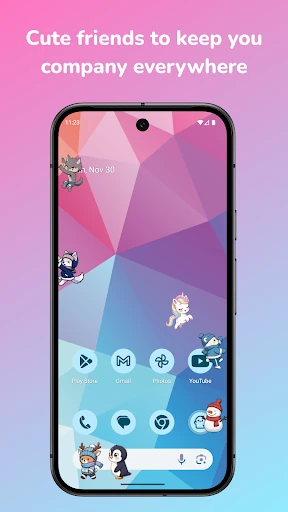
When I imagine using Shimeji during an ordinary evening, it fits neatly between the things I already do on my phone. I might be browsing or chatting, with a small cat wandering across the screen, climbing and eventually settling down. The pet is not the reason I opened those other apps; it is a playful layer that makes the downtime between messages or pages feel a little less plain.
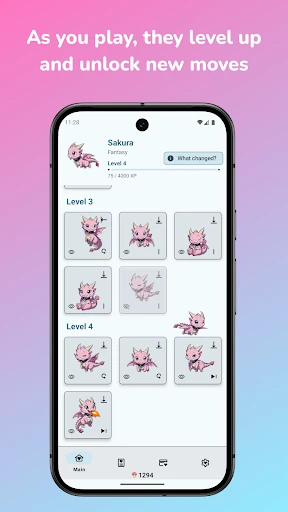
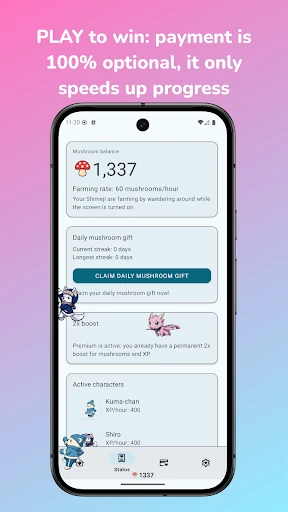
The appeal is in the small interactions. I can tap or drag a pet and see how it reacts, rather than treating it like a static wallpaper. Pets also earn experience as they wander, and playing with them can earn bonus XP. That gives a screen companion a little progression to follow, without turning the basic experience into a task I need to manage all day.
More Play Than Utility
Compared with a static wallpaper, Shimeji is much more active: its characters move over other apps, and I can interact with them. It also goes beyond a single decorative image by offering original characters, compatible PC Shimeji pack imports and tools to make a pet. If I want my phone to look exactly the same every time, a static background is simpler; Shimeji is for people who enjoy a bit of motion.
This is not a messaging app, a game built around a substantial story, or a tool for getting work done. The pets can keep me company while I study or chat, but they are still a playful overlay, not a study aid or chat feature. Ghost Mode is useful when I want them visible but not responding to touches, such as while gaming, though the app’s central purpose remains entertainment and personalization.
Small Ways to Make It Yours
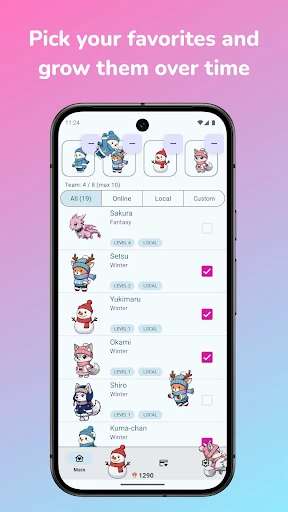
A useful starting habit is to adjust a pet’s size, speed and behavior until it feels comfortable over the apps I use most. I would begin with one character, watch how it moves during a normal browsing session, and then change the settings if it feels too prominent. Since the app can run up to 10 pets at once, there is room to build up gradually rather than filling the screen immediately.
There are a few satisfying ways to keep the experience personal. I can collect original characters, import compatible PC packs, or make a pet from my own artwork. The editor supports drawing and editing frames, while Magic AI can create a character from a description or turn a single picture into an animated pet. Ghost Mode is another handy habit when I want the pets present but out of the way.
More From Our News Desk

Zoom Meetings, Google Meet, or Teams: Which Is Easiest to Join?

How I Build a Free Streaming Lineup With Tubi

Why Crunchyroll Is the Default Anime App for So Many Fans

YouTube TV: A Practical Guide to Cutting Cable

Rummikub and the Small Comfort of Phone Games

TeamViewer Remote Control or AnyDesk for Helping Family?
Who Will Enjoy Shimeji
I’d recommend Shimeji to people who enjoy cute characters, anime-inspired screen decor or small interactive distractions. It is especially suited to anyone who likes the idea of customizing a phone beyond choosing a background, since the app combines pets that move around with collection, imports and character creation. If a wandering cat makes an everyday screen feel more cheerful, this is an easy idea to understand.
It may be less appealing if I want a quiet, completely static screen or if any movement over other apps would feel distracting. The pets are meant to be visible while I use the phone, although Ghost Mode lets them ignore touches. I would also look elsewhere for a conventional game or productivity tool: Shimeji is built around playful screen companions, not a deeper activity or practical phone-management job.
Shimeji: Play with Screen Pets is an Android personalization app from Digital Cosmos. Google Play shows more than 10 million installs and a 4.4-star rating from about 420,000 ratings. It is free to download, with ads and in-app purchases. The listed price range for individual in-app products is $2.49 to $28.99.
The app has an Everyone content rating. Its listed version is 14.1, and the release date is December 24, 2016. Google Play gives October 18, 2026, as the last update date. The supplied app details do not give a minimum Android version, so I would check the Google Play page on the device I plan to use.
A Little Life on the Home Screen
First Look and Setup
When I first opened Shimeji, the premise was immediately clear: this is about putting animated pets on top of the apps I already use. The character mix includes cats, kittens and anime-style companions, with actions such as walking, climbing, sitting and napping. It feels closer to adding a living decoration than starting a conventional game, which makes the app’s appeal easy to judge early.
I’d start by choosing a character and getting a sense of how it behaves on my screen before adding more. The controls let me set size, speed and behavior, so I can shape the experience around my phone habits. I appreciate that these practical adjustments are part of the concept: a pet that looks charming at one size might feel intrusive at another.
The Everyday Experience
In day-to-day use, Shimeji’s main trick is that its pets keep moving while I switch between other apps. I can see one wander, climb or nap while I browse, draw or chat. That makes the app feel more like ambient company than something I need to open for a dedicated session. The effect is lighthearted, but it also depends on enjoying movement in the background.
Interaction gives the pets a little more character. I can tap, drag or toss them and watch their responses, and they gain XP as they roam. Playing with them provides bonus XP, while leveling up unlocks additional moves, poses and surprises. I like that there is a gentle sense of development, though I would treat it as a small extra rather than a demanding progression system.
More Than Ready-Made Pets
The standout feature is the range of ways to build a collection. Shimeji offers original characters, supports importing compatible PC Shimeji packs, and lets me create a pet from my own art. That mix gives the app more staying power than choosing one character and leaving it unchanged. I can browse what is available or take a more hands-on route and make something personal.
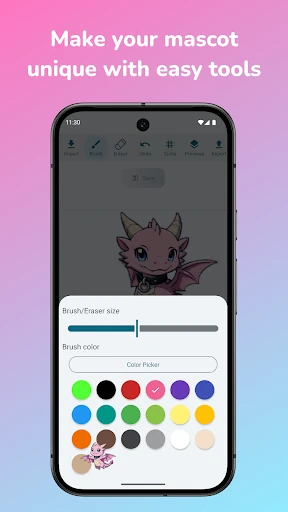
The creation tools go beyond picking an image. The app describes an editor for drawing and editing each frame, with brush, eraser, fill and color tools. Magic AI can also make a pet from a written description, or turn a single picture into a character with actions such as walking, climbing, dancing and sleeping. These options make Shimeji part collection and part creative toy.
There is also a newer 3D cat experience, with cats I can pet, feed, throw and play with. The description highlights hundreds of animations and interactions, alongside the screen-wandering pets. It is a different kind of play from watching a character cross my apps, and adds another reason to explore the app if I enjoy interacting directly with virtual cats.
A Comfortable Daily Routine
For a low-key routine, I would choose one pet for a while and let it accompany the things I already do on my phone. A short browsing session is a good way to see whether its movement feels pleasant or distracting. I can tap it when I want a moment of interaction, then carry on with what I was doing instead of turning the app into the main event.
When I want more variety, I can add characters over time, try a compatible imported pack or make a pet of my own. I would keep the screen manageable by changing size and speed to suit the moment. If I am gaming or chatting and want the pets to stay visible without responding to touches, Ghost Mode offers a way to keep them around while reducing interaction.
Limits to Keep in Mind
The biggest limitation is also the defining idea: the pets sit over other apps. If I prefer an uncluttered screen, even a cute character can become a distraction during reading or focused work. Ghost Mode helps with touches, but it does not change the fact that the pets remain visible. The option to run as many as 10 at once sounds fun, though I would expect that many to feel busy.
There is a learning curve to the creative side, especially if I want to draw and edit every frame rather than pick an existing character. Importing is specifically for compatible PC Shimeji packs, so it is not a promise that every character file will work. The app also includes ads and in-app purchases, details worth weighing if I prefer a fully ad-free or purchase-free experience.
Finally, Shimeji is best judged as playful personalization, not as a replacement for a full game or a tool that improves the apps underneath it. Its pets can accompany studying or browsing, but the app does not turn those activities into structured lessons or organized work. I would try it for the charm and customization, while being realistic about what a screen pet can add.
Shimeji works best when I want my phone to feel a little more personal and do not mind animated companions sharing the screen. Its combination of wandering pets, touch interactions, progression and creative options gives the idea more depth than a simple decoration, while Ghost Mode and size controls offer some practical flexibility.
I’d recommend trying it if playful characters are your thing, especially if you like collecting or creating them. I’d skip it if I value a still, distraction-free screen above all else. For the right person, Shimeji is a cheerful small extra; it does not need to be more than that.
Shimeji Frequently Asked Questions
What is Shimeji: Play with Screen Pets used for?
Shimeji adds animated cats and other characters that move over your apps. You can tap, drag or toss pets, collect original characters, import compatible PC Shimeji packs, and create pets from artwork or a description. It is mainly for playful phone personalization and entertainment, rather than a productivity tool or a conventional story-driven game.
Which phones and devices can run Shimeji: Play with Screen Pets?
Shimeji: Play with Screen Pets is an Android app. Its pets are designed to appear over other apps on the phone. The supplied app details do not specify a minimum Android version, so check the Google Play page for the requirements shown for your device before installing.
Does Shimeji: Play with Screen Pets cost money?
The app is free to download and includes ads and in-app purchases. The listed in-app product range is $2.49 to $28.99 per item. Purchase options and prices can vary, so check the Google Play page for the current details before buying anything.
What Android version does Shimeji: Play with Screen Pets require?
The app details provided here do not specify a minimum Android version. Since device compatibility can depend on the current app and phone, I’d check Shimeji: Play with Screen Pets on Google Play using the device you plan to install it on.
Who is Shimeji: Play with Screen Pets best for?
It is a good fit for people who enjoy animated characters, cute cats and hands-on phone customization. You can keep pets on screen, interact with them and make or collect characters. It may not suit someone who wants a still, distraction-free display or is looking for a substantial game or practical productivity feature.
Pros
- Pets wander over other apps and respond to taps, drags and throws.
- Offers original characters, compatible PC pack imports and pet creation tools.
- Size, speed, behavior controls and Ghost Mode add useful flexibility.
- The newer 3D cats offer direct petting, feeding and play.
Cons
- Animated pets may distract people who prefer a still, uncluttered screen.
- The app contains ads and offers in-app purchases.
- Only compatible PC Shimeji packs can be imported.
- Category
- Personalization
- Version
- 14.1