myCricket
- 294.08K
- 4.6
- Installs
- 50.00M
- Price
- Free

Screenshots
Analysis by Reviewed APKs
myCricket is Cricket Wireless’s account-management app, built for customers who want to check their plan, data use and payment details without making a call or visiting a store. I’d recommend it most to people who already use Cricket and like handling routine account tasks on their phone. Its focus is practical rather than broad: it puts the essentials of a wireless account in one place and adds support and shopping tools.
A quick account check
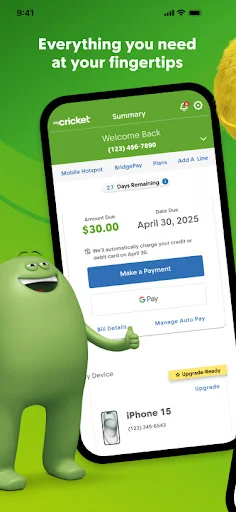
Picture the small pause before a weekend trip: I want to know whether I have enough data left and when my service renews, but I don’t want to hunt through old messages or call customer service. myCricket’s account home screen is meant for exactly that kind of check, bringing payment status, plan details, data and due dates together. It gives the app a clear everyday job instead of asking me to learn a complicated system.
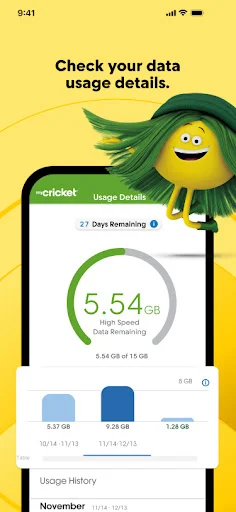
The data gauge and billing-cycle countdown are especially useful in that moment. I can look at how much data remains and how many service days are left, then decide whether I need to change my habits for the rest of the cycle. The app also covers payment, so I can move from checking an account detail to handling a bill in the same place. That makes it a practical companion for ordinary account upkeep.
For Cricket account tasks
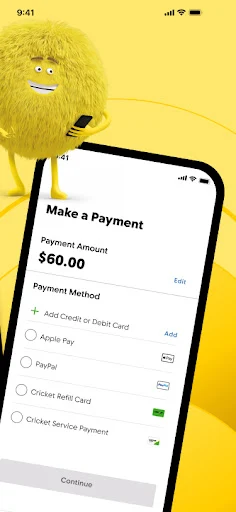
Compared with a general-purpose payment app, myCricket is tailored to a Cricket Wireless account. It is where I’d go to review a plan, check data usage, make a payment or look for answers about service. The listed payment options include credit or debit cards, Cricket Refill Cards, gift cards, Google Pay and Samsung Pay. That carrier-specific focus is its main advantage for customers who want account details and payment together.
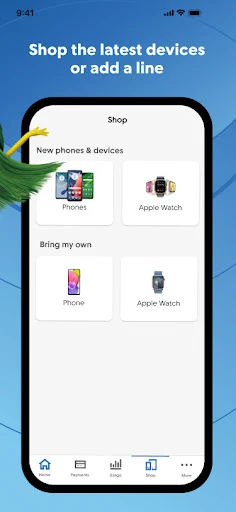
It is not a general phone utility, nor is it presented as a way to manage service from other carriers. The shopping section does address switching to Cricket with an unlocked device, but the app’s main purpose remains managing a Cricket account. If I only need to send money or track spending, a dedicated finance app is a more natural fit. myCricket makes the most sense when the wireless account itself is what I need to handle.
Make checks a habit
A useful routine is to open the account home screen before a busy week and take a quick look at the bill, due date and remaining data. That short check can help me spot an approaching payment or a low data balance before it becomes an inconvenience. Since the app also shows the days left in the current billing cycle, I can put the usage figure in context rather than treating it as an isolated number.
I’d also use the support area as a first stop when a routine question comes up. Its answers are grouped by categories and popular topics, and the description says support representatives can help troubleshoot when those answers are not enough. For payment, it is worth choosing the method I already use and keeping the app handy when I need to check account status. These are simple habits, but they suit a tool designed for quick, occasional visits.
More From Our News Desk

Zoom Meetings, Google Meet, or Teams: Which Is Easiest to Join?

How I Build a Free Streaming Lineup With Tubi

Why Crunchyroll Is the Default Anime App for So Many Fans

YouTube TV: A Practical Guide to Cutting Cable

Rummikub and the Small Comfort of Phone Games

TeamViewer Remote Control or AnyDesk for Helping Family?
Who will find it useful
I’d recommend myCricket to existing Cricket Wireless customers who want a straightforward way to keep an eye on their account. It should appeal especially to people who check data often, prefer to pay on a phone, or want to review plan details without making a trip to a store. The mix of account status, payment, data information and support gives routine tasks a single, carrier-specific home.
It may not suit someone looking for a broad device-management app or an account tool for a different wireless provider. The app’s value depends on having a reason to manage Cricket service, so its features may matter little to people who rarely review their bill or data. Customers considering a switch can also use the shopping area to explore moving an unlocked device to Cricket, but that does not change the app’s central account focus.
myCricket is developed by Cricket Wireless LLC and is available on Google Play for Android. It is free to install, has no in-app purchases and contains no ads. Google Play shows a 4.6-star rating from around 294,000 ratings, with over 50 million installs. Its content rating is Everyone, making the store’s age classification suitable for a broad audience.
The listed app version is 2.38.0. myCricket was released on December 17, 2012, and its listed last update date is October 20, 2026. The Android version requirement is not included in the supplied app details, so check Google Play for the requirement that applies to your device. The app’s stated purpose is managing a Cricket Wireless account.
The everyday account tools in practice
A focused first impression
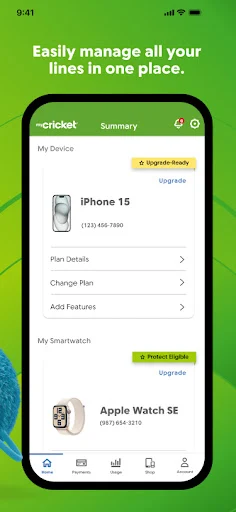
When I first open an account-management app, I want to get to the useful information without having to work out what the app is for. myCricket has a straightforward purpose: keep a Cricket Wireless account within reach. Its home screen brings together payment status, plan information, data use and due dates, which makes the broad shape of the app easy to understand.
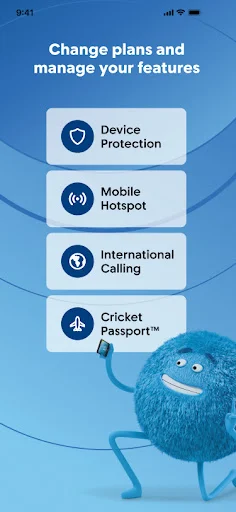
The description presents the app as free and designed for managing an account on the go. That framing fits its contents: there are account tools, ways to pay, plan and feature options, support, and a shopping section. I would start by checking the account home screen and then explore the parts relevant to my immediate task. There is no need to treat it as a complicated all-purpose phone dashboard.
Routine account management
For day-to-day use, the main draw is having account details and practical actions close together. I can check payment status or a due date, review my plan and see how much data remains. If I need to make a payment, the app supports several methods, including credit and debit cards, Cricket Refill Cards, gift cards, Google Pay and Samsung Pay. That range gives customers options without changing the app’s basic role.
I’d expect to use it in short visits rather than spend a long session browsing. A quick check before streaming away from Wi-Fi, for example, is a reasonable way to use the data gauge and cycle countdown. Later, I could return to make a payment or look up a service question. The app’s usefulness comes from those small account tasks being grouped together, not from adding unrelated features.
Data and support stand out
The data usage gauge is one of the more distinctive practical details. It is paired with a countdown showing how many service days remain in the billing cycle, which helps make a remaining-data figure easier to interpret. I like that pairing in principle: the same amount of data can feel very different near the start of a cycle than close to its end.
Support is another meaningful part of the package. The app organizes answers by categories and popular topics, then offers help from support representatives for troubleshooting. That makes it more than a place to check a bill. The shopping section is also notable: customers with an unlocked device who want to switch to Cricket can use the app’s guided transfer process. Each feature remains tied to the carrier relationship.
A simple weekly routine
A practical routine would be to check the account home screen once a week, or whenever I know I have a heavier mobile-data week coming up. I’d look at the data gauge and days left, then glance at the payment and due-date information. This is not a complicated planning system, but it can make the next few days feel less uncertain when I am away from home or using mobile data more often.
If a bill needs attention, I can use one of the listed payment methods in the app. If a question comes up instead, I can look through the organized support answers before seeking troubleshooting help. I would keep those tasks in mind as separate reasons to return rather than expecting the app to do everything at once. The habit is useful precisely because each visit can stay brief.
Keep the scope in mind
The main limitation is also the app’s defining boundary: it is built around Cricket Wireless accounts. If I do not use Cricket, the account tools are not aimed at me. Even for Cricket customers, someone who prefers handling every account task in person may not get much value from a mobile companion, though the app does offer alternatives to store visits for payments.
The app’s details are practical, but customers should still check Google Play for current device requirements and the latest store information. The supplied facts do not give a minimum Android version, and requirements can vary by device or change over time. That is a small check to make before installing. In day-to-day terms, the app is best judged as a focused account tool rather than a replacement for every kind of customer support.
myCricket has a clear, useful purpose: helping Cricket Wireless customers check account details, follow data use, make payments and find support. I like the way the data gauge and billing countdown answer a common question quickly, while payment options and account information round out the basics.
I’d recommend it to Cricket customers who want routine account tasks close at hand, especially if they often check usage or pay on their phone. It is less compelling for people outside the Cricket ecosystem or anyone seeking a general phone-management tool. For its intended audience, the focused approach is a sensible fit.
myCricket Frequently Asked Questions
What is myCricket used for?
myCricket is for managing a Cricket Wireless account. It lets customers review payment status, plans, data usage and due dates, make payments, explore plan features, find support answers and access a shopping process for moving an unlocked device to Cricket.
Which phones and platforms support myCricket?
The supplied app information places myCricket on Android through Google Play. Check the store page for current device compatibility and the Android version requirement that applies to your phone, since those details can vary or change.
What Android version does myCricket require?
The minimum Android version is not provided in the available app details. Before installing, check myCricket’s Google Play page for the current requirement and compatibility information for your device.
Does myCricket cost money or include purchases?
myCricket is free to install and the supplied facts say it has no in-app purchases or ads. Payment methods offered for a Cricket account include credit or debit cards, Cricket Refill Cards, gift cards, Google Pay and Samsung Pay.
Is myCricket useful if I am not a Cricket customer?
The app is primarily designed for Cricket Wireless account management, so its main tools are intended for Cricket customers. Its shopping area is described as helping people with unlocked devices explore switching to Cricket. Check Google Play for current details before deciding whether it fits your needs.
Pros
- Combines account status, plan details, data use and due dates in one app.
- Offers several payment methods, including Google Pay and Samsung Pay.
- Pairs a data gauge with a countdown for the current billing cycle.
- Includes categorized support answers and access to troubleshooting help.
Cons
- Its account-management tools are specifically centered on Cricket Wireless.
- The minimum Android version should be checked on Google Play before installing.
- The app is less useful to people who rarely manage wireless accounts on a phone.
- Category
- Tools
- Version
- 2.38.0