Cricket Visual Voicemail
- 33.32K
- 3.9
- Installs
- 10.00M
- Price
- Free

Screenshots


Analysis by Reviewed APKs
Cricket Visual Voicemail gives Cricket Wireless customers a way to see and manage voicemail messages without working through them only by calling in. I like the practical focus: messages appear in a list, and I can choose what to play, save, or remove. It suits people who get useful calls but have little patience for a long queue of messages; it is a voicemail manager, not a replacement for broader messaging tools.
A Better Way Through Voicemail
Picture a weekday when I have missed a few calls between errands and work. With Cricket Visual Voicemail, I can look over the messages first, then play the one that sounds relevant instead of listening to every recording in the order it arrived. That simple change is the app’s main appeal. It turns voicemail into a small inbox I can sort through when I have a spare minute.
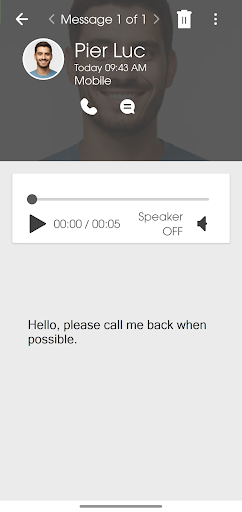
Once I choose a message, playback controls let me pause, stop, replay, or fast-forward. If it needs a response, I can call the person back or reply by text. I can save something I want to keep, or delete a message that no longer matters. The experience is built around ordinary follow-up: hear what someone needs, decide what to do, and move on without making voicemail a project.
Voicemail, Not Another Inbox
The obvious alternative is dialing into voicemail and navigating messages through audio prompts. This app’s visual list makes choosing a message feel more direct, especially when I only need to check one recording or revisit an older one. It also offers more control during playback than simply listening straight through. For someone who gets calls but cannot always answer, that focused convenience can make voicemail easier to keep up with.
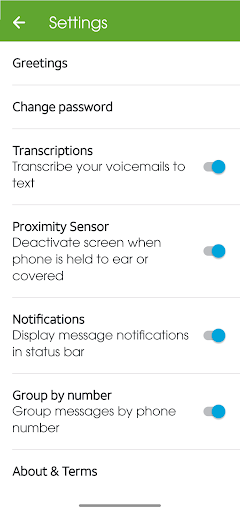
It is still specifically a Cricket voicemail tool, rather than a general-purpose communication hub. It does not turn messages into written transcripts, and I would not choose it as a replacement for texting, email, or a full call-management app. The useful comparison is narrower: it gives Cricket customers a visual way to handle voicemail and act on it. If voicemail is rarely part of your day, there may be little here to change your routine.
Small Habits That Help
A quick review after a missed-call notification is a natural way to use the app. I can scan the message list, listen to the ones that need attention, and leave the rest for later. When a recording includes details I may need again, saving it gives me a reason not to rely on memory. The option to save important messages to the phone or memory card is particularly practical for that kind of reference.
I would also make a habit of clearing out messages once I have dealt with them, while taking a moment to keep anything worth retaining. For a message that is hard to hear, replaying or fast-forwarding can help me focus on the relevant part. And if my recorded greeting no longer fits, the app makes changing it part of the voicemail workflow rather than a separate chore.
More From Our News Desk

Zoom Meetings, Google Meet, or Teams: Which Is Easiest to Join?

How I Build a Free Streaming Lineup With Tubi

Why Crunchyroll Is the Default Anime App for So Many Fans

YouTube TV: A Practical Guide to Cutting Cable

Rummikub and the Small Comfort of Phone Games

TeamViewer Remote Control or AnyDesk for Helping Family?
Who Will Find It Useful
I would recommend Cricket Visual Voicemail to Cricket Wireless customers who get enough calls to make a visual message list worthwhile. It is especially handy if you prefer choosing which messages to hear, want to save a recording, or often need to return a call or text after listening. People who check voicemail in short gaps during the day may appreciate being able to work through messages in their own order.
It may not suit someone who rarely receives voicemail or expects automatic written transcripts. The app is focused on managing voicemail, so it is not a broader alternative to email or text messaging. It also depends on a Cricket voicemail account, and setup may involve a one-time SMS to authenticate that account. For anyone outside that customer base, the central purpose is unlikely to be relevant.
Cricket Visual Voicemail is a free Communication app from Cricket Wireless LLC on Google Play. It has more than 10 million installs and a 3.9-star rating from about 33,000 ratings. The content rating is Everyone. The app is listed as version 3.19.0.101277, and its release date was December 11, 2012.
There are no in-app purchases or ads. The latest update date provided is August 18, 2025. The available app details do not specify a minimum Android version, so it is worth checking compatibility in Google Play before installing. During initial setup, the app may send a free one-time SMS to Cricket Voicemail to authenticate the account.
A Hands-On Look at Voicemail
A Focused First Impression
When I first open an app with a narrow job like this, I want it to get me to the messages quickly. Cricket Visual Voicemail is designed around a list of recordings, with the basic decisions close at hand: play, save, or delete. That straightforward purpose is a good fit for a task most people want to finish, not linger over.
Initial setup may include a one-time SMS to the Cricket Voicemail service to authenticate the account. That is useful to know before starting, particularly if I am setting things up when I have only a moment. Once access is ready, the app’s focus stays on voicemail rather than asking me to learn a wider set of communication features.
The Everyday Message Flow
The central day-to-day experience is choosing a recording from a list and listening on my terms. I can start with the message that seems most important, pause when something interrupts me, then replay or fast-forward as needed. That is more flexible than treating voicemail as a single audio session where every message has to be heard in sequence.
After listening, the next step is clear: return the call, reply by text, save the recording, or delete it. These actions make the app useful at the moment a voicemail arrives, not only when I am doing a general inbox cleanup. It gives a missed call a natural next step without claiming to handle the conversation beyond that.
Useful Control Over Messages
The standout feature is message control. I can play, pause, stop, replay, and fast-forward, which matters when a caller leaves a long message or I need to hear one detail again. Being able to select messages in any order is just as valuable: I can prioritize a work call or family message rather than letting arrival order decide what gets my attention first.
Saving and exporting voice messages add options for recordings I want to keep. The app can save important messages to the phone or memory card, while the greeting can be changed from within the voicemail experience. These are modest tools, but they match real reasons someone might open a voicemail app: preserve a detail, share a recording, or update what callers hear.
A Simple Weekly Routine
A practical routine could be a quick check after a busy stretch of missed calls. I would scan the list, play messages that call for a response, and use call-back or text reply while the context is fresh. If I need to keep a recording, I would save or export it before clearing away messages I have already handled.
There is no need to make this complicated. The app’s controls support short visits as well as a longer catch-up: pause if something comes up, replay a detail, or leave lower-priority messages until later. Receiving voicemail through the app does not count against the high-speed data quota, according to the app description; downloading the app and responding to voicemail using email does count against it.
Limits to Keep in Mind
The app’s usefulness depends on being a Cricket Wireless voicemail customer. It is not presented as a general voicemail service for every carrier, and it does not offer voicemail transcription in the described feature set. If reading a message silently is essential to your routine, this particular app may not deliver the experience you are looking for.
Its focused scope is both its strength and its limit. There are no broader inbox tools described beyond managing voice messages, changing a greeting, and responding by call or text. I would judge it by whether it makes Cricket voicemail easier to work through, rather than expecting it to organize all my communications. That keeps expectations sensible and makes the practical value easier to assess.
Cricket Visual Voicemail makes a small, familiar task less rigid. The ability to choose messages, control playback, save recordings, and respond from the same voicemail workflow is useful without adding unnecessary complexity. It is a focused tool, and the experience makes most sense for people who already use Cricket voicemail regularly.
I would try it if I were a Cricket customer who often misses calls and wants more control than dialing in provides. If I barely receive voicemail or want automatic transcription, I would look for a different fit. For its intended audience, this is a practical convenience rather than a dramatic change to how communication works.
Cricket Visual Voicemail Frequently Asked Questions
What is Cricket Visual Voicemail used for?
Cricket Visual Voicemail lets Cricket customers view a list of voicemail messages and play them in any order. You can pause, replay, stop, or fast-forward recordings, then save or delete them. The app also lets you change your recorded greeting and respond to a message by calling back or sending a text.
What devices can run Cricket Visual Voicemail?
Cricket Visual Voicemail is an Android app available through Google Play. The supplied app details do not specify a minimum Android version, so compatibility can depend on your device and software. Check the Google Play store page on your phone for the current requirements before installing.
What Android version does Cricket Visual Voicemail require?
The minimum Android version is not provided in the available app details. Requirements can vary as the app is updated and by device, so check Cricket Visual Voicemail’s Google Play store page for the version currently supported. During initial setup, the app may send a one-time SMS to authenticate your Cricket Voicemail account.
Does Cricket Visual Voicemail cost money?
Cricket Visual Voicemail is free to download and has no in-app purchases or ads. Receiving voicemail through the app does not count against the high-speed data quota, according to its description. Downloading the app and responding to voicemail using email does count against that quota.
Is Cricket Visual Voicemail right for me?
It is a good fit if you use Cricket voicemail and want to review recordings visually, choose what to hear first, and save messages or respond by call or text. It may not suit you if you rarely receive voicemail or need written transcriptions. Its main purpose is voicemail management, not general messaging.
Pros
- Choose and play voicemail messages in any order, with useful playback controls.
- Save or export important recordings and change your recorded greeting.
- Reply to a message by returning the call or sending a text.
- Free to download, with no ads or in-app purchases.
Cons
- Its voicemail features are intended for Cricket Wireless customers.
- The described features do not include voicemail transcription.
- The minimum Android version is worth checking in Google Play.
- Category
- Communication
- Version
- 3.19.0.101277