Gallery
- 651.16K
- 4.2
- Installs
- 1.00B
- Price
- Free

Screenshots
Analysis by Reviewed APKs
Gallery is a photo and video organizer for Android, built to help me find images, make quick edits, and manage files without relying on an internet connection. It suits anyone whose camera roll has outgrown endless scrolling, especially people who want a lightweight option with folder and SD card support. My overall take is that it focuses on useful everyday jobs rather than turning photo management into a bigger project.
Finding Yesterday’s Photo
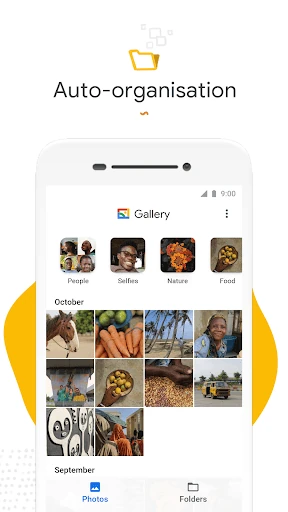
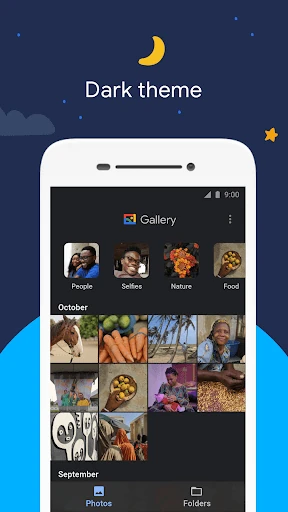
When I’m looking for a picture from a recent weekend, the usual problem is remembering roughly when I took it but not exactly where it sits among screenshots, portraits, and videos. Gallery’s automatic organization is designed to sort photos into groups such as People, Selfies, Nature, Animals, Documents, Videos, and Movies. That gives me another way to narrow the search instead of swiping through every item in date order.
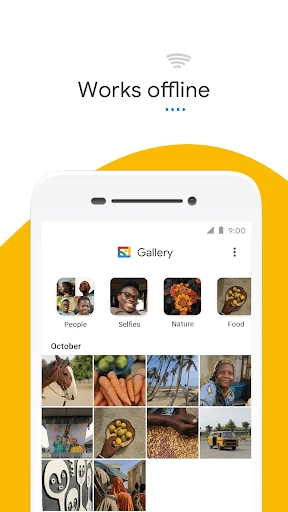
I can picture opening Gallery while chatting with a friend, finding a relevant photo, and sharing that memory without turning the search into a long detour. The app is built to work offline, so browsing and managing stored photos does not depend on having data available. Its practical appeal is right there: less time hunting through a camera roll, with simple editing available if a picture needs a quick improvement before it leaves my phone.
A Gallery, Not a Studio
Gallery sits in the everyday photo-library category: it helps me browse, sort, edit lightly, and manage files. It is not presented as a full creative studio or a cloud backup service. The strongest distinction is its combination of automatic groupings, folder organization, and SD card support, alongside a small app size and offline use. That makes it a sensible alternative to relying only on a long, unfiltered camera roll.
I would choose it for locating familiar pictures and making a one-tap auto-enhance adjustment, not for elaborate retouching or building a complex visual project. The description focuses on straightforward tools rather than advanced editing controls. That narrower purpose can be a plus if I want to get in, find a photo, and move on; it may feel limited if I expect a broad suite of creative features.
Small Habits That Help
A little folder discipline can make Gallery more useful over time. If I already separate pictures by topic or purpose, I can keep using folders to organize them in my own way instead of depending only on automatic categories. This is especially handy for documents or saved images that I want to keep distinct from casual camera shots. The app supports viewing, copying, and transferring photos to and from SD cards.
I’d also make a habit of trying the automatic grouping when I cannot remember a photo’s date, then returning to folders when I know how I want something arranged. For a quick polish, auto-enhance offers a simple one-tap option. Since Gallery works offline, I can browse and manage stored photos when connectivity is inconvenient, rather than treating a weak signal as a reason to postpone basic organization.
More From Our News Desk

Zoom Meetings, Google Meet, or Teams: Which Is Easiest to Join?

How I Build a Free Streaming Lineup With Tubi

Why Crunchyroll Is the Default Anime App for So Many Fans

YouTube TV: A Practical Guide to Cutting Cable

Rummikub and the Small Comfort of Phone Games

TeamViewer Remote Control or AnyDesk for Helping Family?
Who may enjoy Gallery
I’d recommend Gallery to Android users who want a straightforward place to browse photos and videos, particularly if their camera roll has become a mixed collection of family pictures, documents, selfies, and clips. Its automatic categories offer a different route to finding things, while folders preserve a more personal way to sort. Offline operation and SD card support are useful practical touches for people managing files directly on their device.
It may not suit someone seeking a feature-rich editing suite or a service centered on online photo storage. The tools described are intentionally simple, with auto-enhance as a quick adjustment rather than a promise of detailed creative control. People who prefer to arrange every image manually may also get less value from automatic organization, though Gallery’s folder support gives them another way to keep things in order.
Gallery is a free Android photography app from Google LLC. On Google Play, it has more than 1 billion installs and a 4.2-star rating from around 651,000 ratings. It is rated Everyone. The app is described as a small, lightweight photo and video gallery, and its listed price is zero.
The app does not contain ads or offer in-app purchases. The current listed version is 1.9.4.930218541 release. Gallery was released on July 23, 2019, and its latest update is dated June 24, 2026. The Android version requirement can vary by device and is worth checking on Google Play.
A Simpler Way to Browse Photos
A Straightforward First Impression
When I first opened Gallery, the idea that stood out was its focus: handle the pictures and videos already on a phone, without adding a lot of ceremony. The app is described as small and designed to use less device memory, leaving more room for personal photos. That combination makes sense for a utility I might open briefly several times a day rather than spend an evening configuring.
The main promise is easy to understand. Gallery can organize pictures automatically, offer an auto-enhance edit, and let me keep using folders. Those jobs cover the moments when I want to locate an image, give it a quick adjustment, or arrange files more deliberately. It also works offline, which suits a basic gallery app that should remain useful when a connection is not part of the day.
The Everyday Browsing Loop
Most gallery use is ordinary: I take pictures, forget where one went, and later want to find it quickly. Gallery’s automatic organization is intended to help with that by grouping images into categories such as Selfies, Nature, Animals, and Documents, along with video-related groups. Rather than relying on memory of a date, I can think about what the picture shows and use that as a starting point.
That approach is most helpful when I have a rough subject in mind but no clear timeline. When I do know how I want to keep certain pictures, folders provide a more hands-on alternative. I like that those two ideas can coexist: automatic groups for quicker discovery and folders for personal organization. The experience stays centered on browsing and managing, instead of asking me to adopt a new photo workflow.
Useful Standout Features
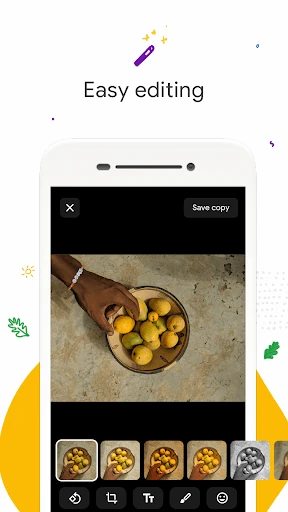
Auto-enhance is the most direct editing feature described for Gallery. I can use it when a picture needs a quick improvement and I do not want to work through a complicated set of controls. It is a modest tool, but that can be the right fit for a snapshot I want to share soon. Gallery’s pitch is convenience, not detailed manual editing or a collection of elaborate creative effects.
Folder and SD card support give the app a more practical file-management angle. I can organize photos in folders and view, copy, or transfer items to and from an SD card. That matters for people who keep some media on removable storage or prefer their own folder structure. Together with offline use, these features make Gallery feel aimed at handling files close to home, on the device.
A Quick Weekly Tidy
A simple routine could be to open Gallery once a week, scan the automatic groups for photos I have been trying to find, and put selected images into folders that match how I think about them. If I need a picture from a hike or a document saved on my phone, categories such as Nature or Documents provide a useful place to start. I can then use folders for any arrangement I want to maintain.
For pictures I plan to share, I can try auto-enhance as a quick finishing step rather than opening a separate editing workflow. If an image is on an SD card, Gallery’s support for viewing, copying, and transferring files gives me a way to manage it alongside other photos. None of that requires a complicated routine. The value comes from small, repeatable actions that keep finding and sorting less tedious.
Keep Expectations Practical
Gallery’s strengths are focused, so I would not go in expecting a full photo-editing workstation. The described editing option is auto-enhance, and the emphasis is on organization, browsing, and simple file handling. That should be enough for quick everyday tasks, but anyone who wants lots of hands-on control may prefer a separate editing tool for that part of their routine.
Automatic organization also has a geographic caveat: face grouping is not available in every country. The app’s described categories include People and Selfies, but I would not assume every grouping works identically everywhere. More broadly, automatic sorting is a helper, not a replacement for a folder structure if I want to organize files in a specific personal way.
Offline use is a practical benefit, but it does not turn Gallery into an online storage or backup service. Its purpose is managing photos and videos, including files on the device and supported SD cards. I’d choose it for that local, everyday role and keep my expectations aligned with a lightweight gallery rather than a broader photo platform.
Gallery is a sensible choice when the problem is a crowded camera roll, not a lack of advanced editing tools. Automatic categories, folder organization, SD card support, offline use, and one-tap auto-enhance cover a useful set of everyday needs without making the app’s purpose complicated.
I’d recommend it to Android users who want a lightweight way to find and manage photos on their device. If your priority is detailed image editing or online storage, this is not the app I’d pick for that job. For straightforward browsing and organization, though, its focused approach is appealing.
Gallery Frequently Asked Questions
What is Gallery used for?
Gallery is a photo and video gallery for browsing and organizing pictures on an Android device. It automatically groups photos into categories, supports user-organized folders, and includes a one-tap auto-enhance editing tool. It also works offline and supports viewing, copying, and transferring photos to and from SD cards.
Which devices can run Gallery?
Gallery is an Android app. The specific Android version requirement can vary by device, so check the Google Play store page for the requirement that applies to your phone or tablet. Its description highlights a small app size and support for managing photos and videos, including files on SD cards.
Does Gallery cost money or have purchases?
Gallery is free to download, and it does not contain ads or offer in-app purchases. Google Play details can change, so it is worth checking the store page for current information before installing. The app’s described tools include automatic photo organization, folders, SD card support, and auto-enhance.
Can Gallery organize photos without internet?
Yes. Gallery is designed to work offline and can manage photos and videos without using mobile data. Its automatic organization groups images into categories such as Selfies, Nature, Animals, and Documents. Face grouping is not available in every country, so the available grouping experience may differ by location.
Is Gallery suitable for serious photo editing?
Gallery is best suited to everyday browsing, organization, and quick edits. Its description highlights auto-enhance as a one-tap editing tool, rather than a broad collection of advanced controls. I’d recommend it for finding and lightly improving pictures, but someone looking for detailed creative editing may want a separate app for that work.
Pros
- Automatic categories offer another way to find photos beyond scrolling by date.
- Works offline and is designed to use less device memory.
- Folder organization and SD card transfers support practical file management.
- One-tap auto-enhance is handy for quick, uncomplicated edits.
Cons
- Editing is focused on simple adjustments rather than extensive creative controls.
- Face grouping is not available in every country.
- Automatic categories may not replace a personal folder system.
- Category
- Photography
- Version
- 1.9.4.930218541 release