Reface: Face Swap AI Generator
- 1.78M
- 3.6
- Installs
- 100.00M
- Price
- Free

Screenshots




Analysis by Reviewed APKs
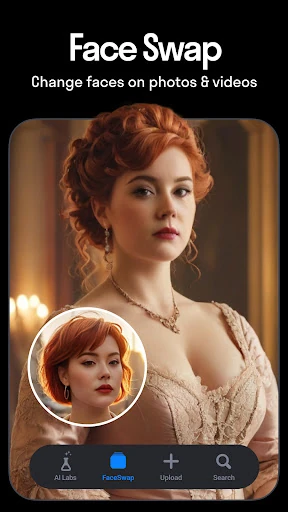
Reface: Face Swap AI Generator is a playful photo and video editor for turning selfies into face swaps, animated clips, hairstyle previews, and other AI-styled images. I see it working best for people who enjoy making quick, shareable edits rather than polishing photos with precise manual controls. Its mix of silly transformations and practical-looking style previews gives it range, though the ads and in-app purchases are part of the experience.
A Quick Creative Break
When I want a quick laugh for a group chat, Reface’s basic idea is easy to understand: choose a face photo, pick a template from the app’s collection, and make an edit that puts the face into a video, movie still, or character image. The same general spirit carries over to animated face effects, including clips that make a photo appear to sing. It is an approachable way to turn a spare moment into something shareable.
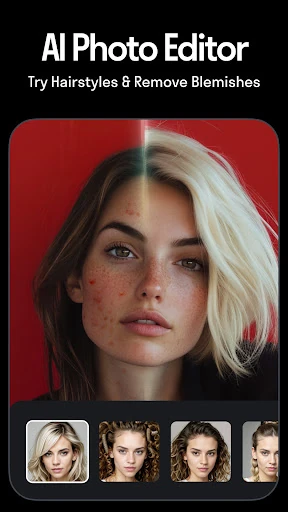
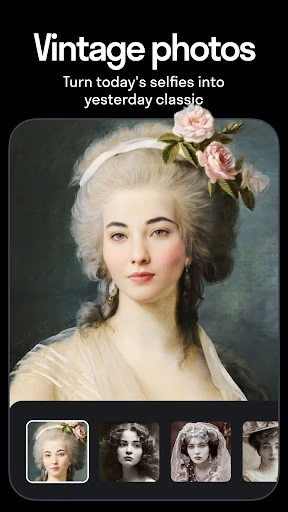
I can also picture using it during a more ordinary photo-editing session. A selfie can become an avatar or stylized portrait, while the hairstyle tools offer a quick way to preview different cuts and colors. Those are different jobs from making a joke video, but they sit alongside the swaps in one app. The appeal is variety: I can browse for a playful effect, try a look, and save an image without switching between separate creative tools.
Playful Edits, Not Precision Retouching
Compared with a conventional photo editor, Reface is built around transformations and templates rather than detailed, hands-on adjustments. Its face swaps, themed effects, singing animations, and AI portraits give me a starting point instead of a blank canvas. That makes it a more immediate option when I want an amusing or dramatic result, but it is not the tool I would reach for to carefully retouch a photograph or control every aspect of a finished composition.
The hairstyle previews and headshot generator broaden its uses, but I would treat them as creative previews, not as a replacement for trying a haircut in person or making a carefully art-directed portrait. Reface is also not a general-purpose video editor in the sense of building a longer project from many clips. Its strongest use is making individual, template-led transformations and sharing them, rather than managing a full photography or video workflow.
Make Browsing Work for You
I get more out of an app with lots of effects when I begin with a specific idea. Before browsing, I might decide whether I want a reaction clip, a new avatar, or a hairstyle comparison. That small choice helps keep the session focused, since the app offers several kinds of transformations. For a face swap, I would start with a clear face photo; for hairstyle previews, I would compare a few looks rather than saving every variation.
A simple habit is to make one or two versions, check the result, and save only the edits I might actually share or revisit. The app’s description says hairstyle looks can be compared side by side and exported to show a stylist, which makes those previews easier to use in a practical conversation. I would also keep an eye on the in-app purchase prompts while exploring, especially if I am only opening Reface for an occasional joke.
More From Our News Desk

Zoom Meetings, Google Meet, or Teams: Which Is Easiest to Join?

How I Build a Free Streaming Lineup With Tubi

Why Crunchyroll Is the Default Anime App for So Many Fans

YouTube TV: A Practical Guide to Cutting Cable

Rummikub and the Small Comfort of Phone Games

TeamViewer Remote Control or AnyDesk for Helping Family?
Who May Enjoy Reface
I would recommend Reface to people who like making quick visual jokes, trying playful face effects, or experimenting with AI-style portraits. It suits casual creators who want a ready-made template to work from, and the hairstyle previews may interest anyone who wants to compare possible looks in a photo. The app’s broad mix is useful if I want both silly edits and more polished-looking transformations without treating either as a serious editing project.
It may be a less comfortable fit for someone who wants a quiet, ad-free experience, detailed manual editing, or a tool focused on one narrow task. The Google Play rating is 3.6 stars across around 1.8 million ratings, so reactions are mixed rather than universally glowing. I would also be cautious about treating generated portraits or style previews as exact representations. Reface is most satisfying when I approach it as entertainment and experimentation.
Reface: Face Swap AI Generator is a Photography app from NEOCORTEXT, INC. On Google Play, it has over 100 million installs and a 3.6-star rating from around 1.8 million ratings. The app is free to download and contains ads. Its content rating is Mature 17+, which is worth considering before installing it for a younger user.
The listed Android requirement is Android 9 or later, and the current version is 6.4.0. The app was released on December 23, 2019, and its latest update is dated January 26, 2026. Reface offers in-app purchases, with listed items ranging from $0.99 to $79.99. That spread makes it sensible to check purchase details before choosing any paid option.
A Closer Look at Reface
First Open and Setup
When I first open Reface, the main attraction is clear: this is a place to transform a face photo into something more expressive, funny, or stylized. The app’s description groups together swaps, hairstyle try-ons, AI portraits, and animated effects, so I would expect browsing to be part of getting started. Rather than approaching it like a traditional editor with a blank workspace, I would pick the kind of result I want and explore the available effects.
The first useful decision is choosing an image that suits the transformation. A face photo is the starting point for many of the app’s effects, and the description presents templates as a way to place that face into other scenes or styles. I would begin with one straightforward test, see how the chosen effect changes the image, and then decide whether I want to try a different category. That is a low-pressure way to learn what the app does.
The Everyday Editing Loop
In everyday use, Reface feels best suited to short sessions. I can imagine opening it while waiting for a friend, trying a face swap, and sending the result into a conversation once it looks amusing. The same quick-loop approach works for filters and avatars: pick an effect, review the transformed picture, and make another version if the first one is not the mood I wanted. It keeps the app’s more playful side easy to dip into.
What I would keep in mind is that template-led creativity is different from full editing control. Reface gives me effects and transformations to try, rather than describing a workflow centered on precise, manual changes to every part of an image. That makes it convenient when I want to get from a selfie to a finished gag quickly. It also means I should choose it for the result it specializes in, not expect it to replace every editing app on my phone.
More Than Face Swaps
Face swaps are the obvious draw, but the app’s described feature set reaches into several other creative directions. Reface includes AI singing animations that make a photo appear to lip-sync to a song, plus gender swaps, face morphing, and age-changing effects. Those options give a casual session more variety than simply placing one face into a series of scenes. I would use them as playful transformations and judge each result as an effect, rather than as a realistic portrait.
The hairstyle tools are a more practical-sounding part of the package. Reface describes previews for short, long, bob, and curly styles, along with hair-color changes and haircut options. It also says users can compare looks side by side and export them to show a stylist. That turns the app from a pure joke generator into a place to explore visual possibilities, although I would still treat an AI preview as a starting point for discussion.
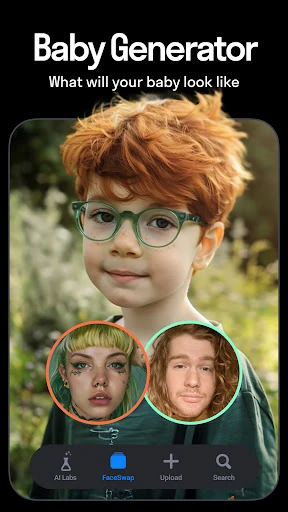
There are also AI avatars, stylized headshots, themed effects, pet filters, and an AI baby image generator described in the app’s feature set. Those tools make Reface feel like a collection of creative experiments rather than one narrowly focused editor. The range is appealing if I enjoy browsing and testing different concepts. For a more focused session, I would choose one category first so the number of options does not distract from the result I came to make.
A Simple Sharing Routine
For a low-effort routine, I would pick a clear face photo, settle on a theme, and test a small number of templates. If I am making a reaction for friends, a funny swap or singing animation is an obvious direction. If I am exploring a hairstyle, I would compare a few cuts or colors and save the alternatives that are most useful. This keeps the session purposeful without making a casual creative app feel like a project.
Once I have an edit I like, sharing is part of the intended use: the description says Reface can share face swaps, avatars, memes, and videos directly on social media. I would take a moment to review the finished image before sending it, especially when the effect changes someone’s appearance in a dramatic way. For hairstyle comparisons, I would save a small set of options rather than relying on one generated result.
Limits to Keep in Mind
Reface’s variety can be a strength, but it can also make the experience feel busy if I only want one simple tool. Face swaps, hairstyle previews, avatars, themed effects, and animated images all compete for attention. I would go in with a task in mind, particularly if I have only a minute to spare. The 3.6-star Google Play rating across around 1.8 million ratings also suggests that user experiences are mixed.
The app contains ads and offers in-app purchases, so it is not simply a free experience with no commercial interruptions. Listed purchase prices range from $0.99 to $79.99 per item, a wide span that makes checking the purchase screen worthwhile before paying. I would also avoid expecting the app to provide detailed manual retouching or a complete video-editing workspace. Its main strength is generating individual transformations from photos and templates.
Finally, the hairstyle and portrait tools are best approached as visual experiments. A generated image can help me consider a look or create a stylized profile image, but it is still an edited result. That distinction matters most when I use a preview for a practical conversation rather than simply for fun. Reface offers plenty to try, but I get the most value when I keep expectations aligned with its creative, effect-driven purpose.
Reface is a flexible creative app for quick face swaps, animated photo effects, avatars, and hairstyle experiments. I like that it can move between a silly group-chat edit and a more practical visual preview, without asking me to build everything from scratch. Its wide feature mix is the main draw, while ads, purchases, and a less-than-unanimous rating are reasons to approach it with realistic expectations.
I would recommend trying Reface if you enjoy template-based edits and are happy to treat AI transformations as entertainment or inspiration. It is less compelling if you want detailed photo controls or a single-purpose, interruption-free editor. For the right kind of casual creator, it is an easy app to dip into, make something amusing, and close again.
Reface Frequently Asked Questions
What is Reface: Face Swap AI Generator used for?
Reface is used to make face swaps, animated photo effects, AI-style portraits, avatars, and hairstyle previews. Its described tools also include singing animations, hair-color changes, themed effects, and pet filters. I would think of it as a creative app for quick transformations and shareable results, rather than a detailed manual photo editor.
Which devices can run Reface: Face Swap AI Generator?
Reface: Face Swap AI Generator is an Android app on Google Play. The listed requirement is Android 9 or later. Check the Google Play store page on your device for current compatibility details, since device support can vary. The app’s listed features include creating and sharing edited photos and videos.
Does Reface: Face Swap AI Generator cost money?
Reface is free to download and contains ads. It also offers in-app purchases, with listed items ranging from $0.99 to $79.99. The exact options available to you may vary, so check the Google Play purchase details before paying. I would explore the app with those ads and optional purchases in mind.
What Android version does Reface require?
Reface: Face Swap AI Generator lists Android 9 as its minimum requirement. If you are unsure whether your phone or tablet is compatible, check the app’s Google Play page from that device. The current version is 6.4.0, and compatibility details can change as the app is updated.
Who is Reface: Face Swap AI Generator best for?
Reface is a good fit for people who enjoy playful face swaps, animated effects, AI avatars, or visual hairstyle experiments. It may be less suitable if you want precise manual retouching or dislike ads and in-app purchases. Its Google Play rating is 3.6 stars from around 1.8 million ratings, so user opinions are mixed.
Pros
- Combines face swaps, singing animations, avatars, and hairstyle previews in one creative app.
- Template-led effects make it easy to start with a photo and try a transformation.
- Hairstyle options include color previews and side-by-side comparisons.
- Supports sharing edited face swaps, avatars, memes, and videos.
Cons
- Contains ads and offers in-app purchases across a wide listed price range.
- Its broad collection may feel busy when you only want one specific editing tool.
- The 3.6-star Google Play rating reflects mixed user feedback.
- Category
- Photography
- Version
- 6.4.0