SnapBridge
- 170.67K
- 4.1
- Installs
- 10.00M
- Price
- Free
Screenshots
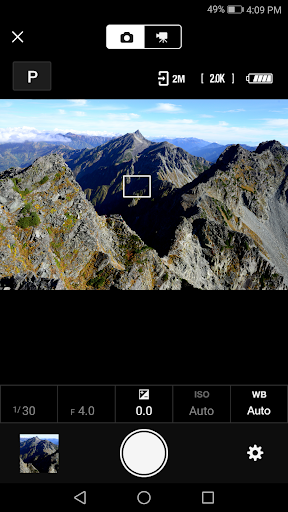
Analysis by Reviewed APKs
SnapBridge connects compatible Nikon cameras with an Android phone so I can bring photos over, share them, and handle a few camera tasks from the same app. It suits Nikon owners who want a simpler bridge between camera and phone, especially for everyday sharing. I like the range of practical jobs it covers, though its usefulness depends on having a supported camera and a recent Android device.
From Camera to Phone
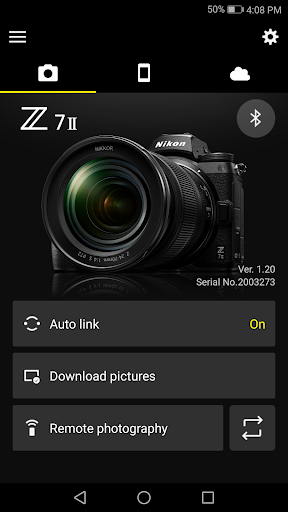
Picture a familiar end-of-day routine: I have taken photos with my Nikon camera and want a few on my phone to send to family or post on social media. SnapBridge is built for that handoff. After pairing the camera and phone, new photos can download automatically, and I can also browse the camera’s pictures and choose images to transfer. That makes the app useful beyond the moment I first connect the devices.
Once images are on the phone, I can share them by email or through social media, much as I would photos taken on the phone itself. That is the central appeal: keeping the camera as the place I take pictures while using the phone for quick access and sharing. The app can also add photo information or text to uploaded images, giving me another small step before passing a picture along.
A Nikon Companion, Not an Editor
SnapBridge makes most sense if I already use a compatible Nikon camera. It is a companion for connecting, transferring, and handling selected camera tasks, rather than a general photo library or a replacement for taking pictures with a phone. It can adjust camera settings and take photos, but those remote photography options depend on the camera, and movie recording is not supported on every model.
Compared with simply using a phone camera, the benefit is access to photos made with a dedicated Nikon camera and a way to move them across without first relying on a computer. But I would not choose SnapBridge as a movie player: the app cannot view movies, and downloading them requires switching to Wi-Fi and selecting files manually. AVI movie files cannot be downloaded through the app.
Make Transfers Predictable
A little setup can make the app more useful in an everyday routine. I can pair a camera, enable automatic downloading for new photos, and then check the camera’s images when I want a particular shot. SnapBridge supports pairing with as many as five cameras, which is handy for someone who uses more than one compatible Nikon body rather than wanting a separate phone workflow for each.
I would also treat camera firmware and connection settings as part of the setup, not an afterthought. Nikon advises keeping the camera firmware current, and the app can notify me about firmware updates for paired cameras. If a camera has a WPA2-PSK/WPA3-SAE authentication setting and will not connect, Nikon’s instructions say to switch it to WPA2-PSK-AES. The camera manual covers changing that setting.
More From Our News Desk

Zoom Meetings, Google Meet, or Teams: Which Is Easiest to Join?

How I Build a Free Streaming Lineup With Tubi

Why Crunchyroll Is the Default Anime App for So Many Fans

YouTube TV: A Practical Guide to Cutting Cable

Rummikub and the Small Comfort of Phone Games

TeamViewer Remote Control or AnyDesk for Helping Family?
Who Will Get the Most From It
I would recommend SnapBridge to Nikon camera owners who regularly want camera photos on an Android phone without making a computer the middle step. Automatic downloads, manual browsing, and sharing cover a useful range of needs, while remote camera tasks and clock-setting can be welcome extras. Pairing more than one camera is another practical touch for people with several supported models.
It is a weaker fit for someone without a supported Nikon camera, or for anyone expecting a full photo-editing or movie-viewing app. The Android requirement is 13.0 or later, and a Bluetooth Low Energy-capable device is required, so older phones may be ruled out. People who only take pictures on their phones may not need a camera connection app at all.
SnapBridge is made by Nikon Corporation and is listed on Google Play as a free photography app. It has more than 10 million installs and a 4.1-star rating from around 171,000 ratings. The app contains no ads and offers no in-app purchases, so its listed price is zero rather than a subscription or a paid download.
The listed version is 2.14.0. SnapBridge was released on April 18, 2016, and its most recent update is dated October 8, 2026. It is rated Everyone. The stated Android requirement is 13.0 or later; it also requires Bluetooth 4.0 or later, a display resolution of at least 960 by 540 pixels, and 100 MB or more of free device memory.
A Practical Link Between Nikon and Android
Getting Connected
My first impression is that SnapBridge has a focused purpose: connect a Nikon camera with a smart device and make the pictures easier to reach. Bluetooth and Wi-Fi need to be enabled when using the app, and the phone needs Bluetooth Low Energy support. Before relying on it for a photo outing, I would check that my camera model is supported and bring its firmware up to date.
The supported list ranges across Nikon Z and DSLR cameras, COOLPIX models, and KeyMission 80, though availability can differ by region. Connection is not guaranteed on every Android device, so meeting the stated requirements does not promise identical behavior everywhere. If pairing has trouble, Nikon suggests turning the camera off and on, switching tabs in SnapBridge, or closing and reopening the app.
Everyday Photo Transfers
The everyday workflow is the app’s strongest idea. Once the camera is paired, new photos can download automatically, so I do not have to remember to start a transfer every time I take a picture. When I want something specific, I can view pictures on the camera and download chosen photos instead. That mix of automatic and manual transfer suits both casual sharing and a more deliberate pick-and-choose habit.
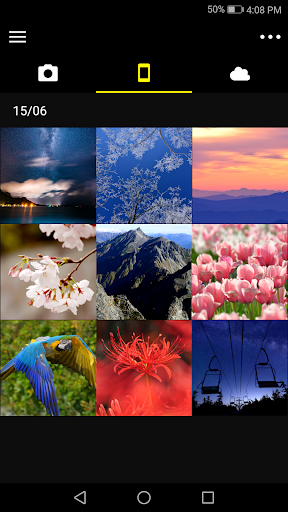
After a download, the app lets me view the photos and share them by email or social media. I can also add photo information or text to uploaded images. That is a straightforward path from camera capture to phone-based sharing, without suggesting that SnapBridge is meant to replace a dedicated editing workflow.
Useful Camera Extras
SnapBridge does more than transfer files. It can adjust camera settings and take photos, although remote photography depends on the camera having Wi-Fi, and remote movie recording is unavailable on some models. I would check the capabilities of my particular camera before planning to use the phone as a remote control. The app also supports pairing a phone with up to five cameras.
A few smaller tools are geared toward keeping camera and phone in sync. SnapBridge can set the camera clock to the time reported by the smart device, and it can send location data to the camera. Its GPS function can run continuously in the background and increase battery drain; the app’s power-saving mode can reduce that drain.
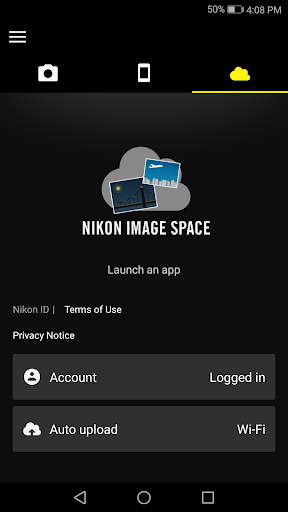
For supported cameras, SnapBridge can send images to Nikon Imaging Cloud, but that upload requires a Nikon ID. The app also supports registering for a Nikon ID and can notify me about firmware updates for paired cameras. These options broaden the app’s role, but they remain tied to camera compatibility and, for cloud uploads, an account.
A Simple Photo Routine
For a typical day out, I would start by checking the connection and letting new photos transfer automatically as I shoot. Later, I could browse the camera from the phone, download a handful of favorites, and share those images by email or social media. If I use more than one compatible Nikon camera, I can keep up to five paired through the app rather than treating each camera as a separate phone setup.
I would keep movie transfers as a separate, intentional task. The app requires switching to Wi-Fi and choosing movie files manually, and AVI files cannot be downloaded. It also cannot play movies, so I would use another movie-viewing app after a successful transfer. Knowing that boundary makes the photo-sharing workflow easier to plan around.
Compatibility Has Limits
The main limitation is the dependency on a supported Nikon camera. Even within the supported range, some functions differ by model: remote photography and movie downloads require camera Wi-Fi, and remote movie recording is not available on some cameras. The supported-model information may also include cameras that are not sold in every region, so I would confirm the details for the camera I own.
The Android requirement is 13.0 or later, alongside Bluetooth 4.0 or later and the stated display and memory minimums. Nikon also says performance can depend on the device environment and network conditions, and does not guarantee operation on every Android device. That makes a quick connection check before an important shoot sensible, rather than assuming every pairing will behave the same.
There are a few other practical boundaries: the app cannot view movies, GPS use can affect battery life, and connection problems may call for restarting the camera or app. Camera Wi-Fi settings can matter too; Nikon gives a specific WPA2 setting to try if the camera uses WPA2-PSK/WPA3-SAE and will not connect. These are manageable caveats, but they are worth knowing before depending on the app.
SnapBridge is a focused, useful companion for Nikon owners who want camera photos on an Android phone and a direct route to sharing them. Automatic transfers, manual selection, camera controls, and multi-camera pairing give it more purpose than a one-time import tool. Its strongest value is still the everyday connection between a compatible camera and the phone.
I would try it if my Nikon model is supported and my Android device meets the requirements. I would not choose it as a general editor or movie player, and I would check camera-specific features before relying on remote shooting. For the right Nikon setup, it offers a practical bridge with clear limits.
SnapBridge Frequently Asked Questions
What is SnapBridge used for?
SnapBridge connects a compatible Nikon camera with a smart device. It can automatically download new photos, let users browse and select pictures from the camera, and share downloaded photos by email or social media. Depending on the camera, it can also adjust settings, take photos remotely, set the camera clock, and handle location data.
Which devices and cameras work with SnapBridge?
SnapBridge is described for Android smart devices and supports a range of Nikon cameras, including selected Z, DSLR, COOLPIX, and KeyMission models. The stated Android requirement is version 13.0 or later, with Bluetooth 4.0 or later and Bluetooth Low Energy support. Camera availability and features can vary, so check the Google Play and camera information for your setup.
What Android version does SnapBridge require?
SnapBridge requires Android 13.0 or later. It also calls for Bluetooth 4.0 or later, a screen resolution of at least 960 by 540 pixels, and at least 100 MB of free memory. Nikon notes that the app is not guaranteed to run on every Android device, so it is worth checking the Google Play information for current device compatibility.
Does SnapBridge cost money?
SnapBridge is free to download on Google Play. It has no in-app purchases and contains no ads. Sending images to Nikon Imaging Cloud requires a Nikon ID, according to the app description. Store details can change, so check the Google Play page for the current price and any updated account or service requirements.
Is SnapBridge right for every photographer?
It is best suited to people who own a compatible Nikon camera and want camera photos on an Android phone for viewing or sharing. It is less useful without a supported camera, and it is not a movie player or a general-purpose photo editor. Remote features also depend on camera capabilities, so check your model before counting on them.
Pros
- Automatically downloads new photos after a compatible Nikon camera is paired.
- Supports browsing camera pictures and selecting photos to download manually.
- Can pair with up to five cameras and share downloaded photos.
- Offers camera controls, clock setting, and optional location-data transfer.
Cons
- Requires Android 13.0 or later and a compatible Nikon camera.
- Movie downloads require Wi-Fi and manual selection; AVI files are excluded.
- GPS can increase battery drain, and performance may vary by device and network.
- Category
- Photography
- Version
- 2.14.0











