Epson iPrint
- 863.56K
- 4.6
- Installs
- 50.00M
- Price
- Free

Screenshots
Analysis by Reviewed APKs
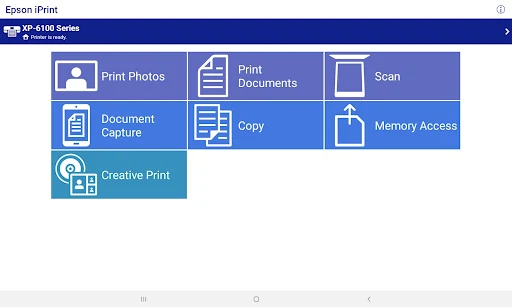
Epson iPrint is a companion app for printing, scanning, and sharing documents and photos with compatible Epson printers from an Android phone or tablet. I found it most useful for everyday jobs that would otherwise mean moving a file to a computer first. It offers a lot more than a basic print button, though its usefulness depends on having an Epson printer that the app supports.
A quick print from the sofa
When I want a webpage, email attachment, or saved PDF on paper, the usual nuisance is getting it off my phone and onto a computer. Epson iPrint is built to skip that detour. I can choose a supported file or photo on my Android device and send it to an Epson printer, whether the printer is nearby or set up for remote printing. It turns a small household task into something I can do from where I am.
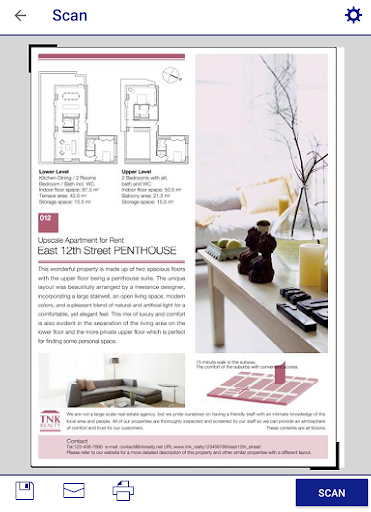
The app also covers the other direction. With an Epson all-in-one, I can scan a page and save it to my device, send it by email, or save it online. For a quick copy, it can use the phone and a nearby Epson printer. Those options make it handy for a school form, a receipt, or a document someone needs digitally, without treating every paper task as a separate computer project.
A printer companion, not a print shop
Compared with moving files to a desktop first, Epson iPrint puts routine printing and scanning in the phone workflow. It can handle photos, emails, webpages, stored files, attachments, PDFs, and Microsoft Office documents. Office files need Google Drive access so they can be rendered as printable PDFs. That extra requirement is worth remembering if a document is sitting in a format the app cannot turn into a printable page on its own.
This is not a general-purpose printer app for every brand, nor is it an alternative to a full desktop publishing program. Its job is practical output and scanning with supported Epson hardware. If I need intricate page design or extensive document editing, I would prepare that elsewhere. If I want a few copies, a scan, or a photo printed without opening a laptop, this is much closer to the right tool.
Small habits that help
I get more out of a printer companion when I check the settings before sending a job rather than treating every document as a one-page default. Epson iPrint lets me choose paper size and type, copies, page range, one- or two-sided printing, color or monochrome, and borders. For a draft or a long file, those choices can save paper and avoid the familiar moment of finding the wrong pages in the tray.
For scanning, it helps to decide what the file is for before I start: the app offers different resolutions and image types, and a camera capture can be formatted and enhanced before saving. I can also check printer status and ink levels from the app. Those small checks make it easier to catch a low-ink or setup issue before I am counting on a printout.
More From Our News Desk

Zoom Meetings, Google Meet, or Teams: Which Is Easiest to Join?

How I Build a Free Streaming Lineup With Tubi

Why Crunchyroll Is the Default Anime App for So Many Fans

YouTube TV: A Practical Guide to Cutting Cable

Rummikub and the Small Comfort of Phone Games

TeamViewer Remote Control or AnyDesk for Helping Family?
Who will find it useful
I would recommend Epson iPrint to people who already use a compatible Epson printer and regularly handle documents or photos on an Android phone or tablet. It suits households, students, and anyone who occasionally needs a paper copy, a scan, or a quick duplicate without transferring files to a computer. The range of supported everyday jobs is the appeal: it can print, scan, copy, and help manage remote printers.
It may not suit someone without an Epson printer, or someone whose particular model is not supported. It is also not a replacement for desktop tools when a document needs serious editing or carefully controlled layout. People who mostly read and share files digitally may have little reason to install it. For occasional printing from a phone, though, it can remove several needless steps from an ordinary errand.
Epson iPrint is made by Seiko Epson Corporation. On Google Play it has over 50 million installs and a 4.6-star rating from around 864,000 ratings. The app is free to install, with no in-app purchases or ads. Its content rating is Everyone, making it suitable for a general audience.
The current version is 7.15.0. Google Play gives its original release date as August 8, 2011, and its last update as September 15, 2026. The minimum Android requirement is worth checking on the Google Play page, since it can vary by device and app version.
Making Phone Printing Feel Routine
First steps and setup
My first impression is that Epson iPrint is aimed at getting a practical job done, not turning printing into a complicated project. The starting point is straightforward: use an Android phone or tablet with an Epson printer the app supports. The range of printer models matters, so I would check compatibility before building a routine around it.
Once the printer is available, the app's jobs make sense in familiar terms: print, scan, copy, or manage remote printers. If a printer is not found in a complex network, the description includes manual IP printer setup as an option. The built-in FAQ is another useful fallback for setup questions, rather than a reason to guess at network settings.
One detail to keep in mind is that Wi-Fi Direct use requires allowing location services so the app can search for wireless networks. Epson says location data is not collected for that purpose. It is a specific setup condition, not a general reason to expect location-based features during ordinary printing.
The everyday print flow
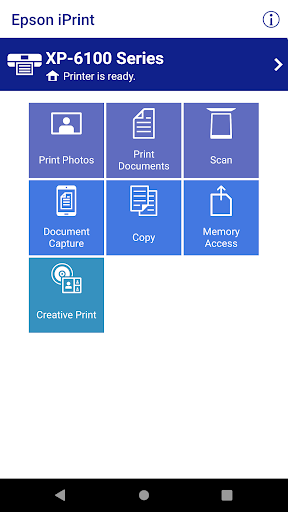
The day-to-day appeal is the variety of things I can send from the phone. Photos, webpages, emails, stored files, email attachments, PDFs, and Word, Excel, or PowerPoint files are all covered. That means I do not have to think of the app as only a photo printer or only a document utility; it can handle a mixed pile of small jobs.
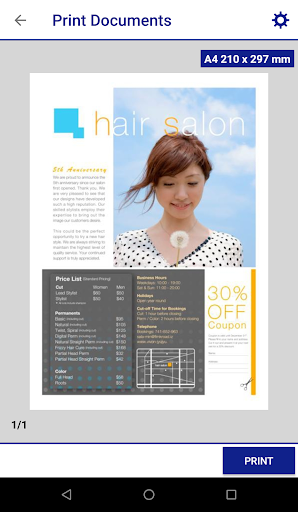
The print settings are also more useful than a bare send command. I can select paper size and type, copies, a page range, and single- or two-sided printing, then choose color or monochrome and whether the output has borders. These options help match the job to the paper and printer, especially when I am printing more than a single page.
Office files have a caveat: they require access to Google Drive for rendering into printable PDF format. That is easy to overlook if I am in a hurry, so I would check the file type and access before assuming every document will go straight to paper. PDFs and other supported files offer a simpler path.
More than printing
Scanning gives Epson iPrint a second useful role. From a compatible Epson all-in-one, I can scan and then save the file to the device, send it by email, or save it online. Different scanning resolutions and image types let me choose an output that fits the job, rather than treating a quick note and a photo as identical.
For a page that is already in front of me, the app can capture a document with the phone camera, format and enhance it, then save it ready to print. It can also copy documents and photos using the phone and a nearby Epson printer. These features cover quick paper tasks without claiming to be a full document editing suite.
There are a few printer-management extras as well. I can check status and ink levels, manage remote printers, and buy ink and supplies. For remote printing, Epson describes printing from anywhere to email-enabled Epson printers. The app also supports transferring files between the phone and an SD card or USB drive through an Epson printer.
A simple weekly routine
A useful routine might be to handle household paperwork in one sitting. I can print a form or an email attachment, scan a signed page from an Epson all-in-one, and save the scan to the phone or send it by email. If someone needs a duplicate, the copy function covers that nearby-printer job. Keeping these tasks in one app means fewer trips between the phone, a computer, and the printer.
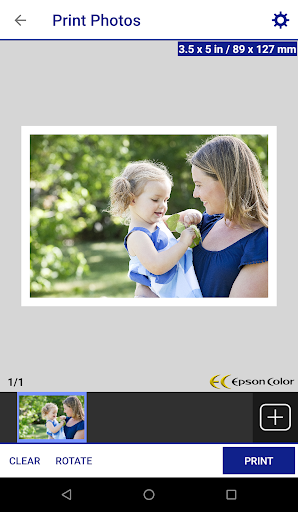
For photos, I would choose the images first and use the multiple-photo printing option when I have a batch. Epson lists automatic backlight and color-cast correction for high-quality photo printing. I would still review paper size, borders, and color settings before sending the job, since those choices affect how a photo comes out and how much paper or ink it uses.
For files I print often, it helps to know where they are stored and whether they are attachments or local files. Epson iPrint can print both stored files and email attachments. A quick status and ink-level check before a larger job is a sensible habit, particularly when the printout is needed that day.
Limits to keep in mind
The biggest limitation is hardware compatibility. Epson iPrint is specifically for Epson printers, and the supported models are determined by Epson. A printer from another manufacturer will not become usable just because it is connected to the same phone or network. Checking model support before relying on the app is the practical first step.
Remote printing also depends on an email-enabled Epson printer, while Wi-Fi Direct has its own location-services permission requirement for network searching. Office document printing involves Google Drive access for PDF rendering. Those conditions do not make the app unusually difficult, but they can add friction when the printer, connection, or file is not set up for the particular task.
Finally, this app is focused on printing, scanning, copying, and printer-related tasks. It does not replace a full document editor, and people who rarely use a printer may not get much value from it. For occasional phone-based output, the controls are broad; for work centered on editing and page design, another tool will still be needed.
Epson iPrint makes the most sense as a practical companion for a compatible Epson printer, especially when documents and photos already live on an Android phone. Printing settings, scanning, copying, and status checks give it a broader role than a one-tap print utility, while the Office-file and printer-compatibility requirements are worth checking.
I would try it if I regularly need paper copies or scans and want to avoid routing every job through a computer. If I do not own a supported Epson printer, or almost never print, it is unlikely to change my routine. For the right setup, it is a capable tool for ordinary print-and-scan errands.
Epson iPrint Frequently Asked Questions
What is Epson iPrint used for?
Epson iPrint lets Android phone and tablet users print photos, emails, webpages, PDFs, Office files, stored files, and email attachments with supported Epson printers. It can also scan from an Epson all-in-one, copy documents and photos with a nearby printer, capture documents with the phone camera, and check printer status and ink levels.
Which devices can use Epson iPrint?
Epson iPrint is described for Android phones and tablets, and it works with supported Epson printers. The particular printer model matters, so check Epson's compatibility information before relying on it. Available requirements can vary by device and app version, so the Google Play page is the best place to check current Android compatibility.
What Android version does Epson iPrint require?
The minimum Android version may vary with the device and app version. Check the requirements shown on Google Play for the version you plan to install. The app supports printing, scanning, and sharing from Android phones and tablets, but the printer also needs to be a compatible Epson model for those functions to work.
Is Epson iPrint free, and does it have purchases?
Epson iPrint is free to download on Google Play and has no in-app purchases or ads. The app includes an option to buy ink and supplies for a printer, but the app itself does not charge a purchase price. Ink, paper, and other supplies are separate from the app.
Is Epson iPrint a good fit for my home?
It is a good fit if your home has a supported Epson printer and you sometimes print or scan from Android devices. It can handle common jobs like a photo, an email attachment, or a scanned form. It is less useful without Epson hardware or if you rarely print, and it is not a substitute for full document editing software.
Pros
- Prints photos, documents, webpages, emails, and attachments from Android devices.
- Combines printing, scanning, copying, and printer status checks in one app.
- Offers practical controls for pages, paper, color, copies, and borders.
- Supports remote printing with email-enabled Epson printers.
Cons
- Works only with Epson printer models supported by the app.
- Office file printing requires Google Drive access for PDF rendering.
- Wi-Fi Direct requires location services permission to search for networks.
- Category
- Tools
- Version
- 7.15.0