Epson DocumentScan
- 2.97K
- 3
- Installs
- 1.00M
- Price
- Free

Screenshots
Analysis by Reviewed APKs
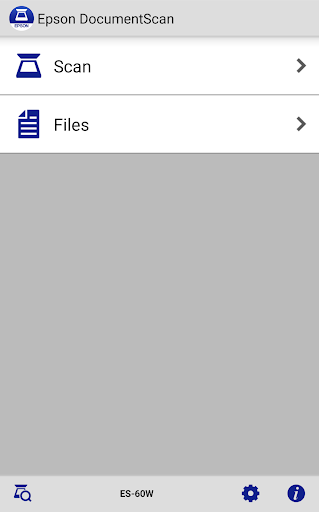
Epson DocumentScan is a companion app for scanning paper documents from a supported Epson scanner straight to an Android device. I see its appeal in ordinary tasks like saving a signed form or sending a multipage document without first opening a computer. It is focused rather than universal: if you already own a compatible Epson scanner, it offers a practical phone-based workflow; without one, it has little to do.
A Scan Without the Computer
Imagine coming home with a form that needs to be emailed before the evening is over. With a supported Epson scanner nearby, DocumentScan lets you connect the scanner to your Android device over the same Wi-Fi network, or set up a direct Wi-Fi connection. You can choose scan settings, capture the pages, check the result, and send the file on without making a computer the middle step.
That kind of small convenience is where the app makes sense. I would use it for a few pages that need to move quickly: a document to share with a colleague, a receipt to keep, or paperwork that belongs in cloud storage. The preview is useful because it gives you a chance to review the scan before sending it. For a simple one-off job, the appeal is a shorter route from paper to a file.
A Scanner Companion, Not a Scanner
DocumentScan is not a general phone-camera scanning app. Its central requirement is a supported Epson scanner, and the app is designed to communicate with that hardware. That makes it a more natural choice for someone who already has an Epson scanner than for a person looking for a standalone way to digitize pages with a phone camera. Checking scanner compatibility before building a routine around it is important.
Compared with scanning through a computer, the phone workflow can be more direct when you simply want to preview and share a file. Compared with camera-based scanning apps, though, this one depends on a physical Epson scanner rather than using the phone itself to capture the page. I would not choose it as a general document organizer or as a replacement for scanner software across other brands. Its job is narrower: connect, scan, review, and pass the result along.
Small Habits That Help
A little preparation makes the connection step less disruptive. I would check that the scanner and Android device are on the same Wi-Fi network when using the standard Wi-Fi mode, or use the direct connection option when there is no external network available. It also helps to confirm that the scanner model is supported before setting aside time for a scanning session.
For a stack of pages, I would review the page order and orientation before sharing. The app supports changing rotation and order in multipage scans, including applying those changes to multiple pages at once. Choosing document size, image type, resolution, and simplex or duplex scanning before starting can also keep a routine efficient. If a step is unclear, the built-in FAQ is a sensible place to look for help.
More From Our News Desk

Zoom Meetings, Google Meet, or Teams: Which Is Easiest to Join?

How I Build a Free Streaming Lineup With Tubi

Why Crunchyroll Is the Default Anime App for So Many Fans

YouTube TV: A Practical Guide to Cutting Cable

Rummikub and the Small Comfort of Phone Games

TeamViewer Remote Control or AnyDesk for Helping Family?
Who Will Get the Most From It
I would recommend Epson DocumentScan to people who own a supported Epson scanner and want to send scans to a phone, email, another app, or a cloud service without routing everything through a computer. It suits occasional home paperwork as well as a basic office routine, particularly when multipage documents need a quick check before they are shared. Its focused approach is a plus if the scanner is already part of your setup.
It is a poor fit if you do not have a compatible Epson scanner, or if your main goal is to scan pages using only a phone camera. People who need a broad document-management system may also want more than a scanner companion provides. The app hands scanned data off to other applications and cloud services, so the usefulness of those destinations depends in part on having the relevant apps installed and on the services you already use.
Epson DocumentScan is a free Android productivity app from Seiko Epson Corporation. Google Play shows over one million installs and a 3.0-star rating from 2,974 ratings. It is marked for Everyone. The app is specifically for supported Epson scanners, so compatibility is the practical detail I would check before downloading or planning to use it.
The listed version is 1.9.1, with a release date of March 5, 2014, and a last update date of September 2, 2026. The app has no in-app purchases and contains no ads. The supplied information does not specify a minimum Android version, so check the Google Play page on your device for current compatibility details.
A Closer Look at the Scan Workflow
Getting Connected
My first impression is that DocumentScan is built around a clear, practical purpose rather than a long list of unrelated tools. The first thing to sort out is whether the Epson scanner is supported. Once that is established, the app provides guidance for connecting without a PC, which keeps the intended phone-based workflow straightforward in principle.
There are two connection approaches described: joining the scanner and Android device through a Wi-Fi network, or connecting them directly. The direct option is useful when an external Wi-Fi network is not available. I would still treat compatibility and connection setup as the main hurdles, rather than assuming the app will work with any scanner or network arrangement.
The Everyday Scan
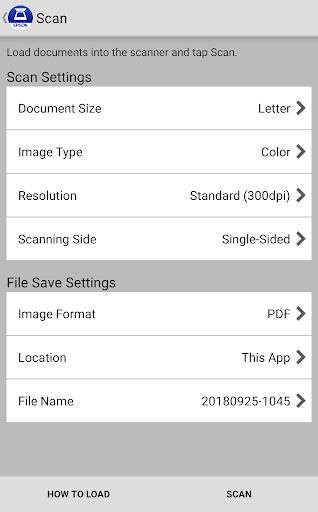
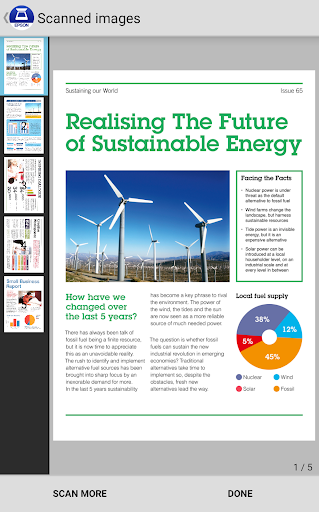
The basic routine is easy to understand: set scan options, send the job to the scanner, preview the resulting data, then decide where it should go. Available settings include document size, image type, resolution, and simplex or duplex scanning. That range gives the user some control over the capture without turning the app into a complicated editing suite.
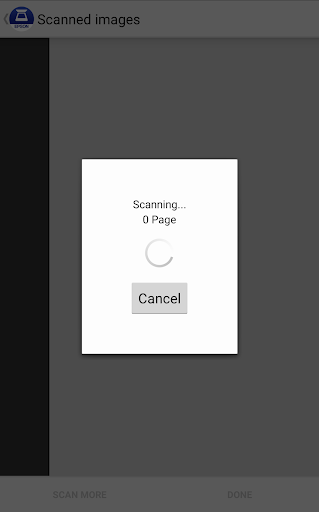
Previewing before sharing is a useful pause in the process. If a scan is headed to email or another app, a quick look can help catch a page that is upside down or out of sequence. The emphasis is on getting scanned pages to their next destination, not on managing a large archive inside DocumentScan.
Useful Page Controls
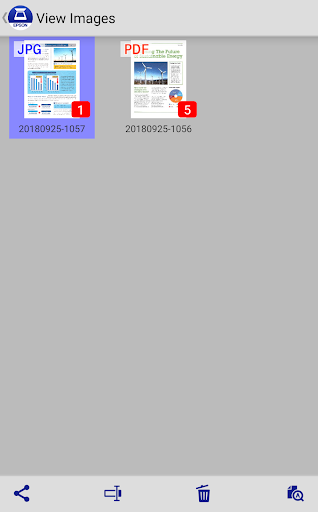
The multipage tools are among the more practical details. You can rotate pages and change their order, and the app supports applying rotation or order changes to multiple pages at once. That is helpful when a batch comes through with several pages needing the same adjustment, rather than forcing you to handle each one as a separate task.
Automatic size recognition and automatic image-type recognition are also available as advanced features. These options can reduce the amount of setup for a scan, though the app still offers manual settings when you want to choose them yourself. I like that the feature set stays close to the scanning job instead of promising a wider set of document tools.
From Paper to Destination
A useful routine might be to scan a short packet, inspect the preview, correct any page rotations or ordering, and then send it where it needs to go. The app can email scanned files or pass saved data to other applications and cloud storage services. Supported destinations named in the description include Box, Dropbox, Evernote, Google Drive, and Microsoft OneDrive.
Those handoffs can make the app fit into a workflow you already have, rather than asking you to keep everything in one place. Some destinations require their own Android applications to be installed. I would check that the services I use are ready on the device before a time-sensitive scan, then treat DocumentScan as the link between the Epson scanner and those existing tools.
Keep the Scope in Mind
The biggest limitation is also the clearest: this is only for Epson scanners, and not every Epson model is necessarily supported. That makes compatibility the first question to answer. The app is not a way to scan when no scanner is available, and its described workflow depends on connecting the Android device with compatible Epson hardware.
The Google Play rating is 3.0 stars, which suggests a mixed reception, although a rating alone cannot explain individual experiences. I would approach setup with realistic expectations and use the built-in FAQ if I ran into a connection question. If the scanner is compatible and the goal is simply scanning and sharing, the focused toolset is sensible; users seeking broader document features may find it limited.
Epson DocumentScan has a clear niche: it helps owners of supported Epson scanners move paper onto an Android device and onward to email, other apps, or cloud storage. I appreciate the direct connection option and the useful controls for multipage scans. Its value depends heavily on having the right scanner, so compatibility should come before any expectations about convenience.
I would try it if I already owned a supported Epson model and wanted a simple phone-based route for everyday scans. I would skip it if I needed a camera-only scanning app or a tool that works across scanner brands. In the right setup, it offers a practical bridge between a scanner and the places you already share files.
Epson DocumentScan Frequently Asked Questions
What is Epson DocumentScan used for?
Epson DocumentScan connects an Android device to a supported Epson scanner so you can scan documents, preview the results, adjust multipage rotation or order, and send files by email or to other apps and cloud storage services. It is a scanner companion, not a phone-camera scanning tool. Check that your Epson scanner is supported before relying on it.
Which devices can run Epson DocumentScan?
The app is for Android devices and supported Epson scanners. It can connect over the same Wi-Fi network or use a direct Wi-Fi connection between the scanner and Android device. A minimum Android version is not specified in the supplied details, so check Google Play on your device for current compatibility requirements.
Does Epson DocumentScan cost money?
Epson DocumentScan is free on Google Play and has no in-app purchases or ads, according to the supplied app details. The cloud and other destinations it can send files to are separate services, and some require their own applications to be installed on your Android device. Check the store page for current availability.
Does Epson DocumentScan work with every Epson scanner?
No. Epson DocumentScan is intended only for supported Epson scanners, so the model matters. The app description directs users to check scanner support before use. It offers Wi-Fi network and direct Wi-Fi connection methods, but neither changes the need for compatible Epson hardware. Review the compatibility information in the store or Epson support materials.
Who should use Epson DocumentScan?
It is best suited to someone who owns a supported Epson scanner and wants to scan to an Android device, then share the result through email, another app, or cloud storage. It may not suit people without compatible hardware, people who want to scan using only a phone camera, or anyone looking for a broad document-management system.
Pros
- Scans directly from supported Epson hardware to an Android device.
- Offers Wi-Fi network and direct Wi-Fi connection options.
- Includes multipage rotation and page-order controls.
- Can send scans to email, other apps, and named cloud services.
Cons
- Works only with supported Epson scanners, limiting who can use it.
- Not designed to scan documents with a phone camera alone.
- Some sharing destinations require their separate Android apps.
- Category
- Productivity
- Version
- 1.9.1