Samsung Email
- 2.53M
- 4.4
- Installs
- 1.00B
- Price
- Free

Screenshots
Analysis by Reviewed APKs
Samsung Email is a mail app for keeping personal and business accounts in one place, with support for common mail protocols and Exchange features. I see its appeal in an everyday routine: checking messages, sorting work and personal mail, and following a conversation without jumping between apps. It is a practical fit for Samsung mobile users who want an email-focused tool, though it is not a general-purpose productivity suite.
A day of mixed inboxes
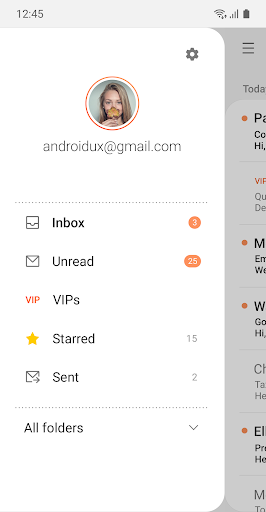
When I first considered the everyday job Samsung Email is built for, I pictured a familiar morning: checking a personal mailbox over breakfast, then switching attention to work messages before the day gets busy. The app can manage multiple personal and business accounts, and its combined mailbox option gives users a way to bring messages together rather than treating every address as a separate stop.
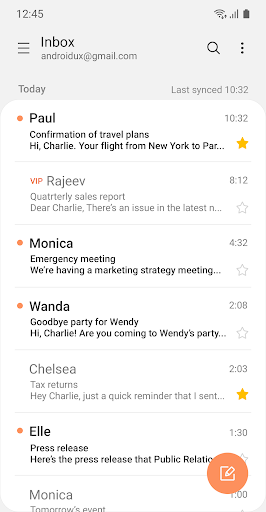
The conversation view is useful when a reply arrives in the middle of a busy day. Instead of reading each message as an isolated item, I can follow related mail as a thread and get the context of an ongoing exchange. Notifications and spam management address two small but persistent inbox chores, helping make the app about keeping up with email rather than simply displaying it.
Email, not an office suite
Samsung Email is best understood as a dedicated email client, not a complete work hub. POP3 and IMAP support cover personal account setups, while Exchange ActiveSync adds business-oriented synchronization with Exchange Server for email, calendars, contacts, and tasks. That combination makes it more than a bare inbox, but its central job remains managing mail and the related Exchange information described in the app’s feature set.
Compared with moving between separate mail apps, a combined mailbox can make several accounts easier to monitor in one place. But I would not choose Samsung Email expecting tools for documents, team chat, or project planning; those are outside the features described here. It also makes most sense for Samsung mobile users, since the app is described as available for Samsung Mobile with Android OS rather than as a cross-platform service.
Small habits that help
I would start by adding the accounts I actually check, then decide whether I prefer a combined mailbox or a more account-by-account approach. Customizable notifications and scheduled synchronization can help shape when new mail gets attention. For example, a user who checks work messages during the day and personal mail later may find it useful to tune the notification and sync experience around that routine.
Thread view is worth using when a discussion has several replies, while spam management can help keep unwanted messages from dominating the inbox. If an account uses Exchange, the synchronization options for calendars, contacts, and tasks are another reason to set it up with care. These are modest habits rather than complicated workflows, but they can make a multi-account email routine feel more orderly.
More From Our News Desk

Zoom Meetings, Google Meet, or Teams: Which Is Easiest to Join?

How I Build a Free Streaming Lineup With Tubi

Why Crunchyroll Is the Default Anime App for So Many Fans

YouTube TV: A Practical Guide to Cutting Cable

Rummikub and the Small Comfort of Phone Games

TeamViewer Remote Control or AnyDesk for Helping Family?
Who may find it useful
I would recommend Samsung Email to people who use a Samsung mobile device and want one email app for personal and business accounts. POP3 and IMAP support offer flexibility for personal mail, while Exchange ActiveSync makes the app relevant to workplaces using Exchange Server. People who value a combined mailbox, conversation threads, notification controls, and spam management will find a practical set of everyday email tools here.
It may be a less natural fit for someone who needs a mail app across several operating systems, or who expects email to come bundled with a broad suite of collaboration features. The app’s described focus is firmly on email and Exchange synchronization. I would also suggest checking device compatibility before relying on it, since its availability is described for Samsung Mobile with Android OS.
Samsung Email is a productivity app from Samsung Electronics Co., Ltd. On Google Play, it has over a billion installs and a 4.4-star rating from around 2.5 million ratings. The app is free, with no in-app purchases or ads reported in the supplied store facts. Its content rating is Everyone, making the store’s age classification straightforward for general audiences.
The supplied app version is 6.2.13.1. Its release date is January 15, 2017, and the recorded last update is May 19, 2026. The minimum Android version is not included in the available facts, so I would check the Google Play page on the device where I plan to use it. The description specifies Samsung Mobile devices running Android OS.
A closer look at daily email
Starting with the basics
My first impression is that Samsung Email has a clear, narrow purpose: it is meant to bring personal and business email together and make ongoing conversations easier to follow. The description emphasizes account support, notifications, spam management, and Exchange integration rather than a long list of unrelated extras. That focus is reassuring if all I need is a place to keep up with several mailboxes.
Setup depends on the kinds of accounts a user wants to connect. POP3 and IMAP are supported for personal email, and Exchange ActiveSync is available for Exchange Server accounts. I would begin with the accounts I use regularly, then consider whether calendar, contact, and task synchronization matters for an Exchange account. The app’s listed optional permissions relate to those connected tasks and to email attachments.
The everyday inbox
Day to day, the most useful idea is being able to manage more than one account without making each mailbox a separate app. A combined mailbox can give a broader view of incoming mail, while account-specific use remains an option for people who prefer to keep work and personal correspondence apart. That flexibility matters when a quick inbox check is squeezed between other parts of the day.
Notifications are another practical part of the routine. Samsung Email offers customizable notifications, and scheduled synchronization lets users adjust how mail is checked. I like that these controls address the interruption side of email as well as the reading side. They do not change the basic job of the app, but they can help a user decide how much attention incoming messages deserve.
Threads and Exchange support
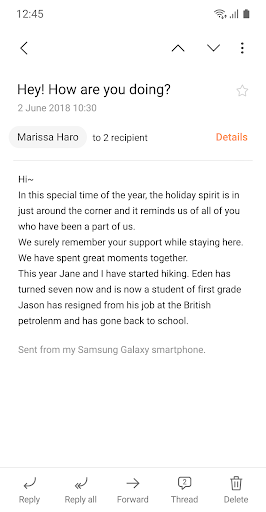
Conversation and thread view is one of the more immediately understandable features. When several messages belong to the same discussion, seeing them as related mail can make it easier to pick up where an exchange left off. It is a small quality-of-life improvement, especially for work conversations that build over the course of a day rather than arriving as one tidy message.
Exchange ActiveSync is the feature that broadens Samsung Email beyond personal inbox management. For Exchange Server accounts, it supports synchronization of email, calendars, contacts, and tasks. The description also notes built-in Exchange policy administration for organizations. Together, these functions make the app relevant in some business settings, although the precise policies and account setup will depend on the organization using Exchange.
A practical daily routine
A sensible routine might begin with a combined mailbox check in the morning, followed by a closer look at important threads as replies come in. I would keep notifications set to match the accounts that need timely attention and use scheduled synchronization to suit the way I check mail. That keeps the workflow grounded in the app’s actual strengths: bringing messages together and making them easier to follow.
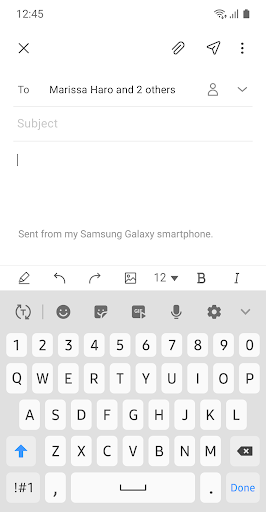
Later, I might switch attention to a specific account when I want to separate personal messages from work. If I use Exchange, its related calendar, contact, and task synchronization can keep those details connected to the business account. For an occasional attachment, the app’s optional permissions describe support for adding photos and files, along with location information. Those permissions can be enabled as needed.
Limits to keep in mind
Samsung Email’s narrow focus is also its main limitation. The described feature set is about email management, account synchronization, and related Exchange data; it does not present itself as a broad collaboration or office suite. Someone who wants a single place for mail, documents, team conversations, and project work may need other tools alongside it.
Compatibility is another practical consideration. The app description says the update is for Samsung Mobile with Android OS, and the supplied facts do not give a minimum Android version. I would check the Google Play page for the device I intend to use rather than assume every Android phone is supported. Exchange administration and synchronization are also relevant only when an account and organization support that setup.
Samsung Email looks like a straightforward choice for keeping several mail accounts manageable, with useful additions for threaded conversations, notifications, spam, and Exchange synchronization. I especially like that its feature set connects naturally to common routines instead of trying to be everything at once.
I would try it if I use a compatible Samsung mobile device and want an email-first app, particularly if Exchange support matters. If I need a cross-platform service or a full collaboration suite, I would look elsewhere or pair it with other tools.
Samsung Email Frequently Asked Questions
What is Samsung Email used for?
Samsung Email is used to manage multiple personal and business email accounts. It supports POP3 and IMAP for personal accounts, plus Exchange ActiveSync for Exchange Server email, calendars, contacts, and tasks. Other described features include combined mailboxes, conversation threads, notification customization, spam management, and S/MIME encryption.
Which devices can run Samsung Email?
The app description specifies Samsung Mobile devices running Android OS. The available facts do not provide a minimum Android version, so compatibility can vary by device and software version. Check the Google Play page on the device you plan to use for current requirements.
Does Samsung Email cost anything?
Samsung Email is free according to the supplied Google Play facts, with no in-app purchases or ads reported. Store details can change, so it is worth checking the Google Play page for the current terms before installing.
Does Samsung Email support work accounts?
Yes. Samsung Email supports Exchange ActiveSync for synchronizing Exchange Server email, calendars, contacts, and tasks. It also describes built-in Exchange policy administration. Whether those functions are available to you depends on having a suitable Exchange account and the settings used by your organization.
Who should use Samsung Email?
It should suit Samsung mobile users who want to manage personal and business mail in one email-focused app, especially those who use Exchange. It may be less suitable for people who need a cross-platform client or a larger collaboration suite. Check the store page to confirm compatibility with your device.
Pros
- Manages multiple personal and business accounts, with a combined mailbox option.
- Supports Exchange synchronization for email, calendars, contacts, and tasks.
- Conversation view, notification controls, and spam management support everyday inbox routines.
- Free on Google Play, with no ads or in-app purchases reported.
Cons
- The description limits availability to Samsung Mobile devices running Android OS.
- It focuses on email rather than broader collaboration or office-suite features.
- The supplied facts do not give a minimum Android version.
- Category
- Productivity
- Version
- 6.2.13.1