Zmodo
- 21.94K
- 1.5
- Installs
- 1.00M
- Price
- Free
Screenshots
Analysis by Reviewed APKs
Zmodo is a companion app for controlling Zmodo connected home products, especially cameras and their live and recorded video. It suits people who already use that equipment and want to check in from a phone rather than treat each camera as a separate chore. My take is that it covers the practical basics well, though the low Google Play rating is a reason to approach it with measured expectations.
A Quick Check-In at Home
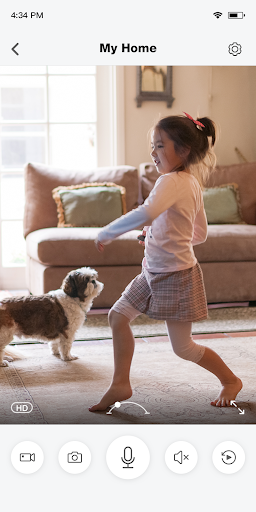
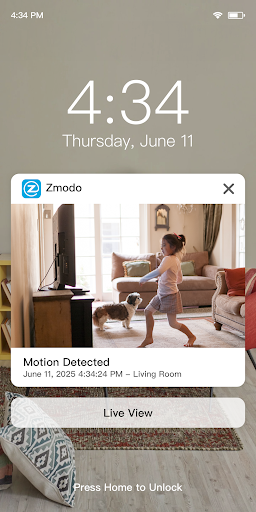
Picture me stepping out to run errands and wanting to see what a camera at home is showing. I open Zmodo, select a camera, and use its live view to check in without waiting until I return. If motion has been captured, the app can send a notification with a thumbnail, which gives me a faster first look than opening a full video every time.
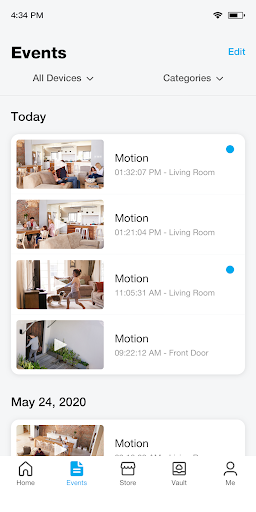
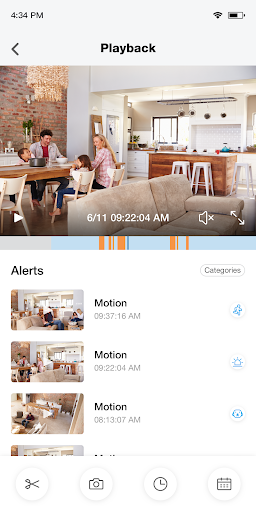
Later, if I want to revisit what happened, I can use the Events page and playback features for stored videos. That makes the app useful beyond a live peek: I can move from a notification to a more organized review of recorded events. For someone who already owns Zmodo connected products, this is a straightforward everyday loop—check live footage, notice an alert, and look back when needed.
For Zmodo, Not Every Camera
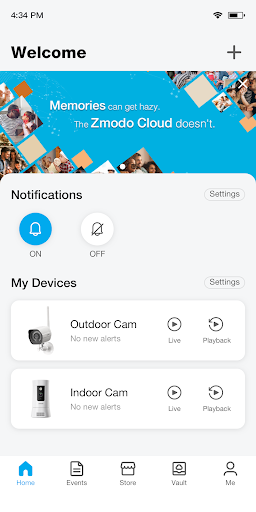
Zmodo makes most sense as the control point for Zmodo connected home products. It brings live viewing, event playback, notifications, and camera grouping into one place, rather than serving as a general-purpose home camera app for equipment from any brand. If your cameras are already part of the Zmodo setup, that focused approach can be convenient; it is less compelling if you are choosing an app before choosing compatible hardware.
I would not treat it as a general home-automation dashboard or a substitute for a professional monitoring service. The described tools center on video and camera events, not broad control of unrelated household devices. Nor is it just a video player: cloud recording is an optional subscription, and the app also provides live viewing and notifications. The obvious alternative is using a device's own camera app, but Zmodo's value depends on owning Zmodo products.
Small Habits That Help
If I had several cameras, I would set up custom camera groups so I could view them together in split-screen rather than opening each one in turn. That is a small setup step with a practical payoff when I want a quick household overview. I would also get into the habit of checking the Events page when an alert matters, since it organizes playback instead of leaving me to rely only on the initial notification.
Notifications are most useful when I treat the thumbnail as a quick clue, not the whole story. If I need context, I can open the relevant stored video and use playback. I would also decide in advance whether cloud recording is worth paying for my use, especially if I expect to need longer clips: downloading a 30-minute clip requires a subscription. A little planning helps avoid surprises when reviewing footage.
More From Our News Desk

Zoom Meetings, Google Meet, or Teams: Which Is Easiest to Join?

How I Build a Free Streaming Lineup With Tubi

Why Crunchyroll Is the Default Anime App for So Many Fans

YouTube TV: A Practical Guide to Cutting Cable

Rummikub and the Small Comfort of Phone Games

TeamViewer Remote Control or AnyDesk for Helping Family?
Who May Find It Useful
I would recommend Zmodo to someone who already has Zmodo cameras or other connected products and wants an app for checking live views and reviewing recorded events. The combination of motion thumbnails, organized playback, and split-screen camera groups gives it several useful roles in a simple home-check routine. It is especially relevant if you often want to check in while away or keep an eye on more than one camera.
It may not suit someone looking for a universal camera app, broad smart-home controls, or a service that includes cloud recording at no extra cost. The Google Play rating is 1.5 from around 22,000 ratings, so I would read recent user feedback and keep expectations realistic before relying on it. If you do not own Zmodo connected equipment, there is little reason to install it just to browse its features.
Zmodo is a free Lifestyle app on Google Play, developed by Zmodo Support. It has over 1 million installs and a 1.5-star rating from around 22,000 ratings. The app is rated Everyone and contains no ads. The supplied version is 8.2.0, with an October 27, 2026 update date; it was first released on November 20, 2015.
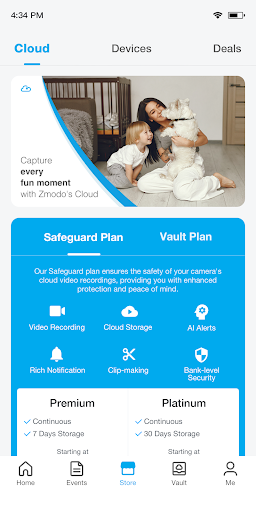
The app offers in-app purchases, with Google Play purchases ranging from $4.99 to $399.99 per item. Its description also gives cloud plans of $4.99 per month or $49.99 per year for Premium, and $9.99 per month or $99.99 per year for Platinum, per device. Package pricing depends on device quantity, and subscriptions renew automatically unless canceled at least 24 hours before renewal.
What It’s Like to Check In
Getting Started
When I first opened Zmodo, I understood its purpose quickly: it is a place to bring Zmodo connected products together and check their video. The description emphasizes an easy-to-use design, and the feature set is focused enough that I would not expect to spend time sorting through unrelated tools. The most relevant first step is having Zmodo equipment to control; the app’s usefulness follows from that connection.
My first impression is less about flashy extras and more about having the basics in one location. Live view, notifications, playback, and camera groups each address a recognizable need. That makes the app easier to evaluate than a sprawling smart-home platform: I can ask whether I want to see a camera now, review an event later, or watch multiple cameras together.
The Daily Check
Day to day, live view is the feature I would reach for when I want a quick look at home. Zmodo says it supports viewing from anywhere, so the app is designed for those moments away from the camera itself. A motion notification with a thumbnail can make the next step more immediate: I can see a preview and decide whether to open playback for more context.
When an event needs a closer look, the Events page provides an organized route to stored video playback. I like that this is presented as a separate part of the experience rather than making notifications carry the entire job. The practical sequence is simple: glance at the alert, open the relevant event, and review the video. That is a sensible pattern for occasional checks, not necessarily an invitation to watch constantly.
Features With a Purpose
Custom camera groups are a useful touch for anyone managing multiple views. The app describes split-screen live viewing, which can make a quick scan more efficient than switching between cameras one at a time. It is a specific convenience rather than a broad promise of automation, and that focus fits the app’s role as a camera companion.
The other standout is the connection between motion alerts and recorded video. Rich notifications include a thumbnail of captured motion, while the Events page organizes playback. Cloud recording is optional, and a subscription is required to download a 30-minute video clip. Those distinctions matter: the app provides several ways to check footage, but some recording and download capabilities come with a paid plan.
A Practical Home Routine
For a simple routine, I would use live view for a quick check when I leave home, then rely on notifications to tell me when there is motion worth a closer look. If an alert arrives while I am busy, its thumbnail gives me a quick preview. When I have time, I can visit Events and review the stored video rather than trying to remember exactly when something happened.
For a home with more than one camera, I would group the views I tend to check together and use split-screen live view for a broad glance. I would reserve longer clip downloads for occasions when I actually need that length of footage, since the description says the 30-minute download feature requires a subscription. This keeps the routine practical and makes the paid features easier to assess against real needs.
Limits to Keep in Mind
The main limitation is that the app is tied to Zmodo connected products. It is not presented as a way to mix camera brands or manage every kind of smart-home device, so its appeal depends on the equipment you own. If you are comparing camera systems, the app is only one part of that decision; the described features alone do not make it a universal solution.
There is also a meaningful difference between basic viewing and optional cloud services. Cloud recording is subscription-based, and a 30-minute clip download requires a subscription. The Google Play score is low, at 1.5 stars, which gives me pause even though the feature list covers useful tasks. I would check recent store feedback and confirm current plan details before building an important routine around the app.
Zmodo brings live camera viewing, motion thumbnails, event playback, and grouped views into one app for people using Zmodo connected products. I like the clarity of that job and the way the features support a realistic check-in routine. The trade-offs are its brand-specific focus, paid cloud options, and a very low Google Play rating.
If you already own Zmodo equipment, I think it is worth trying as the natural place to view and review footage, while checking the store’s current feedback and subscription details. If you need broad device compatibility or want a general smart-home hub, I would look elsewhere. For existing users with straightforward camera needs, it has the right basic tools, with some caution.
Zmodo Frequently Asked Questions
What is Zmodo used for?
Zmodo is used to control Zmodo connected home products. Its described features include live camera viewing, motion notifications with thumbnails, playback of stored videos, an Events page, and custom camera groups for split-screen viewing. Cloud recording is available as an optional subscription service, and downloading a 30-minute video clip requires a subscription.
What devices and platforms support Zmodo?
Zmodo is available on Android through Google Play. It is intended for use with Zmodo connected home products, including cameras. The supplied information does not specify a minimum Android version, so check the current Google Play store details to see which Android versions and devices are supported.
Does Zmodo cost money to use?
Zmodo is free to download and contains in-app purchases. Google Play purchases are shown in a range from $4.99 to $399.99 per item. The app describes optional Premium and Platinum cloud plans, priced per device, with package costs depending on the number of devices. Current prices and plan availability may vary, so check Google Play.
What Android version does Zmodo require?
The Android version requirement can vary by device and app update. Check Zmodo’s Google Play store details for the current minimum requirement before installing. The supplied app information gives version 8.2.0, but that does not establish which Android versions are compatible.
Is Zmodo a good fit for my home?
It may suit you if you already use Zmodo connected products and want to check live views, receive motion thumbnails, and review stored video. It is a less natural fit if you want a general app for other camera brands or broad smart-home controls. Its Google Play rating is 1.5 stars, so reading current reviews may help set expectations.
Pros
- Combines live viewing, motion thumbnails, and stored-video playback in one place.
- Custom camera groups support split-screen live viewing for multiple cameras.
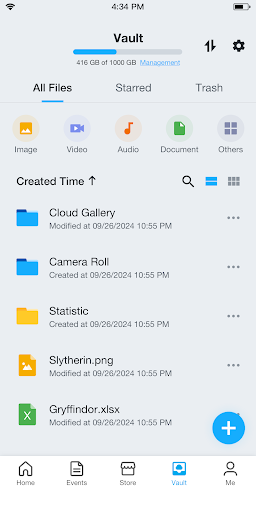
- The Events page gives recorded footage a dedicated place for review.
- Free to download, with no ads.
Cons
- Designed around Zmodo connected products rather than cameras from any brand.
- Cloud recording and 30-minute clip downloads require a subscription.
- Its Google Play rating is low, which may give new users pause.
- Category
- Lifestyle
- Version
- 8.2.0











