T-Life
- 961.96K
- 4.6
- Installs
- 10.00M
- Price
- Free

Screenshots

Analysis by Reviewed APKs
T-Life is T-Mobile’s app for handling everyday carrier tasks alongside shopping and member benefits. I see it suiting current customers who want one place to check usage, pay a bill, or explore perks, as well as people considering a switch. Its range is useful, though it covers several different jobs, so it feels more like a service hub than a focused single-purpose app.
A Bill-Day Starting Point
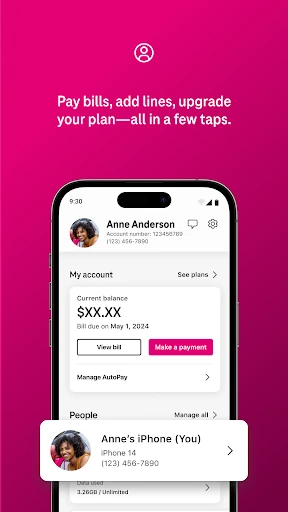
When I picture using T-Life on a regular weekday, the most practical moment is a quick account check between other errands. I can use it to manage my account, pay a bill, and track usage, rather than putting those carrier tasks off until I’m back at a computer. Having those basics grouped with device and plan shopping gives the app a clear role in a T-Mobile customer’s routine.
The same visit can lead somewhere else: I might check what benefits are available, then return to the account side when I need to look at usage. T-Life’s appeal is that it brings these related T-Mobile tasks together. The trade-off is breadth. Someone opening it only to do one small thing may find the mix of account management, shopping, and perks less focused than a dedicated tool.
More Than Account Management
The obvious comparison is a carrier account app, and T-Life does cover that central territory: bills, usage, plans, and devices. But it also reaches into member offers, Scam Shield, Home Internet setup, SyncUP devices, and access to T-Mobile MONEY and T-Life VISA accounts. That makes it broader than a bill-payment companion, especially for households using more than one T-Mobile service.
That wider scope is not the same as being a general lifestyle organizer. The app’s benefits, shopping, and connected-device tools are tied to T-Mobile services, rather than being a universal place for unrelated activities. If I only want to compare phone plans or make a single purchase, the extra sections may be beside the point. It makes most sense when more than one part of the T-Mobile relationship matters.
Small Habits That Help
I’d make T-Life more useful by treating it as a periodic check-in rather than opening it without a purpose. For example, I can review usage when I’m thinking about my plan, pay a bill when it’s due, and take a separate look at benefits when I have time to browse. That keeps the app’s different jobs connected to real tasks instead of turning every visit into aimless shopping.
It also helps to think about which T-Mobile services I actually use. A customer with Home Internet may have a reason to configure a gateway, while someone with SyncUP devices may use the app to stay connected with home, car, or family devices. I wouldn’t expect every section to matter to every person. Focusing on the services I have makes the broad collection easier to approach.
More From Our News Desk

Zoom Meetings, Google Meet, or Teams: Which Is Easiest to Join?

How I Build a Free Streaming Lineup With Tubi

Why Crunchyroll Is the Default Anime App for So Many Fans

YouTube TV: A Practical Guide to Cutting Cable

Rummikub and the Small Comfort of Phone Games

TeamViewer Remote Control or AnyDesk for Helping Family?
Who Gets the Most From It
I’d recommend T-Life to T-Mobile customers who want account basics and other carrier services in one app, especially if they also like checking member benefits or shopping for devices. It can be relevant to people using T-Mobile Home Internet or SyncUP devices, too. Instead of treating those as separate reasons to look elsewhere, T-Life brings them into the same broad service destination.
It may be less appealing to someone who wants a minimalist app for one occasional task, or to someone who has no interest in T-Mobile services. The app also isn’t a substitute for a general wellness or social platform; its lifestyle label shouldn’t suggest those kinds of tools. For someone considering a switch, the plan and device shopping and the described 30-day trial may be worth exploring, subject to the stated eligibility conditions.
T-Life is developed by T-Mobile USA and is available for Android through Google Play. It has more than 10 million installs and a 4.6-star rating from about 962,000 ratings. The app is free to download, and the provided facts say it contains ads. There are no in-app purchases indicated in the app information.
The content rating is Everyone. The Android requirement and current version vary, so check Google Play for the details that apply to your device. T-Life was released on June 6, 2016, and its most recent update in the provided facts is dated January 24, 2026.
A Broad Hub for T-Mobile Life
First Look and Setup
When I first opened T-Life, its purpose came across as broad rather than narrow: it is meant to connect account management with shopping, benefits, and other T-Mobile services. That range is useful if I already know what I came to do, but it also means the app is not defined by a single task. I’d approach it with a specific errand in mind, such as checking usage or browsing a plan.
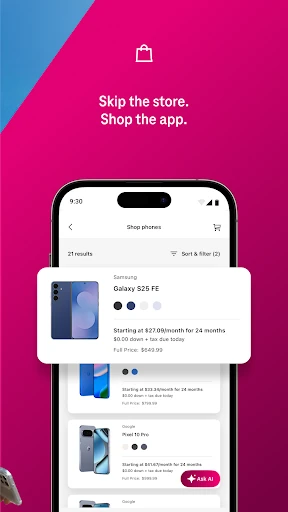
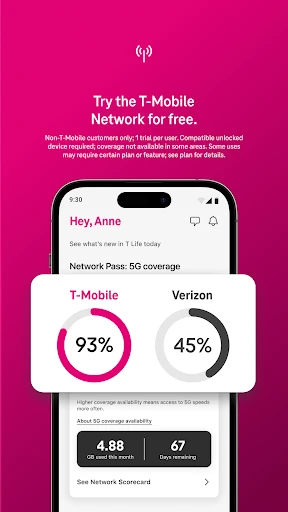
The app’s description points to account access, device shopping, benefits, and connected services as its main areas. That gives a new user a practical sense of what to explore without assuming every tool will be relevant. If I’m not already a T-Mobile customer, the trial and switching information provide another reason to look around, though the trial has eligibility conditions and requires a compatible device.
Everyday Account Tasks
For day-to-day use, the most straightforward value is having account tasks in the same app as other carrier-related needs. I can pay bills and track usage, then look at plans or devices when a change is on my mind. Those are distinct jobs, but they belong to the same customer relationship, so it makes sense to find them together.
I’d still use the app with a little intention. A quick bill or usage check is different from spending time comparing devices or exploring benefits. T-Life brings these activities together, but that doesn’t mean every visit needs to cover all of them. Keeping the immediate task in view helps the app feel like a convenient service hub rather than a collection of unrelated distractions.
Benefits and Connected Services
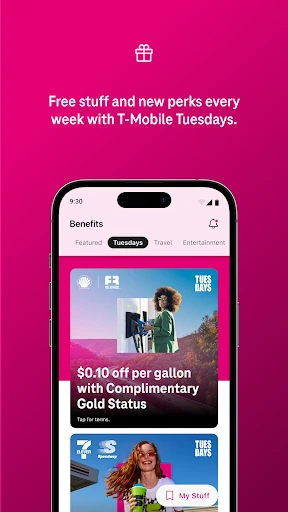
The benefits side gives T-Life a character beyond account maintenance. The description mentions perks such as Netflix On Us, savings on travel and dining, and T-Mobile Tuesday freebies and prize opportunities. These examples make the app worth revisiting even when I don’t have a bill or usage question, although the particular benefits and their terms can be subject to change.
There are also tools for other parts of a T-Mobile setup. The app can help configure a T-Mobile Home Internet gateway and stay connected with SyncUP devices for home, car, and family. Scam Shield is described as protection against spam and robocalls, with VPN-based protection against malicious internet connections. These are specific service features, not a promise that every user will need or use them.
A Useful Monthly Rhythm
A simple routine could start with a bill check, followed by a quick look at usage if I’m wondering whether my current plan still fits. If a device purchase is on the horizon, I can then browse the available selection or compare plans in the same app. That sequence ties the account information to an actual decision instead of encouraging me to browse without a reason.
I’d save benefits for a separate, occasional check-in. That gives me a chance to see whether a perk or T-Mobile Tuesday offer is relevant without making it part of every account visit. Customers who use Home Internet or SyncUP can fold those tools into their own routine as needed. The best workflow depends on which T-Mobile services I actually have.
Keep the Scope in Mind
T-Life’s main limitation is also its defining trait: it covers a lot. Account tasks sit alongside shopping, benefits, connected devices, Scam Shield, and access to financial accounts. That breadth can be convenient, but a person who only needs one function may not value the rest. It is worth judging the app by the T-Mobile services I use, rather than by the number of sections it offers.
Some of the experience also depends on eligibility and device compatibility. The described T-Mobile Trial is for non-T-Mobile customers, is limited-time, allows one trial per user, and requires a compatible device; 5G access requires a 5G-capable device. Benefits and trial terms can change. Those conditions are useful to keep in mind before treating any particular offer as part of the everyday experience.
T-Life makes the most sense as a broad T-Mobile companion: it combines useful account basics with shopping, benefits, and tools for other T-Mobile services. I like the practical range, especially for a customer who would use several of those areas, but someone seeking a single-purpose app may find it more than they need.
I’d recommend giving it a try if you’re a T-Mobile customer who wants account tasks and service extras close at hand. If you’re considering a switch, its plans, device shopping, and trial information may also be useful. Just keep in mind that offers have conditions and the app’s wide scope won’t suit everyone.
T-Life Frequently Asked Questions
What is T-Life used for?
T-Life is T-Mobile’s app for managing an account, paying bills, tracking usage, shopping for devices, and exploring plans and benefits. It also includes access to tools and services such as Home Internet gateway configuration, SyncUP devices, and Scam Shield. Which parts are useful depends on the T-Mobile services you use.
Which devices can run T-Life?
T-Life is an Android app available through Google Play. The Android version requirement varies, so check the store listing for the current requirement for your device. The app description also notes that a compatible device is needed for the T-Mobile Trial, and a 5G-capable device is required to access the 5G network.
What Android version does T-Life require?
The Android requirement for T-Life varies. Check its Google Play store listing to see the requirement that applies to the current release and your device. The app’s current version can vary as well, so the store is the best place to confirm those details before installing or updating.
Does T-Life cost money or include purchases?
T-Life is free to download, and the provided app information does not indicate in-app purchases. It does indicate that the app contains ads. Terms for promotions and benefits can change, so check the store listing and any offer details for current information.
Is T-Life a good fit for every phone user?
It is most useful for people who use T-Mobile services and want account management, shopping, benefits, or connected-service tools in one app. It may be less useful if you do not use T-Mobile or only want a focused tool for one occasional task. The app’s features are tied to T-Mobile services.
Pros
- Combines bill payment and usage tracking with shopping, plans, and member benefits.
- Supports T-Mobile Home Internet gateway setup and SyncUP device connections.
- Includes Scam Shield and access to several T-Mobile-related services.
- Free to download, with no in-app purchases indicated in the provided facts.
Cons
- Its broad range may feel unfocused if you only need one account task.
- Some trial and network features depend on eligibility or compatible hardware.
- Benefits and promotions may change, so they are not a fixed part of the experience.
- Category
- Lifestyle
- Version
- VARY