Xhorse
- 4.53K
- 4.3
- Installs
- 100.00K
- Price
- Free
Screenshots
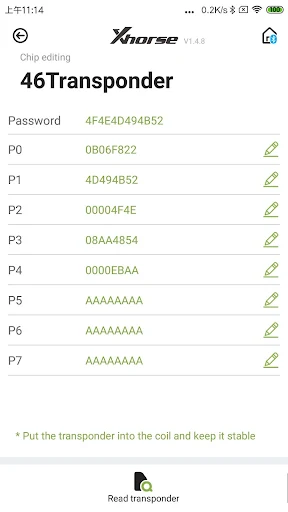
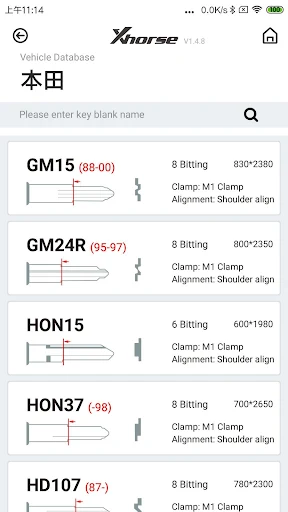
Analysis by Reviewed APKs
Xhorse is a companion app for locksmiths who use the company’s MINI KEYTOOL or DOLPHIN devices. It connects to those tools over Bluetooth and provides functions for key and transponder work, along with data retrieval and customer service. I see it as a specialized workshop companion rather than an everyday car app: useful when the matching hardware is part of your routine, but limited without it.
A job at the workbench
Picture a locksmith preparing a replacement key at the bench. With a compatible MINI KEYTOOL or DOLPHIN connected over Bluetooth, Xhorse is the phone-side companion for operations supported by that device. The exact work depends on which tool is connected: one offers transponder and remote functions, while the other covers key decoding and cutting-related tasks. That device-dependent setup is the app’s central idea, not an optional extra.
When I think through that workflow, the appeal is having device-related operations and support gathered in one app instead of treating the phone as a generic reference screen. A locksmith can use it for key blade, remote, or chip-related work where the connected tool supports the task, and can also access data retrieval and customer service. The app’s value is therefore practical and specific: it works alongside the hardware already chosen for the job.
A companion, not a toolbox
Xhorse sits between a phone app and dedicated locksmith equipment. It is not a general automotive diagnostic app, a consumer remote-control app, or a standalone way to cut keys. The described operations rely on connecting the MINI KEYTOOL or DOLPHIN, and the available functions change with the connected device. That makes it a different proposition from software intended to explain vehicle problems or help drivers manage routine ownership.
Compared with handling every task through separate device interfaces and support channels, Xhorse offers a shared app for device-related functions and customer service. I would not choose it expecting broad vehicle diagnostics, a general vehicle database, or a complete locksmith setup in software alone; those claims are not part of its stated purpose. It makes the most sense for professionals already working with the named Xhorse tools, rather than curious drivers with no matching equipment.
Keep the workflow simple
A useful habit is to think about the connected tool before opening the app. Since functions depend on whether MINI KEYTOOL or DOLPHIN is connected, knowing which device is on the bench helps set expectations for what the app can do. I’d keep the phone and the relevant tool together during a job, then use the app for the operation that matches that device rather than expecting every listed function to appear in every setup.
The app also includes data retrieval and customer service, so it can be useful to remember those as part of the same work routine, not just the key-related operations. I’d treat the app as a companion to an established process: connect the supported device, use the relevant functions, and turn to the available support options when needed. That modest approach is more realistic than expecting a phone app to replace hands-on equipment or locksmith judgment.
More From Our News Desk

Zoom Meetings, Google Meet, or Teams: Which Is Easiest to Join?

How I Build a Free Streaming Lineup With Tubi

Why Crunchyroll Is the Default Anime App for So Many Fans

YouTube TV: A Practical Guide to Cutting Cable

Rummikub and the Small Comfort of Phone Games

TeamViewer Remote Control or AnyDesk for Helping Family?
Who will find it useful
I’d recommend Xhorse to locksmiths who already use the MINI KEYTOOL or DOLPHIN and want an app that supports the tasks those devices perform. Its specific mix of transponder, remote, decoding, and key-cutting-related functions gives it a clear professional audience. The customer service and data retrieval options add practical value around the core work, especially for someone who wants device functions and assistance accessible through one companion app.
It may not suit drivers looking for help with everyday car ownership, or locksmiths who do not use compatible Xhorse equipment. The app’s functions depend on the connected device, so the hardware is part of the experience rather than a minor accessory. I’d also steer away from treating it as a broad diagnostic tool: its stated focus is key and related device operations, not a general-purpose vehicle troubleshooting suite.
Xhorse is published by Xhorse.com and is categorized as a Tools app on Google Play. It is free to install, has no in-app purchases, and contains no ads. Google Play shows an Everyone content rating, more than 100,000 installs, and a 4.3-star rating from about 4,530 ratings. Those figures give a useful snapshot of its reach, though the audience remains specialized rather than general.
The app’s current version is 5.0.5. It was released on January 9, 2019, and its latest recorded update is October 28, 2026. A minimum Android version is not included in the supplied app details, so check Google Play for compatibility with a particular phone. For day-to-day use, the more important requirement is having a supported MINI KEYTOOL or DOLPHIN device for the functions that depend on hardware.
A closer look at Xhorse in the workshop
First impressions and setup
Xhorse makes its purpose clear through the equipment it supports: MINI KEYTOOL and DOLPHIN. It is aimed at professional locksmith work, not casual experimentation, and its functions are tied to a compatible device. That gives the app a narrower starting point than a typical consumer utility, but it also makes the intended role easy to understand. The phone is part of the workflow, while the connected tool does much of the specialized work.
To use the device-dependent functions, the app connects to the relevant equipment through Bluetooth. I’d approach setup with the hardware nearby and with a clear idea of which device I’m using, since that determines what operations are relevant. The supplied details do not describe every setup step, so I wouldn’t assume a particular pairing sequence. The core expectation is straightforward: connect a supported tool, then use the functions available for that tool.
The daily working rhythm
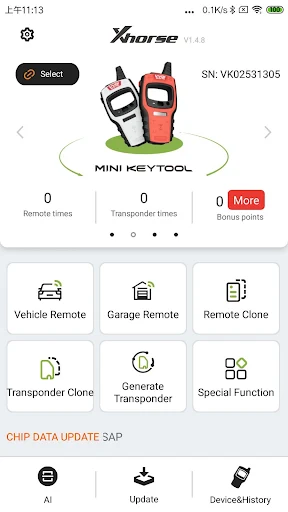
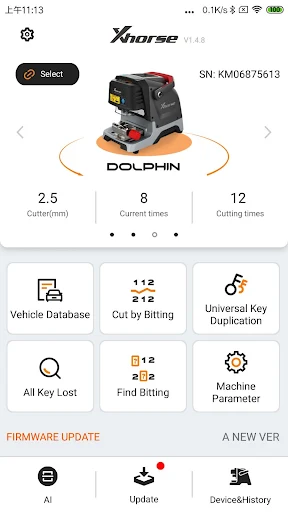
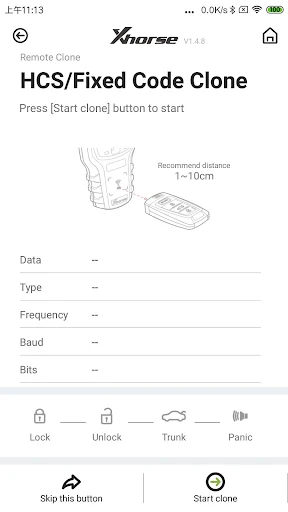
In a typical workday, Xhorse is best understood as an interface for the tasks associated with a connected device. With MINI KEYTOOL, the described options include transponder generation, cloning and editing, plus remote generation and cloning. With DOLPHIN, the focus shifts to decoding keys, cutting keys, universal key duplication, and checking key bitting. Those different lists make the hardware connection central to choosing the right workflow.
That division is useful to keep in mind when moving between jobs. Rather than treating Xhorse as one uniform collection of tools, I’d think of it as a shared app whose capabilities change with the connected equipment. This framing avoids expecting a DOLPHIN workflow while using MINI KEYTOOL, or vice versa. For someone who knows their equipment, the app’s role is easier to place: support the work the connected device is designed to do.
Device-specific functions
The standout feature is not one universal tool but the range of operations available across the two named devices. MINI KEYTOOL covers several transponder and remote tasks, including generation, cloning, and editing. DOLPHIN’s described functions focus more directly on physical key work, from decoding and cutting to universal key duplication and querying key bitting. The distinction makes the app relevant across related locksmith tasks without implying that every function works with every device.
Xhorse also includes data retrieval and customer service, which give the app a role beyond launching device operations. The description mentions upgrade bulletins for MINI KEYTOOL as well. I’d consider those supporting functions rather than reasons to expect a full knowledge base or a complete diagnostic system. What stands out is the combination of hardware-linked operations and service resources in an app designed around locksmith use.
A practical job routine
For a locksmith handling a key-related job, a sensible routine is to identify which supported tool fits the task, connect that device to the app over Bluetooth, and then use the corresponding operations. A MINI KEYTOOL user might be working with transponder or remote functions; a DOLPHIN user might be focused on decoding, cutting, or key-bitting queries. Keeping that distinction in mind can make the app feel more like a useful companion than a confusing list of unrelated options.
After the device work, data retrieval or customer service may be relevant as part of the same broader workflow. I’d keep the app available on the phone used alongside the equipment and avoid relying on it as a substitute for the tool itself. That’s a small but important expectation to set: Xhorse supports the connected-device routine, while the specialized equipment remains central to the job.
Limits to keep in mind
The main limitation is also the app’s defining feature: what it can do depends on the connected device. Without a MINI KEYTOOL or DOLPHIN, the described key and transponder operations are not a standalone phone experience. And even with compatible hardware, the two devices have different functions, so it is worth checking that a particular task belongs to the tool in hand rather than assuming one device covers every operation.
Xhorse is also specialized enough that most drivers will have little reason to install it. Its focus is locksmith-oriented key and related device work, not general vehicle diagnostics or a broad set of ownership tools. The app may be a sensible addition to a matching professional setup, but I would judge it as one part of that setup, not as a complete solution by itself.
Xhorse has a clear job: connect locksmiths to functions associated with MINI KEYTOOL and DOLPHIN equipment, with data retrieval and customer service alongside. I like that its purpose is focused, and the device-specific task lists make its role easy to understand. The trade-off is equally clear: its usefulness depends heavily on having the matching hardware.
If you are a locksmith already using one of those devices, Xhorse is worth considering as its companion app. If you are a driver or expect a general car diagnostic tool, it is not aimed at your needs. I’d recommend it for the right professional setup, while keeping expectations tied to the connected equipment.
Xhorse Frequently Asked Questions
What is the Xhorse app used for?
Xhorse is a locksmith-focused companion app for operations involving the MINI KEYTOOL and DOLPHIN devices. Depending on the connected tool, it supports functions such as transponder and remote work, key decoding and cutting, universal key duplication, and key-bitting queries. It also provides data retrieval and customer service.
Which phones and devices support Xhorse?
Xhorse is available on Google Play for Android. Its device-related functions connect over Bluetooth to the MINI KEYTOOL or DOLPHIN. The minimum Android version can vary by app release and device, so check the Google Play page for the current requirement before installing it on a particular phone.
Is Xhorse free, and does it have purchases?
Xhorse is free to install on Google Play. The supplied app details show no in-app purchases and no ads. The app’s key-related functions depend on compatible MINI KEYTOOL or DOLPHIN equipment, so consider the hardware requirement separately from the app’s installation cost.
Does Xhorse work without locksmith equipment?
The app’s described transponder, remote, decoding, and key-cutting-related functions depend on connecting a MINI KEYTOOL or DOLPHIN device over Bluetooth. It is therefore not presented as a standalone key-making tool on a phone. Its suitability depends on whether you use the supported equipment and need locksmith-focused functions.
Is Xhorse useful for everyday drivers?
Xhorse is designed for locksmiths and people working with its compatible devices, rather than general car owners. Its focus is key and related equipment operations, not everyday vehicle management or broad diagnostics. Drivers without the matching hardware are unlikely to get much value from its specialized workflow.
Pros
- Supports a broad range of key-related tasks across MINI KEYTOOL and DOLPHIN devices.
- Connects to compatible equipment over Bluetooth.
- Includes data retrieval and customer service alongside device functions.
- Free to install, with no ads or in-app purchases.
Cons
- Most key-related functions depend on compatible Xhorse hardware.
- Available operations differ according to the connected device.
- Its locksmith-focused purpose offers little for general drivers.
- Category
- Tools
- Version
- 5.0.5











