XBOX
- 2.33M
- 4.5
- Installs
- 100.00M
- Price
- Free

Screenshots
Analysis by Reviewed APKs
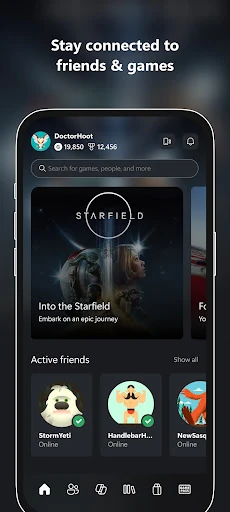
The XBOX app is a companion for keeping up with friends, games, and supported gaming devices from a phone or tablet. I found its appeal less in replacing a console and more in making the small between-session jobs easier: checking messages, chatting, browsing games, or queuing an install. It suits people already in the Xbox world, though its many connected features work best when you have a reason to use them.
Between-Session Gaming
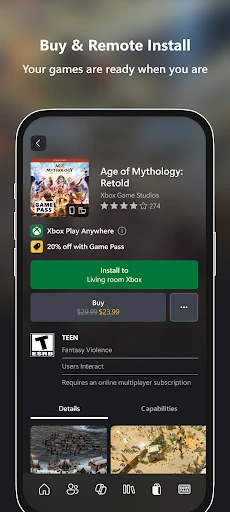
Picture finishing a game night, then remembering the game your friend mentioned while you are away from your console. I can open XBOX on my phone, browse games, look at Game Pass recommendations, and buy a title without switching devices. If I want it ready for later, I can queue a game for installation on my console. That is a useful bridge between deciding what to play and actually sitting down to play it.
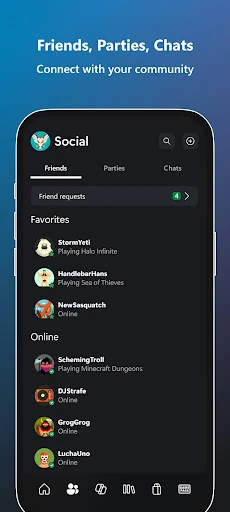
The same in-between moments are handy for keeping a group together. I can check messages and game invites, see achievements, and use voice or text chat with friends who are on console or PC. The app also brings game clips and screenshots from my console into a place where I can share them to social networks. It gives gaming plans a little more continuity when everyone is not in front of a screen.
A Companion, Not a Console
Compared with opening a console just to check a message or see what a friend is doing, the phone app is a convenient shortcut. It gathers social updates, game discovery, remote installs, and Rewards points in one mobile place. When I have a spare minute on a commute or during a break, that is a better fit than powering up a full gaming setup just to handle a small task.
Still, I would not treat XBOX as a substitute for playing games on a supported gaming device. Its description focuses on staying connected, managing game-related tasks, and communicating; it does not present the phone app as the place to play console games. It also makes most sense to people already interested in Xbox friends, games, and services. If gaming is not part of your routine, the stream of related activity may feel unnecessary.
Small Habits That Help
I get more out of a companion app when I check it for a purpose rather than browse it endlessly. Before a planned session, I can look for invites and messages, then queue an installation if I have chosen a game. After playing, I can check achievements or pick out a clip to share. These are small tasks, but handling them from a phone can make the next session feel less like a scramble.
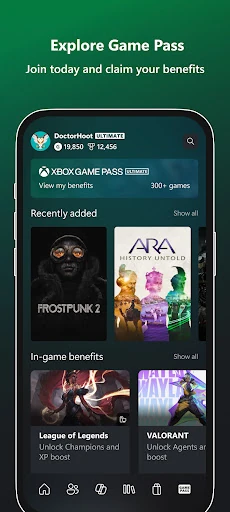
Game discovery can also work as a light planning habit. I can explore Game Pass, pay attention to recommendations and new-game notifications, and keep a wishlist to share. The app includes Rewards points tracking, claiming, and redemption, so that is another reason to stop by when I am already checking in. I would keep notifications focused on updates I care about, rather than letting every gaming prompt interrupt the day.
More From Our News Desk

Zoom Meetings, Google Meet, or Teams: Which Is Easiest to Join?

How I Build a Free Streaming Lineup With Tubi

Why Crunchyroll Is the Default Anime App for So Many Fans

YouTube TV: A Practical Guide to Cutting Cable

Rummikub and the Small Comfort of Phone Games

TeamViewer Remote Control or AnyDesk for Helping Family?
Who Will Get the Most From It
I would recommend XBOX to people who regularly play with friends and want a simple way to stay in touch when they are away from their console. Chat across console and PC, invite notifications, and messages are practical reasons to keep the app nearby. It also suits players who like to browse games on their phone, queue console installs, share captures, or keep track of Rewards points between sessions.
It may be less appealing if you only want a place to play games on your phone, or if you do not use Xbox gaming devices and services. The app is built around a connected gaming life, so its value depends on having friends, games, or supported devices to connect with. I would also think about how many notifications I want from a gaming companion before making it part of my everyday phone routine.
XBOX is an entertainment app from Microsoft Corporation. On Google Play, it has over 100 million installs and a 4.5-star rating from around 2.3 million ratings. The app is free to download, with no in-app purchases or ads according to the supplied app details. Its content rating is Teen, which is worth keeping in mind when deciding whether it is suitable for a younger user.
The supplied app details give version 2610.2.3, a release date of November 19, 2013, and a last update date of October 26, 2026. XBOX is intended for use from a phone or tablet and connects with supported gaming devices. The minimum Android version can vary with app compatibility and device requirements, so check Google Play for the current requirement on your device.
How XBOX Fits Into Everyday Gaming
Opening the App
My first impression is that XBOX has a broad job: it is meant to connect friends, games, and supported devices, rather than focus on one narrow utility. That makes the app relevant at several points in a gaming day, from checking a message to looking for something new to play. I would start by deciding which of those jobs matters most to me, so the range of options feels useful instead of busy.
The description supports using the app on a phone or tablet while away from home, and its features revolve around an existing Xbox gaming routine. I would think about the friends and devices I want to stay connected to before relying on it for a particular task. Compatibility requirements can change, so checking Google Play for the current Android requirement is a sensible first step when setting it up.
A Daily Check-In
Day to day, the most practical role is acting as a social inbox for gaming. I can check messages, see game invites, and keep a conversation going with voice or text chat even when friends are playing on console or PC. That is useful when a group is arranging a session at different times or when I want to catch up without turning on the television.
There is a nice sense of continuity in also seeing achievements from me and my friends. Rather than making a separate trip to a console just to see what happened, I can use a phone check-in to catch up on that activity. I would not need to open the app constantly; a quick look when I have a few minutes is enough to make its social features feel worthwhile.
Features With a Purpose
Remote installation is one of the app's clearest conveniences. When I know what I want to play later, I can queue a game from my phone for installation on my console. It turns a small planning task into something I can do away from the gaming setup, which is especially useful when I remember a download before I get home.
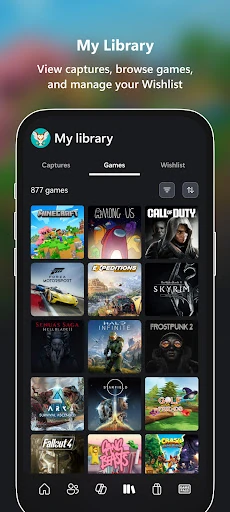
Game discovery is another substantial part of the experience. I can explore Game Pass, see customized recommendations, get notifications about new games, and queue titles to play. The app also lets me buy games without leaving it. Those options make browsing feel connected to an eventual play session rather than just a catalog visit, although the usefulness depends on what I am looking for.
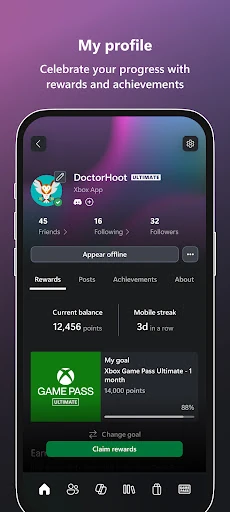
For players who like sharing, the app provides access to game clips and screenshots captured from a console, with sharing to favorite gaming and social networks. I can also track, claim, and redeem Rewards points. Those features will not matter equally to everyone, but they give different kinds of players a reason to use the app beyond chat.
A Useful Pre-Game Routine
A practical routine for me would begin with a quick check before a planned evening of play. I would look for messages or invites, see whether friends are available, and browse recommendations if I have not chosen a game. If a title catches my eye, I can queue it for installation on my console and get on with the rest of my day instead of waiting beside the setup.
After a session, I could return to check achievements or share a clip or screenshot from the console. If I am already in the app, it is also a natural moment to see whether there are Rewards points to track, claim, or redeem. None of these steps needs to become a chore. The value comes from folding them into moments when I already have my phone in hand.
Limits to Keep in Mind
XBOX is a companion rather than a replacement for the gaming device itself. Its stated jobs are communication, discovery, remote installation, sharing, notifications, and Rewards management. Someone expecting the app to provide the full console gaming experience on a phone is looking for a different kind of product. Its strengths are most apparent when there is a supported device and an Xbox gaming routine to connect to.
The number of features can also make the app feel like more than a simple chat tool. If all I want is to message one friend, game browsing, recommendations, captures, and Rewards may be extras I rarely touch. Notifications about invites and new games can be useful, but I would choose carefully what I want to hear about so gaming updates do not become background noise.
Finally, the experience is tied to supported gaming devices and the app's compatibility with a particular phone or tablet. The supplied information does not give a minimum Android version, so I would check Google Play before downloading to an older device. That is a small practical step, but it matters more than guessing based on how long the app has been available.
I see XBOX as a handy connective layer for an existing gaming life. Its best everyday touches are checking in with friends, managing a game install from a phone, and keeping clips, recommendations, and Rewards within reach. The app has a lot to cover, but those small conveniences make a clear case for keeping it around if you play regularly.
I recommend it to Xbox players who want their social and game-related tasks close at hand, especially those who coordinate with friends across console and PC. If you do not use supported gaming devices or want a mobile game-playing app, it is unlikely to be a useful fit. For the right player, it is a practical companion rather than an essential destination.
XBOX Frequently Asked Questions
What is the XBOX app used for?
XBOX helps you stay connected with friends, games, and supported gaming devices from a phone or tablet. You can use voice and text chat, check messages and invites, browse Game Pass and recommendations, queue console game installations, buy games, share console clips and screenshots, and manage Rewards points.
Which devices can I use the XBOX app on?
The app is described for phones and tablets and connects with supported gaming devices. Its chat can include friends on console or PC. The current device and compatibility requirements may vary, so check Google Play for the details that apply to your phone or tablet.
What Android version does XBOX require?
The minimum Android version can vary as app compatibility changes and is not specified in the supplied app details. Check the XBOX page on Google Play for the current requirement before installing, particularly if you use an older phone or tablet.
Does the XBOX app cost money?
The app is free to download, and the supplied details indicate that it has no in-app purchases or ads. The app also lets you buy games, so check Google Play and the relevant purchase details for current pricing before buying anything.
Is the XBOX app suitable for casual players?
It can suit casual players who use Xbox gaming devices and want to check messages, chat, browse games, or queue an installation from a phone. It is less useful if you do not use supported devices or expect to play console games directly in the app. Its content rating is Teen.
Pros
- Keeps voice and text conversations going with friends on console or PC.
- Lets players queue game installations on a console from a phone.
- Combines game discovery, console captures, notifications, and Rewards tools.
Cons
- Its usefulness depends on having an Xbox gaming routine and supported devices.
- The variety of features may feel excessive if you only want messaging.
- It is a companion app, not a replacement for playing on a gaming device.
- Category
- Entertainment
- Version
- 2610.2.3