Watch Faces by Facer
- 57.38K
- 4.6
- Installs
- —
- Price
- Free

Screenshots


Analysis by Reviewed APKs
Watch Faces by Facer is an iPhone app for finding and sending new designs to an Apple Watch. Its appeal is range: the catalog covers practical digital and fitness-style layouts as well as art, characters, and licensed pop-culture designs. I’d recommend it to people who like changing their watch’s look. It’s a discovery and personalization tool, not a replacement for the Apple Watch’s built-in features.
A fresh face for the day
When I want my Apple Watch to feel a little less familiar, Facer gives me a large collection to browse rather than making me settle for the same face again. I might look for something clean and analog for a quiet weekend, then browse fitness or utility designs when I want a more information-focused look. The useful part is being able to explore styles in one place before sending a choice to the watch.
The basic handoff is straightforward: install Facer on the iPhone, make sure its watch app is installed, choose a design, and tap “Send to watch.” From there, the Apple Watch app on the iPhone opens and adds the face to its list. One small wrinkle is that a newly downloaded face may look blank in that iPhone app until I close and reopen it.
A catalog, not a watch system
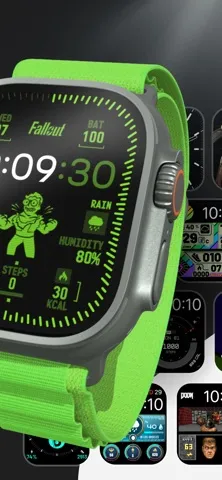
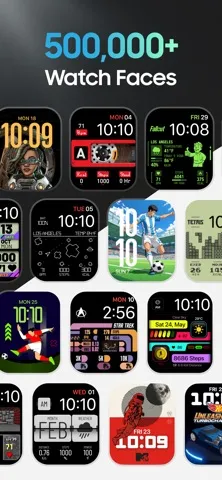
Facer makes most sense alongside Apple’s own watch-face options. Instead of focusing only on the faces already available on the watch, it offers a much broader collection to explore, including designs from artists and licensed brands such as PAC-MAN, Tetris, Star Trek, and Fallout. That variety is the point: I can browse for a particular mood or fandom rather than treating face selection as a one-time setup decision.
It is not a general smartwatch management app, and the material describes it specifically as a way to discover, customize, and share watch faces. If I’m looking for a new watch, a fitness service, or a way to replace Apple Watch’s other functions, this is the wrong tool. Facer also mentions support for other smartwatch platforms, but the iOS app’s setup instructions are centered on Apple Watch.
Browse with a little purpose
I’d get more out of Facer by starting with the kind of face I need, not by scrolling indefinitely. The catalog spans analog, digital, hybrid, fitness, utility, sports, world-time, astronomy, seasonal, and artistic styles. Keeping a practical goal in mind—easy-to-read information, a particular visual style, or a favorite character—makes the huge selection feel less like an endless gallery.
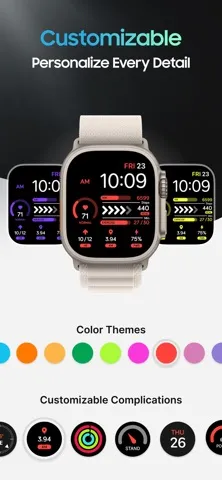
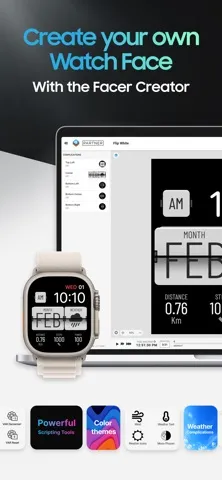
It also helps to treat changing a face as a small routine. I can browse when I have a spare moment, send a choice to the watch, and check the result on my wrist before deciding whether it suits my day. If I want something more personal than the catalog offers, Facer points creators to its web-based Creator for designing and sharing faces without coding.
More From Our News Desk

Zoom Meetings, Google Meet, or Teams: Which Is Easiest to Join?

How I Build a Free Streaming Lineup With Tubi

Why Crunchyroll Is the Default Anime App for So Many Fans

YouTube TV: A Practical Guide to Cutting Cable

Rummikub and the Small Comfort of Phone Games

TeamViewer Remote Control or AnyDesk for Helping Family?
Who will enjoy Facer
I’d recommend Facer to Apple Watch owners who enjoy personalizing their devices, follow particular pop-culture brands, or like switching between expressive and practical designs. The mix of free faces, premium collections, and creator-made work gives browsing a clear purpose beyond picking a default. It should also appeal to anyone who likes seeing many different visual approaches before settling on a look for their watch.
It may be less appealing if I’m already happy with the faces I use, or if I want an app whose main job is something other than watch-face discovery. The large catalog can also be more choice than a person wants when all they need is one simple design. And while the description mentions multiple smartwatch platforms, this iPhone experience is most directly suited to people setting up an Apple Watch.
Watch Faces by Facer is made by Little Labs, Inc. On the Apple App Store it has a 4.6 out of 5 rating from around 57,000 ratings. The app is free to download, and its content rating is 4+. Facer’s description includes both free designs and premium faces, so anyone considering a purchase should check the App Store for current purchase details.
The app requires iOS 16.0 or later. Its current version is 6.2.77. Facer was released on March 3, 2016, and the most recent update shown in the provided app information is November 3, 2026. The setup described for Apple Watch uses the iPhone app together with the Facer app on the watch.
Making Watch-Face Browsing Feel Useful
A straightforward starting point
My first impression is that Facer is built around abundance. The description puts the collection at more than 500,000 watch faces, with thousands of free options, so the first challenge is choosing where to look. The range is broad enough to cover familiar analog and digital styles as well as more specialized designs for fitness, sports, entertainment, and art.
The setup instructions are refreshingly concrete. I install the iPhone app, make sure the Facer watch app is installed, browse, and send a chosen face to the watch. That sequence gives the app a clear job from the start. The only setup detail I’d keep in mind is the note that a face can appear black or blank in Apple’s iPhone watch app until that app is reopened after download.
The everyday browsing loop
Day to day, the main experience is looking through designs and deciding which one belongs on the watch next. Facer’s breadth makes that loop useful for small changes: a more restrained face for work, a colorful character design for fun, or a utility-oriented layout when I want information to take priority. The collection includes options for different tastes rather than presenting one house style.
Sending a face to the watch is the practical bridge between browsing and using the result. I can choose a design in Facer, tap the send option, and continue through the Apple Watch app’s face list. That means the iPhone is where discovery starts, while the watch is where I see whether the design actually feels right in ordinary use.
A catalog with character
Licensed designs are one of the features that give the catalog a distinctive angle. Facer names brands and characters including Fallout, PAC-MAN, Tetris, Star Trek, Call of Duty, Ghostbusters, Street Fighter, and SpongeBob SquarePants. For fans, that can make watch-face selection more personal than choosing between generic colors or shapes.
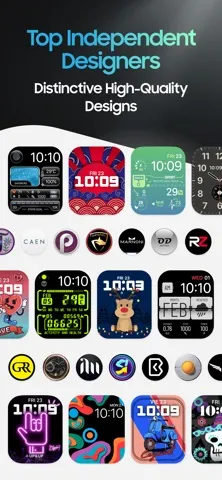
There is plenty beyond branded artwork. The described categories include classic analog, digital, hybrid, health and fitness, data-rich utility, world time, astronomy, seasonal, sports, and luxury-inspired designs. Facer also says new brands, artists, and collections are added regularly, and that faces come from creators and designers.
For people who want to go beyond browsing, Facer points to Facer Creator on the web. It is intended for designing and sharing watch faces without coding. That gives the app a creator-community dimension, although designing happens through the web-based Creator rather than being presented as a core iPhone setup step.
A small weekly refresh
A simple way I’d use Facer is to set aside a few minutes when I’m ready for a change. I’d browse toward one goal—perhaps a cleaner look, a favorite character, or a face with more utility—then send a candidate to the watch. Trying a design in the context of an ordinary day is more useful than judging it only as a thumbnail in a collection.
If the first choice does not feel right, the catalog gives me plenty of other directions to explore. I can switch between categories rather than repeating the same search, and the range of styles makes that process feel less like shopping for one fixed product. For an especially personal result, the Creator option is there for making and sharing an original design.
Keep expectations in check
The size of the collection is both its main draw and a possible source of friction. With so many faces, browsing can take longer than simply picking a familiar built-in option. I’d approach it with a style or use in mind instead of expecting the perfect design to appear immediately. The catalog’s range helps, but it does not remove the work of choosing.
The described Apple Watch flow also depends on having Facer installed on both the iPhone and the watch, and it passes through Apple’s watch app when adding a face. That is worth knowing if I expect every step to happen inside one screen. The note about a face briefly appearing blank in Apple’s iPhone app is a small but practical caveat.
Finally, Facer is centered on watch-face personalization. It can help me find, send, create, and share designs, but it should not be mistaken for a broader watch-management or fitness service. The description mentions compatibility with other platforms, while the specific instructions here are for Apple Watch.
Facer’s strongest quality is choice. It brings together a wide range of practical, artistic, and licensed watch faces, then gives Apple Watch owners a clear way to send a selection to the device. The browsing process has a small handoff wrinkle, but the app’s focus is easy to understand.
I’d try it if I enjoy refreshing my Apple Watch’s appearance or want to browse designs tied to particular interests. If I rarely change faces, the catalog may be more than I need. For people who like personalizing a watch, though, Facer is a useful place to start.
Watch Faces by Facer Frequently Asked Questions
What is Watch Faces by Facer used for?
Watch Faces by Facer is used to discover and send watch-face designs to an Apple Watch. Its collection includes analog, digital, fitness, utility, artistic, sports, and entertainment styles, as well as designs featuring licensed brands. The description also points to a web-based Creator for designing and sharing original watch faces.
Which devices can I use Watch Faces by Facer on?
The app is available for iPhone and its setup instructions cover Apple Watch, with the Facer watch app installed as part of the process. Facer also describes support for other smartwatch platforms. The exact devices and compatibility details can vary, so it is worth checking the App Store information for the current requirements.
What iOS version does Watch Faces by Facer require?
Watch Faces by Facer requires iOS 16.0 or later. Its described Apple Watch setup uses the iPhone app and the Facer app on the watch. Compatibility details can change as the app is updated, so check the App Store before installing if you need to confirm support for a particular device.
Does Watch Faces by Facer cost anything?
The app is free to download, and Facer describes thousands of free watch faces alongside premium faces and exclusive collections. Current purchase options and prices may vary, so check the App Store for the latest details before buying anything.
Is Watch Faces by Facer a good fit for me?
It is a good fit if you own an Apple Watch and enjoy trying different looks, browsing licensed designs, or exploring work by artists and creators. It may be less useful if you rarely change watch faces or want an app for a different smartwatch task. The collection is broad, so browsing with a style in mind can help.
Pros
- A wide range of analog, practical, artistic, and entertainment-focused designs.
- Licensed faces include recognizable brands such as PAC-MAN, Tetris, and Star Trek.
- The send-to-watch flow gives browsing a clear next step.
- A web-based Creator offers a route to designing and sharing original faces.
Cons
- The huge catalog may take time to browse without a specific style in mind.
- Adding a face involves handing off to Apple’s watch app.
- A newly downloaded face may briefly appear blank in the iPhone watch app.
- Category
- Lifestyle
- Version
- 6.2.77











