Wansview Cloud
- 45.76K
- 4.5
- Installs
- 1.00M
- Price
- Free

Screenshots
Analysis by Reviewed APKs
Wansview Cloud is a phone app for viewing and managing a compatible Wansview Cloud Camera at home. I see it as a practical option for people who want to check on pets, family members, or a room while they are away, rather than a general-purpose smart-home hub. Its live video, motion alerts, and recorded-video review cover the basics, though the experience depends on having the camera.
A Quick Check From Away
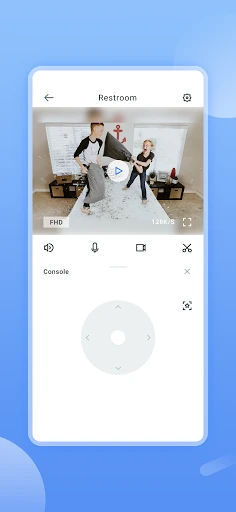
Imagine leaving home for the day and wanting to see whether your dog has settled down or whether a parent is doing all right. With a Wansview Cloud Camera set up, I can open the app and view the room in real time from my phone. If the camera supports movement controls, I can pan or tilt to look around instead of relying on one fixed view.
Motion alerts give the app another role in that routine. Rather than repeatedly opening a live feed, I can use an alert as a prompt to check what happened, then review recorded video when I need more context. Two-way audio also makes the camera more than a silent window: I can talk through it when that is useful. These tools make the most sense for occasional, practical check-ins.
A Camera Companion, Not a Hub
Wansview Cloud is built around its own compatible camera, so it is a focused companion rather than a broad home-monitoring platform. Its strengths are straightforward: a live view, motion notifications, recorded-video review, audio in both directions, and camera controls. If I already use a Wansview Cloud Camera, that focused approach is appealing. I can get to the camera experience without treating the app as a control center for unrelated devices.
That narrow purpose also sets a boundary. This is not a general home-automation app, a video editor, or a tool for controlling cameras from every brand. The description centers on watching a home and managing the compatible camera, not on organizing a large collection of connected products. I would choose it for camera access and check-ins, not as a replacement for a wider smart-home system or an everyday messaging app.
Small Habits That Help
I would make a quick live-view check part of the moments when I actually have a reason to look in: after leaving a pet alone, for instance, or when I want to confirm a room is as expected. Motion alerts can reduce the temptation to keep the feed open all day. When an alert arrives, I can decide whether to look live or check a recording instead.
Camera movement and two-way audio are most useful when I use them deliberately. I can pan or tilt to inspect a different part of the room, then speak through the camera if a quick voice prompt would help. For a calmer routine, I would keep the camera view and alert checks tied to specific needs instead of treating every notification as urgent. That makes the app feel like a useful window, not a constant interruption.
More From Our News Desk

Zoom Meetings, Google Meet, or Teams: Which Is Easiest to Join?

How I Build a Free Streaming Lineup With Tubi

Why Crunchyroll Is the Default Anime App for So Many Fans

YouTube TV: A Practical Guide to Cutting Cable

Rummikub and the Small Comfort of Phone Games

TeamViewer Remote Control or AnyDesk for Helping Family?
Who May Find It Useful
I would recommend Wansview Cloud to someone who owns a compatible Wansview Cloud Camera and wants a simple way to check in from a phone. Pet owners, people keeping an eye on a room, and families who want a remote view may appreciate the mix of live streaming, motion alerts, recordings, and two-way conversation. The combination is more useful than a static live feed when a check-in needs a little context.
It may not suit someone who does not have the compatible camera, or who expects one app to manage cameras from many brands and other smart-home devices. It is also not a substitute for being physically present when a person or pet needs hands-on care. I would treat it as a convenient remote viewing tool, then decide whether its focused camera role matches the way I already look after my home.
Wansview Cloud is a free Lifestyle app from AJCLOUD INTERNATIONAL INC. On Google Play, it has over one million installs and a 4.5-star rating from about 45,800 ratings. The app is rated Everyone. It is designed to work with a Wansview Cloud Camera, so the phone app is only one part of the setup.
The current version is 2.0.26080608. Wansview Cloud was released on August 22, 2018, and its listed last update is September 11, 2026. Google Play shows the app as free, with no in-app purchases and no ads. The minimum Android version is worth checking on the Google Play page for the device being used.
A Closer Look at Remote Checks
Opening the App
My first impression is that Wansview Cloud has a clear job: connect a phone to a Wansview Cloud Camera and make the camera view accessible away from home. That purpose is easy to understand before getting into the details. I would start by making sure I have the compatible camera, then use the app to manage it and reach its video features.
The setup experience depends on the camera being part of the picture, so this is not an app I would install expecting it to provide a view by itself. Once the camera is in use, the listed features give me a sensible starting point: live video, camera management, and controls for looking around. I like that the central use is easy to explain, even if the app's usefulness rests on the camera.
The Everyday View
The main day-to-day experience is checking the camera feed from a phone. I can use live streaming for an immediate look at home, whether I am checking on a pet or simply want to see what is happening in a room. That kind of quick glance is the app's core value. It is a specific answer to the small uncertainty of being away, rather than a reason to spend time inside an app.
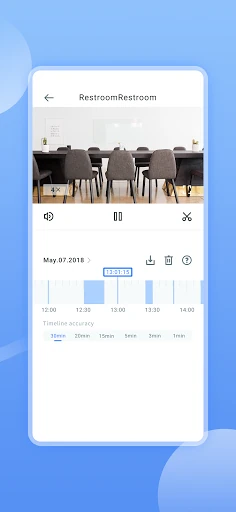
When a live view does not answer the whole question, recorded video and motion alerts add useful context. An alert can draw my attention to detected movement, while a recording lets me review what happened rather than relying only on the moment I opened the feed. I would use these features as parts of one camera routine: notice, check, and review when needed.
More Than a Live Feed
Two-way conversation and audio stand out because they let the camera support an interaction, not just observation. If I need to speak through the camera, the app includes that capability. It is a small but meaningful difference from simply opening a video window, especially during a pet check or another moment when a voice may be useful.
Pan, tilt, and zoom controls also make the phone more useful as a viewing tool. Rather than accepting only the camera's initial framing, I can adjust the view to look for more detail. The app also supports HD video and day and night vision, according to its feature description. Together, these capabilities make the camera experience more flexible across different viewing situations.
A Simple Check-In Routine
For a practical routine, I would use the app at a few natural points in the day instead of leaving the feed open. Before heading out, I might confirm the camera is showing the room I care about. Later, a motion alert can prompt me to look at the live view or review recorded video. That keeps the app tied to a clear question: what is happening at home?
If the room is not fully visible, I can use the camera's pan or tilt controls to look around, then zoom in when I need a closer view. Two-way audio gives me another option if watching is not enough. This is a useful sequence because each tool has a distinct job. I do not have to treat every feature as something to use on every check.
Keep Its Scope in Mind
The main limitation is also the app's defining choice: it is for a compatible Wansview Cloud Camera. If I want a single app for a mix of camera brands or broader home automation, this focused setup may not meet that expectation. Its features are about camera viewing and management, so I would decide whether that is enough before building my routine around it.
Remote video and motion alerts can help me stay informed, but they do not replace a person checking in when someone needs direct help. I would also think about how often I want alerts and live checks in my day, since constant monitoring can become distracting. Used for occasional, relevant checks, the app's tools have a clear purpose without turning the phone into a permanent watch station.
Wansview Cloud makes the most sense as a dedicated phone companion for a compatible camera. Live viewing is the centerpiece, while motion alerts, recorded video, two-way audio, and camera controls add practical ways to check in. I appreciate that the feature set stays close to that everyday job rather than trying to be a whole smart-home system.
I would recommend it to Wansview Cloud Camera owners who want a direct way to see what is happening at home and review activity when needed. If you need broad device compatibility or a more expansive home-management app, look elsewhere. For focused camera check-ins, Wansview Cloud offers a useful collection of viewing and communication tools.
Wansview Cloud Frequently Asked Questions
What is Wansview Cloud used for?
Wansview Cloud works with a Wansview Cloud Camera to let you view home video on your phone. Its described features include live streaming, motion alerts, recorded-video review, two-way conversation and audio, pan, tilt, zoom, HD video, and day and night vision. It is intended for camera check-ins, such as looking in on a room, family members, or pets.
What devices can use Wansview Cloud?
Wansview Cloud is an Android app on Google Play and is designed to work with a Wansview Cloud Camera. The camera is needed for the viewing features described. Check the Google Play page for current device compatibility and the Android version required for a particular phone, since those details can vary.
What Android version does Wansview Cloud require?
The Android requirement can vary with the app version and device. Check the Wansview Cloud page on Google Play for the current minimum version shown for your phone. The app's listed version is 2.0.26080608, but the store page is the best place to confirm whether a specific device can install it.
Does Wansview Cloud cost money?
Wansview Cloud is free to download on Google Play. The app facts show no in-app purchases and no ads. You will need a compatible Wansview Cloud Camera to use its camera features; the price and availability of camera hardware may vary, so check the store or seller for current details.
Is Wansview Cloud a good fit for me?
It may suit you if you have a compatible Wansview Cloud Camera and want phone-based live viewing, motion alerts, or recorded-video review. Its focus is camera access, rather than managing a broad range of smart-home products. If you need compatibility with other camera brands or a wider home-control system, check the store details and compare your requirements before choosing.
Pros
- Combines live viewing with motion alerts and recorded-video review.
- Includes two-way audio for speaking through a compatible camera.
- Pan, tilt, and zoom controls help adjust the camera view.
- Free on Google Play, with no ads or in-app purchases.
Cons
- Requires a compatible Wansview Cloud Camera to use its main features.
- Focused on camera monitoring rather than broader smart-home control.
- Frequent alerts or check-ins could become distracting for some users.
- Category
- Lifestyle
- Version
- 2.0.26080608











