VPhoto
- 3.61K
- 4.7
- Installs
- 500.00K
- Price
- Free

Screenshots
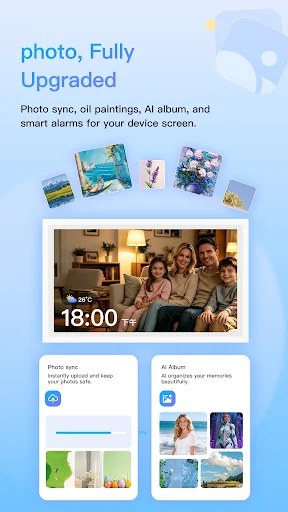
Analysis by Reviewed APKs
VPhoto is a companion app for sending pictures to a smart digital photo frame, with extra tools for turning photos into artwork or short videos. I’d look at it if I wanted to share family moments with a frame at home, especially when I couldn’t update it in person. Its appeal is broader than photo transfer, though the frame connection is the heart of the experience.
A Frame for Family Moments
When I picture VPhoto fitting into a normal week, I think of a family photo frame sitting in a parent’s living room. I could take a picture during a weekend visit, then use the app to send it to the frame remotely. That makes the frame feel less like a fixed collection of old snapshots and more like a place to share small updates as they happen.
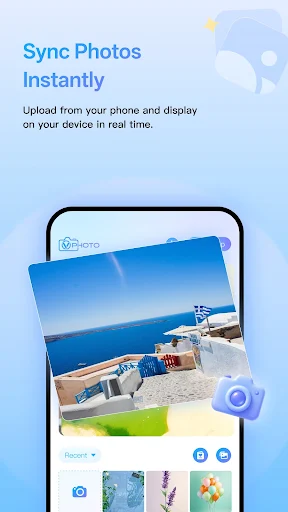
The main job is practical: upload photos from a phone and push them to a connected frame. VPhoto also says it can manage multiple smart frames, which could help if relatives have frames in different homes. I’d use it for everyday pictures and travel memories, rather than treating it as a public social feed. The sharing experience described here centers on personal frames.
A Companion, Not a Photo Library
VPhoto sits in a different lane from a general photo editor or a cloud gallery. Its defining purpose is to get images from a phone onto a smart photo frame, and the art and AI tools are extras around that job. If I mainly wanted to organize a large archive or share pictures widely on social platforms, I’d choose a service designed for those tasks instead.
It is also not a standalone digital frame: the app’s central use depends on having a compatible smart frame to receive the pictures. For someone who already owns one, remote sending is an appealing convenience. For someone shopping only for editing tools, the frame-management focus may feel beside the point. The app description doesn’t establish that every tool works independently of a frame.
Make Sharing a Small Habit
I’d get the most from VPhoto by making photo sharing a quick routine instead of waiting until I have a perfect album. After a family dinner or a day out, I could choose one or two moments and send them along while they are still fresh. That keeps the frame changing naturally without turning the process into another big organizing project.
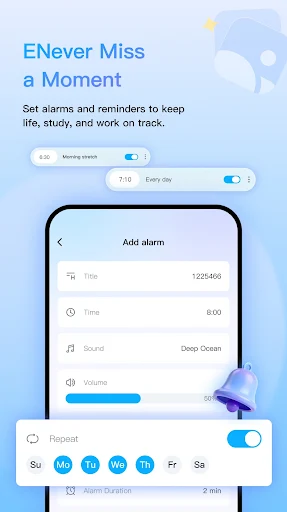
A second useful habit would be to give the creative tools a specific purpose. I might try an artistic filter on a portrait, make a photo-to-video creation for a special occasion, or browse the oil-painting gallery when I want the frame to show art. The customizable alarm could serve as a separate reminder tool. Keeping each feature tied to a real need should make the app feel less cluttered.
More From Our News Desk

Zoom Meetings, Google Meet, or Teams: Which Is Easiest to Join?

How I Build a Free Streaming Lineup With Tubi

Why Crunchyroll Is the Default Anime App for So Many Fans

YouTube TV: A Practical Guide to Cutting Cable

Rummikub and the Small Comfort of Phone Games

TeamViewer Remote Control or AnyDesk for Helping Family?
Who Might Enjoy VPhoto
I’d recommend VPhoto to people who have a compatible smart photo frame and want a simple way to send pictures to it from a phone. It seems especially suitable for families sharing photos across households, or for anyone who likes the idea of refreshing a home display with recent moments. The extra creative features may also appeal to people who enjoy trying lightweight effects on personal photos.
I’d be less likely to recommend it to someone who wants a full photo-management system, a dedicated professional editor, or a social network for posting pictures. The frame is central to the app’s purpose, so the experience may have limited value without one. People who prefer to keep their workflow in a single gallery app may also find the separate frame-sharing routine unnecessary.
VPhoto is made by Shenzhen Fujia Technology Co., Ltd. On Google Play, it has over 500,000 installs and a 4.7-star rating from 3,611 ratings. It is listed as a free app, with no in-app purchases or ads. Its content rating is Everyone, making it suitable for a general audience according to the store’s rating category.
The supplied store details give VPhoto version 2.0.39, with a release date of June 17, 2020, and a last-updated date of November 2, 2026. A minimum Android version is not included in the available app details, so check the Google Play page on your device for current compatibility information before installing.
The Small Ritual of Sending Photos
First Look and Setup
When I first opened the idea of VPhoto, the clearest point was its connection to a physical frame. This isn’t just a place to tweak pictures and leave them on a phone; the app is meant to send them outward to a smart display. That gives the experience a tangible destination, and it also means the frame relationship should guide how I judge the app.
The description presents photo syncing, creative tools, alarms, and device management together. I’d start by focusing on the frame and the basic photo-transfer purpose, then explore the other options once that job made sense. The app description doesn’t spell out individual setup steps, so I wouldn’t assume a particular pairing process. A compatible frame is the key piece to have in mind.
Everyday Photo Sharing
Day to day, the useful promise is sending a phone photo to a frame with a tap, with the app describing the transfer as real-time. That suits the little moments that might otherwise stay buried among camera-roll pictures: a child’s drawing, a visit with relatives, or a view from a short trip. The frame can give those images a place where people at home will notice them.
I like that this is a specific kind of sharing rather than another general-purpose feed. It puts the destination in a room, where a photo can become part of the household’s background. The practical value depends on the frame being part of the routine, though. If nobody looks at it or updates it, fast sending alone won’t make the display more meaningful.
Creative Tools Alongside Sync
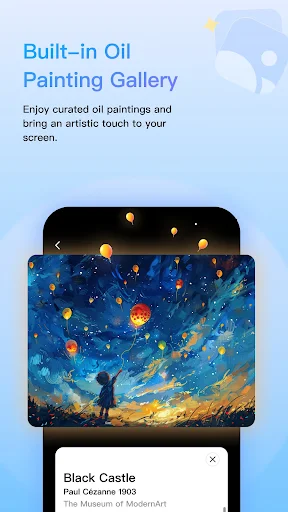
The art gallery is a distinctive addition to a frame-focused app. VPhoto describes a collection of classic masterpieces and an option to apply an oil-painting texture to a photo. That gives me a way to switch between personal snapshots and artwork on the display, rather than filling it only with family pictures. It could be a nice change when I want the frame to feel more decorative.
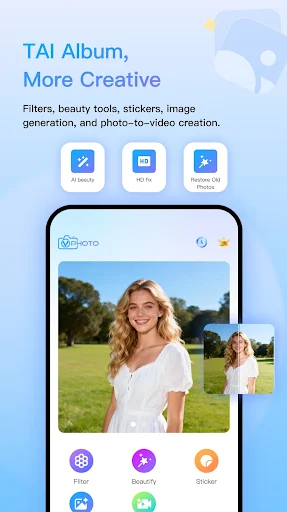
The AI creative toolkit includes portrait beautification, artistic filters, stickers, image generation, and one-tap photo-to-video creation. Those options suggest a playful side beyond simply moving files. I’d treat them as ways to experiment, not as essential steps in sharing a picture. The description names these capabilities but doesn’t explain their individual controls or results, so expectations should stay grounded.
A Weekly Frame Refresh
One low-effort routine I’d try is refreshing the frame once a week. I could look back at the past few days, pick a couple of photos worth revisiting, and send them to the frame. That makes sharing manageable and gives relatives a steady trickle of new scenes instead of a large batch that arrives all at once.
For a birthday or family gathering, I might use the creative options selectively. A filter or photo-to-video creation could make one image feel suited to the occasion, while the rest can stay as ordinary snapshots. If I manage more than one frame, the device-management function could be useful for keeping those destinations in view. The best routine is still the one that doesn’t make sharing feel like homework.
Keep the Frame in Mind
The biggest limitation is also the clearest boundary: VPhoto is built around a smart photo frame. Without a compatible frame, its signature purpose has nowhere to go. The app includes editing and art options, but I wouldn’t assume those alone make it a replacement for a dedicated photo editor or a full cloud gallery.
There are several feature categories in the description, which may make the app feel like a bundle of different tools. People who only want to send pictures could ignore the alarms and creative features, while users looking for advanced editing may want more detail about how those tools work before relying on them. I’d judge VPhoto by whether its frame-sharing routine fits my household, not by the length of its feature list.
VPhoto has a clear central idea: make it easier to send phone photos to a smart frame, including when the frame is somewhere else. I like that practical focus, and the art and AI options give users a few different ways to freshen what appears on the display.
I’d try it if I already had a compatible frame and wanted a convenient way to keep family pictures circulating. If I didn’t own one, or wanted a comprehensive photo organizer, I’d look elsewhere. For its intended frame-sharing role, VPhoto sounds like a useful companion with extras worth exploring at my own pace.
VPhoto Frequently Asked Questions
What is VPhoto used for?
VPhoto is a companion app for sending photos from a phone to a smart digital photo frame. It also describes an oil-painting art gallery, photo editing and creative tools, photo-to-video creation, customizable alarms, and management for multiple smart frames. Its core use is sharing pictures with a frame, rather than serving as a general social platform.
Which devices and platforms support VPhoto?
VPhoto is an Android app available through Google Play. Its main photo-sync function is intended to work with a smart photo frame, and the description says it can manage multiple frames. Check the app’s Google Play page and your frame information for current device compatibility, since supported models and requirements may vary.
What Android version does VPhoto require?
The minimum Android version may vary, so check the VPhoto page on Google Play from your device for the current requirement. The app’s purpose is to connect a phone with a smart photo frame, so it is also worth checking that your frame is compatible before relying on the photo-sync features.
Is VPhoto free, and does it have purchases?
VPhoto is listed as free on Google Play, with no in-app purchases and no ads in the supplied store details. Store information can change over time, so check the current Google Play page for the latest cost and purchase details before installing.
Who is VPhoto best suited for?
VPhoto is best suited to people who have a compatible smart photo frame and want to send family, travel, or everyday pictures to it from a phone. Its creative tools may be a bonus for people who enjoy experimenting. It may be less useful if you don’t have a frame or want a complete photo-library and editing system.
Pros
- Remote photo syncing gives everyday phone pictures a place on a smart frame.
- Art gallery and creative tools offer alternatives to displaying only snapshots.
- Multiple-frame management may help households sharing more than one display.
- Free to install, with no ads or in-app purchases in the supplied details.
Cons
- Its main purpose depends on having a compatible smart photo frame.
- The broad toolset may be unnecessary for people who only want photo transfer.
- The available description gives limited detail about setup and individual editing controls.
- Category
- Tools
- Version
- 2.0.39











