V380 Pro
- 284.73K
- 3.7
- Installs
- 50.00M
- Price
- Free
Screenshots
Analysis by Reviewed APKs
V380 Pro is a camera-monitoring app for checking live video, reviewing recordings, and receiving alerts about activity in places you care about. It suits people who already use compatible cameras and want to keep an eye on a home, shop, or workplace from a phone. I like the practical mix of remote viewing and alerts, though its usefulness depends on having a camera setup that works with it.
Checking in from elsewhere
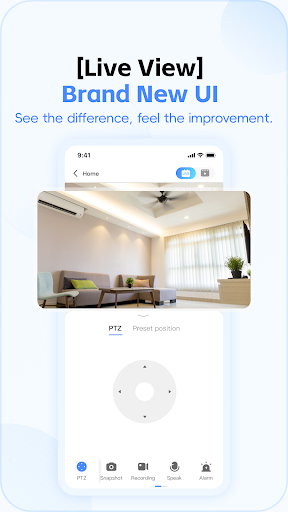
Imagine leaving home for the afternoon and wanting to see whether everything looks normal. With V380 Pro, the central task is straightforward: open the app and view a camera’s live stream remotely. The same idea applies to a store or office when you are away. I find that kind of quick visual check more useful than a vague notification, because it lets me look at what is happening rather than only know that something changed.
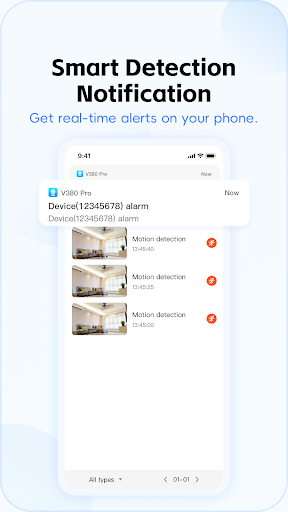
Alerts and recordings give that check-in a second step. The app describes motion detection alerts with captured pictures, and says users can review recordings to see what happened. If I received an alert while out, I could use the app to follow up with a view or replay instead of relying on the alert alone. That makes it a monitoring companion for a camera, not a substitute for having a camera in the first place.
A camera companion, not a camera
V380 Pro is best understood alongside the camera it monitors. A general video app is for watching entertainment; this one is intended to show feeds from places such as homes, villas, shops, factories, and offices. Its focus is practical oversight: live viewing, motion alerts, replay, and a way to speak through the app. Those functions make sense when you already have a compatible camera and want remote access from your phone.
It is not a general smart-home dashboard or a standalone security system. The app’s described features revolve around video monitoring and camera-related alerts, so I would not choose it for unrelated home controls or as a replacement for deciding what equipment a space needs. The app also cannot make a camera feed useful if the camera itself is poorly positioned or the connection is unreliable. The phone view is only one part of the setup.
Make alerts easier to use
A useful habit is to treat an alert as a prompt to check, rather than as the whole story. V380 Pro describes notifications for abnormal activity and captured images, with recordings available for reviewing what happened. When an alert arrives at an inconvenient moment, I would first look at the available image or video and then decide whether a longer replay is worth opening.
Device sharing can also make the app fit a household routine. The description says a device can be shared with family members so they can view together. That could avoid making one person the only point of contact for a camera. Voice talkback is another practical option when a quick spoken message is more useful than simply watching. These features work best as small, purposeful checks, not as a reason to stare at a feed all day.
More From Our News Desk

Zoom Meetings, Google Meet, or Teams: Which Is Easiest to Join?

How I Build a Free Streaming Lineup With Tubi

Why Crunchyroll Is the Default Anime App for So Many Fans

YouTube TV: A Practical Guide to Cutting Cable

Rummikub and the Small Comfort of Phone Games

TeamViewer Remote Control or AnyDesk for Helping Family?
Who will find it useful
I would recommend V380 Pro to someone who already has a camera intended to work with the service and wants to check in while away. Its mix of live viewing, replay, motion alerts, voice talkback, and device sharing covers several ordinary monitoring needs without making the app sound like a broad home-management tool. It may also suit a small workplace where a person wants to glance at a space remotely.
It may not suit someone looking for an app that works by itself, or someone who does not need remote camera monitoring. The experience also depends on whether the camera and service fit the user’s setup; the app is not a universal viewer for every camera. I would suggest keeping expectations focused on checking video and reviewing activity, rather than assuming it provides every camera feature or solves every security concern.
V380 Pro is an Android app in the Tools category, developed by Guangzhou Hongshi information Technology Co., Ltd. Google Play shows over 50 million installs and a 3.7-star rating from about 285,000 ratings. It is free to download, contains ads, and offers in-app purchases. The listed purchase range is $0.49 to $299.99 per item, so optional spending can vary considerably.
The app has an Everyone content rating. Its listed version is 2.2.92, with a release date of July 23, 2018, and a last update date of October 30, 2026. A minimum Android version is not included in the supplied app details. If device compatibility matters, check the current Google Play information for the phone or tablet you plan to use.
A closer look at everyday monitoring
First impressions and setup
When I first considered V380 Pro, its purpose was easy to grasp: it is for viewing and monitoring camera feeds, not for browsing a complicated collection of unrelated tools. That focused identity is helpful if you have a clear job in mind, such as checking a room while away or reviewing activity after a motion alert. The app’s value begins with having a camera and a place you want to monitor.
The provided details do not describe a step-by-step setup process, so I would not assume that every camera pairs in the same way. In practice, the important first task is confirming that the camera you intend to use is supported by the service and following the setup information supplied for that equipment. A little care at this stage can prevent frustration later when you want to rely on a live view or alert.
The daily viewing routine
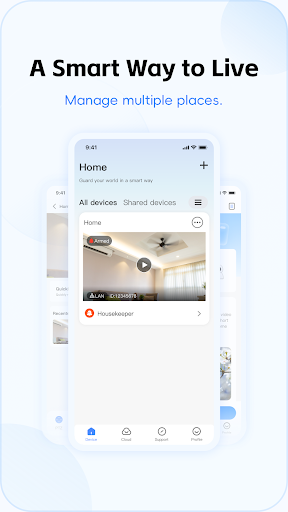
The day-to-day appeal is remote access. Rather than needing to be in the monitored space, I can use the app to view a live stream and get a sense of what is going on. That could mean checking a home while running errands or taking a quick look at a work area after closing. It is a simple, concrete job, and the app’s features are organized around that kind of check-in.
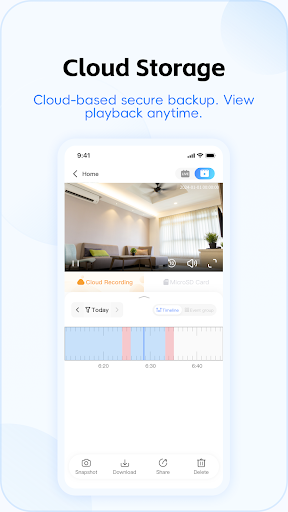
Replay adds value when a quick glance is not enough. The app describes reviewing recordings after an abnormal situation, which gives an alert some context. I would use live viewing for an immediate look and recordings when I wanted to understand an earlier event. These are related but different habits: one answers what appears to be happening now, while the other helps revisit what the camera captured.
Features with a clear purpose
Motion detection alerts are among the more practical features because they can draw attention to activity without requiring constant live viewing. V380 Pro describes instant alerts and picture capture, followed by the option to view recordings. That sequence gives a user a way to notice an event and then look into it. It is still worth treating an alert as information to review, rather than proof of what caused the movement.
Voice talkback gives the app a use beyond watching silently. The description presents it as a way to speak through the service from elsewhere, which could be handy for a brief message at home or in another monitored space. Device sharing is similarly straightforward: family members can share access and view together. Both features support ordinary coordination, without turning the app into a general-purpose messaging service.
The app also describes motion trajectory tracking, which automatically captures a motion path, and cloud recording for keeping video online. These features may matter to users who want more context or recordings that are not tied only to the camera device. I would consider them useful additions to the core monitoring job, while keeping in mind that availability and the details of any service can depend on the actual setup.
A practical check-in habit
A sensible routine might be to check the live feed when there is a specific reason, such as arriving at work and wanting to look at a space remotely. If a motion alert comes through later, I could inspect its captured image and then review the recording if I needed more context. This keeps the app tied to a concrete question instead of encouraging an endless cycle of refreshing the camera view.
For a shared household, device sharing may let more than one family member take part in those checks. Voice talkback could be reserved for moments when a spoken message is useful, while a live view is enough for a quiet visual check. The best routine will vary by camera and household, but the app’s described tools support a few distinct tasks rather than requiring one person to handle every check.
Limits to keep in view
The clearest limitation is dependence on the camera setup. V380 Pro is useful only in the context of the monitoring service and a camera that can be used with it; the app alone does not show a room. That makes compatibility an important question before building a routine around live views or alerts. Users should also remember that a camera’s position and the conditions around it affect what its feed can show.
Cloud recording is described as a feature, but the supplied details do not explain its specific plan options. The app also contains ads and offers in-app purchases, with a broad listed price range. That does not tell me which features require payment, so anyone considering a paid option should check the current store information before purchasing. It is better to understand those costs in advance than to assume every service is included.
Finally, the app’s rating on Google Play is 3.7 stars, which gives prospective users a useful point of reference but not a complete picture of how it will work with a particular camera. I would approach it as a focused monitoring tool and judge it against the needs of my own setup. If a user expects universal camera support or a full security solution, this narrow role may feel limiting.
V380 Pro has a clear practical purpose: use a phone to view camera feeds, respond to motion alerts, revisit recordings, and share access. I like that the described features connect to real monitoring tasks rather than trying to cover every smart-home function. Its main caveat is that the experience depends on a suitable camera and that optional purchases deserve a look before spending.
I would recommend giving it a try if you already use a compatible camera and want remote check-ins or shared viewing. If you do not have a camera setup, or want a universal security dashboard, it is probably not the right fit. Keep expectations centered on camera monitoring, and check the store details for current compatibility and purchase information.
V380 Pro Frequently Asked Questions
What is V380 Pro used for?
V380 Pro is used for remote video monitoring with a camera connected to its service. Its described features include live viewing, replaying recordings, motion alerts with picture capture, voice talkback, device sharing, motion trajectory tracking, and cloud recording. It is intended for monitoring places such as homes, shops, or offices, rather than serving as a general video or smart-home app.
Which phones and devices can run V380 Pro?
V380 Pro is listed as an Android app on Google Play. The supplied details do not give a minimum Android version, so check the current Google Play information for compatibility with your phone or tablet. The app is designed to work with a camera monitoring setup; whether a particular camera works with it is worth checking before relying on the app.
Is V380 Pro free, and does it have in-app purchases?
V380 Pro is free to download on Google Play, contains ads, and offers in-app purchases. The listed range is $0.49 to $299.99 per item. That range does not explain which options cost money or what each includes, so check the current store details before making a purchase. Costs and available options may vary.
Does V380 Pro need a specific Android version?
The app information provided does not state a minimum Android version. Because device requirements can change, check V380 Pro’s current Google Play page and the compatibility details shown for your device before installing. The app’s intended use also depends on having a camera that works with its monitoring service.
Who should use V380 Pro?
It is most suited to people who already have a compatible camera and want to check live video, receive activity alerts, review recordings, or share viewing with family. It may not suit someone without a camera or someone looking for an all-purpose security or smart-home app. Its value depends on how well the camera setup fits the user’s needs.
Pros
- Combines remote live viewing with replay, giving users ways to check now and review activity later.
- Motion alerts and captured images can prompt a closer look without constant feed watching.
- Device sharing and voice talkback support practical coordination with family members.
- Cloud recording and motion tracking add options beyond a basic live view.
Cons
- Its usefulness depends on having a camera that works with the monitoring service.
- Ads and a wide in-app purchase price range make optional costs worth checking.
- The 3.7-star Google Play rating suggests the experience may not suit everyone.
- Category
- Tools
- Version
- 2.2.92











