uBlock Origin Lite
- 980
- 4.7
- Installs
- —
- Price
- Free
Screenshots
Analysis by Reviewed APKs
uBlock Origin Lite is a content blocker for people who want fewer ads and less tracking while browsing. Its default rules combine several established filter lists, with additional rulesets available through its options. I found the appeal straightforward: it aims to do its filtering without keeping its own process running continuously. It suits users who want a focused browser tool, rather than a general-purpose privacy or security app.
A Quieter Browsing Session
When I want to read a news story on my phone, the interruptions can start before I reach the first paragraph: advertising blocks, tracking requests, and crowded page layouts all compete for attention. uBlock Origin Lite is designed to block content as I browse, using its default collection of filter lists. The practical goal is simple: open a page and spend more time with the article than with the clutter around it.
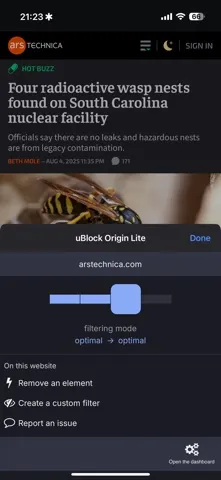
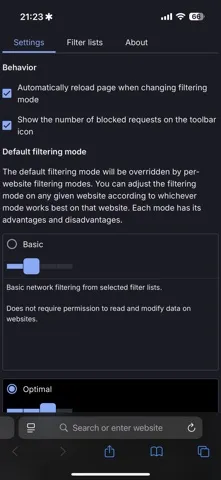
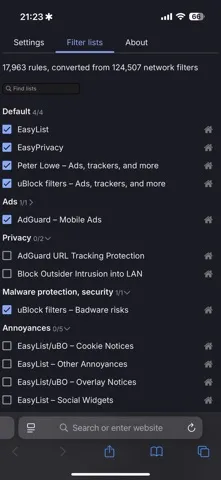
The default rules draw on uBlock Origin's built-in filter lists, EasyList, EasyPrivacy, and Peter Lowe’s ad and tracking server list. That gives the app a concrete starting point without requiring me to assemble a set of rules before browsing. If I want to adjust that starting point, I can open the popup panel and go to its options using the cogs icon. The experience is centered on blocking, not browsing itself.
A Focused Browser Tool
The obvious comparison is with other content-blocking tools that rely on filter lists. uBlock Origin Lite takes a rules-based approach and lets me enable additional rulesets from its options page. That makes it a fit for someone who wants a blocker with a defined default setup and some room to tailor it, rather than an app built around a broad collection of unrelated privacy features.
It is not a browser, a reading app, or a complete online safety package. Its job is content filtering, and the description specifically covers ads and tracking-related lists. I would still use my usual browser for finding and reading sites; uBOL works as a companion to that routine. If I want a tool whose main purpose is organizing bookmarks or managing passwords, this is not aimed at that need.
Small Setup Habits
I would start by using the default ruleset for a while instead of changing several things at once. That makes it easier to notice whether the browsing experience feels better and whether a particular site behaves differently. If I decide I want broader filtering, the options page is where I can enable more rulesets. A small, deliberate change is easier to understand than turning on every available option immediately.
A useful habit is to check the popup or options only when I have a reason, rather than treating the blocker as something that needs constant attention. The app says its service worker is needed only when I interact with the popup panel or options pages; filtering itself is performed by the browser. That design supports a set-it-up-and-browse rhythm, with occasional adjustments when my preferences change.
More From Our News Desk

Zoom Meetings, Google Meet, or Teams: Which Is Easiest to Join?

How I Build a Free Streaming Lineup With Tubi

Why Crunchyroll Is the Default Anime App for So Many Fans

YouTube TV: A Practical Guide to Cutting Cable

Rummikub and the Small Comfort of Phone Games

TeamViewer Remote Control or AnyDesk for Helping Family?
Who Might Like uBOL
I would recommend uBlock Origin Lite to iPhone and iPad users looking for a dedicated content blocker with a recognizable set of default filter lists. It should especially interest people who want to reduce ad and tracking-related content while browsing, but do not want to spend their first session building a ruleset from scratch. The ability to enable more rulesets offers a bit of flexibility without changing the app's central purpose.
It may not suit someone looking for a standalone browser, a broad privacy dashboard, or a tool that explains every decision it makes in detail. Its approach is focused on filtering, and users who prefer to leave a blocker entirely untouched may have little reason to visit the options. I would also check the current App Store details before installing, since device and system requirements can affect whether it fits my setup.
uBlock Origin Lite is an iOS app from Raymond Hill. On the Apple App Store, it has a 4.7 out of 5 rating from 980 ratings. The app is free, and its listed content rating is 4+. Its minimum requirement is iOS 18.5, so I would check my device’s software version before downloading.
The App Store version is 2026.1103.1743. The app was released on August 4, 2025, and its most recent update is dated November 4, 2026. Those details describe the store version and release history; the app itself is presented as a content blocker with default filter lists and optional additional rulesets.
How uBlock Origin Lite Fits Into Browsing
A Direct First Impression
When I first opened uBlock Origin Lite, the clearest thing about it was its narrow purpose. This is a blocker, not a browser competing for my home screen. The default ruleset gives it a starting configuration based on several filter sources, so the main idea is understandable without turning setup into a project. I like that the options are available when I want them, rather than being the whole point of the app.
The iOS requirement is worth checking before I get started: the listed minimum is iOS 18.5. After that, the useful first step is simply understanding where the options live. The description points to a cogs icon in the popup panel for reaching them. I would keep the first session simple, try the default setup, and save customization for a moment when I know what I want to change.
The Everyday Experience
Day to day, the appeal is that filtering is meant to happen without a permanent uBOL process running. The description says the browser performs CSS and JavaScript injection-based content filtering, while the app’s service worker is needed only when I interact with the popup panel or options pages. That is a distinctive technical choice, but the user-facing benefit is easy to grasp: I can browse without needing to keep opening the blocker.
I would judge it by the pages I already visit, not by expecting every site to look identical. Content blockers can change what appears on a page, and this app's listed purpose is to filter content using rulesets. If I want to alter the filtering setup, I can go to the options page and enable more rulesets. Otherwise, the routine can stay fairly hands-off.
Rulesets With Familiar Roots
The default rules are one of the app’s most concrete strengths. They correspond to uBlock Origin’s default filterset and include its built-in filter lists, EasyList, EasyPrivacy, and Peter Lowe’s ad and tracking server list. Rather than presenting an empty canvas, uBOL starts with these sources already forming its baseline. That gives users a clear sense of what the default experience is built around.
I also appreciate that additional rulesets are available through the options page. This gives me a route to adjust the setup if the default does not match my preferences, without implying that I have to customize it immediately. The description does not spell out every possible ruleset or its effect, so I would make changes thoughtfully and consult the options themselves rather than assume what each one covers.
A Simple Browsing Routine
For a practical routine, I would install the app, check that my iOS version meets the requirement, and begin with the default rules. Then I would use my normal browser for a few days, especially on the kinds of sites where ads or tracking clutter tend to distract me. This gives me a useful baseline for deciding whether the app’s approach suits my habits, without making setup more complicated than it needs to be.
If I later want to change the filtering, I would open the popup panel and use the cogs icon to reach the options page. From there, I can enable additional rulesets. I would make one change at a time and see how it affects my browsing before adding another. The app’s design supports this occasional check-in: its own service worker is needed for those interactions, while the browser handles the described filtering.
Limits to Keep in Mind
The focused design is also a limitation if I want more than content blocking. uBlock Origin Lite is not presented as a full browser or a general-purpose privacy suite, and its default lists do not promise that every unwanted element will disappear from every page. I would treat it as one tool in a browsing setup, rather than expecting a single app to address every concern I have online.
There is also a little uncertainty in how much customization will matter to an individual user. The app supports enabling more rulesets, but the description does not explain the full contents or effects of every option. Some people will be happy with the default setup; others may want to explore. Since the app requires iOS 18.5, compatibility is another practical point to check before deciding it fits my device.
uBlock Origin Lite makes a clear case for itself: a focused content blocker, a useful default collection of filter lists, and optional rulesets for people who want to adjust the setup. I like that the described filtering is handled by the browser rather than requiring a permanent app process. Its appeal is strongest when I want a companion tool, not an all-in-one browsing solution.
I would try it if I use a compatible iPhone or iPad and want a straightforward way to filter content while browsing. I would keep expectations specific, start with the defaults, and explore additional rules only if I have a reason. For users who want a browser or a wider privacy toolkit, I would look elsewhere; for focused blocking, uBOL is a considered option.
uBlock Origin Lite Frequently Asked Questions
What is uBlock Origin Lite used for?
uBlock Origin Lite is a content blocker for browsing. Its default ruleset includes uBlock Origin’s built-in filter lists, EasyList, EasyPrivacy, and Peter Lowe’s ad and tracking server list. You can enable additional rulesets through the options page. It is a companion blocking tool, not a browser or a general-purpose privacy suite.
Is uBlock Origin Lite available on iPhone and iPad?
uBlock Origin Lite is listed for iOS on the Apple App Store. Its stated minimum requirement is iOS 18.5, so check your device’s software version before installing. Store availability and compatibility details can vary, so the current App Store information is the best place to confirm whether it is suitable for your device.
Does uBlock Origin Lite cost money?
uBlock Origin Lite is listed as free on the Apple App Store. The supplied store facts do not give details about in-app purchases or advertising, so check the current App Store page if those details matter to you. The app’s described purpose is content filtering, with a default ruleset and optional additional rulesets.
What iOS version does uBlock Origin Lite require?
The listed minimum requirement for uBlock Origin Lite is iOS 18.5. I would check the version installed on my iPhone or iPad before downloading. Requirements and compatibility information can change, so the current App Store page is worth checking if you are unsure whether your device can run it.
Who should use uBlock Origin Lite?
It is suited to iOS users who want a dedicated content blocker with a defined set of default filter lists and the option to enable more. It may not be the right fit if you want a standalone browser or a broad privacy toolkit. Its focus is filtering content while you browse, rather than managing other parts of your online routine.
Pros
- Starts with several established filter lists rather than an empty setup.
- Additional rulesets can be enabled from the options page.
- Filtering is performed by the browser without a permanent uBOL process.
- A focused tool for users seeking content blocking while browsing.
Cons
- Requires iOS 18.5, which may exclude older device software.
- Its narrow purpose will not replace a browser or broader privacy suite.
- The effects of individual additional rulesets may take some exploring.
- Category
- Tools
- Version
- 2026.1103.1743











