Toyota
- 139.02K
- 4.6
- Installs
- 5.00M
- Price
- Free

Screenshots
Analysis by Reviewed APKs
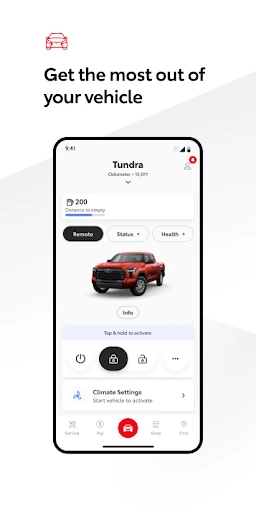
Toyota is a companion app for owners who want to handle connected vehicle tasks from their phone, from checking service information to using supported remote features. I found its appeal less in replacing the car’s own controls than in making a few useful things easier to reach when I’m away from the vehicle. It suits Toyota drivers with compatible models; what it can do depends on the car and available services.
A handier way to check in
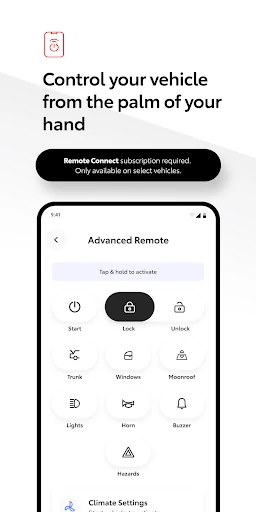
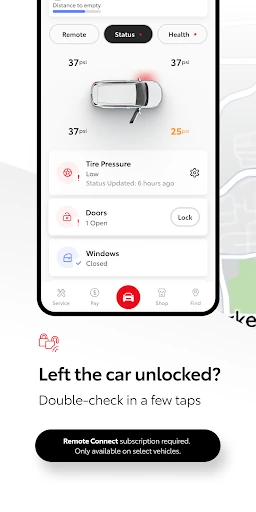
Picture pulling into a grocery store on a rainy afternoon, parking, and then realizing you cannot remember whether you locked the car. With a compatible Toyota and connected service, the app can let you check in and lock or unlock the doors remotely. I like that kind of small convenience: it gives the app a clear job beyond collecting vehicle information, without requiring me to be sitting in the driver’s seat.
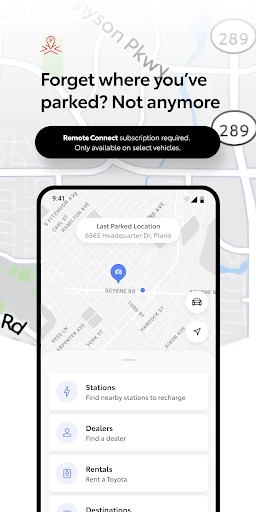
When I first considered how I’d use Toyota, the most practical routine was an occasional check before or after a drive. I could look up the owner’s manual or warranty guide, and, where supported, use connected features such as Last Parked Location. If the car needs attention, the app also supports scheduling service with a Toyota dealer and tracking vehicle health. Those jobs fit naturally around errands and maintenance rather than demanding daily attention.
A companion, not a car replacement
Toyota sits alongside the controls and information already built into a vehicle. Its connected services can extend some tasks to a phone, including remote engine start or stop, door controls, navigation tools, and service scheduling on supported models. That makes it more like a remote companion and ownership hub than a replacement for the car’s dashboard or infotainment system. The app’s value depends on the Toyota you own and which services are available to it.
I would not choose Toyota as a general-purpose navigation app or as a way to manage a vehicle from another brand. Drive Connect features include cloud navigation, voice commands, and Destination Assist, but availability varies. Nor is it a universal remote-control kit: connected features require an account, enrollment, compatible vehicle, and working network and GPS conditions. If your Toyota does not support the services you want, the app’s practical reach will be narrower.
Small habits that help
I’d get the most from Toyota by setting it up before I urgently need a feature. After creating an account, I would check which connected services are available for my vehicle and enroll in any included trials I want to explore. That way, a remote command or service lookup is something I’ve already tried once, not a new process I’m figuring out while standing in a parking lot.
For everyday use, I’d keep the app tied to a few simple moments: checking the last parked location after an unfamiliar outing, consulting the manual when a vehicle question comes up, and arranging dealer service when maintenance is due. I’d also remember that connected functions depend on service availability and a cellular connection, GPS, and 4G access. A phone app is useful, but it is not a substitute for the vehicle’s own controls.
More From Our News Desk

Zoom Meetings, Google Meet, or Teams: Which Is Easiest to Join?

How I Build a Free Streaming Lineup With Tubi

Why Crunchyroll Is the Default Anime App for So Many Fans

YouTube TV: A Practical Guide to Cutting Cable

Rummikub and the Small Comfort of Phone Games

TeamViewer Remote Control or AnyDesk for Helping Family?
Who will get the most from it
I’d recommend Toyota to owners of supported Toyota models who want vehicle-related tasks close at hand. It should be especially useful if you like having a service appointment option, owner resources, and available connected features in one app. The clearest fit is someone who already knows their car supports the services they care about and is comfortable creating an account and enrolling to use them.
It may be less compelling if you drive an older or unsupported vehicle, expect every feature to work on every Toyota, or want a standalone driving app. The experience can vary by vehicle, subscription type, region, and market, and some services depend on connectivity. I’d also be cautious about expecting ongoing access to trial features without checking their terms. For a compatible owner, though, it can be a convenient extra rather than another app to open every day.
Toyota is developed by Toyota Motor North America, Inc. On Google Play, it has more than 5 million installs and a 4.6-star rating from about 139,000 ratings. The app is free to download, and Google Play reports no in-app purchases or ads. Its content rating is Everyone. The listed release date is August 6, 2019, and the most recent update was January 30, 2026.
The minimum requirement is Android 10. The current version can vary. Toyota’s app supports 2010 or newer vehicles, with a 2018-or-newer requirement for Hawaii, though connected features also depend on the vehicle and service availability. The app’s connected services may include trials, and a paid subscription is required after a trial when applicable; service availability and terms vary by vehicle, region, and market.
How Toyota fits into everyday ownership
Getting started
When I first opened Toyota, I would treat account setup as the start of the experience rather than assume the app works like a universal remote. The description asks users to log in or create an account and enroll in included trials to explore services available for their vehicle. That makes the first useful step checking compatibility and available services, so expectations match the Toyota in the driveway.
The setup story is tied to the car, not just the phone. Toyota says connected services vary by vehicle and market, and some features depend on cellular service, GPS, and 4G availability. I appreciate having that context in mind before relying on a remote command. It also means the app’s first impression will differ from one owner to another, depending on their model and enrolled services.
The everyday experience
Day to day, Toyota makes the most sense when I have a specific ownership task in mind. I might check vehicle health, look for a manual detail, or schedule service with a Toyota dealer. If my model supports connected controls, I could also use the phone for remote start or door locks. These are practical touchpoints rather than reasons to keep the app open all afternoon.
What surprised me is how much the experience relies on a good match between the app, the vehicle, and the service plan. The app can bring several ownership functions together, but the available mix is not identical for every driver. I’d think of Toyota as a convenient access point, then let the vehicle’s eligibility determine whether it becomes part of my regular routine or an occasional reference.
Connected features worth noting
Remote Connect is one of the more tangible features: on supported vehicles, it can start or stop the engine and lock or unlock doors. Digital Key and Last Parked Location are also named among the connected services. I like that these address straightforward situations, such as wanting to check where I left the car, rather than relying on an abstract promise of being more connected.
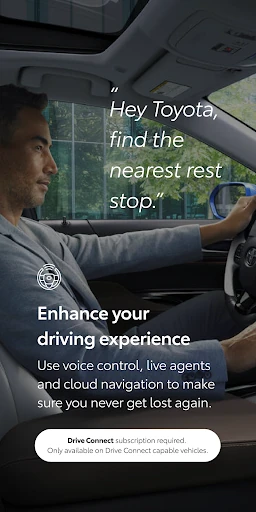
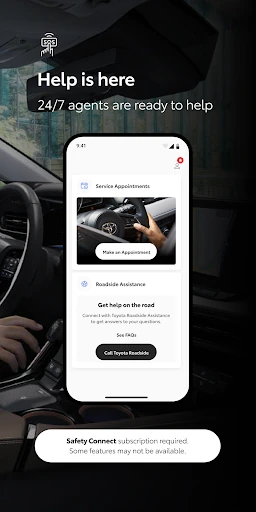
The app also covers several ownership and travel needs. Service Connect supports tracking vehicle health, while the app can help schedule dealer service. Drive Connect includes cloud navigation, voice commands, and Destination Assist with live-agent support. The owner resources include the manual and warranty guides. Safety Connect includes roadside assistance support, an Assist 24/7 button, and an SOS button inside the Toyota.
A practical weekly routine
A routine I can imagine is opening Toyota once before a longer drive to check the last parked location feature or confirm which connected tools my vehicle supports. After a trip, I could use the manual or warranty guide if a question comes up. When service is due, I could use the app to arrange an appointment with a Toyota dealer instead of putting off the task until I remember to call.
For a busy day, the remote features may be the most immediately useful part, if the vehicle is eligible. I’d use them for a specific reason, such as checking or operating the doors while away from the car, rather than assuming every command is available in every situation. Keeping the app’s role modest makes it easier to appreciate: it helps with selected ownership tasks, while the car remains the main place to drive and manage the vehicle.
Limits to keep in mind
The biggest limitation is variability. Toyota says connected services differ by vehicle, subscription type, region, and select markets. Trials begin on the original purchase or lease date of a new vehicle, except Wi-Fi trials, which begin at activation; a paid subscription is required after a trial when applicable. That makes it worth checking the terms for a particular vehicle rather than assuming a feature will remain available indefinitely.
Connectivity is another practical constraint. Toyota says services depend on 4G network availability, a cellular connection, and GPS, and operation may be limited or unavailable without them. Data charges may apply. There is also a vehicle-age threshold: the app supports 2010-or-newer vehicles, except in Hawaii, where the threshold is 2018 or newer. Those conditions do not erase the app’s usefulness, but they shape what I would rely on.
Toyota is a useful companion for compatible Toyota owners who want service tasks, vehicle resources, and selected connected controls in one place. I like its practical focus and the way it can help with small moments away from the car. Its main caveat is that the experience depends heavily on model, region, connectivity, and service eligibility.
If you own a supported Toyota and want those conveniences, I’d give the app a try and check which services your vehicle can use. If you expect the same tools on every model or want a complete replacement for in-car systems, it may disappoint. For the right owner, it is a sensible addition to the ownership routine.
Toyota Frequently Asked Questions
What is the Toyota app used for?
Toyota is an app for managing selected vehicle and ownership tasks. Depending on the vehicle and available services, it can offer remote controls, Last Parked Location, service scheduling, vehicle-health tracking, navigation features, roadside assistance support, and access to the manual and warranty guides. The exact feature set varies, so I’d check what is available for the specific Toyota.
Which phones and Toyota vehicles work with the Toyota app?
The app is available on Android, and it requires Android 10 or newer. Toyota says the app supports 2010-or-newer vehicles, with a 2018-or-newer threshold in Hawaii. Connected features can have additional vehicle, region, and service requirements, so the general vehicle-age guideline does not mean every feature will be available on every supported car.
Is the Toyota app free, and are there subscriptions?
The Toyota app is free to download on Google Play, which reports no in-app purchases or ads. However, some connected services have trials, and Toyota says a paid subscription is required after a trial when applicable. Availability and terms vary by vehicle, service, and region, so check the app or store information for the details that apply to you.
Does the Toyota app work without a phone signal?
Connected services depend on 4G network availability, a cellular connection, and GPS. Without one or more of those, operation may be limited or unavailable, including access to response-center and emergency support. I would not rely on a connected feature without considering those conditions. The app’s owner resources and other functions may have different requirements.
Is the Toyota app useful for every Toyota owner?
It is most useful for owners whose vehicles support the connected services they want. Toyota says availability varies by vehicle, subscription type, region, and market, and vehicle age also matters. If your car is compatible, the app can help with selected remote, service, navigation, and owner-resource tasks. Check Google Play and your vehicle’s service details for current eligibility.
Pros
- Combines vehicle resources, dealer service scheduling, and selected connected features.
- Remote controls can help with practical tasks away from a compatible Toyota.
- Includes access to owner’s manuals and warranty guides.
- Offers navigation and roadside assistance features on supported vehicles.
Cons
- Available features vary substantially by vehicle, region, and service eligibility.
- Connected functions depend on cellular service, GPS, and 4G availability.
- Some services require a paid subscription after an applicable trial.
- Category
- Auto & Vehicles
- Version
- VARY