HondaLink
- 18.37K
- 2.1
- Installs
- 1.00M
- Price
- Free
Screenshots
Analysis by Reviewed APKs
HondaLink connects a compatible Honda to your phone for vehicle-status checks, remote commands, service scheduling and, on some vehicles, charging tools. I see it as a useful companion for owners who want a quick way to check on their car or handle a few tasks without walking back to it. The big caveat is compatibility: what you can actually do depends on the Honda model, year, country and subscription package.
A quick check before leaving
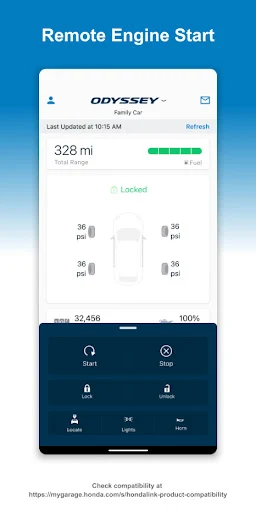
When I first think about HondaLink in an everyday routine, it is the small check before heading out. If I cannot remember whether I locked the car or switched off the lights, the app can show vehicle status, including door, trunk and hood openings, lights, fuel level and mileage. That is a more practical job than trying to remember every detail from the moment I parked.
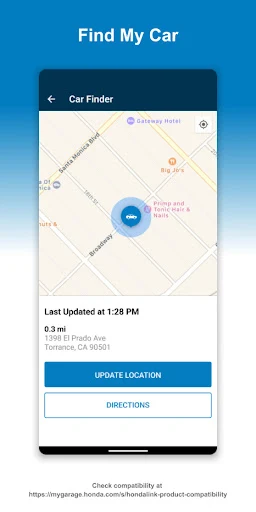
The remote commands make the same routine useful from farther away. Depending on the vehicle, HondaLink can lock or unlock doors, precondition the cabin temperature, locate the car, or flash the lights and sound the horn. I would use those last options in a crowded lot, where remembering which row I parked in is less reliable than I would like.
A companion, not a replacement
HondaLink sits alongside the usual ways of looking after a car: checking it in person, contacting a service department, or using the controls in the vehicle itself. Its advantage is convenience between those moments. I can check reported status, keep an eye on maintenance reminders and recalls, or schedule service without treating the app as a full workshop or a substitute for hands-on attention.
It is not a universal remote for every Honda, and it is not a general-purpose navigation or driving app based on the information available here. The listed tools vary by model, model year and country, and a subscription package may be required. I would check compatibility before building a routine around any particular command, especially if remote access is the main reason for installing it.
Make the checks count
I would get the most from HondaLink by using it at moments when a quick answer saves a trip outside: after parking, before leaving home, or when trying to find the car in a busy lot. A glance at fuel and mileage can also be handy when planning the next errand. These are modest habits, but they make the app feel more like a practical companion than something opened once and forgotten.
For service, I would treat reminders as prompts to follow up rather than as a complete maintenance history. If the vehicle supports charging tools, checking charge status or setting a charging schedule could become part of a regular plug-in routine; the app can also help find charging stations. Since those tools depend on the vehicle, it is worth confirming they are available before relying on them.
More From Our News Desk

Zoom Meetings, Google Meet, or Teams: Which Is Easiest to Join?

How I Build a Free Streaming Lineup With Tubi

Why Crunchyroll Is the Default Anime App for So Many Fans

YouTube TV: A Practical Guide to Cutting Cable

Rummikub and the Small Comfort of Phone Games

TeamViewer Remote Control or AnyDesk for Helping Family?
Who will find it useful
I would recommend HondaLink to Honda owners whose specific vehicle is compatible and who want remote commands, status checks, service scheduling or charging tools in one place. It is especially appealing if you sometimes forget whether a door is locked, park in large lots, or prefer to handle a service appointment from your phone. For those tasks, having the car’s information close at hand can be genuinely convenient.
It may be a poor fit if your Honda does not support the features you want, or if you expect every command to work across every model. The app’s Google Play score is 2.1 from around 18,000 ratings, so I would keep expectations measured and check compatibility before depending on it. If you rarely need connected-car tools, the extra app may not add much to your routine.
HondaLink is developed by American Honda Motor Co., Inc. On Google Play, it has over 1 million installs and a 2.1-star rating from 18,369 ratings. The app is free to download, and the provided store facts show no in-app purchases or ads. Its content rating is Everyone.
The current version in the provided facts is 5.5.2. HondaLink was released on June 18, 2015, and its last update is dated October 19, 2026. A minimum Android version is not provided in these facts, so check the Google Play page for the requirement that applies to your device.
The useful details depend on your Honda
A practical first impression
HondaLink’s purpose is easy to grasp: it brings selected vehicle information and connected services onto a phone. The feature list covers several different needs, from checking whether a door is open to setting a charging schedule. I like that this is centered on actual ownership chores rather than trying to turn a car companion into an all-purpose lifestyle app.
Before expecting a particular button to be useful, I would start with the compatibility check. Honda says available features can differ by model, model year and country, and a subscription package may be required. That caveat shapes the whole experience: the app can offer a helpful set of controls, but the exact set is tied to the car.
Useful between drives
The strongest day-to-day case is being able to check a few details without going out to the vehicle. Fuel level, total mileage, door and trunk status, hood status and whether lights are left on are all part of the stated vehicle-status tools. That can settle a small uncertainty quickly, particularly when the car is parked away from home.
Remote commands add a more active side to that convenience. Locking or unlocking the doors, preconditioning the temperature, locating the car, and using the lights or horn are all listed capabilities, though availability depends on the Honda. I would think of them as occasional helpers rather than assume that every command is available or appropriate in every situation.
Beyond remote commands
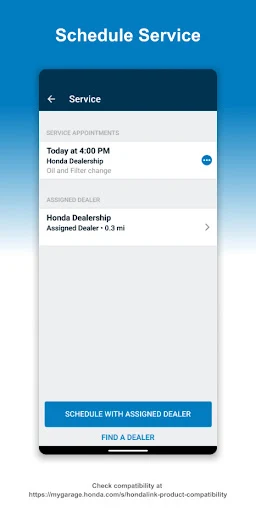
Service and safety tools broaden the app’s role. HondaLink can provide recall notifications and maintenance reminders, and it can be used to schedule service appointments. I like the idea of moving from a reminder to arranging a visit in the same app; it is a straightforward ownership task that otherwise tends to get postponed when life gets busy.
Charging features give the app another purpose for compatible vehicles. The listed options include checking charging status, setting a charging schedule and finding charging stations. I would not assume these tools apply to every Honda, but for an owner whose vehicle supports them, they can make HondaLink relevant even when the car is parked and plugged in.
Build a simple routine
A low-effort routine could be to check the vehicle status after parking if I am unsure about a door or light, then use the locator or light-and-horn command when I return to a crowded lot. That gives the app a clear purpose without turning every drive into an administrative exercise. Fuel and mileage checks can fit naturally into planning errands or a longer trip.
I would also make a habit of responding to maintenance reminders and recall notifications instead of letting them blend into the background. If the app supports charging features for the vehicle, checking charge status and setting a schedule may be useful recurring tasks. The main thing is to base the routine on features the particular car actually supports.
Keep expectations grounded
The most important limitation is vehicle compatibility. HondaLink’s feature set can change with the model, model year and country, and some functions may require a subscription package. That makes it hard to recommend the app based on a remote command alone without first checking the compatibility information for the specific vehicle.
The Google Play rating is another reason I would approach it with measured expectations: it stands at 2.1 stars from 18,369 ratings. That figure does not tell me which features any individual owner will have, but it is a useful signal to avoid assuming a seamless experience. I would install it for a concrete need and judge it against that need.
HondaLink has a sensible role for compatible Honda owners: it brings vehicle checks, selected remote commands, service tasks and charging tools together on a phone. The convenience is easiest to appreciate in small moments, like checking a door or finding the car. Its value depends heavily on which features work with the vehicle.
I would try HondaLink if I owned a compatible Honda and wanted one of its specific connected features. I would check the compatibility details first, especially if a subscription may be involved, and keep expectations practical given the store rating. For owners whose cars support the tools they need, it can be a useful extra; for everyone else, it may be easy to ignore.
HondaLink Frequently Asked Questions
What is HondaLink used for?
HondaLink connects a compatible Honda with vehicle-status checks, selected remote commands, service scheduling and, for some vehicles, charging tools. Depending on the car, it can show fuel level, mileage, door or light status, help locate the vehicle, or support charging schedules. Available features differ by model, model year and country.
Can I use HondaLink on my phone?
HondaLink is available as an Android app through Google Play. The provided facts do not give a minimum Android version, so check the Google Play page for the requirement on your device. The vehicle also needs to be compatible for the connected features you want to use.
What Android version does HondaLink require?
The minimum Android version is not included in the provided store facts. Requirements can change, so check HondaLink’s Google Play page before installing, particularly if your phone runs an older version of Android.
Does HondaLink cost money?
The app is free to download, and the provided facts show no in-app purchases or ads. Some HondaLink features may require a subscription package, according to the app description. Check the Google Play details and compatibility information for the terms that apply to your vehicle and country.
Is HondaLink useful for every Honda owner?
Not necessarily. Honda says available features vary by vehicle model, model year and country, and a subscription package may be required for some tools. I would check compatibility before relying on a particular remote command or charging feature. It is most useful if your car supports the connected tasks you want to handle.
Pros
- Combines vehicle-status checks with selected remote commands for compatible Hondas.
- Includes service reminders, recall notifications and appointment scheduling.
- Charging tools can cover status, schedules and station finding on supported vehicles.
Cons
- Features vary by model, model year and country, so compatibility is essential.
- Some connected features may require a subscription package.
- Its Google Play rating is low at 2.1 stars from 18,369 ratings.
- Category
- Auto & Vehicles
- Version
- 5.5.2