FIXD OBD2 Scanner
- 30.15K
- 4
- Installs
- 1.00M
- Price
- Free

Screenshots
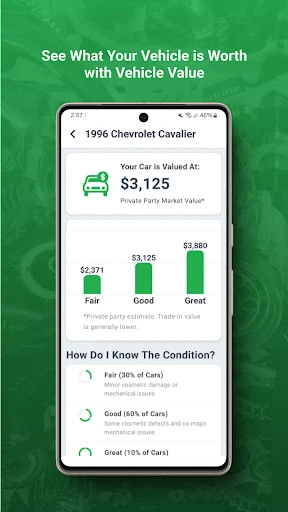
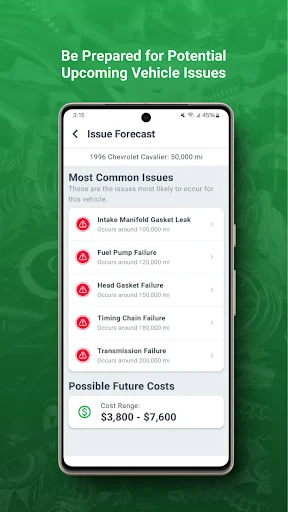
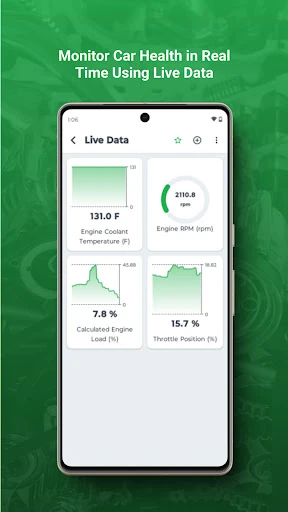
Analysis by Reviewed APKs
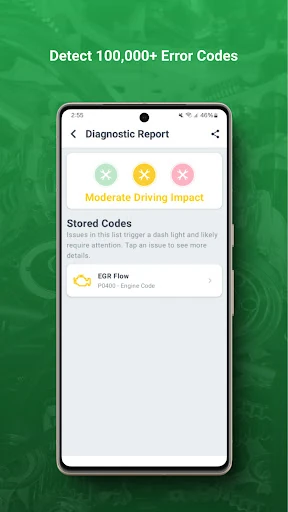
FIXD OBD2 Scanner is for drivers who want a clearer explanation when a check engine light appears and a simple way to keep scheduled service in mind. I like the practical focus: it aims to translate a confusing warning into plain language rather than turn car care into a technical project. It should suit curious everyday drivers, though it is not a substitute for a mechanic’s judgment.
When a Warning Appears
Picture a check engine light coming on during an ordinary drive home. The car may still seem to run normally, but the warning is hard to ignore, and a quick web search can lead to technical explanations that raise more questions than they answer. FIXD’s central job is to make that moment easier to understand by translating the light into simpler terms.
When I think about using it in that situation, the appeal is less about becoming a car expert and more about having a starting point. Instead of staring at an ambiguous warning and guessing what it means, I can use the app to get a more approachable explanation. That can help me decide what I need to learn next, without treating an app’s explanation as a diagnosis from a professional.
A Helpful Companion, Not a Garage
FIXD sits between the car’s warning light and the deeper research or professional help a driver might seek afterward. Its focus is narrow and useful: clearer language around check engine lights, plus tracking scheduled service. That makes it a different kind of tool from a general car forum or a repair shop. I would use it to get oriented, not as a replacement for hands-on inspection or expert advice.
It is also not a broad driving or vehicle-management app based on the information available. The central promise is understanding a warning and keeping scheduled service on the radar. Drivers who want a detailed technical dashboard, a full repair workflow, or a substitute for professional diagnosis may want something else. I find the focused scope refreshing, as long as expectations stay grounded.
Small Habits That Help
The most useful habit is to treat service tracking as something to revisit before a reminder becomes urgent. I would check it when planning routine car care, then return to it when a check engine light appears. Those are two distinct moments: one is about staying on schedule, and the other is about making sense of a new warning. Keeping both in mind gives the app a practical place in a normal ownership routine.
I would also make a note of what the app says when a warning appears, rather than relying on memory later. That gives me a clearer starting point if I need to ask a mechanic a question. The app’s plain-language goal is especially helpful when I am busy or feeling uncertain, but I would still separate an explanation from a final decision about what the vehicle needs.
More From Our News Desk

Zoom Meetings, Google Meet, or Teams: Which Is Easiest to Join?

How I Build a Free Streaming Lineup With Tubi

Why Crunchyroll Is the Default Anime App for So Many Fans

YouTube TV: A Practical Guide to Cutting Cable

Rummikub and the Small Comfort of Phone Games

TeamViewer Remote Control or AnyDesk for Helping Family?
Who May Find It Useful
I would recommend FIXD to drivers who feel unsure when a dashboard warning appears and would rather start with clear language than a list of technical terms. It also makes sense for people who want to keep scheduled service visible as part of their routine. If you like having a simple reference point before deciding what to do next, the app’s focused approach could be reassuring without asking you to learn automotive jargon.
It may be less satisfying for drivers who expect a full diagnostic workshop in their pocket or want the app to make repair decisions for them. FIXD is best approached as an aid to understanding, not as a promise that every vehicle question can be settled on a phone. Drivers who already prefer to handle all maintenance questions directly with a mechanic may not need another tool in their routine.
FIXD OBD2 Scanner is an Auto & Vehicles app from FIXD. On Google Play it has over one million installs and a 4.0-star rating from about 30,000 ratings. The app is free to download and contains in-app purchases, with listed items ranging from $0.99 to $119.99. It does not contain ads, and its content rating is Everyone.
The current version shown is 26.22. The app was released on September 17, 2015, and its last update is dated October 22, 2026. A minimum Android version is not included in the available details, so check Google Play for device compatibility before installing. The app’s core purpose is translating check engine lights into simpler language and tracking scheduled service.
Making Car Warnings Easier to Read
A Clear First Impression
When I first opened FIXD, the idea that stood out was straightforward: a check engine light should not leave a driver wrestling with confusing terminology. The app is presented as a way to understand a vehicle better, with plain-language explanations at its center. That focus gives it an immediate purpose, especially for someone who has seen a warning on the dashboard and is unsure where to begin.
Getting started with any vehicle app can feel like one more task on an already full day. I would approach FIXD with a specific question in mind, such as what a check engine light means or how to keep scheduled service in view. That keeps the experience grounded in what the app is meant to do, rather than expecting it to serve as a complete guide to every aspect of car ownership.
The Everyday Experience
Day to day, the two useful moments are likely to be a new warning and a scheduled service check. Those needs are easy to understand, and FIXD’s stated role is to make the first less confusing while helping track the second. I appreciate that combination because vehicle upkeep is not only about reacting to problems; remembering routine service is part of the same ordinary ownership picture.
The best experience here depends on keeping expectations practical. A plain-language explanation can make a technical warning less intimidating, but it does not tell me everything about the condition of a vehicle. I would use the app to get a clearer sense of what a warning is communicating, then consider what further help is appropriate. That is a useful, modest role rather than an all-purpose answer.
Two Useful Jobs
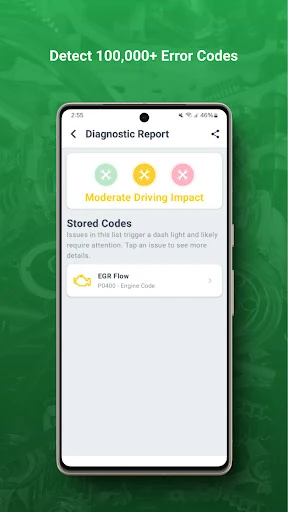
The standout feature is translation: FIXD aims to turn check engine lights and technical definitions into language that is easier for a regular driver to follow. That matters because dashboard warnings can be stressful even when the driver has no idea what the underlying terms mean. An accessible explanation gives the moment a little structure and helps replace a vague concern with something more understandable.
The other supported part of the app is tracking scheduled service. I like that it complements the warning-focused side without changing the app into a general-purpose car reference. One feature responds to an unexpected signal; the other is about keeping planned upkeep on the radar. Together, they create a compact reason to return to the app at more than one point in a vehicle’s routine.
A Simple Car-Care Routine
A practical routine could start with checking scheduled service when I am planning the week or arranging general car care. I would then return to FIXD if a check engine light comes on, using the plain-language explanation as an initial reference. These are small actions rather than a complicated system, which is a good fit for drivers who want a little more context without building a detailed maintenance spreadsheet.
If I were discussing a warning with a mechanic, I would keep the app’s explanation in mind as a way to describe what I have been trying to understand. I would not treat it as a final answer or assume that the wording replaces a professional assessment. That distinction keeps the app helpful: it can make the first conversation easier to have, while the actual vehicle question may still need more attention.
Keep Expectations Grounded
FIXD’s appeal is also its limitation: it focuses on check engine light explanations and scheduled service tracking. Drivers looking for a much broader collection of automotive tools may find that scope too narrow. I would rather know what role an app plays than expect it to solve every car question, but it is worth deciding whether these particular needs match your own routine before adding another app.
A simple explanation should not be confused with certainty about what is wrong or what repair is needed. Cars can require more context than a warning light alone provides, so I would use FIXD as a starting point for understanding rather than a substitute for qualified help. That careful approach makes the app more useful and avoids expecting a phone-based explanation to settle every practical decision.
FIXD OBD2 Scanner has a clear, everyday purpose: make check engine lights easier to understand and help keep scheduled service in view. I like that its core idea is approachable and focused, especially for drivers who find technical car language daunting. Its usefulness depends on treating it as a guide to understanding, not a replacement for professional judgment.
I would recommend giving it a look if warning lights leave you unsure where to start or if you want a simple reminder-oriented aid for routine service. Drivers seeking a comprehensive repair tool should keep looking, but for plain-language context and service tracking, FIXD has a sensible niche.
FIXD Frequently Asked Questions
What is FIXD OBD2 Scanner used for?
FIXD is intended to help drivers understand their vehicles by translating check engine lights and technical definitions into simpler language. It also tracks scheduled service. I would use it as an accessible starting point when a warning appears or as a prompt to keep routine upkeep in mind, rather than as a replacement for a mechanic’s assessment.
Which phones and devices support FIXD OBD2 Scanner?
FIXD OBD2 Scanner is an Android app available through Google Play. The minimum Android version is worth checking on the store page, since device requirements can vary. Before installing, I would check the current compatibility details for your phone so you know whether your device supports the app.
What Android version does FIXD OBD2 Scanner require?
The minimum Android version can vary by app release and device, so check the FIXD OBD2 Scanner page on Google Play for the current requirement. That is the best place to confirm compatibility before downloading. The app’s purpose is to explain check engine lights in simpler terms and track scheduled service.
Does FIXD OBD2 Scanner cost money?
FIXD OBD2 Scanner is free to download and contains in-app purchases. Listed in-app items range from $0.99 to $119.99, so the cost of optional purchases may vary. It does not contain ads. I would check Google Play for current purchase details before deciding whether anything beyond the free download is right for you.
Is FIXD OBD2 Scanner suitable for new drivers?
Its plain-language approach to check engine lights may be useful for new drivers or anyone who finds automotive terminology confusing. Scheduled service tracking is another practical reason to consider it. It is still best used as an aid to understanding, not as a complete diagnosis or a substitute for professional advice about a vehicle.
Pros
- Translates check engine light information into simpler, more approachable language.
- Combines warning explanations with scheduled service tracking.
- Free to download and does not contain ads.
- A focused concept that is easy to understand.
Cons
- Its focused scope may not satisfy drivers seeking a broader automotive toolkit.
- Plain-language explanations should not replace professional vehicle assessment.
- In-app purchases range widely in price.
- Category
- Auto & Vehicles
- Version
- 26.22