BlueDriver OBD2 Scan Tool
- 16.88K
- 3.8
- Installs
- 1.00M
- Price
- Free
Screenshots
Analysis by Reviewed APKs
BlueDriver OBD2 Scan Tool turns an Android phone or tablet into a vehicle diagnostic companion when paired with its Bluetooth sensor. I found its appeal in the gap between a warning light and a trip to the repair shop: it can show trouble codes and explain likely fixes in plain language. It suits curious drivers and hands-on owners, though the sensor is a separate purchase.
When a warning light appears
Picture a check engine light appearing on the way home. Rather than guessing what it means, I can plug the BlueDriver sensor into the car’s data port, connect it to the app over Bluetooth, and read the trouble code. The app presents information about the issue and possible fixes, giving me a more useful starting point before I decide whether to investigate further or call a mechanic.
The app’s job is to help translate vehicle diagnostic information into something a driver can use. I can check freeze frame data, look at live data, and save or share a Repair Report tied to the vehicle and code. It’s also useful before a smog test, since it can show readiness information. That makes it more practical than a simple code lookup when I want context about what the car is reporting.
More than a code reader
A basic code reader can tell me that a fault has been recorded, but BlueDriver aims to add explanation and vehicle-specific repair information. Its reports draw on a database of real-world fixes, and enhanced diagnostics can cover systems such as ABS, airbags, and transmissions for supported vehicles. That extra detail is the reason I’d consider it over a bare-bones reader, especially if I want to discuss a fault with a mechanic.
It is still a diagnostic tool, not a substitute for mechanical work or a promise that a suggested fix is right for every situation. The phone app also needs the separately sold BlueDriver sensor to scan a vehicle. I wouldn’t choose it if I only wanted general car-maintenance reminders or a way to track fuel spending; its focus is reading diagnostic information and helping make sense of it.
Make the scan useful
I’d get more from BlueDriver by recording the vehicle’s details and keeping reports when a warning light appears, rather than scanning once and forgetting the result. A saved report can help me compare information over time or share the same code and vehicle context with a repair shop. If I’m troubleshooting, the plain-language likely fixes give me a more focused list of questions than a code number alone.
A quick check before a smog test is another sensible habit. I can review readiness and freeze frame data without treating one screen as a verdict on the car’s overall condition. Live data with interactive multi-PID graphing can also help when I want to watch selected readings together. I’d keep the car parked for setup and scanning, then use the resulting information to plan what to do next.
More From Our News Desk

Zoom Meetings, Google Meet, or Teams: Which Is Easiest to Join?

How I Build a Free Streaming Lineup With Tubi

Why Crunchyroll Is the Default Anime App for So Many Fans

YouTube TV: A Practical Guide to Cutting Cable

Rummikub and the Small Comfort of Phone Games

TeamViewer Remote Control or AnyDesk for Helping Family?
Who will get the most from it
I’d recommend BlueDriver to drivers who want more context when a dashboard warning appears, and to DIY-minded owners who are comfortable looking at vehicle data. It can also help someone prepare for a conversation with a mechanic by saving a report connected to the exact vehicle and trouble code. The app is free to install, but the sensor is needed for full scanning, so the whole setup is not just a phone download.
It may not suit someone who expects the app alone to diagnose a car, or who wants a simple maintenance schedule rather than diagnostic tools. The extra information can help narrow down questions, but interpreting a fault and choosing a repair still takes judgment. Drivers should also check whether enhanced diagnostics cover their vehicle and system before relying on those features. For occasional code checks, the separate sensor purchase may feel like more commitment than they need.
BlueDriver OBD2 Scan Tool is developed by Lemur Vehicle Monitors and is listed in Google Play’s Auto & Vehicles category. It has over one million installs and a 3.8-star rating from around 16,900 ratings. The app is free to install, with no in-app purchases or ads. Its content rating is Everyone, and the listed minimum requirement is Android 8.0.
The current listed version is 8.7.1. BlueDriver first released on January 20, 2014, and its latest listed update was February 5, 2026. The phone app needs the separately sold BlueDriver Bluetooth sensor for vehicle scanning; the sensor plugs into the vehicle’s data port and connects to the app. BlueDriver says there is no subscription required.
A closer look at BlueDriver
Setup and first impressions
When I first opened BlueDriver, the basic arrangement made sense: the phone app works with a sensor plugged into the vehicle’s data port, communicating over Bluetooth. The app is free to install, but the sensor is sold separately. Setup includes creating a BlueDriver account, which provides access to scans, reports, and new features across devices.
The recent update introduced a redesigned onboarding flow intended to help users connect and scan sooner, along with bug fixes and performance improvements. That matters because the first task is pairing the phone and sensor, not exploring menus. I’d handle the account and Bluetooth setup while parked, before I need the app in a stressful moment beside a warning light.
The everyday scan
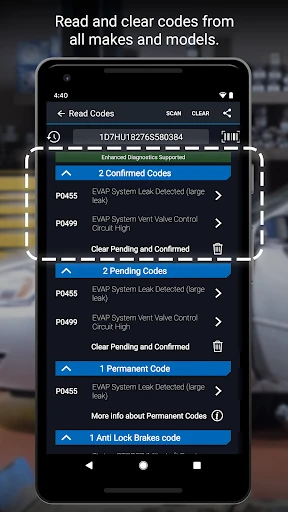
In day-to-day use, the main loop is straightforward: connect the sensor, scan for codes, and read the results. BlueDriver can read and clear trouble codes, including check engine, ABS, airbag, and transmission codes. What I appreciate is that the app doesn’t stop at presenting a code; it offers likely fixes in plain language, giving a driver a starting point for understanding what the vehicle has reported.
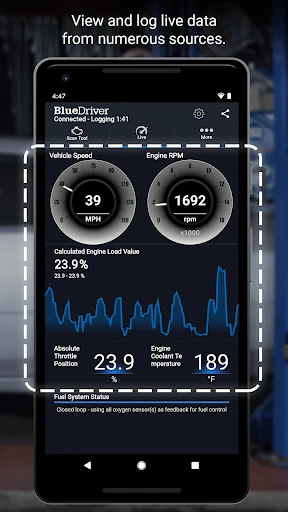
There’s also live data with interactive graphing for multiple readings, plus freeze frame information associated with a fault. These tools are more useful when I have a specific question than when I’m casually tapping around. I’d look at them while the car is stationary and use the results to guide a follow-up conversation or investigation, rather than assuming a graph alone identifies the cause.
Reports with vehicle context
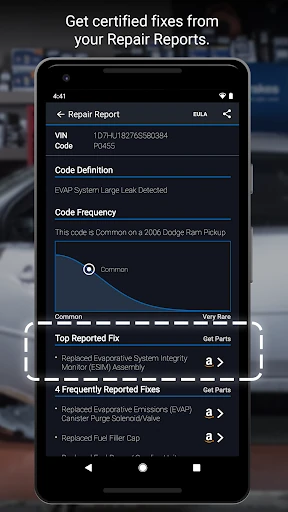
Repair Reports are one of the app’s more distinctive features. BlueDriver says reports are based on the vehicle’s year, make, and model as well as the trouble code, and can be saved or shared. That gives me something more informative to keep or pass along than a note saying a warning light came on. The reports use a database of real-world fixes to present likely explanations and possible next steps.
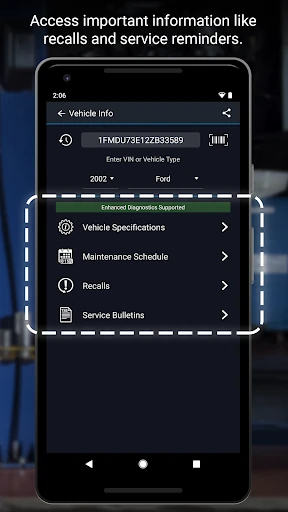
The app also offers Mode 6 onboard monitoring test results and smog readiness information. For supported vehicles, enhanced diagnostics extend beyond basic engine codes to areas such as ABS and transmission systems. Coverage depends on vehicle make, model year, and region, so I’d check the supported coverage before expecting a particular system to appear. A Repair Report can also be previewed by entering a VIN and code without a sensor.
A practical weekly routine
I wouldn’t scan a healthy car every morning just to watch numbers move. A more grounded routine is to keep the sensor available, connect it when a warning light appears, and save the report before clearing anything. That leaves me with a record of what the car reported. If I’m preparing for a smog test, I can also check readiness information rather than relying on memory.
When I do want a closer look, I can compare selected live readings using the interactive graph and review freeze frame data for context. I’d note what the app says and share the report if I’m asking a shop for help. Switching between metric and imperial settings can make the readings easier to follow. The point is to turn a scan into a useful record, not to treat every result as a repair instruction.
Keep the limits in view
The most important practical limitation is hardware: the app needs the separate BlueDriver sensor for full diagnostic scanning. It connects wirelessly, but it still has to be plugged into the vehicle’s data port. The app is not a standalone scanner, and an installation alone won’t retrieve codes from the car. That distinction is easy to miss if someone sees “free” and expects the whole setup to cost nothing.
Enhanced diagnostic coverage varies across manufacturers and regions. BlueDriver names supported makes and model-year ranges for some enhanced systems, so I’d check those details against my own vehicle before buying the sensor for a specific need. And although likely fixes and repair reports can make a fault easier to understand, they don’t turn the phone into a mechanic. The results are best treated as helpful diagnostic information, not a definitive repair decision.
BlueDriver is a useful step up from a bare code reader for drivers who want explanations, saved reports, and access to more vehicle data. I like that it connects codes to vehicle-specific repair information and offers tools for readiness checks and live readings. Its strongest use is helping me understand what to ask or investigate next.
I’d recommend it to a curious car owner who is willing to buy the separate sensor and wants diagnostic information close at hand. If you only need an occasional code check or expect the app itself to fix the car, it may be more tool than you need. Check vehicle coverage first, then decide whether the extra context is worth the hardware.
BlueDriver OBD2 Scan Tool Frequently Asked Questions
What is BlueDriver OBD2 Scan Tool used for?
BlueDriver OBD2 Scan Tool connects with a separately sold Bluetooth sensor to read and clear vehicle trouble codes. It can show information for systems including the engine, ABS, airbags, and transmission, along with features such as live data, freeze frame data, smog readiness, and vehicle-specific Repair Reports.
Which phones and vehicles work with BlueDriver OBD2 Scan Tool?
The app is available for Android phones and tablets. Its sensor plugs into a vehicle’s data port, and the description says that port is found in cars built since 1996. Enhanced diagnostic coverage varies by vehicle make, model year, and region, so check the Google Play information and BlueDriver’s coverage details for your particular car.
What Android version does BlueDriver OBD2 Scan Tool require?
The listed minimum requirement for BlueDriver OBD2 Scan Tool is Android 8.0. It can be installed on a compatible phone or tablet, but full vehicle scanning also requires the separate BlueDriver Bluetooth sensor. Requirements may change with app updates, so it is worth checking the Google Play listing before installing.
Does BlueDriver OBD2 Scan Tool cost money?
The app is free to install and has no in-app purchases or ads listed. The BlueDriver sensor is sold separately and is required for full scanning functionality. BlueDriver says no subscription is required. Sensor availability and purchase details may vary, so check the Google Play listing or the seller’s current information before buying.
Is BlueDriver OBD2 Scan Tool suitable for beginners?
It can suit a beginner who wants plain-language explanations and likely fixes alongside vehicle trouble codes. The app provides diagnostic information, not a replacement for mechanical work, and some features depend on the vehicle’s coverage. Someone who only wants a basic maintenance reminder app may find BlueDriver too specialized, especially since scanning needs a separate sensor.
Pros
- Explains trouble codes with likely fixes in plain language.
- Saves and shares Repair Reports tied to vehicle details and codes.
- Includes live data graphing, freeze frame information, and smog readiness checks.
- No subscription is required, and the app has no ads.
Cons
- Full vehicle scanning requires the separately sold BlueDriver sensor.
- Enhanced diagnostic coverage depends on vehicle make, model year, and region.
- Diagnostic results provide useful context but do not replace repair expertise.
- Category
- Auto & Vehicles
- Version
- 8.7.1