Car Scanner ELM OBD2
- 367.99K
- 4.7
- Installs
- 10.00M
- Price
- Free

Screenshots
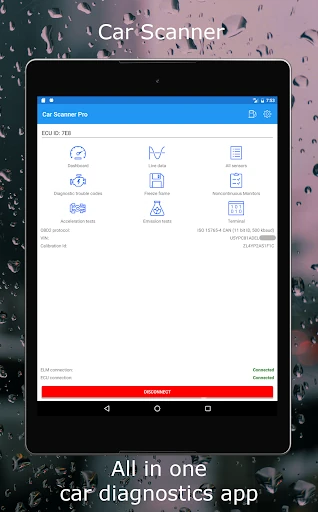
Analysis by Reviewed APKs
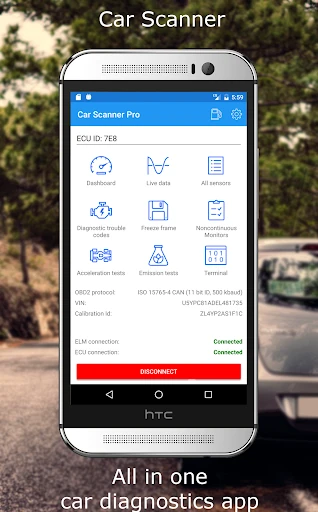
Car Scanner ELM OBD2 turns a compatible phone-and-adapter setup into a live view of a car’s diagnostic data. I’d point it toward drivers who like understanding warning codes, checking sensor readings, or keeping an eye on trip information without immediately reaching for a dedicated scan tool. Its customizable dashboard and broad feature set make it more flexible than a basic code reader, though the adapter and vehicle determine what it can show.
A quick check before driving
Picture a dashboard warning appearing before the morning commute. With a compatible OBD2 adapter connected to the car, Car Scanner can read diagnostic trouble codes and show descriptions from its code database. I like the idea of being able to check what the car has recorded before deciding what to do next. It gives a driver useful context, rather than leaving a warning light as the only clue.
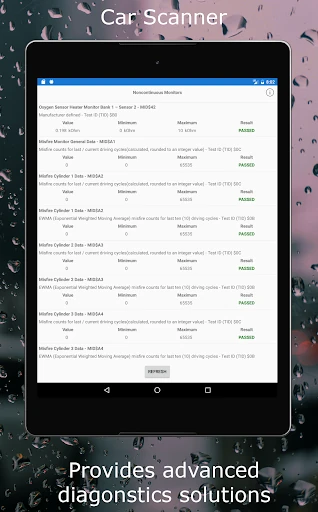
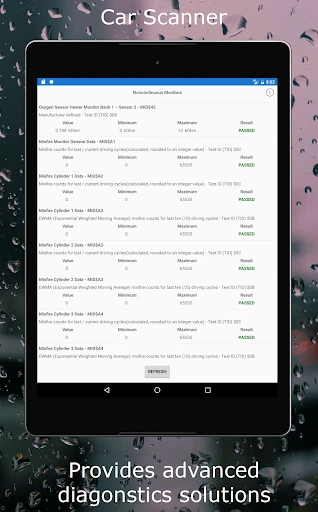
The app can also display live sensor information, saved sensor readings associated with a fault, and ECU self-monitoring results through Mode 06. I’d use those details as a way to understand what the car is reporting, not as a substitute for a mechanic’s diagnosis. What appears depends on the vehicle and its supported sensors. That distinction matters: a phone app can organize available data, but it cannot make a car report information it does not provide.
More than a code reader
A simple code reader focuses on faults; Car Scanner also offers configurable gauges and charts, trip-computer information, fuel-consumption statistics, and performance measurements such as acceleration times. That range makes it appealing to someone who wants to check different kinds of vehicle data in one app. It can also check readiness for emissions testing, which is a practical feature when you want to see the car’s status before arranging a test.
This is still a companion to an OBD2 adapter, not a standalone car diagnostic device. It needs an adapter that connects to the vehicle and communicates with the phone, and different cars expose different information. Some coding and service functions are limited to specific vehicle groups or platforms. I wouldn’t choose it expecting every feature to work on every car, or treat its readings as a replacement for hands-on repair work.
Make the data useful
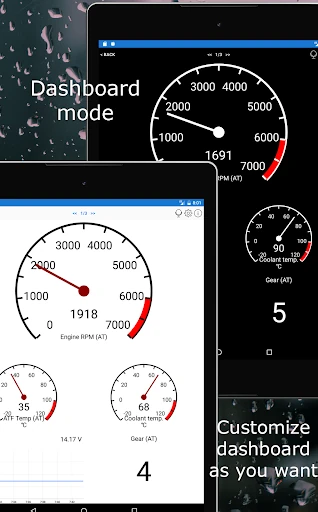
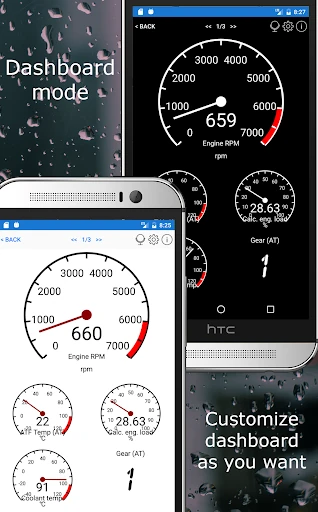
The custom dashboard is a good place to start if the default mix of readings does not suit your routine. You can arrange gauges and charts around the information you care about, rather than watching a screen crowded with every possible value. For a regular commute, that might mean keeping a few useful readings together; for a weekend check, you might prefer to look across sensors or review performance data.
A sensible habit is to connect only when parked and take time to learn what your selected readings mean. The app supports extended PIDs, which can expose additional manufacturer-related information when the car supports it, but that also makes compatibility important. I’d keep the setup simple at first, confirm that the adapter stays connected, and build a dashboard gradually instead of trying to interpret every available number at once.
More From Our News Desk

Zoom Meetings, Google Meet, or Teams: Which Is Easiest to Join?

How I Build a Free Streaming Lineup With Tubi

Why Crunchyroll Is the Default Anime App for So Many Fans

YouTube TV: A Practical Guide to Cutting Cable

Rummikub and the Small Comfort of Phone Games

TeamViewer Remote Control or AnyDesk for Helping Family?
Who will get the most from it
I’d recommend Car Scanner to curious drivers who already own, or are willing to buy, a compatible OBD2 adapter. It suits people who want to inspect fault codes, view live sensor data, check emissions readiness, or add trip and fuel-use information to their routine. Drivers who enjoy tailoring a dashboard may appreciate having gauges and charts they can arrange around their own priorities.
It may be a poor fit if you want diagnostics without connecting extra hardware, or if you expect every reading and special function to work on every vehicle. People who prefer a single plain-language answer to a warning light may also find the data-heavy approach less comfortable. Compatibility depends on the adapter, car, and available vehicle data, so a little patience and willingness to check those details will help.
Car Scanner ELM OBD2 is published by CAR SCANNER LLC in the Auto & Vehicles category. On Google Play, it has more than 10 million installs and a 4.7-star rating from about 368,000 ratings. The app is rated Everyone. Its Google Play release date is January 23, 2018, and the supplied store details give version 2.2.21.
The app is free to install and includes ads and optional in-app purchases, priced at $1.49 to $3.99 per item. The supplied Google Play details give September 26, 2026 as its last update. To use its vehicle functions, you also need a Wi-Fi, Bluetooth, or Bluetooth LE ELM327-compatible OBD2 adapter; the app alone cannot connect to the car’s diagnostic system.
A dashboard built around your car
Getting connected
My first impression is that Car Scanner is built for drivers who want more than a single warning-code result. The central idea is a phone-based view of what the car reports, with dashboards, diagnostics, and trip information all in the mix. Before exploring those screens, though, the practical first step is having an appropriate OBD2 adapter and making sure it works with both the phone and the vehicle.
The adapter connects to the car’s diagnostic socket and communicates with the app over Wi-Fi or Bluetooth, including Bluetooth LE. The description names several adapter brands as recommendations and cautions that some inexpensive clones can have connection or data-delay problems. I’d treat adapter choice as part of getting started, rather than assuming that every device using the ELM327 label will behave equally well.
Everyday readings
Once the connection is working, the app’s day-to-day appeal is the ability to see car data in real time. Instead of using a scan tool only when a warning appears, a driver can also open it to look at sensor readings or trip-computer information. Fuel-consumption statistics add another reason to check in during ordinary driving, though the usefulness of those figures depends on what the vehicle supplies.
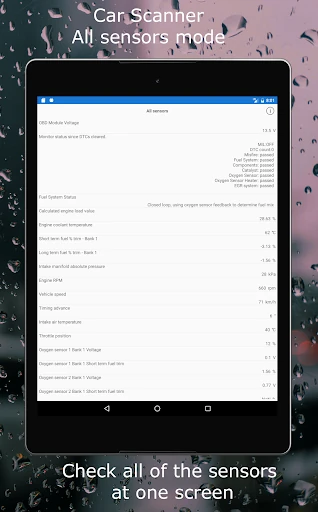
I’d keep the routine focused. A quick look at a few selected gauges is easier to make sense of than trying to watch a wall of readings. Charts can help put changing values in context, while the option to view sensors together is useful when doing a more deliberate check. As with any car data display, the app reports information; interpreting it still takes care.
A flexible feature set
The dashboard is one of the most distinctive parts of the package. Users can choose gauges and charts and lay them out to fit their priorities. There is also a heads-up display mode intended to project dashboard data onto the windshield. I’d think of that as a display option for appropriate circumstances, not a reason to interact with the phone while driving.
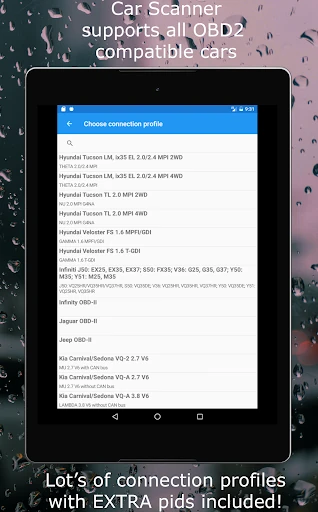
For deeper checks, Car Scanner can read and reset diagnostic trouble codes, display saved sensor states associated with a fault, and show Mode 06 ECU self-monitoring results. It can also check emissions-test readiness. Extended PIDs provide a route to additional data when the car supports it, and the app includes connection profiles intended to add features for various manufacturers.
The feature list extends into acceleration measurements and coding or service functions for certain supported vehicles. Compatibility for coding can depend on the car’s platform, modules, and firmware, so I’d check the specific vehicle details before counting on a particular function. This breadth is useful, but it is not a promise that every menu or measurement applies to every car.
A useful weekend routine
A practical way to use the app is to make a short check part of a parked-car routine. I’d connect the adapter, look for stored trouble codes, and review any available readings that seem relevant. If there is a warning, the code description and related sensor information can help provide context for a conversation with a repair professional, without pretending to settle the diagnosis on their own.
For a longer drive, a custom dashboard can keep a chosen set of readings in one place, while the trip-computer features offer fuel-consumption statistics. Before an emissions test, checking readiness is another focused use. These are separate jobs, so it makes sense to change the dashboard or screens to suit the task instead of expecting one layout to be ideal for everything.
I’d also make a habit of checking that the adapter connection is stable before trusting a reading session. The description notes that some adapters can lose connection, introduce lag, or have other problems. Starting with a reliable connection and keeping the display uncluttered makes the experience more useful and less distracting.
Compatibility comes first
The main limitation is that this app depends on hardware and vehicle support. You need an OBD2 ELM327-compatible adapter, and the car must expose the data you want to see. The description says OBD2 is used by most vehicles built after 2000 and may work with some vehicles dating back to 1996, but the exact fit is worth checking for a particular car and adapter.
A second limitation is that the depth of the feature set can be a lot to take in. Trouble codes, live values, extended PIDs, dashboards, and specialized functions each serve different purposes. Some features are only available for particular makes or platforms, and vehicle modules or firmware can affect compatibility. I’d approach the app as a flexible toolkit, not a universal fix-it button.
Finally, live data is only as useful as the underlying connection and the driver’s understanding of it. The app can show what the ECU provides, but it cannot supply missing sensors or confirm a repair by itself. That makes it most valuable for informed checking and monitoring, with professional help still appropriate when a problem needs diagnosis.
Car Scanner ELM OBD2 stands out for combining fault-code checks with customizable dashboards, live sensor views, trip information, and selected vehicle-specific tools. I like that it can serve both quick checks and more deliberate data exploration, provided the adapter and car cooperate.
I’d recommend it to drivers who enjoy learning what their car reports and are comfortable pairing an app with OBD2 hardware. If you want a no-setup answer or expect every feature to fit every vehicle, look elsewhere. For the right driver, it is a capable and flexible companion.
Car Scanner ELM OBD2 Frequently Asked Questions
What is Car Scanner ELM OBD2 used for?
Car Scanner ELM OBD2 connects to a vehicle through a compatible OBD2 adapter to show diagnostic trouble codes, sensor data, and other available information. It can also display trip-computer and fuel-consumption information, check emissions readiness, and provide configurable dashboards. Which readings and functions work depends on the vehicle, its supported data, and the adapter.
Which phones and vehicles work with Car Scanner ELM OBD2?
Car Scanner ELM OBD2 is an Android app on Google Play. It requires a Wi-Fi, Bluetooth, or Bluetooth LE ELM327-compatible OBD2 adapter to communicate with a car. The description says the OBD2 standard is used by most vehicles built after 2000 and may work with some dating to 1996. Check the app’s Google Play page and vehicle compatibility details for your setup.
What Android version does Car Scanner ELM OBD2 require?
The Android version requirement can vary with the app’s current release and device. Check the Car Scanner ELM OBD2 Google Play page for the requirement shown for your phone before installing. The app also needs a compatible OBD2 adapter for its vehicle functions, so phone compatibility alone does not complete the setup.
Is Car Scanner ELM OBD2 free, and does it have purchases?
Car Scanner ELM OBD2 is free to install on Google Play. It contains ads and offers in-app purchases priced at $1.49 to $3.99 per item in the supplied store details. Prices and purchase options can change by region or over time, so check the Google Play page for the current details before buying.
Is Car Scanner ELM OBD2 suitable for beginners?
It can suit a beginner who wants to learn what a car’s diagnostic system is reporting, especially for checking codes or viewing a few selected readings. The amount of data and the need for an adapter may feel like extra work if you want a simple answer. Vehicle compatibility varies, and readings are best treated as information rather than a complete diagnosis.
Pros
- Combines fault-code checks, live sensor data, trip information, and emissions-readiness checks.
- Custom dashboards let drivers choose gauges and charts that suit their routine.
- Supports extended PIDs and selected vehicle-specific functions where compatible.
- Free to install, with a substantial Google Play user base.
Cons
- Requires a separate compatible OBD2 adapter to access vehicle data.
- Available readings and special functions vary by vehicle, adapter, and supported modules.
- Some adapters may have connection problems or introduce data delays.
- Category
- Auto & Vehicles
- Version
- 2.2.21