RepairSolutions2
- 28.41K
- 4.7
- Installs
- 1.00M
- Price
- Free

Screenshots
Analysis by Reviewed APKs
RepairSolutions2 is a vehicle-care and diagnostic app for car and truck owners, DIYers, and entry-level technicians. It can offer useful maintenance and repair information even without a scanner, while compatible OBD2 tools unlock scans and live data. I like that it connects a trouble code with possible fixes rather than leaving me with an unfamiliar abbreviation. Its usefulness depends on your vehicle and whether you have a compatible tool.
A Check-Engine-Light Companion
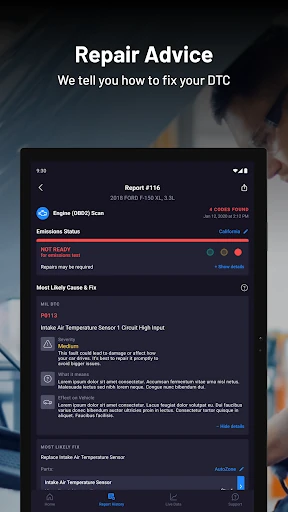
When a warning light appears on the way home, I want more than a cryptic code and a guess at what it means. RepairSolutions2 can pair with a compatible OBD2 scanner or dongle to read diagnostic trouble codes and create a vehicle report. It also explains codes in everyday language and can show the effect on the vehicle and available fixes. That makes it a practical first stop for understanding what might need attention.
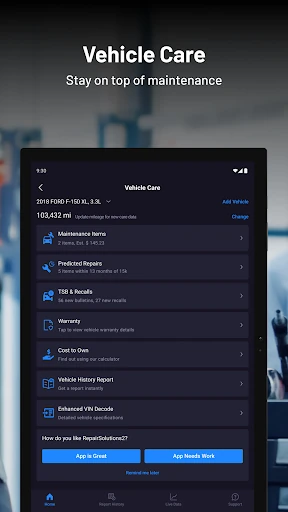
I can also see the appeal before a problem comes up. The app offers vehicle-care details such as scheduled maintenance, recalls, technical service bulletins, warranty status, and predicted repairs. I’d use those details to prepare for a service visit or decide what question to ask next, not as a substitute for a mechanic’s inspection. Vehicle-specific information and supported functions vary by year, make, and model.
More Than a Code Reader
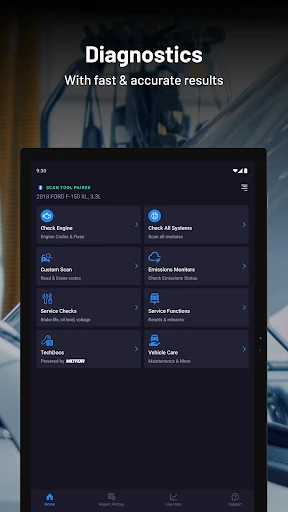
A basic code-reader app is mainly useful once a scanner has produced a trouble code. RepairSolutions2 aims to cover more of the ownership routine: some vehicle-care information is available without a tool, and a compatible scanner adds diagnostic reports, code reading and erasing, module scans, and live data. The repair information and ASE-verified fixes are meant to help connect a diagnosis with possible next steps.
That broader scope also means this is not simply a general driving log or a full professional workshop system. The app focuses on vehicle information, diagnostics, and repair options; it does not promise that every vehicle supports every function. If I only want a quick explanation of a code, a simpler reference may be enough. If I want app-based scanning, I need a compatible OBD2 tool.
Build a Small Car-Care Routine
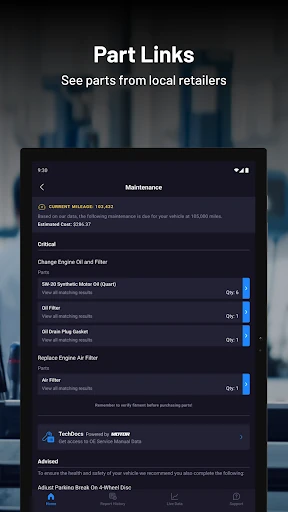
A useful habit is to add vehicle information and check the maintenance guidance before a service appointment, then keep any relevant report handy when discussing a warning or repair. The app includes manufacturer-scheduled maintenance and direct purchase links for recommended service items. I’d treat those prompts as a way to prepare and compare options, while checking that the information applies to my particular vehicle.
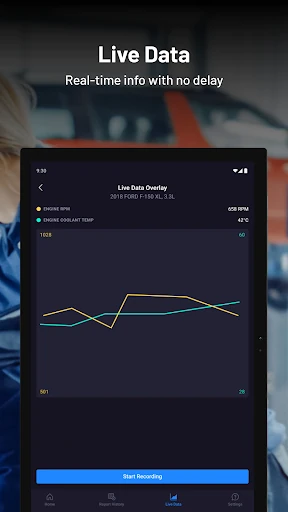
For someone with a compatible scanner, it can help to make a scan part of a deliberate troubleshooting routine rather than repeatedly checking codes without a plan. The app supports quick engine scans, scans of specific modules, and a complete network scan. Live-data sessions can be customized, graphed, and recorded for later access. Those tools are most useful when I know what question I’m trying to answer.
More From Our News Desk

Zoom Meetings, Google Meet, or Teams: Which Is Easiest to Join?

How I Build a Free Streaming Lineup With Tubi

Why Crunchyroll Is the Default Anime App for So Many Fans

YouTube TV: A Practical Guide to Cutting Cable

Rummikub and the Small Comfort of Phone Games

TeamViewer Remote Control or AnyDesk for Helping Family?
Who May Find It Useful
I’d recommend RepairSolutions2 to owners who like having maintenance and repair information close at hand, especially if they already own a compatible OBD2 scanner or dongle. DIYers may appreciate the plain-language code definitions and repair guidance, while an owner who prefers a shop can use vehicle-care information and the in-app repair-scheduling option to prepare for service.
It may be less appealing if you expect every feature to work with every car, or want a complete repair manual with detailed instructions for every job. Some diagnostic functions require compatible hardware, and vehicle support varies. I’d also be cautious about treating predicted repairs or code descriptions as a final diagnosis. The app is better as a practical information and troubleshooting aid than as a replacement for hands-on expertise.
RepairSolutions2 is developed by Innova Electronics Corporation and is in the Auto & Vehicles category on Google Play. The app is free to install, with in-app purchases; individual in-app products are listed from $9.99 to $29.99. It contains no ads and has an Everyone content rating. Google Play shows over one million installs and a 4.7-star rating from 28,415 ratings.
The current version provided is 2.7.5. The app was released on September 9, 2019, and its listed last update is October 26, 2026. Some functions require a compatible OBD2 scan tool or dongle, and supported features can vary by vehicle. The supplied Android-version field is empty, so check Google Play for the device requirements that apply to your phone.
A Closer Look at Everyday Diagnostics
Getting Started With Context
My first impression is that RepairSolutions2 is trying to serve two situations at once: an owner who wants general vehicle-care information and an owner who has a scanner ready to connect. That distinction matters. The no-tool option includes maintenance, predicted repairs, recalls and technical service bulletins, cost-to-own information, and code definitions. A compatible OBD2 device opens up the app’s scanning and diagnostic functions.
Before relying on a feature, I’d check that the vehicle and scanner are supported. The app’s description makes clear that features differ by vehicle year, make, and model, and not every function works with every vehicle. That is a sensible expectation for car diagnostics, but it does mean setup is not just a matter of installing the app and assuming all the options will be available.
The Daily Diagnostic Flow
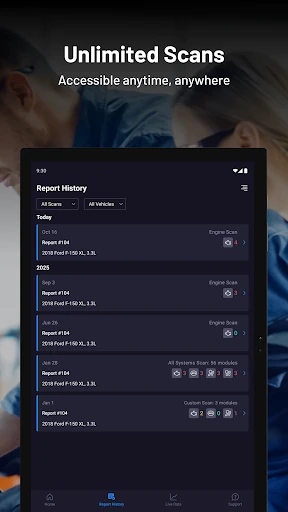
With a compatible tool connected, the everyday job is straightforward in concept: run a scan, read the codes, and use the report and repair information to understand what the results could mean. The app supports engine-only quick scans, scans of specific modules, and complete network scans. It can read and erase diagnostic trouble codes, so users have more than one way to inspect a vehicle’s electronic systems.
The most helpful part is the bridge between a code and an explanation. RepairSolutions2 pairs definitions with the effect on the vehicle and available fixes, rather than presenting only a string of letters and numbers. I’d still use that information as a starting point, since a code does not by itself establish the full cause of a problem. The app is designed to make the next conversation or investigation more informed.
Features With Practical Value
Live data is one of the more involved tools. The app lets users choose specific data inputs, view them in line graphs, and record sessions for later access. That can be useful when someone is trying to observe changing readings instead of relying on a single scan result. It is a feature for users comfortable spending time with diagnostic information, rather than a requirement for basic vehicle-care use.
The ownership features widen the app’s role. Users can look up scheduled maintenance, warranty status, recalls, technical service bulletins, predicted repairs, and five-year cost-to-own information. Repair guidance is described as verified by ASE Master Technicians, and the app can help identify parts for a specific vehicle through online retailers. These features make the app relevant between warning lights, not just when a fault code appears.
A Useful Pre-Visit Routine
If my car were due for service, I’d use the app ahead of the appointment to review scheduled maintenance and any relevant vehicle-care information. If a warning appeared and I had a compatible scanner, I’d run the appropriate scan and save the diagnostic details for reference. That gives me a clearer starting point for describing the issue, without pretending a phone report has settled every question.
For repairs I do not want to handle myself, the app includes a Schedule Repair option that can help users choose a repair facility and a suitable time. Parts links are also available for maintenance and repairs. I’d use these as convenience features to explore options, while keeping the actual repair decision tied to the vehicle’s needs and the information from a qualified inspection.
Limits to Keep in Mind
The biggest practical limit is hardware and vehicle compatibility. Some functions require a compatible scanner or dongle, and the app says support varies by vehicle year, make, and model. Owners without a tool still have access to vehicle-care information, but should not expect to run scans or view live diagnostic data just by installing the app.
There is also a learning curve in deciding what to do with diagnostic information. Codes, predicted repairs, and live readings can help frame a problem, but they are not the same as a confirmed repair diagnosis. The app offers a lot of material, and users who only want a simple maintenance reminder may find its diagnostic emphasis unnecessary. Checking vehicle support before depending on a specific function is a sensible first step.
RepairSolutions2 has a useful balance of no-tool vehicle information and deeper diagnostics for people with compatible OBD2 hardware. I especially like the combination of plain-language code explanations, maintenance guidance, and repair information. It gives owners a more informed place to start when a warning appears or service is coming due.
I’d try it if I wanted to understand my vehicle better or already had a compatible scanner. It is less compelling for someone expecting every feature to work on every car, or a complete replacement for professional diagnosis. Check vehicle and device support first, then use the app as a practical companion.
RepairSolutions2 Frequently Asked Questions
What is RepairSolutions2 used for?
RepairSolutions2 provides vehicle-care information and, with a compatible OBD2 scanner or dongle, diagnostic tools. It can show code definitions, maintenance guidance, recalls, technical service bulletins, predicted repairs, and repair information. With compatible hardware, users can scan vehicle systems, read or erase trouble codes, and view customizable live data. Available functions depend on the vehicle.
Which phones and devices support RepairSolutions2?
RepairSolutions2 is an Android app available through Google Play. Some of its diagnostic features also require a compatible OBD2 scan tool or dongle connected to the vehicle. Not every tool or vehicle supports every function, and compatibility varies by vehicle year, make, and model. Check the Google Play information and tool compatibility details before relying on a feature.
What Android version does RepairSolutions2 require?
The Android-version requirement can vary with the current app release and device. Check the RepairSolutions2 page on Google Play for the requirement that applies to your phone. The app’s vehicle features also depend on vehicle compatibility, and diagnostic scanning requires a compatible OBD2 tool or dongle. Some vehicle-care information is available without that hardware.
Does RepairSolutions2 cost money?
RepairSolutions2 is free to install on Google Play and contains in-app purchases. Individual in-app products are listed at $9.99 to $29.99. The app description says no purchase is required to install it, while some features require a compatible OBD2 device. Check Google Play for current purchase details and which options are available to you.
Is RepairSolutions2 suitable for beginners?
It can suit a car owner who wants plain-language code definitions and vehicle-care information, including without a scanner. A compatible OBD2 tool is needed for diagnostic scans and live data, and those features may take more familiarity to interpret. I’d treat the app as a helpful starting point, not a substitute for a hands-on diagnosis when a problem needs attention.
Pros
- Offers maintenance and recall information even when you do not own a compatible scanner.
- Pairs trouble-code definitions with vehicle effects and available repair information.
- Live data can be selected, graphed, recorded, and revisited.
- Includes repair scheduling and vehicle-specific parts links.
Cons
- Diagnostic functions require compatible OBD2 hardware and vehicle support varies.
- A code or predicted repair is a starting point, not a complete diagnosis.
- The range of features may feel excessive for basic maintenance tracking.
- Category
- Auto & Vehicles
- Version
- 2.7.5