Ticketmaster-Buy, Sell Tickets
- 205.39K
- 2.6
- Installs
- 50.00M
- Price
- Free

Screenshots
Analysis by Reviewed APKs
Ticketmaster-Buy, Sell Tickets is a mobile app for finding live events, buying tickets and keeping them handy for entry. It suits people who go to concerts, games, theater and other ticketed events, especially when plans involve friends or family. After spending time with its ticket-focused workflow, my take is that it is most useful as a practical companion to an event, rather than a general-purpose guide to going out.
From Search to Show
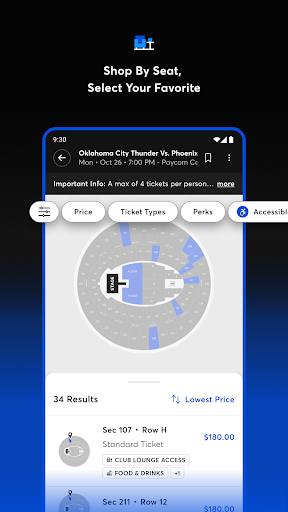
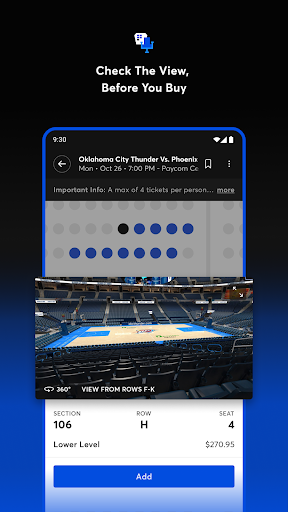
When I’m trying to turn a free evening into a concert plan, the useful part is having event discovery and ticket management in one place. I can search for events, check available seats and, where a venue map is offered, look at an interactive 3-D view and seat views before buying. That is a more grounded way to choose than picking a section from a list and hoping I understand where it sits.
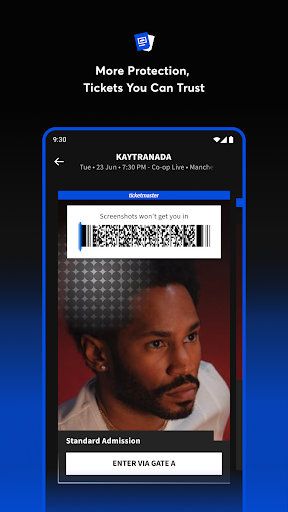
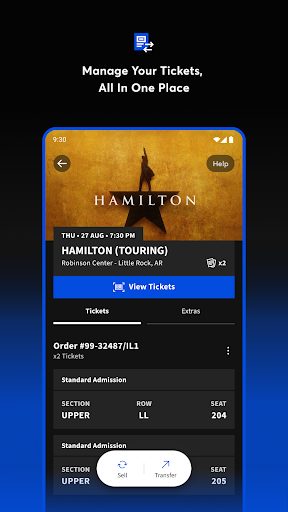
Once tickets are sorted, the app’s job shifts from browsing to getting everyone through the door. Event information and tickets stay together in the app, and mobile-entry events can be scanned from the phone. I can also transfer seats to friends or family for free, which is handy when one person makes the booking but the group arrives separately. It keeps the plan in one place instead of scattered through messages.
A Ticketing Tool, Not a Guide
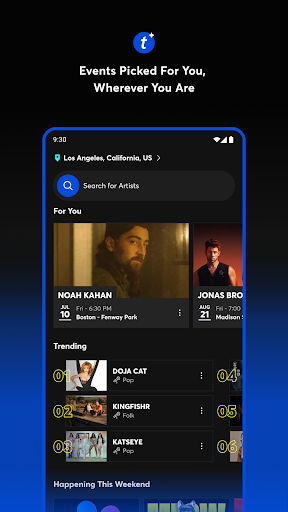
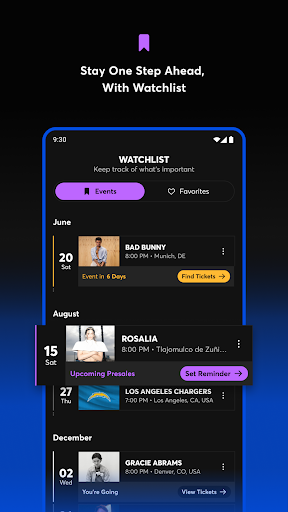
Compared with searching across venue pages and keeping confirmation messages in my inbox, Ticketmaster gives me a single place to look for events and handle tickets it supports. Alerts for favorite events, artists, bands and venues can help me keep an eye on what I care about. Its breadth spans concerts, sports, theater, festivals and family events, so it can serve as a regular starting point for live plans.
I wouldn’t treat it as a complete local-events guide or a companion for every ticket bought elsewhere. Its core purpose is buying, selling, transferring and accessing tickets through Ticketmaster’s service. It also isn’t the event itself: seat availability, venue details and whether mobile entry applies depend on the particular event. If I only need general ideas for a free afternoon, a broader discovery tool may make more sense.
Keep Plans in One Place
A little organization makes the app more useful. I’d check the event details once the tickets are in hand, then transfer a companion’s ticket early if we plan to arrive separately. For mobile-entry events, I’d also make sure I can reach the ticket from the app before heading out, rather than waiting until I’m in a busy queue and trying to remember where it lives.
Alerts are most helpful when I keep them focused on artists, teams, venues or events I genuinely want to follow. That gives me a reason to check in without turning every spare moment into a ticket search. And when plans change, the resale and transfer options are worth checking inside the app. They provide ways to handle tickets, though whether a particular ticket can be sold or transferred can depend on its event.
More From Our News Desk

Zoom Meetings, Google Meet, or Teams: Which Is Easiest to Join?

How I Build a Free Streaming Lineup With Tubi

Why Crunchyroll Is the Default Anime App for So Many Fans

YouTube TV: A Practical Guide to Cutting Cable

Rummikub and the Small Comfort of Phone Games

TeamViewer Remote Control or AnyDesk for Helping Family?
Who It Suits Best
I’d recommend Ticketmaster to people who regularly attend major live events and want to buy and manage tickets on their phone. It is especially practical for groups: one person can handle the purchase, then transfer seats to other attendees. Fans who follow particular artists, bands, venues or sports can also make use of event alerts, while seat maps can help make the buying decision feel less abstract.
It may be less appealing to someone who rarely attends ticketed events or prefers to keep every purchase in a separate venue app. The Google Play rating is 2.6 from around 205,000 ratings, so the overall user feedback is a clear reason to approach it with measured expectations. I’d also remember that the app itself is free, but getting into a show still means buying the event ticket.
Ticketmaster-Buy, Sell Tickets is made by Ticketmaster L.L.C. and is available on Google Play for Android. The app is free to download, and the supplied store information says it has no in-app purchases and contains no ads. Event tickets are separate purchases, so the app’s free download should not be confused with free admission to a concert, game or show.
Google Play shows a 2.6 rating from 205,394 ratings and over 50 million installs. Its content rating is Everyone. The supplied app version is 304.0; it was released on May 21, 2012, and last updated on October 29, 2026. A minimum Android version is not provided in the supplied details, so check Google Play for device compatibility.
A Closer Look at the Ticket Routine
Opening the App
My first impression is that Ticketmaster is built around a straightforward question: what event do I want to attend? The app focuses on finding tickets and handling them, rather than asking me to learn a broad set of unrelated tools. That purpose is easy to understand whether I’m looking for a concert, a sports game, theater or a family event.
Getting started is most useful when I have a real event or favorite artist in mind. Searching can lead from browsing to ticket options, and available interactive venue maps add context to the seat choice. I like that this can help with the practical decision of where to sit, not just the more exciting decision of what to see.
The Day-to-Day Ticket
The day-to-day experience is less about opening the app constantly and more about having it ready at the right moments: while choosing seats, coordinating with friends and preparing to enter. Event details and tickets are kept together, so I can return to the relevant information instead of retracing the whole purchase process when showtime gets close.
For mobile-entry events, a ticket can be scanned from the app. The description also says seats for those events can be uploaded to Apple Wallet, which may suit someone who prefers keeping entry passes there. That option applies to mobile-entry events, so I’d check the instructions for my specific event rather than assume every ticket works the same way.
Useful Event Extras
The seat-view tools are among the more practical touches. An interactive 3-D venue map and seat views can help me compare locations before buying, especially when I don’t know a venue well. They don’t replace checking the event details, but they give the decision more context than a section name alone.
Ticket transfers and resale address the less glamorous side of attending events: plans change, and groups don’t always move together. The app lets users transfer seats to friends and family for free and list tickets on its resale marketplace. Alerts for favorite artists, bands, venues and events round things out for people who like to keep tabs on upcoming shows.
A Simple Show-Day Routine
For a typical night out, I’d use the app in stages. First, search for the event and compare seats, using a venue map or seat view when available. After buying, I’d check the event information and make sure everyone who needs a ticket has received it. That small bit of preparation can make the group’s arrival less dependent on one person’s phone.
Closer to the event, I’d open the ticket before reaching the entrance and follow the event’s mobile-entry instructions. If I’m attending a mobile-entry event and prefer Apple Wallet, the app supports uploading those seats there. The point is not to over-plan every detail; it’s to avoid leaving ticket access and group coordination until the busiest part of the evening.
Limits to Keep in Mind
Ticketmaster’s usefulness depends on the event and ticket in front of me. Seat maps, seat views, mobile entry and the ability to transfer or resell are features described by the service, but I wouldn’t assume every event offers every option. Checking the specific event details is part of using the app well, particularly when coordinating with a group.
The overall Google Play rating is low, at 2.6 from more than 205,000 ratings. That does not tell me exactly how my own purchase will go, but it is worth factoring into expectations. The app is free to install, while tickets themselves cost money according to the events being purchased; the free download is not a promise of inexpensive seats.
Ticketmaster makes the most sense when I want one place to search for live events, choose seats and keep supported tickets accessible. Transfers, resale and mobile entry give it a role beyond the initial purchase, and the venue views can help with a decision that otherwise feels like guesswork.
I’d try it if I attend concerts, games or shows and want a dedicated ticketing app. I’d go in with realistic expectations, check the details for each event and remember that the store rating is notably low. For occasional eventgoers, its value depends on whether the events they want are available through the service.
Ticketmaster Frequently Asked Questions
What is Ticketmaster-Buy, Sell Tickets used for?
Ticketmaster is used to search for live events, buy tickets and manage them on a phone. It also supports listing tickets for resale, transferring seats to friends or family and accessing tickets for mobile entry. The app covers event types such as concerts, sports, theater, festivals and family events.
Which phones and platforms support Ticketmaster-Buy, Sell Tickets?
The app is available on Android through Google Play. The supplied information does not give a minimum Android version, and compatibility can vary by device, so check the Google Play store details for your phone. The app description also mentions uploading eligible mobile-entry seats to Apple Wallet.
Does Ticketmaster-Buy, Sell Tickets cost money?
The app is free to download, and the supplied store facts say it has no in-app purchases and contains no ads. Event tickets are separate from the app download and are purchased for the events you choose. Ticket prices and availability can vary, so check the relevant event in the app.
What Android version does Ticketmaster-Buy, Sell Tickets require?
The supplied details do not state a minimum Android version. Requirements can vary as the app is updated, so check its Google Play store page for the current compatibility information before installing. The listed app version is 304.0.
Is Ticketmaster-Buy, Sell Tickets right for occasional eventgoers?
It can suit occasional attendees who want to search for an event, keep tickets together and transfer seats to companions. People who rarely attend live events may not need a dedicated ticketing app. Some options depend on the event, so check its details for mobile entry, seat views and transfer or resale availability.
Pros
- Combines event search, ticket access and group transfers in one app.
- Interactive venue maps and seat views can add useful context before buying.
- Alerts help fans follow selected events, artists, bands and venues.
- Free to download, with no ads according to the supplied store facts.
Cons
- Google Play feedback is low, with a 2.6 rating from over 200,000 ratings.
- Ticket features such as mobile entry and transfers can depend on the event.
- The app is focused on ticketing, not broad local activity planning.
- Category
- Events
- Version
- 304.0