SeatGeek – Tickets to Events
- 41.73K
- 4.2
- Installs
- 5.00M
- Price
- Free

Screenshots


Analysis by Reviewed APKs
SeatGeek – Tickets to Events is an Android app for finding and buying tickets to sports, concerts, theater, festivals, and comedy, with options to resell tickets too. I like that it brings event browsing, seat information, and mobile tickets together rather than treating ticket buying as a one-step search. It suits people who attend live events and want to compare options, though it is focused on tickets rather than planning an entire night out.
Finding a Night Out
When I want to make a loose plan for the weekend, SeatGeek gives me a direct place to start: search for a team, artist, venue, genre, or sport and browse upcoming events nearby. That is a useful change from having to know the exact event already. I can imagine checking for a concert after work, then switching to a game or theater show if the dates or prices do not fit.
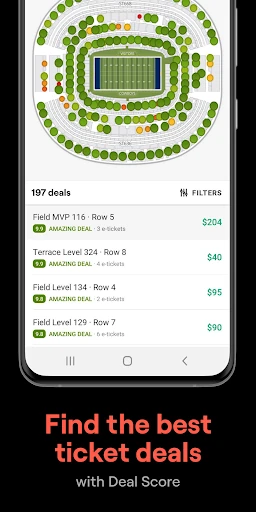
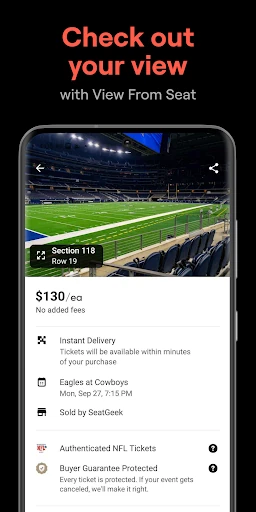
Once I have a candidate event, the seating chart makes the decision feel more grounded than a list of ticket prices alone. SeatGeek maps deals onto sections and offers panoramic photos from those areas, so I can get a sense of the view before choosing. Deal Score also gives offers a color-coded value rating. I would still compare the details carefully, but these tools make the initial scan easier.
A Ticket Tool, Not a Planner
The clearest comparison is with an event calendar or a venue’s own ticket page. SeatGeek brings different kinds of live events into one browsing experience and includes resale listings, seating information, and mobile tickets. That breadth is handy when I am open to several types of outing. It also gives me a way to compare offers rather than starting from one venue’s inventory alone.
I would not treat it as a full trip-planning or social calendar app. Its job is centered on discovering, buying, selling, and sending event tickets, not arranging transportation, meals, or a group itinerary. Nor does a color-coded Deal Score remove the need to review the actual listing and seat details. It helps narrow choices, but the final decision still belongs to the buyer.
Small Habits That Help
I would start a search with a broad category or a nearby venue, then narrow things down to a specific artist, team, or event. That keeps the app useful even when I have a free evening but no fixed plan. When a particular event catches my eye, checking the seating chart and its panoramic section photos before comparing prices gives the offer more context than a number on its own.
For a group outing, I would decide how many tickets we need before buying and use the send-ticket option when people need their tickets on their own phones. If plans change, SeatGeek also supports reselling tickets through its marketplace, with a suggested price to help set a listing. The Daily Tap is another small routine: the app lets users enter once a day for a chance to win nearby event tickets.
More From Our News Desk

Zoom Meetings, Google Meet, or Teams: Which Is Easiest to Join?

How I Build a Free Streaming Lineup With Tubi

Why Crunchyroll Is the Default Anime App for So Many Fans

YouTube TV: A Practical Guide to Cutting Cable

Rummikub and the Small Comfort of Phone Games

TeamViewer Remote Control or AnyDesk for Helping Family?
Who Will Enjoy SeatGeek
I would recommend SeatGeek to people who go to games, concerts, theater, festivals, or comedy and want one app for browsing and ticket transactions. It is especially useful if you compare seat locations before buying, sometimes shop resale listings, or need to send tickets to friends. The ability to search by event, venue, team, artist, or category gives casual planners a few different ways into the same catalog.
It may be less appealing to someone who rarely attends live events or wants an app devoted to calendars, travel, or venue details beyond tickets. Deal Score and seat photos are helpful reference points, not substitutes for reading a listing closely. People who already know exactly where they want to buy may prefer to use that seller directly. For everyone else, SeatGeek is a practical option to check alongside other choices.
SeatGeek – Tickets to Events is developed by SeatGeek and is available on Google Play for Android. The app is free to install, with no in-app purchases or ads. Its content rating is Everyone, and it requires Android 10 or later. Those basics make it straightforward to consider if you have a compatible Android phone and are looking for an event-ticketing app.
On Google Play, SeatGeek has over 5 million installs and a 4.2-star rating from 41,726 ratings. The app’s listed version is 2026.01.231624. It was released on November 13, 2013, and its most recent update was January 23, 2026. Those figures offer a useful snapshot of its reach and update history, while the app’s event selection and ticket details are the more important things to judge for a particular outing.
A Closer Look at the Ticket Experience
Opening and Getting Started
My first impression is of an app with a clear purpose: helping me get from an event idea to a ticket. The range is broad, covering sports, concerts, festivals, comedy, and theater, so the starting point does not have to be one particular league or artist. Searching by team, artist, venue, genre, or sport gives the experience several practical entry points.
For a first search, I would begin with an event I already have in mind or browse nearby options if my plans are flexible. SeatGeek describes its event discovery as a way to browse live events, and the search categories make that task easy to understand. I would then check the event’s available seating and ticket details before making a choice, rather than assuming every offer is interchangeable.
The Everyday Ticket Search
The central experience is comparing tickets for a live event. Interactive seating charts put deals in their venue sections, while panoramic photos from each section help show what the view may be like. I find that combination more useful than a bare list of prices because it connects the offer to a place in the venue. It is still a preview, but it gives the comparison some needed context.
Deal Score adds another layer by color-coding offers according to value. That can help me spot options worth a closer look without manually sorting every choice at the outset. I would use it as a guide, not as a final verdict: seat location and the details of the individual listing still matter. The feature is most helpful when several tickets for the same event are competing for attention.
Useful Ticket Features
Mobile tickets are a practical part of the app’s appeal. SeatGeek says users can show an e-ticket in the app for entry, avoiding the need to print a ticket. For a night when I am already carrying my phone, that is a straightforward convenience. Sending tickets is also supported, so a group can get tickets onto friends’ phones instead of coordinating around one person at the venue.
The selling tools make SeatGeek relevant after a purchase, too. Users can list tickets on its marketplace, and the app can recommend a price. That does not mean every ticket will sell or that one suggested price will suit every situation; it simply gives a seller a starting point. For someone whose plans change, having discovery, buying, and resale in the same app is a sensible package.
Payment options named in the app description include Google Pay and credit card. The Daily Tap offers another small extra: users can enter up to once a day for a chance to win free tickets to live events nearby. Neither feature changes the main job of the app, but both add useful details around the core ticket search.
A Practical Event Routine
For a planned evening, I would search for the event first, compare the available sections, and look at the panoramic photos before choosing a seat. I would use Deal Score to find offers to inspect, then review the listing itself rather than choosing by color alone. That routine is simple enough for a quick check during a lunch break, yet it gives me more to work with than a single price comparison.
For a spontaneous plan, I would browse by location or category and see what is coming up nearby. If friends are joining, I would settle on the number of tickets before buying and use the send-ticket feature where appropriate. If a purchased ticket becomes unnecessary, the resale marketplace is an option to explore. These are useful paths through the app, without requiring every outing to follow the same routine.
I would also make a habit of checking the app when I am deciding between types of events, not just when I have already picked a show. Search by team, artist, venue, genre, or sport can turn an open evening into a more concrete plan. The Daily Tap gives regular users one more reason to check in, though it is an extra rather than a dependable way to get tickets.
Limits to Keep in Mind
SeatGeek is strongest when the goal is a live-event ticket. It is not a general-purpose planner, and its event search should not be confused with advice about the rest of an outing. The seating photos can help set expectations, but they are visual previews rather than a personal view from the seat on the day. I would still pay attention to the event and ticket information attached to each offer.
A value indicator is useful, but it cannot decide what matters most to every buyer. One person may prioritize a particular section, while another may be focused on price. Deal Score gives a quick comparison, not a complete measure of personal preference. Resale prices can also be above or below face value, so it makes sense to look at the price and ticket details that apply to the offer being considered.
The app’s practical value also depends on whether it has options for the event and area I care about. Its broad categories are helpful for browsing, but they do not mean every event will be equally relevant to every user. I would treat SeatGeek as a useful place to search and compare, then make the purchase decision based on the specific event, seat, and price in front of me.
SeatGeek brings event discovery, seat comparisons, mobile tickets, ticket sharing, and resale into one focused Android app. I especially like the combination of section photos and Deal Score, because it gives ticket browsing more context than a price list alone. Its extras are secondary, but the main experience is easy to understand.
I recommend it to people who regularly look for live-event tickets or want a convenient way to compare options across event types. It is less compelling if you need a complete planning tool or rarely attend events. As with any ticket purchase, I would review the details of the specific offer before deciding.
SeatGeek Frequently Asked Questions
What is SeatGeek – Tickets to Events used for?
SeatGeek is used to discover, buy, and resell tickets for live events such as sports, concerts, festivals, comedy, and theater. It includes interactive seating charts, panoramic section photos, and Deal Score to help compare offers. Users can also show mobile tickets in the app and send tickets to friends.
Which phones and platforms support SeatGeek?
SeatGeek is an Android app available on Google Play. It requires Android 10 or later. If you are considering a particular device, check its Android version and the current Google Play information, since device compatibility can vary.
How much does SeatGeek cost?
SeatGeek is free to install on Google Play, and the supplied app facts show no in-app purchases or ads. Ticket prices are separate from the app’s installation cost and can vary by event and offer. Check the event details in the app before buying.
Does SeatGeek let me sell or send tickets?
Yes. SeatGeek supports sending tickets to friends’ phones and listing tickets for resale through its marketplace. The app description says resale listings may be priced above or below face value and that it can recommend a listing price. The details for a particular ticket or transaction may vary, so check the relevant information in the app.
Is SeatGeek a good fit for casual eventgoers?
It can suit casual eventgoers who want to browse nearby sports, concerts, theater, festivals, or comedy and compare ticket options. Seat photos and Deal Score can help with that comparison. It may be less useful if you rarely attend live events or want a broader trip-planning tool; the app is focused on event tickets.
Pros
- Search across sports, concerts, theater, festivals, and comedy in one ticket-focused app.
- Interactive seating charts pair offers with panoramic photos from venue sections.
- Mobile tickets and ticket sharing can simplify entry and group coordination.
- Deal Score offers a quick, color-coded way to compare ticket value.
Cons
- Deal Score is a comparison aid, not a substitute for reviewing each ticket’s details.
- The app focuses on tickets rather than broader plans for an evening out.
- Resale prices may be above or below face value.
- Category
- Events
- Version
- 2026.01.231624