Tesla
- 47.38K
- 3.6
- Installs
- 5.00M
- Price
- Free
Screenshots
Analysis by Reviewed APKs
Tesla is a companion app for people who own a Tesla vehicle or Powerwall, bringing remote controls and energy information into one place. I like how it can handle small tasks that would otherwise mean finding the car key or walking outside, while also giving Powerwall owners a way to check household energy use. It is most useful as an everyday extension of compatible Tesla hardware, not a stand-alone driving app.
A Quick Check Before Leaving
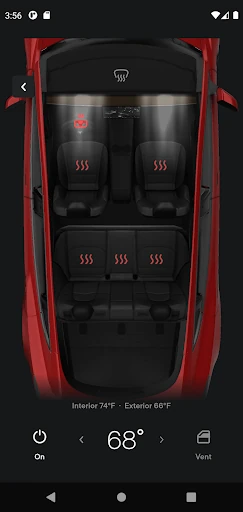
On a chilly morning, I can see the appeal of checking the car before heading out: use the app to heat or cool it while it is still in the garage, then check charging progress and start or stop charging if needed. The controls make those small preparations possible without going out to the vehicle first. It is a practical routine for someone who wants to get the car ready while finishing breakfast or gathering their things.
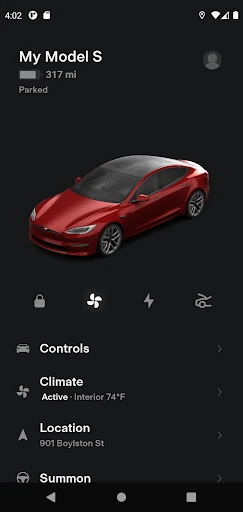
The same convenience works after parking. If I cannot remember whether I locked the car, I can use the app to lock it remotely; if I have lost track of where it is, I can locate it and get directions. Flashing the lights or honking the horn offers another simple way to find it in a crowded lot. These are modest jobs, but they are exactly the kind of interruptions a remote companion app can help smooth over.
A Companion, Not A Car
I think of Tesla as a remote control and information companion for a vehicle, with Powerwall features alongside it for owners with that equipment. It covers tasks such as checking charging, adjusting climate, locking the car, and sending an address from another app to begin navigation in the vehicle. That makes it different from a general navigation app or a broad smart-home dashboard: its usefulness is tied to Tesla products.
It is not a replacement for the car’s own controls, and it is not a driving or route-planning app in the usual sense. The description focuses on communicating with the vehicle and Powerwall, rather than managing other makes of car or household devices. I would not install it expecting a complete Tesla ownership experience without compatible hardware. For the right owner, though, it fills a clear gap between being physically beside the vehicle and needing to act from elsewhere.
Small Habits That Help
I would make a quick charging check part of the routine whenever I am planning a drive, rather than waiting until I am standing by the car. The app can show charging progress and lets me start or stop charging. If I am heading somewhere new, sending an address from a favorite app to begin navigation in the car keeps that handoff simple. These are small steps, but they make the app feel more useful when they become part of an ordinary departure.
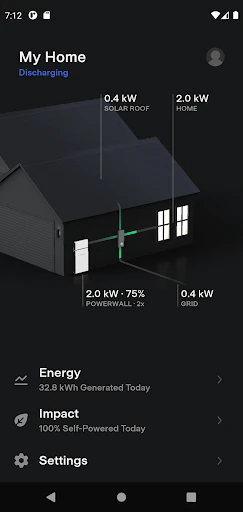
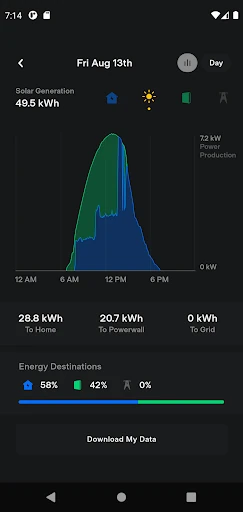
For owners with Powerwall 2, a regular glance at stored energy, solar energy used at home, and energy exported to the grid can help make the app more than a car remote. The app also lets users download solar production and battery usage data. I would keep that check separate from the car routine, perhaps when reviewing the day’s household activity, so the two sets of tools each have a clear purpose.
More From Our News Desk

Zoom Meetings, Google Meet, or Teams: Which Is Easiest to Join?

How I Build a Free Streaming Lineup With Tubi

Why Crunchyroll Is the Default Anime App for So Many Fans

YouTube TV: A Practical Guide to Cutting Cable

Rummikub and the Small Comfort of Phone Games

TeamViewer Remote Control or AnyDesk for Helping Family?
Who Will Get The Most From It
I would recommend Tesla to people who own a compatible Tesla vehicle and want remote access to everyday controls, charging progress, location, and software updates. It is especially appealing if you regularly prepare the car before a trip, park in busy places, or like being able to check on the vehicle without walking out to it. Powerwall 2 owners have an additional reason to use it, with household energy monitoring and downloadable data.
It may not suit someone without Tesla hardware, since the app’s central purpose is communicating with Tesla vehicles and Powerwalls. Nor is it aimed at people looking for general electric-car comparisons, driving lessons, or tools for managing an unrelated home energy system. I also would not treat it as a substitute for checking the vehicle in person when a situation calls for that. Its strengths are specific, and the best fit is an owner who will use them regularly.
Tesla is developed by Tesla, Inc. On Google Play, it has over 5 million installs and a 3.6-star rating from 47,385 ratings. The app is free to download, with no in-app purchases or ads. Its content rating is Everyone. The listed Android requirement is Android 7.0 or later.
The current listed version is 4.53.1-4047. Tesla was released on January 31, 2013, and was last updated on February 5, 2026. The recent changes are described as minor fixes and improvements. Powerwall features require Powerwall 2, so the energy tools are relevant only to owners with that equipment.
Everyday Control From A Distance
A Focused First Impression
When I first opened the app, the clearest idea was its role: a direct connection to a Tesla vehicle or Powerwall, rather than a general-purpose utility. The available tasks are easy to picture in everyday life, from checking charging to locking the car from afar. That focus makes the app’s purpose straightforward, especially for owners who already know which vehicle or energy system they want to manage.
Getting meaningful use from it depends on having the relevant Tesla hardware. Vehicle owners can use the car-related controls, while Powerwall monitoring requires Powerwall 2. I appreciate that distinction because it sets realistic expectations: this is not an app where every feature will matter to every user. Once the hardware matches, the range of remote tasks gives owners several reasons to keep it handy.
Useful Between Drives
The day-to-day value comes from handling a few tasks at a distance. I can check charging progress, start or stop charging, adjust the cabin climate, and lock or unlock the vehicle. Locating the car, tracking its movement, or using lights and the horn to find it adds practical help when parking is less straightforward. None of these functions needs a dramatic use case; ordinary convenience is the point.
I also like the address handoff from favorite apps to navigation in the car. It gives the phone and vehicle complementary roles without turning Tesla into a general navigation product. Passengers can quickly control media, too, which is a small but distinct convenience during a shared ride. Taken together, the app is most compelling when I use it for quick checks and preparation, rather than opening it just to browse.
More Than Remote Locks
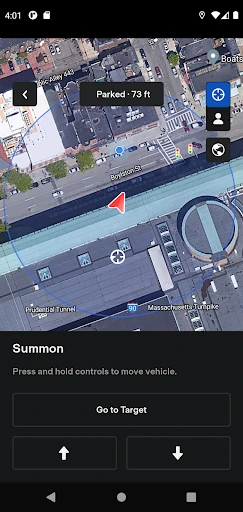
The range of vehicle controls goes beyond locking and climate. The app can vent or close the panoramic roof, flash lights or honk the horn, and update vehicle software remotely. For vehicles with Autopilot, it can also summon the car out of a garage or a tight parking space. Those options make the app feel like a collection of owner-focused controls, rather than a single-purpose remote key.
Powerwall adds a different kind of utility. Owners can monitor energy stored from solar, energy used by the home, and energy exported to the grid, then download solar production and battery usage data. I find that combination distinctive because it brings vehicle and home energy tools together without pretending they are the same task. The Powerwall features require Powerwall 2, so they are a bonus for a specific group of owners.
A Simple Daily Routine
A useful routine might start with a charging check when planning the next outing. If the car needs more time, the app can start charging; if it is ready, I can set the cabin climate before leaving. When I have an address in a favorite app, sending it to the car helps bridge the gap between planning on my phone and setting off in the vehicle. It is a tidy sequence of small actions.
After arriving, I can use the app to confirm the car is locked or locate it later if I have forgotten which part of a large lot I used. In the evening, a Powerwall 2 owner might review stored energy and household use, or download the related data. That is a practical pattern rather than a requirement: the app’s controls are there when useful, and not every owner needs every feature every day.
Keep The Scope In Mind
Tesla’s biggest limitation is also part of its identity: the app is built around Tesla vehicles and Powerwalls, not a universal set of car or home controls. Without the right hardware, much of its value disappears. Even for owners, some features apply only to certain equipment; Summon is for vehicles with Autopilot, and Powerwall tools require Powerwall 2. That makes it worth thinking about the specific functions you can use.
The app is best understood as a convenient link to supported hardware, not a replacement for every interaction with a car or energy system. Its store rating is 3.6 stars, so the overall response from Google Play users is mixed rather than uniformly positive. I would weigh that alongside the clear usefulness of its remote controls and the fact that the app’s appeal depends heavily on ownership and setup.
Tesla makes the most sense when I treat it as a pocket companion for an existing vehicle or Powerwall. Remote climate, charging checks, locking, location tools, and software updates cover useful moments in an owner’s routine, while Powerwall 2 brings in a separate set of energy tools.
I recommend it to Tesla owners who want those controls close at hand, especially if they will use them before and after drives. If you do not own compatible Tesla hardware, or want a general-purpose car or home app, this is not likely to be a useful install.
Tesla Frequently Asked Questions
What is the Tesla app used for?
Tesla is used to communicate with Tesla vehicles and Powerwalls. Vehicle owners can check charging progress, start or stop charging, adjust climate, lock or unlock the car, locate it, and use other remote controls. Powerwall 2 owners can monitor energy stored, used at home, or exported to the grid, and download solar production and battery usage data.
Which devices and platforms support the Tesla app?
The app is available on Android through Google Play. The listed minimum requirement is Android 7.0. Its features are designed for Tesla vehicles and Powerwalls; Powerwall features require Powerwall 2. For the latest device compatibility details, check the app’s Google Play store page.
What Android version does Tesla require?
Tesla requires Android 7.0 or later, according to its listed requirements. If you are unsure whether your particular device will work well, check the current Google Play store page for compatibility information, since device support and requirements can vary.
Does the Tesla app cost money?
The app is free to download on Google Play. The supplied store details say it has no in-app purchases and contains no ads. Access to its useful controls still depends on having compatible Tesla hardware, and Powerwall features require Powerwall 2. Check the store page for any changes to current app terms.
Who should use the Tesla app?
It is best suited to Tesla vehicle owners who want remote access to charging, climate, locks, location, and other listed controls. Powerwall 2 owners can also use its energy monitoring tools. Someone without Tesla hardware is unlikely to get much from it, since the app is focused on those products rather than general car or home management.
Pros
- Remote charging, climate, locking, and location controls cover useful everyday owner tasks.
- Address sharing can send a destination from a favorite app to car navigation.
- Powerwall 2 owners can monitor household energy and download usage data.
- Some vehicles support extra conveniences such as Summon and remote software updates.
Cons
- The app’s usefulness depends on owning compatible Tesla hardware.
- Powerwall monitoring requires Powerwall 2, and Summon applies to vehicles with Autopilot.
- Google Play users give it a mixed 3.6-star rating.
- Category
- Lifestyle
- Version
- 4.53.1-4047











