T-Mobile Visual Voicemail
- 93.05K
- 3
- Installs
- 100.00M
- Price
- Free

Screenshots

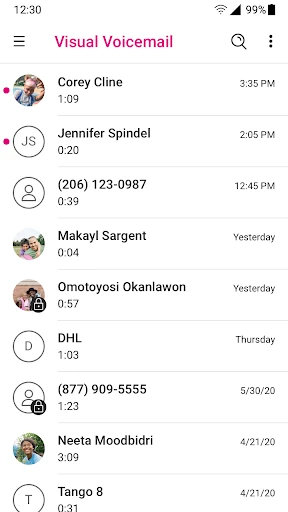
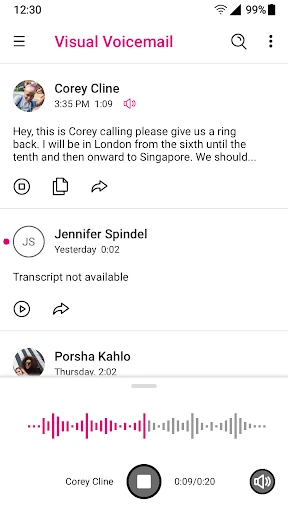
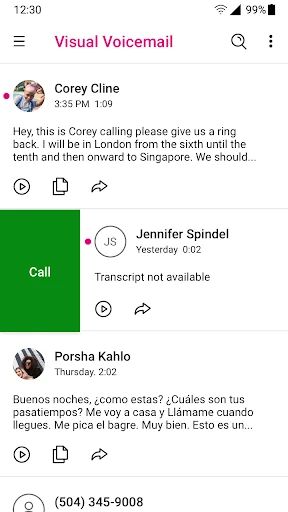
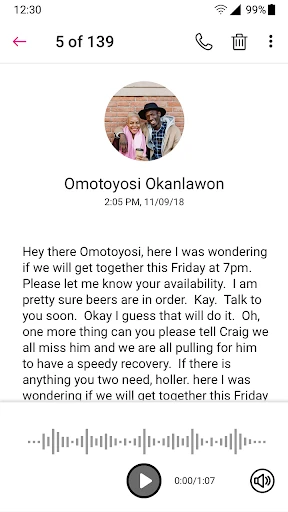
Analysis by Reviewed APKs
T-Mobile Visual Voicemail gives T-Mobile customers a way to view and play voicemail messages on an Android phone without dialing into a mailbox and listening in sequence. It suits people who get messages throughout a busy day and want to choose which ones to hear first. My overall take is practical: it handles everyday voicemail management neatly, with transcription available as a paid upgrade rather than part of the free basics.
A Busy-Day Voicemail Check
Imagine stepping out of a meeting and noticing a few missed calls. With ordinary dial-in voicemail, you may need to work through messages one at a time to find out whether any need a quick reply. T-Mobile Visual Voicemail puts messages in the app so you can select one to play, then move to another. That makes a short check during a lunch break feel more manageable, especially when you do not want to hear every message in order.
When I first considered the everyday routine, the useful part was having listening and message management together. The app lets you save or delete voicemails, and you can set up a greeting. A message you want to keep can be saved; one that no longer matters can be removed with a few taps. It is a modest improvement, but it helps voicemail feel less like a long phone menu and more like a small inbox.
A Voicemail Tool, Not a Phone Suite
The obvious alternative is calling your voicemail number and navigating the audio prompts. This app is for people who would rather see their messages and choose what to hear next. It is also distinct from a general messaging or calling app: its job is voicemail, with tools to listen, save, delete, and manage greetings. If you rarely receive voicemail, the visual layout may not change much about your day.
There is also a paid Premium option for voicemail-to-text, which can transcribe and translate messages in a preferred language and deliver them in the inbox, by SMS, or by email. That can be useful when listening is inconvenient, but the core app does not need that upgrade for basic playback. Scam Shield features are also mentioned in the app description, including identifying, blocking, and reporting likely scam calls; this does not turn the app into a broad communications hub.
Small Habits That Help
A simple habit is to open the app after a stretch of missed calls, scan the available messages, and play the one that seems most urgent. Because messages can be heard in any order, there is no need to treat the inbox like a queue. I would save anything I expect to revisit and delete messages that are no longer useful, rather than letting old items accumulate indefinitely.
It is worth setting up a greeting that fits how you use your phone, then making a quick voicemail check part of an existing routine, such as after work or once you have a quiet moment. If you opt for Premium transcription, a glance at the text may help you decide which message deserves a full listen. The first-time authentication guidance recommends using the app on the T-Mobile cellular network, so doing that during initial setup can avoid an unnecessary detour.
More From Our News Desk

Zoom Meetings, Google Meet, or Teams: Which Is Easiest to Join?

How I Build a Free Streaming Lineup With Tubi

Why Crunchyroll Is the Default Anime App for So Many Fans

YouTube TV: A Practical Guide to Cutting Cable

Rummikub and the Small Comfort of Phone Games

TeamViewer Remote Control or AnyDesk for Helping Family?
Who Will Find It Useful
I would recommend T-Mobile Visual Voicemail to T-Mobile customers who get enough voicemail to appreciate choosing messages from an app instead of dialing in. It is especially sensible for people who check messages between errands, prefer to listen in their own order, or want a straightforward way to save and delete recordings. The free basic voicemail tools make it easy to understand the app’s main purpose without committing to transcription.
It may be less compelling if voicemail is an occasional afterthought or if you expect a full messaging service with features beyond voicemail management. Transcription is an optional paid upgrade, so someone who wants text versions should consider that extra cost. The app is for Android, and its account authentication is tied to T-Mobile service; it is not a general voicemail app for customers on any carrier.
T-Mobile Visual Voicemail is developed by T-Mobile USA and is a Communication app for Android. Google Play shows over 100 million installs and a 3.0-star rating from about 93,000 ratings. It is free to download, and the app contains no ads. The content rating is Everyone. Android 8.0 is the minimum requirement stated for the app.
The current version is 10.7.0.784475. It was released on November 22, 2010, and was last updated on May 30, 2025. The basic voicemail features are free, while voicemail-to-text is offered through Premium for a monthly fee; the amount is not specified in the app details here. These practical details can change, so it is worth checking Google Play before installing.
Making Voicemail Easier to Triage
Getting Started
The first impression is of an app with a narrow, understandable purpose: bringing voicemail messages onto the phone in a form you can browse and play. The description says activation happens at first launch without changing the voicemail number or reconfiguring forwarding. That should make the idea less intimidating for someone who has avoided voicemail settings because they sound like a job for a long afternoon.
One setup detail is worth remembering. For a first use of the latest version, T-Mobile recommends opening the app on its cellular network so the account can authenticate; this is a one-time requirement. I would do that during setup rather than waiting until I need to retrieve an important message. After that initial step, the central task is simply using the app to view and listen to voicemail.
The Everyday Experience
The core advantage is control over playback order. Instead of calling in and hearing messages sequentially, you can choose which one to listen to from the phone. That is a small but meaningful fit for real life: a missed call from a familiar contact might matter more than an older message, and you can get to it directly rather than waiting through everything before it.
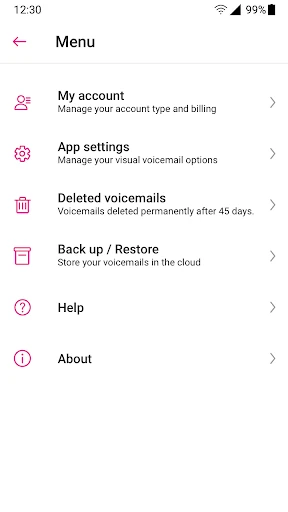
The app also gives you basic ways to keep the inbox in shape. You can save messages you want to retain and delete those you do not need, while greeting setup is handled in the same general voicemail context. Those are practical rather than flashy tools. For someone who receives only a couple of messages, they keep the app easy to understand; for a busier inbox, they provide a little more control.
Transcription and Scam Shield
The most notable extra is voicemail-to-text through Premium. The description says messages can be transcribed and translated into a preferred language, with delivery in the app inbox, as an SMS, or to an email address. That gives people another way to review a message when they cannot listen right away. It is an optional paid service, so I would treat it as an add-on rather than assume it comes with the free app.
The app description also mentions enhancements to Voice-To-Text and a Scam Shield bundle. Scam Shield is described as allowing users to identify, block, and report likely scam calls. These additions broaden the app’s usefulness around calls, though the basic identity remains visual voicemail. If those call-related functions are the main reason you are interested, check the current app information to see how the bundle applies to your situation.
A Routine That Sticks
A workable routine is to check messages at a natural pause instead of letting them pile up until you have to make a long catch-up call. I would open the app after a busy morning, listen to messages in whichever order makes sense, save the ones with information I may need later, and clear out recordings that have served their purpose. The point is not to spend more time managing voicemail, but to make each check more deliberate.
A greeting is another small thing to get right once and then leave alone unless your circumstances change. For example, a greeting that tells callers you will get back to them can set expectations without requiring you to check the app constantly. If Premium transcription suits your routine, text can help with a quick first pass; listening remains available when tone or detail matters.
Keep the Scope in Mind
This is a T-Mobile voicemail app, not a universal inbox for every carrier or a replacement for a full messaging service. Its usefulness depends on having voicemail to manage and a T-Mobile account that can authenticate. People who seldom receive voice messages may find that dialing into voicemail is already good enough, so the app’s extra convenience may not justify adding another app to their routine.
The other consideration is the split between free basics and paid transcription. You can listen to and manage voicemail without paying for Premium, but text transcription and translation are part of the paid option. The app has a 3.0-star Google Play rating, so I would read recent user feedback alongside the feature description if reliability is a key concern. Its stated Android minimum is version 8.0.
T-Mobile Visual Voicemail makes a familiar phone task easier to scan and control. Choosing messages in any order, saving or deleting recordings, and setting a greeting cover the basics without making voicemail feel complicated. The optional transcription and Scam Shield features add useful possibilities, but they do not change the app’s focused role.
I would try it if I am a T-Mobile customer who checks voicemail regularly and wants less time spent dialing through messages. If I rarely get voicemail, or only want text transcripts, I would weigh that habit against the paid Premium option. For the right routine, it is a practical convenience rather than an essential communications app.
T-Mobile Visual Voicemail Frequently Asked Questions
What is T-Mobile Visual Voicemail used for?
T-Mobile Visual Voicemail lets Android users view and listen to voicemail messages in the app, choosing which message to play rather than hearing them only in sequence by dialing in. It also supports setting up greetings and importing, saving, or deleting voicemails. Premium adds voicemail-to-text features, including transcription and translation.
Which phones can run T-Mobile Visual Voicemail?
The app is available for Android, and its stated minimum requirement is Android 8.0. The app description recommends using a T-Mobile cellular network the first time you open the latest version so your account can authenticate. Requirements can change, so check the Google Play store details for your device before installing.
Does T-Mobile Visual Voicemail cost anything?
The app is free to download, and its basic voicemail features are free. Voicemail-to-text is a separate Premium option with a monthly fee; the amount may vary, so check Google Play or the app’s current information before subscribing. The app details say it contains no ads.
Does T-Mobile Visual Voicemail include transcription?
Voicemail-to-text is available through Premium, rather than being included in the free basic features. The app description says Premium can transcribe and translate messages into a preferred language and send them to the inbox, by SMS, or to an email address. Check the store or app for current subscription details.
Who should use T-Mobile Visual Voicemail?
It is most useful for T-Mobile customers who receive voicemail regularly and want to choose messages from an app, manage recordings, or set a greeting. It may be unnecessary for someone who rarely gets voicemail, and transcription requires a paid Premium option. It is an Android voicemail app rather than a carrier-independent messaging service.
Pros
- Lets you choose voicemail messages in any order instead of dialing in to hear them sequentially.
- Basic listening, greeting setup, saving, and deleting are available without a Premium subscription.
- Optional transcription and translation can make messages easier to review when listening is inconvenient.
- The app is free to download and contains no ads.
Cons
- Designed for T-Mobile customers, so it is not a general voicemail app for every carrier.
- Voicemail-to-text requires a paid Premium plan with a monthly fee.
- The 3.0-star Google Play rating suggests checking recent feedback before relying on it.
- Category
- Communication
- Version
- 10.7.0.784475