Supercuts Online Check-in
- 38.57K
- 4.5
- Installs
- 1.00M
- Price
- Free

Screenshots


Analysis by Reviewed APKs
Supercuts Online Check-in is for people who want to get onto a salon’s waitlist before heading out for a haircut. I found its appeal easy to understand: it brings nearby wait times, same-day check-in, directions, and saved visit details into one place. It is a practical companion for regular Supercuts customers, though it cannot make every location or visit run on the same schedule.
A Less Uncertain Haircut Run
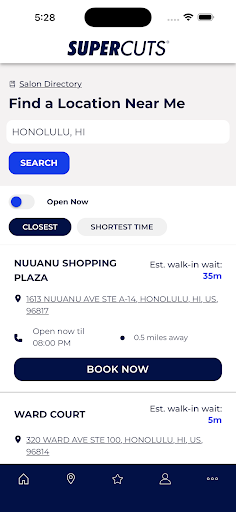
When I first opened Supercuts Online Check-in, I pictured using it on an ordinary Saturday: I have a few errands to run, but I also need a trim and do not want to spend the afternoon guessing how long a salon line might be. The app lets me look at current wait times at nearby locations, choose a salon, and check in from my phone. That gives the trip a little more shape before I leave home.
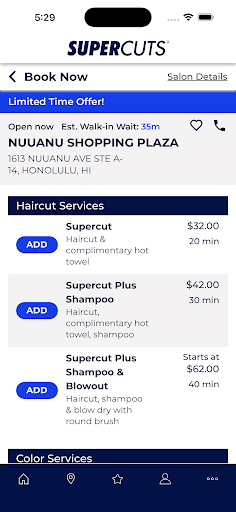
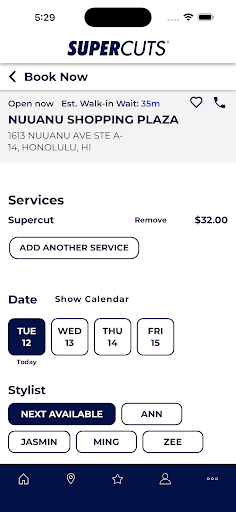
For a same-day visit, I can select a time, service, and preferred stylist, then get my name onto the waitlist at a participating salon. I like that this is framed as checking in rather than a fixed appointment. I would still plan to arrive promptly at the time I selected, but I can make a more informed choice about where to go and when to head over.
A Companion, Not a Salon
The obvious alternative is simply walking into a Supercuts location and joining the queue there. Walk-ins are still accepted, so the app is not a requirement for getting a haircut. Its advantage is planning: I can compare nearby wait times, check in ahead, and pull up directions instead of arriving without a sense of the wait. Supercuts also offers online check-in through its website, so the app is not the only digital route.
This is a focused tool for Supercuts visits, not a general salon directory or a place to browse styles and compare independent stylists. I would not use it to plan an appointment at another chain, and check-in is available only at participating locations. The app can help me prepare for a visit, but it does not turn a waitlist into a promise of an exact chair time.
Small Habits That Help
A little setup can make repeat visits less fiddly. The description says I can save guest information, choose a favorite salon, and use visit history to check in again after a previous visit. I would add those details once rather than re-entering them while standing in a parking lot. If I usually go to the same nearby location, saving it should make the next check-in feel more direct.
For a family trip, I would save each guest in the profile and check in multiple people together rather than handling separate entries one at a time. I would also glance at wait times before choosing which salon to visit, then use the directions feature to get there. Reminders can help me keep track of the check-in, while a quick check of the selected time helps keep the plan realistic.
More From Our News Desk

Zoom Meetings, Google Meet, or Teams: Which Is Easiest to Join?

How I Build a Free Streaming Lineup With Tubi

Why Crunchyroll Is the Default Anime App for So Many Fans

YouTube TV: A Practical Guide to Cutting Cable

Rummikub and the Small Comfort of Phone Games

TeamViewer Remote Control or AnyDesk for Helping Family?
Who Gets the Most From It
I would recommend Supercuts Online Check-in to people who already visit Supercuts and would rather make a quick plan before leaving home. It makes particular sense for someone who checks wait times, has a go-to salon or stylist, or brings several family members for haircuts. The saved guest details, visit history, and rewards information give regular customers more reasons to keep it handy between visits.
It may not be worth installing if I rarely visit Supercuts, prefer to walk in without checking a queue, or need a tool for salons across different businesses. Online check-in only works at participating locations, and wait times are estimates rather than a fixed appointment schedule. Someone who wants a broad salon-booking service should look elsewhere; this app’s usefulness is tied to the Supercuts visit.
Supercuts Online Check-in is a free Android lifestyle app from Regis Mobile. Google Play shows over one million installs and a 4.5-star rating from about 38,600 ratings. The app is rated Everyone. It is free to download, with no in-app purchases or ads listed in the supplied app facts.
The supplied app facts give version 7.64 and a release date of May 31, 2012. They also give October 30, 2026 as the last update date. The minimum Android version is not included in the available facts, so I have left that technical requirement out rather than guessing.
Making the Wait Easier to Plan
A Straightforward First Look
My first impression is that this app has one clear job: help me get ready for a Supercuts visit. The central ideas are easy to understand even before I have a routine with it: find a nearby salon, check its current wait, and get on the list where online check-in is offered. That narrow purpose is a strength. I do not have to sort through unrelated salon services to reach the practical part.
The most useful setup, based on the available features, is to register and save guest details and a favorite salon. That should make repeat check-ins faster than starting from scratch each time. I would also take a moment to see whether my usual location participates, since availability depends on the salon. Once those basics are in place, the app has more value on the day I actually need a trim.
The Everyday Check-In
The core routine is simple enough to picture on a busy day. I check nearby wait times, choose a location, select the service and time, and add myself to the waitlist from my phone. If I am deciding between two errands or trying to avoid an especially long wait, seeing the available information before I set out is more useful than making the trip first and asking at the front desk.
The app’s check-in is not the same as locking in an exact appointment. Supercuts describes it as joining the queue, and says customers should arrive promptly at the selected time. Local salons may allow check-in on the same day or as far as three days ahead, depending on the location. I would treat the time as a planning cue and leave room for the realities of a walk-in salon.
Useful Repeat-Visit Details
The saved information is one of the features that makes the app more appealing after the first use. A registered account can keep guest details and a favorite salon, while visit history can help with checking in again after a previous visit. I like this kind of small convenience because haircuts are often routine: when the same people visit the same place, repeating basic information is unnecessary friction.
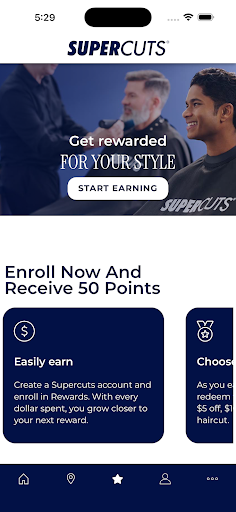
Checking in multiple guests is another practical touch for households. The description says saved guests can be checked in together, which is easier to manage than separate check-ins for each family member. The app also lets customers view Supercuts Rewards points, available rewards, and special offers at participating locations. These features support an ongoing customer relationship, rather than changing the app into a general-purpose beauty service.
A Simple Visit Routine
For a regular haircut, I would start by looking at nearby wait times before I commit to a location. If my usual salon looks busy, I can consider another nearby participating salon and check its directions in the app. After choosing the service and time, I would confirm that the right guest details are included, especially if I am bringing family members. That short check should help prevent avoidable confusion on arrival.
Once I have checked in, I would keep the selected time in mind and head over promptly. The app offers check-in reminders, which can be useful when I am juggling errands or waiting at home. If I have questions about how far ahead a location accepts check-ins, the timing can differ by salon. I would use the information shown for my chosen location rather than assuming every Supercuts follows the same schedule.
Limits to Keep in Mind
The main limitation is that online check-in is available only at participating locations. That matters if I am traveling or if my nearest salon does not offer the feature. The app still has salon-finder and directions functions, but the check-in flow is not universal. Wait times can also change, so seeing a current estimate is helpful for planning without being a reason to assume the visit will take exactly as long as expected.
There is also a difference between getting onto a waitlist and booking a firm appointment. The description says walk-ins remain welcome, and the app’s role is to make the queue easier to approach. Someone who wants to reserve a fixed appointment time at a broad range of salons may find this too limited. I would keep the app for Supercuts visits and use another approach when I need a different kind of booking.
After looking at how its features fit together, I see Supercuts Online Check-in as a useful convenience rather than a must-have for every haircut. Wait-time checks and online check-in can make a familiar trip easier to plan, while saved guest details help with repeat visits and family outings. Its usefulness depends on visiting a participating Supercuts location and being comfortable with a waitlist-based process.
I would recommend it to regular Supercuts customers who like to check their options before leaving home. If I only visit occasionally or want a fixed appointment across many salon brands, I would not make this my main booking tool. For its intended routine, though, it brings the most relevant planning details together without asking me to do much.
Supercuts Online Check Frequently Asked Questions
What is Supercuts Online Check-in used for?
Supercuts Online Check-in helps customers see current wait times at nearby salons, get directions, and join the waitlist from a mobile device at participating locations. Customers can select a time, service, and preferred stylist. It also supports saved guest details, checking in multiple guests, visit history, reminders, and viewing Supercuts Rewards information where available.
Which phones and devices can use Supercuts Online Check-in?
The app is available for Android. The supplied app facts do not give a minimum Android version, so check the Google Play store page for the requirement that applies to your device. Supercuts also says customers can check in through its website, which is an alternative to using the mobile app.
What Android version does Supercuts Online Check-in require?
The minimum Android version may vary by app release and device. The available app facts do not provide a specific requirement, so it is worth checking the Google Play store page before installing. The app is identified as version 7.64 in the supplied facts.
Does Supercuts Online Check-in cost money?
The app is free to download, and the supplied facts say it has no in-app purchases or ads. The check-in feature is available only at participating Supercuts locations. Location participation and any details of a salon visit may vary, so check the app or store information for current details.
Is Supercuts Online Check-in a good fit for me?
It is best suited to people who visit Supercuts and want to check wait times or join a location’s waitlist before arriving. Saved guests and multiple-guest check-in may be useful for families and repeat customers. It may be less useful if you rarely visit Supercuts, need a general salon-booking service, or prefer to walk in without checking first.
Pros
- Shows current wait times at nearby salons to help with choosing where to go.
- Supports saved guest details, favorite salons, visit history, and multiple-guest check-in.
- Includes salon directions, check-in reminders, and Supercuts Rewards information at participating locations.
- Free to download, with no ads or in-app purchases in the supplied facts.
Cons
- Online check-in is available only at participating Supercuts locations.
- Joining a waitlist is not the same as booking a fixed appointment.
- Its usefulness is limited to people who visit Supercuts salons.
- Category
- Lifestyle
- Version
- 7.64











