Sunoco: Pay fast & save
- 5.67K
- 4.5
- Installs
- 500.00K
- Price
- Free

Screenshots
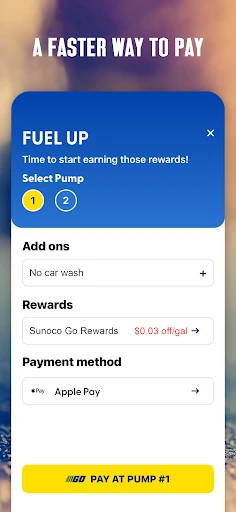
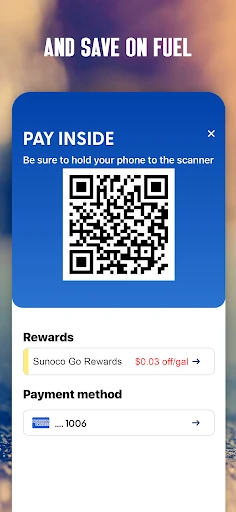
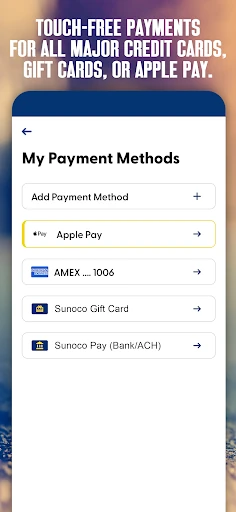

Analysis by Reviewed APKs
Sunoco: Pay fast & save is a fuel-stop companion for finding participating Sunoco stations, paying by phone, and applying gas rewards. I’d recommend it to drivers who regularly fill up at Sunoco and want fewer steps at the pump, especially if they already use a participating grocery rewards program. Its appeal is practical rather than universal: the savings and payment features are tied to participating stations and the Sunoco rewards program.
A More Convenient Fill-Up
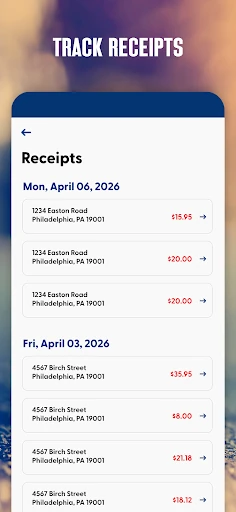
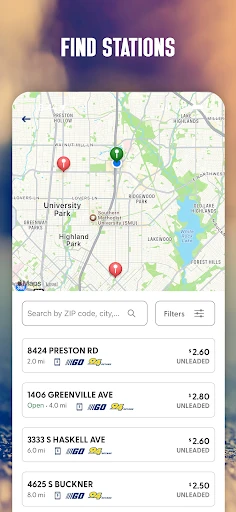
Picture a familiar weekday stop: I’m low on fuel, pulling into a Sunoco station, and hoping to get back on the road without rummaging through my wallet. The app is designed for that moment. I can locate a participating station, use a preferred payment method at the pump or in the store, and have purchases made through the app recorded as digital receipts. It brings several useful parts of a fuel stop into one place.
The rewards give the routine a little extra purpose. Sunoco Go Rewards offers a three-cent-per-gallon saving at participating Sunoco stations; linking a bank account and choosing Sunoco Pay as the preferred payment method raises that stated saving to 13 cents per gallon. A Sunoco Rewards credit card as the preferred method offers eight cents per gallon. Those differences make the payment choice worth considering before I start a fill-up.
Built Around Sunoco Stops
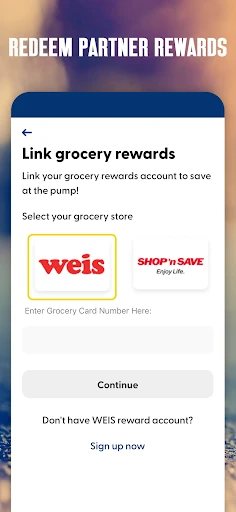
Compared with a general navigation or payment app, Sunoco’s app is much more specific. Its station finder focuses on participating Sunoco locations, while its payment and fuel savings are designed for transactions there. It also lets users connect a grocery rewards program and redeem grocery rewards for gas discounts. That combination can be handy if Sunoco is already part of my regular driving routine, rather than a station I visit only once in a while.
It is not a general-purpose fuel tracker or a way to pay at any gas station. The advertised per-gallon savings apply at participating Sunoco stations, and the app’s payment features are centered on Sunoco. Drivers who rarely stop there may have little reason to keep it in their daily rotation. I’d also treat the listed savings as program details to check against the terms and the station I plan to use.
Small Ways to Save Time
A little preparation can make the app more useful than opening it for the first time beside a pump. I’d set up an account in advance, choose a preferred payment method, and check which participating stations are convenient for my usual routes. The app supports major credit and debit cards, Sunoco gift cards, Sunoco Pay, Apple Pay, and Google Pay. Payment features and rewards require working phone biometrics, such as Face ID or fingerprint access.
I’d also make a habit of checking the station finder before a longer drive and reviewing digital receipts after app purchases. Linking a grocery rewards program could be worthwhile for someone who already participates in one of the supported programs. These are modest steps, not a complicated points strategy. The best workflow is simply to decide how I want to pay, confirm a participating stop, and let the app handle the relevant rewards.
More From Our News Desk

Zoom Meetings, Google Meet, or Teams: Which Is Easiest to Join?

How I Build a Free Streaming Lineup With Tubi

Why Crunchyroll Is the Default Anime App for So Many Fans

YouTube TV: A Practical Guide to Cutting Cable

Rummikub and the Small Comfort of Phone Games

TeamViewer Remote Control or AnyDesk for Helping Family?
Who Gets the Most From It
I’d suggest Sunoco: Pay fast & save to drivers who often use Sunoco and want payment, station lookup, receipts, and fuel rewards together. It is especially relevant to people willing to link an eligible payment method or grocery rewards program to pursue the savings described by Sunoco. If I were already stopping at participating stations, having the rewards and receipts tied to app purchases would be a reasonable convenience.
It may be a poor fit for someone who rarely visits Sunoco, prefers to pay only with a physical card, or does not want to use phone biometrics for payment features. The app also has an age requirement: Sunoco says users must be 18 to download it and create an account. I’d choose it for a repeated fuel-stop routine, not as an essential download for every driver.
Sunoco: Pay fast & save is an Android app from Sunoco. Google Play shows more than 500,000 installs and a 4.5-star rating from 5,675 ratings. The app is free to download, with no in-app purchases or ads listed in the provided app facts. Its content rating is Mature 17+. Sunoco’s description separately says users must be at least 18 to download the app and create an account.
The minimum requirement is Android 7.0, and the current version in the provided facts is 3.67.4. The app was released on May 14, 2018, and was last updated on January 15, 2026. Sunoco describes the update as improving stability, speed, search reliability, and map navigation. Those changes are practical for an app used while looking for a station, though the exact experience can depend on the device.
A Closer Look at Everyday Fuel Stops
Getting Started
When I first opened the app, its purpose was easy to understand: it connects Sunoco station visits with rewards and phone-based payment. That focus keeps the proposition straightforward. I’d start by creating an account, then make sure the phone’s biometric access works before relying on payment features. Sunoco says working Face ID or fingerprint access is required for those features and rewards, so setup is part of the experience rather than an optional extra.
The app is aimed at adults, not younger drivers setting up a rewards account. Sunoco states that users must be 18 or older to download and create an account. After that, I’d choose a preferred payment method and look for participating stations near places I already drive. Doing those things at home is less fiddly than trying to sort them out while parked at a pump.
The Day-to-Day Experience
In regular use, the app’s value comes from combining a few tasks around the same stop. I can look for a nearby participating Sunoco, pay touch-free at the pump or in the store, and keep digital receipts for purchases made through the app. The payment choices described include major credit and debit cards, Sunoco gift cards, Sunoco Pay, Apple Pay, and Google Pay. That range gives different drivers a few ways to fit payment into their routine.
The savings are linked to the payment method and the program, so it helps to understand the options before filling up. Sunoco describes three cents per gallon for Go Rewards, 13 cents when a linked bank account is used through Sunoco Pay as the preferred method, and eight cents when the Sunoco Rewards credit card is preferred. I’d check the app’s terms and participating station details rather than assume every stop qualifies.
Rewards and Receipts
The feature that stands out most to me is the way the app ties station lookup to rewards and payment. Instead of treating fuel discounts as a separate afterthought, it puts the relevant savings beside the choices for paying at a Sunoco stop. Linking a grocery rewards program adds another possible route to gas discounts, though the available partners depend on the program. That makes the app more useful for people who already participate in a supported grocery scheme.
Digital receipts are a quieter but practical feature. Keeping app purchase records together can save me from searching through a glove compartment or email when I want to check a past transaction. The app also says it provides updates, but its strongest everyday tools are the station finder, payment options, rewards, and purchase records. I’d see the receipt archive as helpful housekeeping, not as a full budgeting or vehicle-expense system.
A Simple Fuel Routine
My practical routine would start before the tank is nearly empty. I’d check the station finder when planning a route, especially if I want to use a participating location, and make sure my preferred payment method is already selected. If I’m counting on a particular saving, I’d confirm that the payment method matches the offer. This small bit of planning reduces the chance of arriving at a pump and having to work out the rewards rules from scratch.
After the stop, I’d use the digital receipt as a quick record of an app purchase. If I have grocery rewards connected, I’d check whether they can be redeemed for a gas discount when it suits me. The point is to keep the routine light: find a station, pay in the way that fits the reward, and keep the receipt. I wouldn’t build a complicated system around it unless I were a frequent Sunoco customer.
Limits to Keep in Mind
The biggest limitation is the app’s narrow usefulness outside the Sunoco network. Rewards and station lookup are for participating Sunoco locations, so a driver whose routes rarely pass one may not see much benefit. Payment features also depend on setting up an account and having working biometrics on the phone. Those requirements are worth knowing before treating phone payment as a convenient backup to a wallet.
There is also some fine print behind the savings. The amounts differ by payment method, and grocery rewards depend on participating partners. I’d check the program terms and the details for a particular station before making a trip solely for a discount. The app’s recent improvements to search and maps are welcome, but any station-finding tool is most useful when its results suit the route I’m actually driving.
Sunoco: Pay fast & save makes the most sense as a focused companion for people who already fill up at participating Sunoco stations. I like the practical mix of station finding, touch-free payment, rewards, and stored receipts. The savings are easy to understand in outline, though the preferred payment method and program conditions matter.
I’d recommend giving it a try if Sunoco is a regular stop and phone-based payment fits your habits. If you visit the brand only occasionally or would rather avoid account and biometric setup, the app has less to offer. It is a useful routine tool, not a universal fuel app.
Sunoco Frequently Asked Questions
What is Sunoco: Pay fast & save used for?
Sunoco: Pay fast & save is used to find participating Sunoco stations, access Sunoco Go Rewards savings, pay by phone at the pump or in the store, connect grocery rewards for gas discounts, and keep digital receipts for purchases made through the app. The rewards and payment features are tied to participating Sunoco locations and program terms.
Which phones can run Sunoco: Pay fast & save?
Sunoco: Pay fast & save is an Android app, and the provided minimum requirement is Android 7.0. Payment features and rewards require working phone biometrics, such as fingerprint or Face ID access. Device compatibility can vary, so it is worth checking the Google Play store information for your phone before installing.
Does Sunoco: Pay fast & save cost anything?
The app is free to download. The provided app facts say it has no in-app purchases and contains no ads. Fuel savings are part of the Sunoco rewards program, and the amount depends on the payment method and applicable program conditions. Check the Google Play store and Sunoco’s program details for current terms.
What Android version does Sunoco: Pay fast & save require?
The provided requirement is Android 7.0. Sunoco also says users must be at least 18 years old to download the app and create an account. Working phone biometrics are required to access payment features and rewards. For device-specific compatibility, the Google Play store page is worth checking.
Who should use Sunoco: Pay fast & save?
It is best suited to adults who regularly visit participating Sunoco stations and want to use station lookup, fuel rewards, app payment, or digital receipts. It may be less useful if Sunoco is not part of your usual routes or you prefer not to set up phone-based payment. Reward availability and terms can vary, so check the store and program details.
Pros
- Combines participating-station lookup, phone payment, rewards, and digital receipts.
- Offers different stated per-gallon savings based on preferred payment method.
- Supports grocery rewards redemption for gas discounts at participating partners.
- Works with several payment choices, including Apple Pay and Google Pay.
Cons
- Rewards and station-finding benefits are limited to participating Sunoco locations.
- Payment features and rewards require working phone biometrics.
- Savings depend on payment choice, participating stations, and program conditions.
- Category
- Auto & Vehicles
- Version
- 3.67.4