Square Foot Calculator
- 230
- 4.3
- Installs
- 100.00K
- Price
- Free
Screenshots
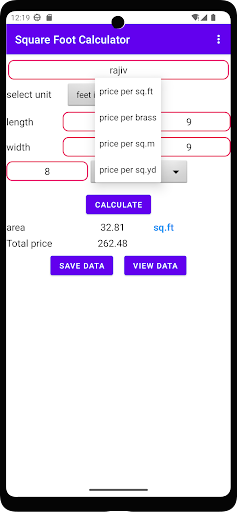
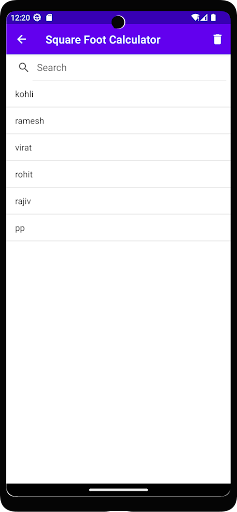
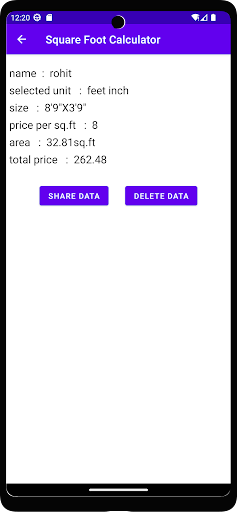
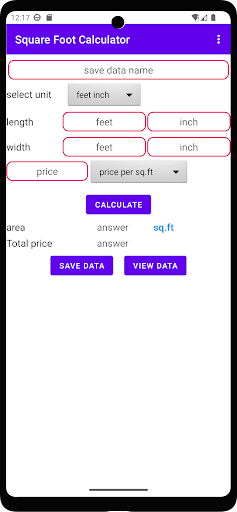
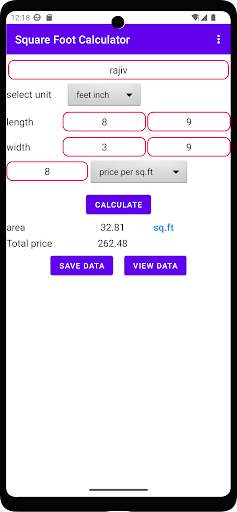
Analysis by Reviewed APKs
Square Foot Calculator is a straightforward area tool for anyone who has two dimensions and wants the result in a useful unit. I can see it helping with a room, a patch of flooring, or a quick measurement while comparing project notes. It accepts dimensions in several units and calculates area in several more. My overall take: practical for simple rectangles, but deliberately narrower than a full measuring or project-planning app.
A quick room estimate
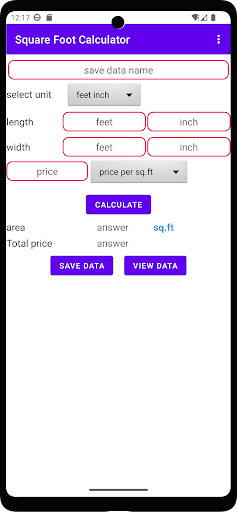
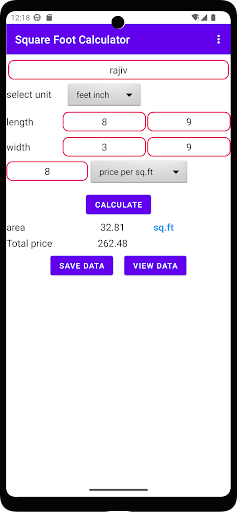
When I need a rough area for a home project, the awkward part is often not measuring but making the units agree. I might have one dimension in feet and another written down in inches. Square Foot Calculator is built for that small calculation: enter the length and height using supported units, then get an area result without working through the conversions by hand.
That makes it handy during an ordinary planning moment, like checking how much floor space a room takes up before I start comparing options. The app can return square feet, square meters, square yards, square centimeters, and square millimeters. I would still measure carefully and check the result before using it for a purchase, but for a quick area calculation, its purpose is clear.
A calculator, not a project suite
Compared with doing the arithmetic on a basic calculator, Square Foot Calculator focuses on the area problem and handles different input and output units. That is the main reason to choose it over a general-purpose calculator when I have measurements in feet, inches, meters, centimeters, millimeters, or yards and want the area expressed in a different unit.
It is not a room scanner, drawing tool, or renovation planner. The material describes entering length and height, then calculating area; it does not describe measuring a space with the phone or managing a project. I would use it for simple two-dimension calculations, not for mapping an irregular room or keeping a complete record of a building job.
Keep measurements consistent
A useful habit is to write down each dimension with its unit before opening the calculator. That small step helps avoid mixing up feet and inches, especially if I am measuring several spaces in one sitting. I can then enter each dimension in the unit I actually recorded and choose an area unit that makes sense for the task.
For a casual estimate, square feet may be the most familiar result; for a comparison using metric measurements, square meters can be easier to read. I would also keep the original dimensions nearby rather than relying only on the calculated area. That makes it simpler to retrace a calculation if I notice a measurement was copied incorrectly.
More From Our News Desk

Zoom Meetings, Google Meet, or Teams: Which Is Easiest to Join?

How I Build a Free Streaming Lineup With Tubi

Why Crunchyroll Is the Default Anime App for So Many Fans

YouTube TV: A Practical Guide to Cutting Cable

Rummikub and the Small Comfort of Phone Games

TeamViewer Remote Control or AnyDesk for Helping Family?
Who may find it useful
I would recommend Square Foot Calculator to renters, homeowners, DIY-minded users, or anyone who regularly needs quick area conversions. It suits the moment when I have two dimensions and want to know the area without pausing to remember conversion formulas. The range of input units gives it some flexibility for measurements gathered in different ways, while the selection of square-unit results covers common area comparisons.
It may not suit someone looking for a complete measuring workflow, saved project records, or tools for unusual shapes. The described job is focused: calculate area from length and height. If I need plans, annotations, or a detailed material estimate, I would look for a tool built for those tasks instead. For a simple calculation, though, its narrow focus can be an advantage.
Square Foot Calculator is an Android app from yntech developer in the Tools category. Google Play shows over 100,000 installs and a 4.3-star rating from 230 ratings. The app is free to download, contains ads, and does not offer in-app purchases. Its content rating is Everyone, and the current version is 3.1.
The app was released on November 8, 2021, and its most recent update is dated August 24, 2026. A minimum Android version is not provided in the available app information, so I would check the Google Play page on the device I plan to use. Those store details are useful context, but the everyday appeal here is the simple area calculation rather than a broad set of extra tools.
A Small Tool for Everyday Measurements
A focused first impression
When I first opened Square Foot Calculator, the basic purpose was easy to understand: provide two dimensions and calculate area. There is no need to think of it as a general calculator with a long list of unrelated functions. That focus is welcome when I am standing in a room with a tape measure and just want an area figure.
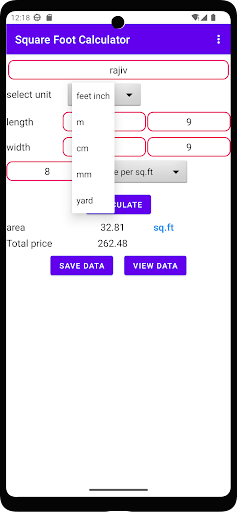
Getting started means choosing the units that match the measurements I have, then entering length and height. The app supports several familiar linear units, including meters, feet, inches, millimeters, centimeters, and yards. I would take a moment to check the units before calculating, since the result depends on entering both dimensions correctly.
The everyday calculation
In day-to-day use, the value is the conversion work it takes off my hands. I can enter dimensions in one of the supported units and receive an area in square units, including square feet, square meters, square yards, square centimeters, or square millimeters. That is more convenient than calculating in one unit and then looking up how to convert the area afterward.
I can imagine using it while checking the size of a bedroom, estimating a small surface, or comparing measurements written in different systems. It is still only as useful as the measurements I give it. I would treat the output as a calculation based on my inputs, not as a substitute for measuring the space carefully.
Useful unit choices
The standout feature is the choice of units on both sides of the calculation. I do not have to make every measurement match before entering it, and the results include more than just square feet. That gives the app a practical role whether I am working from metric dimensions or need an answer in a familiar imperial area unit.
I also like that the supported outputs cover both larger and smaller square units. Square yards can be useful for some comparisons, while square centimeters or square millimeters suit much smaller areas. The app stays centered on area rather than adding unrelated functions, which makes its purpose easy to remember.
A simple measuring routine
For a room check, I would measure the two dimensions, note each number and its unit, then enter them in Square Foot Calculator. After getting the result, I would record the area beside the original measurements. That gives me a quick reference if I later want to compare another space or confirm that I typed the numbers correctly.
When comparing several areas, I would use the same output unit for each calculation. That keeps the figures easier to scan in my notes. The app is most useful in this kind of small repeatable routine: measure, enter, check the area, and move on. It does not need to become the place where I organize the rest of a project.
Limits to keep in mind
The main limitation is the kind of shape the described calculation handles. It uses length and height to calculate area, which fits a simple two-dimension calculation. For an irregular outline or a space that needs to be divided into several sections, I would need to work out those parts separately rather than expect the app to map the shape for me.
It is also a focused calculator, not a complete renovation or measurement system. The app information describes unit choices and area results, but not project storage or room-scanning tools. Ads are present, which is worth considering if I prefer an entirely uninterrupted utility. For quick, straightforward calculations, those boundaries are easy to understand.
Square Foot Calculator does one practical job: it turns two dimensions into area and helps bridge common measurement units. I found the appeal in that simplicity, especially when I need a result quickly without doing conversion arithmetic myself. Its focus also means I would not mistake it for a full planning or measuring app.
I would try it if I often calculate simple areas for rooms or small projects and want square-unit options beyond a single default. If I need shape mapping or project management, I would choose something broader. For everyday two-dimension calculations, this is a sensible, compact tool to keep in mind.
Square Foot Calculator Frequently Asked Questions
What is Square Foot Calculator used for?
Square Foot Calculator calculates area from a length and a height. It accepts dimensions in units such as meters, feet, inches, millimeters, centimeters, and yards, and can provide results in square feet, square meters, square yards, square centimeters, or square millimeters. It is intended for straightforward area calculations.
Which devices can run Square Foot Calculator?
Square Foot Calculator is an Android app available through Google Play. The minimum Android version can vary by device and app compatibility, so check the Google Play page before installing. The app information describes an Android version rather than an iOS or desktop edition.
Does Square Foot Calculator cost money?
The app is free to download and does not offer in-app purchases. It contains ads, so the experience includes advertising. Store details can change over time, so it is worth checking the Google Play page for the current information before installing.
What Android version does Square Foot Calculator need?
The minimum Android version may vary as the app and device requirements change. Check Square Foot Calculator's Google Play page on your device for the current compatibility information. The app's listed version is 3.1, but that is separate from the Android version required to run it.
Is Square Foot Calculator suitable for home projects?
It can suit simple home-project calculations when you have two dimensions and want an area result in a supported unit. It is not described as a room-scanning or project-management tool. For irregular shapes or more involved planning, another kind of app may be a better fit.
Pros
- Accepts dimensions in several common units, including feet, inches, meters, and centimeters.
- Returns area in square feet, square meters, square yards, and smaller square units.
- Keeps its focus on quick area calculations rather than unrelated tools.
- Free to download with no in-app purchases.
Cons
- Designed for straightforward two-dimension area calculations, not irregular room shapes.
- Contains ads, which may interrupt an otherwise simple utility experience.
- Does not provide the broader planning features some home projects may require.
- Category
- Tools
- Version
- 3.1











