Sound Meter
- 186.69K
- 4.5
- Installs
- 10.00M
- Price
- Free
Screenshots
Analysis by Reviewed APKs
Sound Meter turns an Android phone into a simple way to check the noise around you, showing decibel readings in several formats. I found it best suited to quick, informal checks: seeing whether a room is quiet, comparing spots in the house, or getting a rough sense of a noisy moment. Its clear visual approach is useful, but phone-based readings have real limits, so I would not treat them as precision measurements.
A quick noise check
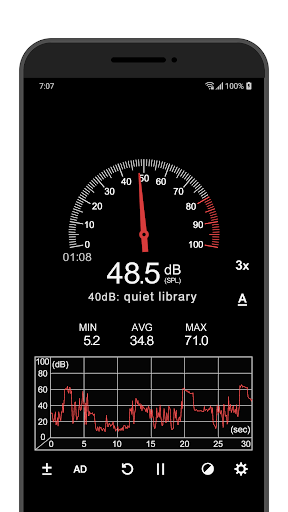
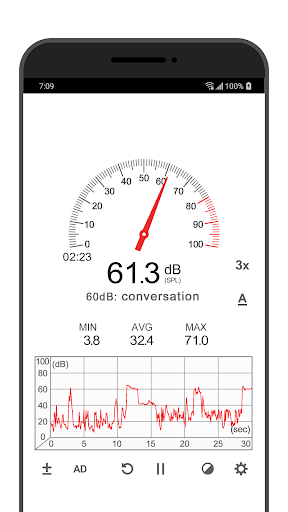
Imagine settling down to read while a steady hum from an appliance catches your attention. I can open Sound Meter, watch the gauge respond, and get a rough idea of the surrounding sound level without bringing out separate equipment. The current reading gives me an immediate reference, while the minimum, average, and maximum values help put a short stretch of noise in context.
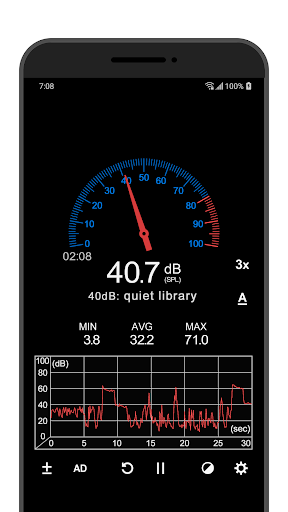
The line graph and elapsed-time display make the app more useful than a number that changes too quickly to follow. I can leave it open while the sound continues and see how the reading moves rather than relying on a passing impression. That is a practical fit for casual curiosity, comparing everyday environments, or getting a basic snapshot before deciding whether I want a more capable measuring tool.
A companion, not a meter
Sound Meter is a lightweight alternative to carrying a dedicated sound level meter when I only need a rough indication. It presents readings as a gauge and graph, with a current noise reference and summary values to make them easier to interpret. For a quick check at home or in another everyday setting, that combination is straightforward and less involved than using specialized measuring equipment.
The app is not a substitute for a proper sound level meter when accuracy matters. Its description notes that phone microphones are generally tuned for human voice and that very loud sounds, around 90 dB and above, may not be recognized by many devices. I would not use its readings as a definitive assessment or as the basis for decisions that depend on precise sound measurement.
Make readings more useful
A small habit that helps is to look at the average as well as the current number. A single moment can jump around, while the average offers a broader view of the stretch I have been watching. The minimum and maximum add another useful pair of reference points, especially when a room has intermittent sounds rather than one steady background level.
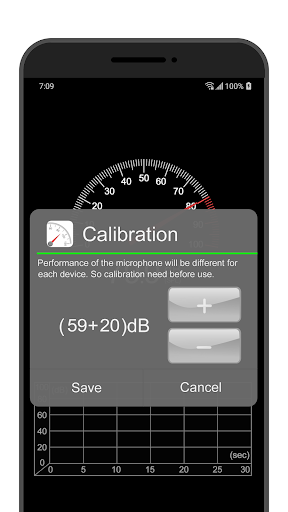
I would also compare readings under similar conditions: use the same phone, keep it in roughly the same position, and allow the graph to show a little time passing. Sound Meter includes a device-specific calibration option, which can help adjust its readings for a particular phone. Those steps make informal comparisons more consistent, though they do not turn a phone into professional measuring equipment.
More From Our News Desk

Zoom Meetings, Google Meet, or Teams: Which Is Easiest to Join?

How I Build a Free Streaming Lineup With Tubi

Why Crunchyroll Is the Default Anime App for So Many Fans

YouTube TV: A Practical Guide to Cutting Cable

Rummikub and the Small Comfort of Phone Games

TeamViewer Remote Control or AnyDesk for Helping Family?
Who may find it useful
I would recommend Sound Meter to people who like having a quick, visual reference for the noise around them. It can suit someone comparing a quiet corner with a busier room, checking how sound changes during an ordinary activity, or simply learning what different environments look like in decibels. The gauge, graph, and min/average/max figures give curious users a few ways to read the same measurement.
It may not suit anyone who needs dependable, precise sound-level measurements for professional work or formal assessment. The app itself cautions that phone microphones have limits, particularly with very loud sounds. It is also a fairly focused tool: if you want a broader audio-analysis workflow, the supplied feature set may feel modest. I see its strength in casual observation, not in replacing dedicated equipment.
Sound Meter is an Android tools app from rootApps. Google Play shows more than 10 million installs and a 4.5-star rating from around 187,000 ratings. It is free to download and contains ads, with in-app purchases priced at $0.79 per item. Its content rating is Everyone.
The current version in the provided app information is 4.1.6. Sound Meter was released on April 27, 2015, and its listed last update is August 26, 2026. A minimum Android version is not included in the supplied details, so check the Google Play page for device compatibility.
A Closer Look at Everyday Noise
Opening the meter
My first impression is that Sound Meter is built around getting to a reading quickly. Its tidy graphic design puts the measurement front and center rather than burying the main purpose under a long list of tools. The gauge gives the number a visual form, and the option to view a line graph adds another way to follow what is happening.
The app relies on the phone’s microphone to measure environmental sound, so using it means treating the result as a phone-based reading from the start. I like that the description explains the limitations plainly. That context matters before the first check: this is a convenient reference for ordinary situations, not a calibrated instrument that should be trusted for every sound or device.
Following sound day to day
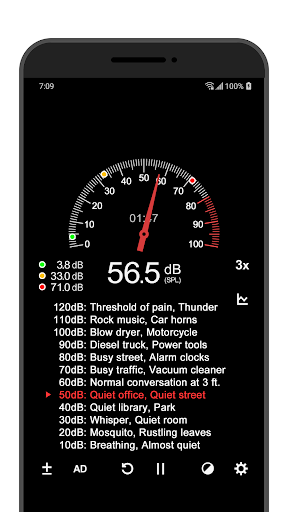
The core experience is simple: watch the decibel value change as the surrounding sound changes. A gauge makes the current reading easy to spot, while the graph line gives the measurement a sense of movement over time. When I want more than a fleeting number, the displayed elapsed time and the minimum, average, and maximum values help summarize the interval I have been observing.
That combination is especially handy when noise is uneven. A brief spike and a steady background hum can feel quite different, even if one current reading makes them seem similar. The summary figures provide a little more context without asking me to interpret a complicated report. Still, I would read them as useful indicators from my device, not as laboratory-grade results.
Useful measurement details
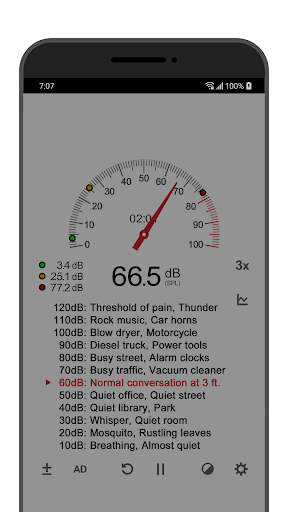
The current noise reference is a helpful touch because it gives the displayed decibel value some context. Instead of seeing only a changing figure, I can relate the reading to the app’s reference display. The gauge and graph serve different purposes: one emphasizes the present level, while the other makes changes easier to notice over the time shown.
The min, average, and max values are the features I would check most often after watching a stretch of sound. They answer different basic questions: how low the reading went, what the general level was, and how high it peaked. Sound Meter also offers calibration for individual devices, which recognizes that phones can differ rather than presenting one adjustment as universal.
Those features remain deliberately focused. The supplied description supports measurement, visual display, elapsed time, summary values, and device calibration. I would not expect extras such as alarms, saved logs, or comparisons across separate sessions based on those details. For a quick sound check, the modest feature set keeps attention on the measurement itself.
A simple home routine
For a casual check around the house, I would start by choosing one spot and watching the reading for a little while. The graph can reveal whether the level stays fairly steady or shifts as sounds come and go. I would then note the average alongside the minimum and maximum, since that gives a more rounded impression than glancing at one point.
If I wanted to compare two locations, I would keep the phone and the way I use it as consistent as possible. Sound Meter’s calibration option can adjust for a particular device, but it does not remove the microphone limitations described by the developer. A routine like this is useful for informal comparisons and personal curiosity, not for proving an exact sound level.
Limits to keep in mind
The biggest limitation is the microphone, not the display. The app explains that most Android device microphones are aligned to human voice and that their maximum measurable values are limited. Very loud sounds, around 90 dB or more, may not be recognized by many devices. So a reading that appears moderate should not be taken as proof that a loud environment has been measured accurately.
Calibration can tailor the app to a device, but it should not be confused with the accuracy of a dedicated sound level meter. The developer recommends using Sound Meter only as an auxiliary tool and suggests an actual meter when more accurate values are needed. I appreciate the distinction; it helps set expectations instead of asking a phone app to do a job its hardware may not handle.
The other practical trade-off is that the app is free with ads and offers in-app purchases. That may be perfectly acceptable for occasional checks, though people who prefer an uninterrupted experience may want to review the store details before installing. The main idea remains narrow and clear: a quick visual reading, with its reliability tied to the phone being used.
Sound Meter is a straightforward way to get a rough, visual sense of environmental noise. I like the mix of a gauge, graph, elapsed time, and min/average/max readings, plus the device calibration option. Those details make casual checks more informative than a bare number, provided I remember that the phone microphone sets important limits.
I would try it for everyday curiosity and informal comparisons, especially if I wanted a simple readout rather than specialized equipment. I would skip it for situations where accurate sound measurements matter and use a dedicated sound level meter instead. For its focused purpose, Sound Meter is practical, clear, and appropriately modest.
Sound Meter Frequently Asked Questions
What is Sound Meter used for?
Sound Meter uses an Android device’s microphone to show environmental sound levels in decibels. It can display a gauge, current noise reference, line graph, elapsed time, and minimum, average, and maximum readings. It is intended as an auxiliary tool for casual checks, rather than a replacement for an actual sound level meter when more accurate measurements are needed.
Which devices can run Sound Meter?
Sound Meter is an Android app available through Google Play. The supplied details do not give a minimum Android version, and compatibility can depend on the device and its software. Check the Google Play page for current requirements before installing. The app’s measurements also depend on the phone microphone, whose limits can affect the readings.
Does Sound Meter cost anything?
Sound Meter is free to download and contains ads. It also offers in-app purchases priced at $0.79 per item in the supplied app information. Store details can change, so check Google Play for current purchase options and pricing before downloading or buying anything.
Can Sound Meter provide accurate readings?
It provides decibel readings from the device microphone, but the developer describes it as an auxiliary tool. Phone microphones are generally aligned to human voice, and very loud sounds—around 90 dB and above—may not be recognized by many devices. For more accurate values, the app recommends using an actual sound level meter.
Who should use Sound Meter?
It may suit Android users who want a quick, informal way to observe noise around them and see how readings change over time. The gauge, graph, and summary values make that easy to follow. It may not suit people who need precise measurements for professional or formal purposes, since phone microphones have limitations.
Pros
- Combines a gauge, graph, elapsed time, and summary readings in one focused tool.
- Shows minimum, average, and maximum values for more context than a momentary reading.
- Includes calibration for individual devices.
- Free to download and easy to understand for casual noise checks.
Cons
- Phone microphone limits can make readings unreliable, especially for very loud sounds.
- Not a substitute for a dedicated sound level meter when accuracy matters.
- Contains ads and offers paid in-app purchases.
- Category
- Tools
- Version
- 4.1.6











