SimpliSafe Home Security App
- 31.98K
- 4.5
- Installs
- 1.00M
- Price
- Free

Screenshots
Analysis by Reviewed APKs
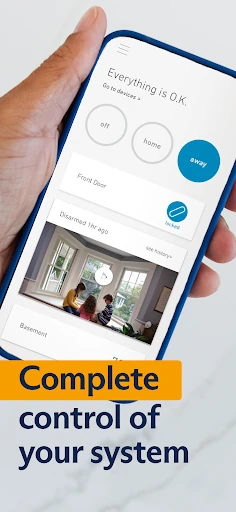
SimpliSafe Home Security App is a phone companion for people who already use a SimpliSafe wireless security system. It brings remote arm and disarm controls together with notifications, an activity timeline, and camera video when you have a SimpliSafe camera. I like its focused purpose: it is a practical way to check in on a system away from home, rather than a general-purpose smart-home hub.
A Check Before Heading Out
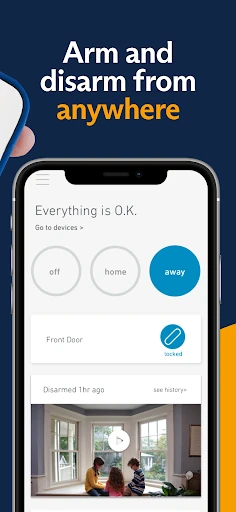
When I picture using this app in an ordinary routine, it is the moment just after pulling away from home and wondering whether the security system is set. Instead of turning back, I can use the app to arm or disarm the SimpliSafe system remotely. That simple task is the clearest reason to keep it handy: it puts a useful system control on the phone for the small uncertainties that come with a busy day.
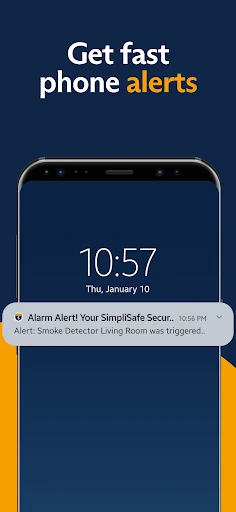
The timeline gives that check-in a little more context. Rather than relying only on memory, I can look through a current record of system activity, while notifications can bring updates to me without waiting for me to open the app. I would find that combination useful when traveling or handling errands. It is not a substitute for paying attention, but it gives me a way to see system activity from away from home.
A Companion, Not a Hub
The obvious comparison is with a general smart-home app or a camera-only viewing app. SimpliSafe’s app has a narrower job: control and follow a SimpliSafe security system, with live video available if a SimpliSafe camera is part of the setup. That focus makes sense for someone already using the system, since the app’s core controls and activity information relate directly to that product.
I would not choose it as a catch-all place to manage unrelated smart devices, nor would I expect it to act as a standalone camera service. Its described controls depend on a SimpliSafe system, and the camera video depends on having a SimpliSafe camera. If you do not use that equipment, the app’s central purpose does not really apply. For existing users, the focused scope is a sensible trade-off rather than a missing feature.
Small Checks That Help
A useful habit is to open the app when a question comes up, rather than checking it constantly. I would use the system controls when leaving or returning, then glance at the timeline if I want more context about what has happened. Notifications can handle the moments when an update matters without requiring me to make repeated manual checks throughout the day.
If I had a SimpliSafe camera, I would treat live video as an occasional check-in and use capture when I wanted to save something I was viewing. That keeps the app’s camera tools tied to a clear reason, instead of turning a routine into endless monitoring. The main workflow is refreshingly straightforward: use the remote controls, let notifications surface updates, and consult the timeline when I need a record.
More From Our News Desk

Zoom Meetings, Google Meet, or Teams: Which Is Easiest to Join?

How I Build a Free Streaming Lineup With Tubi

Why Crunchyroll Is the Default Anime App for So Many Fans

YouTube TV: A Practical Guide to Cutting Cable

Rummikub and the Small Comfort of Phone Games

TeamViewer Remote Control or AnyDesk for Helping Family?
Who Will Find It Useful
I would recommend SimpliSafe Home Security App to people who already have a SimpliSafe wireless security system and want to manage it from a phone. The remote arm and disarm controls are the practical draw, while notifications and the activity timeline make it easier to keep up with system activity when away. Owners with a SimpliSafe camera also have the option to watch and capture live video.
It may not suit someone looking for a general home-automation controller, a standalone camera app, or a way to manage a different security brand. The app’s usefulness is closely connected to SimpliSafe equipment, so that is the first thing I would consider before installing it. If that equipment is already part of your home, the app offers a focused mobile companion; if not, its main controls have little relevance.
SimpliSafe Home Security App is developed by SimpliSafe Home Security Systems and is listed in the Lifestyle category on Google Play. It is free to install, has no in-app purchases, and contains no ads. The content rating is Everyone. Google Play shows over one million installs and a 4.5-star rating from about 32,000 ratings.
The app requires Android 11 or later. The provided version is 7.66.0, with a release date of August 24, 2012, and a last update of February 3, 2026. Those details can change as the app is updated, so I would check Google Play for the current version and device requirements before installing.
A Focused Remote Security Companion
A Purposeful First Impression
The app’s purpose is easy to understand from the outset: it is a mobile control point for a SimpliSafe wireless security system. I appreciate that the central idea does not need much explanation. If you already use the system, the value is apparent in the prospect of handling basic controls and checking activity from a phone instead of needing to be at home.
There is an important expectation to set before getting started: this is not a security system in itself. Its remote controls are for a SimpliSafe system, and the video option applies when you have a SimpliSafe camera. I would think of it as an extension of equipment already in place, not as a way to create a complete setup using only an app.
Useful Between Home and Away
The everyday appeal is the ability to arm or disarm the system from wherever I am. That makes the app relevant to the real in-between moments: leaving in a rush, arriving home earlier than planned, or checking in while out. I value remote control most when it answers a straightforward question quickly, and this is exactly the sort of task the app is meant to handle.
Notifications and the timeline round out that control. Notifications can alert me to updates, while the timeline gives me an up-to-the-minute view of system activity. Those are different ways to stay informed: one brings information to me, and the other gives me somewhere to review it. Together, they make the app more useful than a remote switch alone.
Video When You Have a Camera
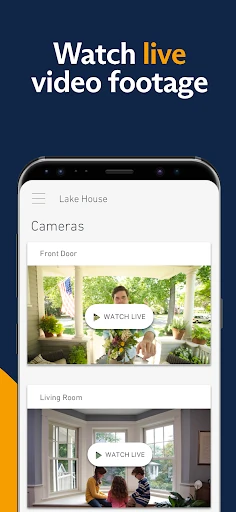
Live video is the feature that expands the app beyond system controls, but it is specifically tied to having a SimpliSafe camera. If that is part of your setup, you can watch a live feed and capture video. I like that the camera function fits naturally beside the remote system controls: it can provide a visual check-in while the rest of the app keeps the system’s activity accessible.
The camera capability is conditional, which is worth keeping in mind when weighing the app. Without a SimpliSafe camera, the controls, notifications, and timeline are the relevant parts of the experience. With one, live viewing and capture add another way to check on things. I would not assume that every user will have the same camera experience, since it depends on the equipment they use.
A Simple Daily Routine
For a practical routine, I would start with the system control when leaving home, then let notifications do their job during the day. If an update raises a question, I would open the timeline to see the recorded system activity. This keeps the app in the background most of the time, while still giving me a clear place to go when I want to check something.
On a day when I am away for longer, a SimpliSafe camera could make the routine more visual: open a live feed when I have a reason to look, and capture video if I want to retain what I am viewing. I would use these tools deliberately rather than checking out of habit. The app is most useful when each feature answers a simple, specific need.
Keep the Scope in Mind
The biggest limitation is also the clearest boundary: this is for controlling a SimpliSafe system, not for managing home security equipment from any brand. The app’s core job depends on that system, and live video depends on a SimpliSafe camera. People who want a broader smart-home dashboard may find the focused purpose too narrow for what they have in mind.
It is also worth separating what the app can do from what the hardware setup provides. It can offer remote controls, notifications, a timeline, and camera viewing and capture when the relevant camera is available. It is not described as a replacement for the system itself. For someone with compatible equipment, that is a practical division of labor; for someone without it, there is little reason to expect the app alone to deliver those functions.
SimpliSafe Home Security App makes sense as a straightforward mobile companion to a SimpliSafe wireless security system. Remote arm and disarm controls are the everyday center of gravity, with notifications and a timeline adding useful ways to keep track of activity. Camera owners get live video and capture as well. Its appeal comes from doing a focused job rather than trying to cover every smart-home need.
I would recommend it to existing SimpliSafe users who want system access while away from home, especially those who value a quick activity check. I would skip it if you need a standalone security app or controls for other equipment. Before installing, check the Android requirement and current store details for your device.
SimpliSafe Frequently Asked Questions
What is SimpliSafe Home Security App used for?
SimpliSafe Home Security App lets you control a SimpliSafe wireless security system remotely. Its described tools include arming and disarming, setting notifications, and reviewing a current activity timeline. If you have a SimpliSafe camera, you can also watch and capture live video. It is a companion for the system, rather than a standalone security setup.
Which phones can run SimpliSafe Home Security App?
The provided platform is Android, and the app requires Android 11 or later. The available facts do not describe other platforms, so I would check Google Play for current device compatibility before installing. Requirements can change with updates, and checking the store listing is the best way to confirm that your particular phone is supported.
Does SimpliSafe Home Security App cost money?
The app is listed as free to install on Google Play, with no in-app purchases and no ads. That describes the app’s store details, not the cost of any SimpliSafe equipment or services you may use separately. Store information can change, so it is sensible to check the current Google Play listing for the latest details.
Does SimpliSafe Home Security App work without a camera?
The app’s system controls, notifications, and activity timeline are described separately from its camera feature. Live viewing and capture are available if you have a SimpliSafe camera. So a camera is needed for those video functions, but the app’s other described uses are tied to controlling and following a SimpliSafe security system.
Who should use SimpliSafe Home Security App?
It is best suited to people who already use a SimpliSafe wireless security system and want to manage it from a phone. Camera owners may also appreciate the live video option. It may not be a good fit if you want a general smart-home app, a standalone camera service, or an app for equipment from another security brand.
Pros
- Remote arm and disarm controls make basic system management accessible away from home.
- Notifications and an activity timeline offer two practical ways to follow system activity.
- SimpliSafe camera owners can watch and capture live video in the app.
- Free to install, with no in-app purchases or ads.
Cons
- Its core controls are intended for people who already use a SimpliSafe system.
- Live video and capture depend on having a SimpliSafe camera.
- The focused security role may not suit people seeking a general smart-home hub.
- Category
- Lifestyle
- Version
- 7.66.0











